The Best Tablet For Media Consumption Of 2026
 By, Michael Brown
Updated
Summary
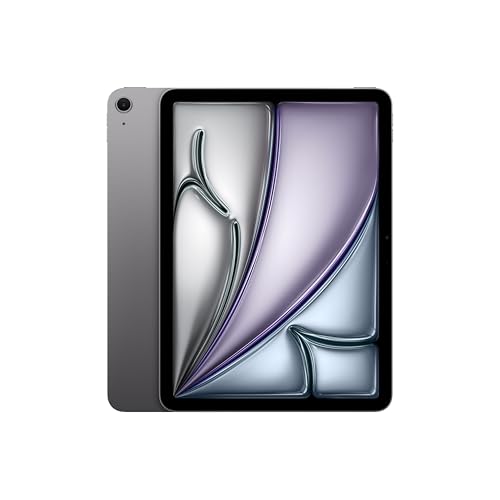
Apple iPad Air 11-inch M4

Amazon Fire HD 10 tablet 10.1"

Apple iPad Pro 11-inch M5
Let us be honest. Most people do not buy a tablet for spreadsheets or video editing. They buy it for the couch. For the airplane tray table. For lying in bed halfway through a movie that they will definitely fall asleep watching. Media consumption—streaming shows, scrolling social media, reading articles, listening to podcasts—is what tablets do best. A good media tablet simply needs a beautiful screen, decent speakers, and a battery that does not tap out halfway through a movie marathon.
But finding the right one is trickier than it sounds. Some tablets have gorgeous displays but tinny, frustrating speakers. Others sound great but feel dim and lifeless in bright rooms. And then there is the app experience. Nothing kills a relaxing evening faster than opening a streaming app that stutters or crashes. A tablet built for media should disappear into the background, letting the content take center stage.
After sifting through user reviews and expert comparisons, one thing became clear. The best media tablets are not always the most expensive ones, but they do need to get the fundamentals right. A sharp, vibrant display that handles both dark horror movies and bright animated shows. When it comes to the one tablet that does all of this better than the rest, one name kept rising to the top of every forum and review roundup: Apple iPad Air 11-inch M4. With its stunning 11-inch Liquid Retina display and powerhouse M4 chip, the iPad Air has quietly become the crowd favorite for pure media enjoyment. Below, we break down the best tablets for media consumption that are actually worth your money.
Our Top Picks


Powerful Apple M4 chip Excellent app ecosystem Lightweight premium design Sharp Liquid Retina display
60Hz display only
Apple clearly positioned the iPad Air as the “safe choice” for most users, and in practice, it is difficult to find major weaknesses in the overall experience. The M4 chip delivers more power than many people realistically need for media consumption, but that extra performance helps the tablet stay fast and fluid for years. Apps launch instantly, scrolling feels responsive, and multitasking remains smooth even with heavier workloads running in the background.
The Liquid Retina display continues to be one of the better LCD screens available on a tablet. Colors appear vibrant, text stays crisp, and brightness levels are strong enough for indoor use, flights, cafes, or casual outdoor viewing. Watching HDR content still looks impressive despite not using OLED technology. Apple’s speaker tuning also helps movies and videos sound fuller than many thinner tablets in the same size range.
Another major advantage is app optimization. Streaming apps, editing tools, note-taking apps, and games generally run more consistently on iPadOS than on many Android tablets. The ecosystem also adds long-term value because Apple usually supports iPads with software updates for many years. The only downside is that it has a 60Hz display. The screen still looks excellent overall, but users familiar with 120Hz devices may find scrolling slightly less fluid by comparison.

Large Full HD display Good battery life Lightweight design Great for streaming
Lock-screen ads are included on the standard version by default
For its price category, the Fire HD 10 offers surprisingly solid value. The larger screen immediately makes movies and videos more enjoyable compared to cheaper 7-inch or 8-inch alternatives, and the stereo speakers are good enough for casual streaming, podcasts, and background music. Battery life is also reliable enough for long viewing sessions without constantly needing a charger nearby.
Amazon’s ecosystem integration is one of the tablet’s biggest strengths. Prime Video, Kindle, Audible, Alexa, and Amazon Photos all work seamlessly out of the box, making the device especially appealing for existing Amazon users. The simplified interface also makes it approachable for children, older users, or buyers who do not need advanced productivity features.
Performance is acceptable for media-focused tasks such as streaming, web browsing, social media, and light multitasking. The octa-core processor and 3GB RAM are enough for casual everyday usage, although heavier gaming and demanding multitasking can still feel more limited compared to premium tablets. One thing you should know is that the standard version includes Amazon lock-screen promotions by default. If you prefer a cleaner interface, you can choose to pay a small additional fee to remove them.

Stunning Ultra Retina XDR display Extremely powerful Apple M5 chip Smooth 120Hz ProMotion panel Excellent speaker quality
Premium pricing
The biggest highlight here is easily the display. The Ultra Retina XDR panel delivers deep contrast, excellent brightness, and impressive HDR performance that noticeably improves movie watching compared to standard LCD tablets. Dark scenes appear richer, highlights look more realistic, and colors stay vibrant without appearing oversaturated. Combined with ProMotion technology, scrolling and animations also look incredibly fluid.
Performance is equally impressive. The Apple M5 chip handles demanding apps effortlessly, and the tablet rarely feels challenged even with heavier multitasking, gaming, or creative workflows. Apps open instantly, editing feels responsive, and high-performance games run smoothly without heating issues becoming distracting during longer sessions.
Apple also refined the overall hardware experience. The landscape-oriented front camera works especially well for video calls, while the quad-speaker setup produces fuller and clearer sound than many smaller tablets. Battery life remains dependable despite the powerful internals, allowing users to comfortably stream, browse, and work throughout the day.
At the same time, this is clearly a premium device with premium pricing. Many casual users who mainly watch videos or browse the web may not fully utilize the extra power offered by the M5 chip. iPadOS also still behaves more like a tablet operating system rather than a true desktop replacement, even though the hardware itself feels capable of much more.

Large AMOLED 2X display Smooth 120Hz refresh rate S Pen included Great multitasking features
The larger size may feel less portable for some users
The AMOLED display is easily the star of the experience. Colors look rich and vibrant, black levels appear deep, and HDR content benefits from the strong contrast performance. Watching Netflix or YouTube on this screen feels noticeably more cinematic than on standard LCD tablets, especially in darker environments. The 120Hz refresh rate also helps scrolling and animations remain very fluid throughout daily usage.
Samsung also did a great job with media features overall. The quad-speaker setup produces clear and spacious audio, making movies and games more immersive without immediately needing headphones. Battery life is dependable for long streaming sessions, and the included S Pen remains one of the better stylus experiences available on Android tablets.
Performance is strong enough for multitasking, gaming, and productivity workloads, although Samsung clearly emphasizes versatility rather than raw benchmark performance alone. Features like split-screen multitasking and Samsung DeX help the tablet function closer to a laptop-style setup when needed. Because of the larger 12.4-inch display, the tablet can sometimes feel slightly oversized for users who mainly prefer handheld reading or casual one-handed browsing. It works best when used on a desk, stand, or while watching content in landscape mode.

Large 3.4K 144Hz display Powerful Snapdragon 8 Elite chip Excellent speaker system Massive battery capacity
LCD panel has less contrast than OLED alternatives
OnePlus positioned the Pad 3 as a large-screen entertainment tablet that also delivers flagship-level performance without reaching the ultra-premium pricing of devices like the iPad Pro. Its 13.2-inch panel feels massive compared to many traditional tablets, which helps movies and split-screen multitasking feel far more comfortable. The 144Hz refresh rate also keeps scrolling and animations looking extremely fluid, especially during gaming and fast-paced navigation.
Audio quality also stands out more than expected. The 8-speaker Dolby Atmos setup produces loud, spacious sound that works especially well for movies and gaming without needing external speakers. Combined with the large display, the tablet feels very well suited for long entertainment sessions. Battery life is equally impressive thanks to the huge 12,140mAh battery, and the 80W fast charging helps minimize downtime between uses.
Nevertheless, this tablet still uses an LCD panel instead of OLED. The screen remains sharp and vibrant overall, but black levels and HDR contrast are not quite as deep as premium AMOLED competitors. Android tablet app optimization can also vary depending on the application, although this has improved compared to older Android tablets.

Excellent JBL speaker setup Convenient built-in kickstand Large 2K display Folio case included
Better suited for casual use than heavy gaming workloads
Lenovo’s Tab Plus focuses almost entirely on entertainment and media playback rather than trying to compete as a productivity-focused flagship tablet. Sound feels fuller, louder, and more spacious than what most tablets in this price range normally deliver. Dialogue remains clear during movies, while music playback benefits from noticeably stronger bass and stereo separation compared to smaller tablets with simpler speaker setups.
The 11.5-inch 2K display also works well for streaming and casual browsing. Colors look reasonably vibrant, sharpness is good enough for movies and reading, and the larger screen size helps create a comfortable viewing experience without making the tablet feel excessively large or heavy.
For casual entertainment usage, overall performance remains perfectly acceptable. Streaming apps, social media, web browsing, and light gaming all run smoothly enough for everyday use. The built-in kickstand also becomes surprisingly useful during long viewing sessions, especially for users who often watch videos while cooking, studying, or working nearby.
Its MediaTek Helio G99 processor is more focused on efficiency and stable everyday performance rather than high-end gaming power. Casual users likely will not notice major issues, but heavier gaming and demanding multitasking workloads can feel a bit limited compared to premium flagship tablets.

Sharp 2.5K display Large 9000mAh battery Quad-speaker setup LTE connectivity
Cameras are fairly basic compared to premium tablets
For users who mostly spend their tablet time watching YouTube, scrolling social media, reading manga, or streaming Netflix during commutes, the Redmi Pad 2 covers the basics without pushing the price too high. Its 11-inch 2.5K display delivers enough sharpness for movies, web browsing, and reading without looking overly cheap or washed out. Combined with the quad speakers, streaming content feels enjoyable enough that most casual users probably will not feel pressured to upgrade immediately to a more expensive model.
The large 9000mAh battery also helps the tablet fit naturally into everyday routines. Long YouTube sessions, casual browsing, and social media usage barely drain the battery aggressively, which makes the device convenient for travel, classes, or simply moving around the house without constantly searching for a charger.
Storage and memory are also surprisingly generous for the category. With 256GB storage and 8GB RAM, the tablet handles daily multitasking far better than many cheaper Android alternatives that struggle once multiple apps stay open in the background. App launches remain reasonably quick, and casual gaming performance is stable enough for lighter titles.
Naturally, some compromises still exist at this price range. Xiaomi focused far more on media consumption and battery life than camera performance. The cameras work fine for video calls or occasional scans, but users expecting flagship-quality photography features may find them fairly basic.
What to Look For in a best tablet for media consumption?
Buyers are frequently hesitant to purchase best tablet for media consumption. Certain factors should be considered while making a significant purchase. Our understanding and expertise with best tablet for media consumption will assist you in making the right decisions.
Please take the following points into consideration before selecting best tablet for media consumption:
Online Access
Cameras
Software
Screen & Audio
Battery
Hardware Connections
Storage
FAQs
Is an iPad good for media consumption?
Yes, iPads are excellent for media consumption thanks to their sharp displays, powerful performance, strong app ecosystem, and high-quality speakers.
Are Android tablets good for entertainment?
Absolutely. Many Android tablets offer large screens, expandable storage, and excellent value for streaming, gaming, and browsing.
What screen size is best for media consumption?
A tablet between 10 and 13 inches usually offers the best balance between portability and immersive viewing.
We constantly update the list of best tablet for media consumption as new data becomes available. For the most up-to-date information, please visit our website regularly.
Please feel free to contact us if you have any queries or concerns with best tablet for media consumption. If you ask, we'll do our hardest to help you in any way we can!
About Michael Brown