The Best Monitor For Reading Document Of 2026
 By, Michael Brown
Updated
Summary

Samsung 43” Smart Monitor M7 4K

BenQ MA270U 27” 4K Monitor
LG 27US500-W Ultrafine Monitor 27-Inch 4K
If your day revolves around PDFs, Word documents, spreadsheets, research papers, or lengthy reports, your monitor plays a much bigger role than you might think. Reading thousands of lines of text on a display with poor sharpness, limited screen space, or uncomfortable brightness can quickly lead to eye strain and reduced productivity. A monitor designed for document-heavy work should make reading feel effortless, not exhausting.
For this type of workload, bigger often is better, but only if the resolution keeps up. A high-resolution display lets you fit more text on the screen without sacrificing readability, making it easier to compare documents, review contracts, or work with multiple windows side by side. Ergonomic adjustments, flicker-free technology, and low blue light modes also become surprisingly valuable during long reading sessions.
One monitor that checks many of these boxes is the Samsung 43” Smart Monitor M7 4K. Its large 4K panel provides ample room for viewing full pages, splitting documents across the screen, or keeping reference materials open without constantly switching windows. Whether you're reviewing legal documents, editing manuscripts, studying academic papers, or simply spending hours in front of text-based applications, the monitors below are designed to make reading more comfortable while helping you stay productive throughout the day.
Our Top Picks


43-inch 4K UHD display AI Picture Optimizer Built-in streaming apps Samsung Knox security
Large 43-inch screen may require a deep desk for comfortable viewing
Open a research paper on one side, a browser on the other, and a notebook underneath, and the advantage of a 43-inch display becomes obvious. Instead of switching between windows every few minutes, there's enough room to keep everything visible at once, making long reading or document review sessions far more comfortable. The 4K UHD resolution also keeps small fonts looking sharp without sacrificing screen space.
Samsung adds a few thoughtful features that support everyday productivity, too. AI Picture Optimizer automatically adjusts the image depending on what you're doing, helping documents remain easier on the eyes while offering richer contrast when it's time to watch a video. If background conversations or office noise become distracting, Active Voice Amplifier increases dialogue clarity automatically so meetings and videos stay easy to follow.
Once the workday ends, the monitor transitions naturally into an entertainment hub. Built-in streaming apps, Samsung TV Plus, SmartThings integration, and Samsung Knox make it much more than a standard office monitor without adding extra hardware to your desk. A screen this large deserves enough viewing distance to stay comfortable. On shallow desks, you may find yourself sitting a little closer than ideal during extended reading sessions.
MacBook color tuning Dual USB-C ports 90W USB-C charging Integrated MacBook controls
Not designed for fast-paced gaming
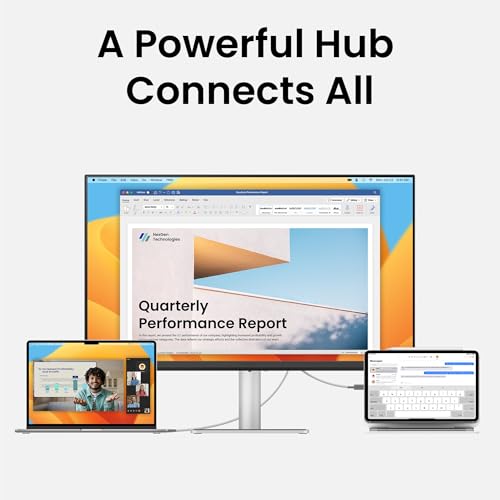
A clean workspace can make it easier to stay focused, especially when most of the day is spent reading reports, writing documents, or managing spreadsheets. BenQ simplifies the setup with dual USB-C ports that let a single cable expand your MacBook display while supplying up to 90W of charging power. That means fewer cables across the desk and one less charger to think about.
Plus, BenQ's exclusive color tuning keeps colors consistent with MacBook displays, while integrated MacBook controls allow brightness and volume adjustments directly from the keyboard. It's the kind of detail that's easy to overlook until you use it every day.
Comfort plays an equally important role during long reading sessions. The fully adjustable stand lets you raise, swivel, tilt, or pivot the display into a more natural position, reducing the need to lean forward while reviewing lengthy documents. Multiple HDMI and USB-C ports also make switching between work devices refreshingly straightforward.
High refresh rates aren't really the focus here, so competitive gamers will likely want something built specifically for faster gameplay. For productivity and document-heavy workflows, the monitor stays true to its purpose.

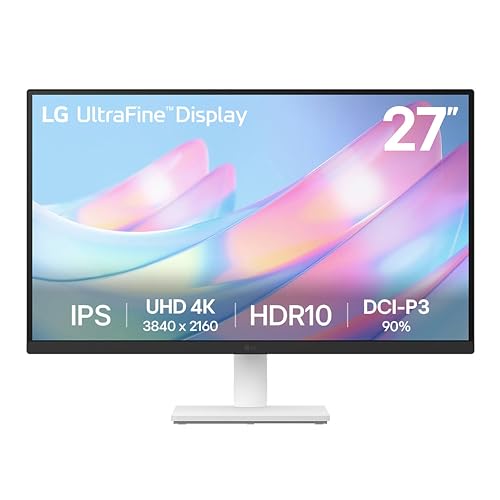
4K UHD resolution HDR10 support 90% DCI-P3 gamut OnScreen Control
No USB-C connectivity for single-cable laptop setups
Long documents often mean tiny text, endless scrolling, and multiple reference windows open at once. The 4K UHD resolution gives everything noticeably more definition, while the 1000:1 contrast ratio helps separate text from the background for a cleaner reading experience. Wide viewing angles are another bonus, especially if you frequently shift positions throughout the day.
This monitor also handles visual detail particularly well. HDR10 support and up to 90% DCI-P3 color gamut bring richer colors and improved contrast, which isn't just useful for creative work—it also helps charts, presentations, and PDFs look more engaging during long study or office sessions.
Workspace management feels pleasantly straightforward thanks to LG's OnScreen Control software. Splitting the display into multiple sections or adjusting settings only takes a few clicks, making it easier to keep documents, notes, and browser windows organized. The ergonomic stand lets you fine-tune the screen angle for a more natural reading position.
Single-cable laptop setups aren't possible here since USB-C isn't included. If your workflow depends on USB-C docking, you'll likely need an adapter or separate connection.

ZeroFrame design AMD FreeSync Premium DFR technology 0.5ms GTG response
Built-in speakers are basic
Fine details are where this display shines. The 27-inch IPS panel paired with 4K UHD resolution keeps spreadsheets, reports, and lengthy PDFs looking crisp from edge to edge. Even after hours of reading, text remains well-defined instead of becoming blurry or fatiguing.
There's also more flexibility than you might expect. Acer's Dynamic Frequency & Resolution (DFR) technology lets you prioritize either higher resolution or a faster refresh rate depending on the task at hand. During office work, maximizing resolution makes documents easier to read, while switching modes benefits smoother visual performance when it's time for entertainment.
The ZeroFrame design deserves credit as well. Thin bezels make dual-monitor setups look much cleaner, creating a nearly uninterrupted workspace for anyone who regularly compares documents across two screens. AMD FreeSync Premium and the fast response time are nice extras that expand the monitor's usefulness beyond productivity.
Audio isn't really the highlight here. The built-in speakers work for basic system sounds and video calls, but most people will get a noticeably better listening experience from external speakers or headphones.

ASUS Eye Care Technology TÜV-certified Flicker-Free Low Blue Light filter 99% sRGB gamut
The stand lacks height adjustment
The larger 31.5-inch screen immediately creates a more relaxed reading experience. With four times the pixel density of Full HD, text stays crisp while allowing multiple documents, spreadsheets, or browser windows to remain visible without feeling crowded. It's the kind of workspace that encourages leaving everything open instead of constantly switching tabs.
Eye comfort is clearly one of ASUS's priorities. TÜV-certified Flicker-Free technology and Low Blue Light filters help reduce strain during long office days, making the monitor particularly appealing for students, writers, and anyone who spends hours reviewing reports or digital paperwork.
Beyond document work, HDR10 support, 99% sRGB coverage, and the IPS panel produce vibrant visuals with wide viewing angles. Dual HDMI inputs also make it easy to keep both a desktop and laptop connected at the same time without constantly swapping cables. The included stand keeps the setup simple, although it doesn't offer height adjustment. A monitor arm may be worth considering if you prefer more flexibility in your sitting position.
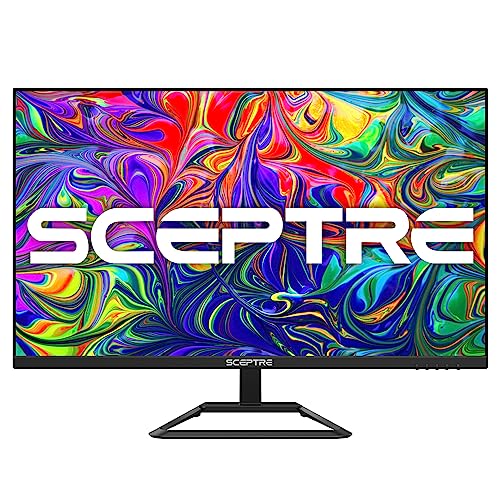
Up to 70Hz refresh rate Built-in speakers Superior 4K picture Wide color and contrast
Slow Boot-Up
A larger display changes the pace of document work more than most people expect. Instead of constantly zooming in or jumping between windows, you can comfortably view lengthy reports, spreadsheets, and research papers side by side. The 4K resolution adds another layer of refinement by keeping small fonts crisp even when multiple applications share the screen.
Image quality is another welcome surprise. With four times the pixels of Full HD, the monitor presents text, charts, and graphics with excellent definition while delivering richer contrast and a broader range of colors. That extra clarity makes extended reading sessions feel noticeably less demanding on your eyes.
The built-in speakers help keep the desk uncluttered, making them handy for online meetings, webinars, or background music while working. A refresh rate of up to 70Hz also adds a little extra smoothness when scrolling through long documents or navigating large spreadsheets.
The monitor takes a little longer to start than many competing models. Once it's up and running, though, everyday productivity is where it spends most of its time shining.

100% sRGB coverage 32-inch IPS panel 4K UHD resolution Adaptive Sync
Maybe overheated during long use
The first thing that catches your attention is how balanced everything looks. With a 32-inch IPS panel, 4K resolution, and 100% sRGB coverage, documents appear exceptionally sharp while charts, presentations, and graphics gain more depth and color accuracy. Even lengthy reading sessions become easier when every character remains clean and well defined.
Scrolling through large PDFs or moving around oversized spreadsheets also feels pleasantly fluid. Adaptive Sync helps eliminate visual stuttering, while the 60Hz refresh rate keeps everyday motion looking stable without trying to be something it's isn't. The result is a monitor that feels calm and consistent throughout the workday.
Flexibility is another strength. HDMI 2.0, DisplayPort 1.4, and a 3.5mm audio jack make connecting laptops, desktops, or additional devices refreshingly straightforward, allowing the monitor to fit naturally into both home offices and study spaces.
Extended workloads may cause the monitor to become warm over time, particularly during long continuous use. Under typical office tasks, it remains focused on delivering a comfortable reading experience.
What to Look For in a best monitor for reading document?
Maybe you should feel overwhelmed by the number of options available to you when it decides to purchase best monitor for reading document in 2026? Visitors can't help but question if a better option is available. Well, we have some key items which will produce positive outcomes while also saving you time & expense.
You need to have an objective view of what you are interested in the product you are looking to buy. To choose a satisfactory best monitor for reading document, the factors related to the product, you need to consider carefully below points.
Refresh Rate
Connections
Resolution
Screen Size
Aspect Ratio
Brightness
Panel Type
Response Time
FAQs
What makes a monitor good for reading documents?
A good monitor for reading documents should have a sharp resolution, an IPS panel, eye-care features like low blue light and flicker-free technology, and an ergonomic stand for comfortable viewing.
Which resolution is best for reading text?
1440p and 4K offer sharper text than Full HD, making them ideal for reading documents, spreadsheets, and web pages for extended periods.
Do eye-care features really help when reading?
Yes, features like flicker-free backlighting and low blue light modes can help reduce eye fatigue during long reading or work sessions.
Conclusion
The buying guide for best monitor for reading document for your requirement is available on the website. It will assist you in determining what to purchase and how much of it to purchase! We hope this article has assisted you in incorporating some neuroscience guidelines into your shopping decision. If you don't find anything in the above list, you can make another purchase with ZZA 32" Monitor 4K.
If some of this sounds intimidating, or if you really want more details on the strategies mentioned in this blog post, please contact us.
About Michael Brown