The 7 Best Projector With Lens Shift For 2026
 By, Michael Brown
Updated
Summary

BenQ HT2060 Projector

XGIMI HORIZON 20 4K Projector

Epson LS11000 4K Laser Projector
A projector with lens shift can make installation dramatically easier. Lens shift allows you to reposition the image without moving the projector itself. Unlike keystone correction, it does not digitally manipulate the picture, helping maintain maximum image quality. It is an especially valuable feature for ceiling-mounted projectors, dedicated home theaters, or any setup where placing the projector in the exact center of the screen is difficult.
The downside is that lens shift is not particularly common, especially on affordable projectors. It is typically reserved for home theater models, and even then, the amount of adjustment can vary significantly from one projector to another. Some offer only vertical lens shift, while others provide both vertical and horizontal movement for greater installation flexibility.
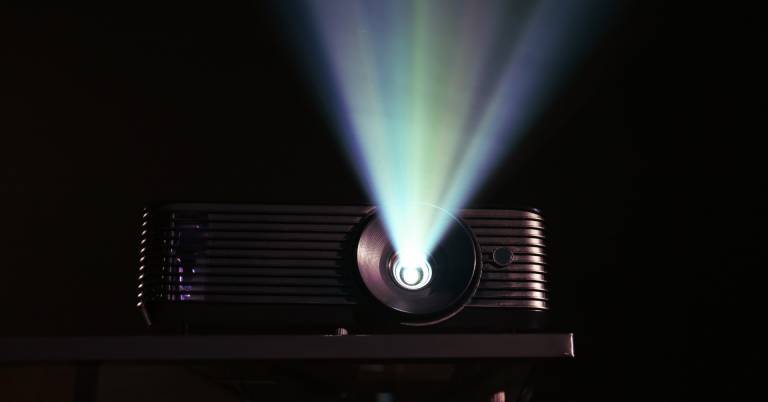
The BenQ HT2060 Projector strikes an excellent balance between performance and practicality. Its vertical lens shift makes setup much more forgiving, while its bright LED light source and home theater-focused image quality make it a compelling choice for movie enthusiasts who want flexibility without moving into premium price territory.
Because lens shift is such a specialized feature, the best projector is not simply the one with the widest adjustment range. The models in this guide were chosen for how well they combine installation flexibility with picture quality, reliability, and overall viewing experience, helping you find the right projector for your room rather than forcing your room to fit the projector.
Our Top Picks


DCI-P3 color coverage Long-life LED source Vertical lens shift Low input lag
Lens shift adjustment is vertical only
A projector often earns its place in a room before the movie even starts, simply by being easy to position. The HT2060 provides vertical lens shift, 1.3x zoom, and two-dimensional keystone correction, giving the image useful movement without demanding that the projector sit at one exact height. That flexibility is especially welcome in living rooms where shelves and furniture already dictate placement.
Once the lights dim, color becomes the main attraction. The LED light source covers DCI-P3 and 98% of Rec.709, helping animated films, nature footage, and richly graded movies retain their character. HDR10 and HLG compatibility add depth to highlights and darker scenes, while the long LED lifespan avoids the regular lamp changes associated with older theater projectors.
Gaming performance is also thoughtfully handled. Input lag is rated at 16.7ms for 1080p at 60Hz, with 4K signals accepted and downscaled for display. Dual HDMI 2.0 inputs simplify switching between a console and media player, and S/PDIF can pass 5.1-channel audio to a separate sound system. For simpler nights, the two 5W chambered speakers are ready without extra equipment.
Lens shift adjustment is vertical only, so horizontal alignment still benefits from careful placement. In practice, setting the projector close to the screen’s centerline and using lens shift for height correction keeps the optical path clean. The result is a relaxed installation that can move between movie nights and game sessions without constant recalibration.
RGB triple-laser engine 3,200 ISO lumens Optical lens shift Built-in Google TV
High-refresh gaming features require a compatible source
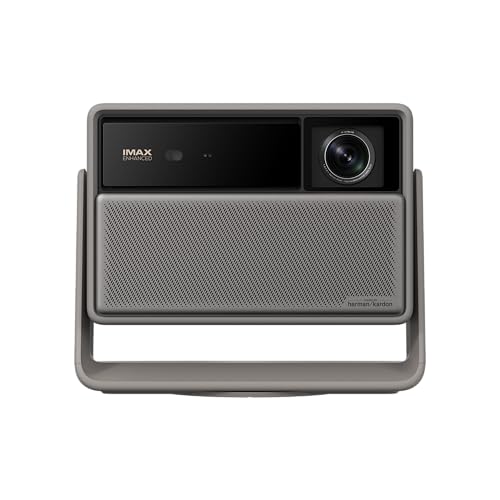
XGIMI makes a strong first impression by putting most of the theater setup inside one polished chassis. Google TV handles entertainment apps, Harman Kardon speakers manage room audio, and the integrated stand helps aim the projector without immediately reaching for a mount. That simplicity matters when the projector moves between a living room and a dedicated movie space.
The RGB triple-laser engine produces 3,200 ISO lumens and a stated 100,000:1 contrast ratio. Dolby Vision, HDR10+, IMAX Enhanced, and Filmmaker Mode then shape that brightness for different kinds of content. Films can retain their intended motion and tone, while vivid series and live events gain the color intensity expected from a laser light source.
Placement is where HORIZON 20 separates itself from many smart projectors. Optical zoom changes image size without throwing away resolution, and lens shift moves the picture optically when the projector cannot sit directly in front of the screen. This combination preserves clarity better than leaning heavily on digital resizing or keystone correction.
Games receive their own set of tools, including VRR, ALLM, response times down to 1ms, and motion up to 240Hz with a suitable source and operating mode. High-refresh gaming features require a compatible source, so ordinary 60Hz devices will not use the fastest settings. Still, the same optical controls and bright laser image remain useful every day, even when the console is switched off.

Motorized lens controls 3-chip 3LCD engine Laser array light source Detailed HDR adjustment
No built-in speakers
Some projectors belong on a coffee table; the LS11000 invites a more deliberate theater installation. Epson’s motorized lens system allows lens shift, zoom, and focus to be adjusted from the viewing position, making it easier to refine a large image after the projector is mounted. That precision is valuable when screen borders leave little room for error.
The picture begins with three separate LCD chips that display the full RGB signal in every frame. Because the colors appear continuously, the image avoids the rainbow artifacts sometimes noticed with single-chip projection. Epson’s laser array supplies 2,500 lumens of both white and color brightness, while the Cinema Lens maintains focus from the center toward the edges.
Pixel-shifting hardware creates a 3840 x 2160 image containing 8.29 million pixels. Behind it, the Epson Picture Processor manages resolution enhancement, frame interpolation, color, contrast, and HDR in real time. HDR10+, HLG, and full 10-bit HDR processing are supported, with sixteen curve-adjustment steps for matching different films and room conditions. Dynamic contrast exceeds 1,200,000:1, helping dark scenes retain shape rather than collapsing into a flat gray background.
A 120Hz refresh rate also gives motion more fluidity for supported video and gaming. There are no built-in speakers, which suits a projector intended to partner with a receiver and dedicated surround system. Once the audio system, screen, and lens memories are arranged, the LS11000 becomes the quiet visual center of a theater built to stay in place.

True 4K detail 3,000-lumen brightness 1.6x optical zoom Vertical lens shift
Lamp-based light source may eventually need replacement
The UHD60 comes from a generation when a 4K home projector was expected to concentrate on picture and installation rather than operate like a smart television. That focus still gives it appeal. Its DLP system places 8.3 million addressable pixels on screen, producing fine texture in landscapes, costumes, and detailed production design.
Brightness reaches 3,000 lumens, allowing the image to remain usable beyond a completely dark theater. HDR10 support works with DCI-P3 and Rec.2020 color information, while Dynamic Black adjusts lamp output to strengthen perceived contrast. Optoma rates that contrast at 1,000,000:1, and UltraDetail processing adds extra definition without changing the original resolution.
The installation controls are unusually practical for a traditional long-throw projector. A 1.6x zoom and 1.39 to 2.22:1 throw ratio provide a broad distance range, while vertical lens shift changes image height with less quality loss than digital correction. Keystone adjustment is available for situations where the chassis cannot be aligned perfectly. HDMI with HDCP 2.2, USB, VGA, and additional inputs accommodate both newer 4K devices and older equipment.
Its lamp-based light source may eventually need replacement, although the rated lifespan reaches up to 15,000 hours. At four hours per day, that represents many years of regular viewing. A planned ceiling mount, clean ventilation, and a familiar media player are enough to let the UHD60 settle into a dependable theater routine.

6,000 ANSI lumens Four-way lens shift Wide optical zoom Triple-laser color
Premium price
Brightness changes what is possible in a projection room. With a claimed peak of 6,000 ANSI lumens, the XR10 can produce a large picture without insisting that every curtain remain closed. That power suits expansive living areas, media rooms used during the day, and screens that would leave a smaller projector looking subdued.
Hisense pairs the light output with a Pure Triple Laser system and a 17-element all-glass lens. A seven-level iris allows brightness and black levels to be adjusted for the room, while optical zoom keeps the image at 4K across a 0.84 to 2.0:1 throw ratio. Lens shift moves the picture up, down, left, or right, making it possible to correct placement without physically relocating this substantial machine.
The cinema credentials continue through IMAX Enhanced, DTS:X, active 3D, and wide color reproduction. VIDAA gathers more than 1,200 apps, channels, cloud gaming services, and other sources behind a voice-controlled interface, reducing dependence on an external media box. Liquid cooling manages heat during long sessions, an important detail when so much laser output is working inside the chassis.
The premium price places the XR10 in the territory of a carefully planned room rather than an occasional movie setup. Its optical flexibility helps justify that commitment because the projector can adapt to screen sizes from 65 to 300 inches and several mounting distances.

True 4K resolution Over 3,000 lumens 98% Rec.709 color HDR-PRO processing
Lamp-based design needs more maintenance than laser models
Live sports place different demands on a projector than a dark, carefully graded film. The room may still have lights on, friends may be moving around, and the picture needs enough brightness to keep uniforms and field markings clear. BenQ addresses that setting with more than 3,000 lumens and 98% Rec.709 color coverage, supported by dedicated Sport modes.
The TK850i displays 8.3 million pixels at 3840 x 2160, giving score graphics, crowd shots, and close-up detail the sharpness expected from a true 4K image. HDR-PRO combines HDR10 and HLG handling with a Dynamic Iris, adjusting contrast and brightness so highlights remain energetic without flattening the rest of the scene.
Android TV and the Google Play Store provide access to thousands of apps, while AirPlay and Chromecast handle casting from other devices. The remote operates both the projector and the Android TV interface, which keeps the coffee table from filling with controls. Lens shift and keystone correction help align the image after the projector has been placed on a shelf or ceiling mount.
The lamp-based design needs more maintenance than laser models, though BenQ backs the projector with a three-year parts-and-labor warranty. For weekend matches and shared viewing, its bright picture and familiar casting tools make the setup easy for everyone in the room to use.

Four-way lens shift Wide optical zoom 5,800 ISO lumens Motorized AI gimbal
Motorized gimbal requires extra clearance around the projector
The N3 Ultimate treats the room almost like a three-dimensional mounting grid. Its motorized gimbal pans through 360 degrees and tilts through 150 degrees, while four-way lens shift moves the picture horizontally by up to 53% and vertically by up to 130%. A 0.88 to 1.7:1 optical zoom adds another layer of physical control without digitally cropping the 4K image.
JMGO combines that flexibility with 5,800 ISO lumens from a triple-laser engine. The projector covers a stated 110% of BT.2020 and lists color accuracy around Delta E 0.7, helping vivid scenes remain controlled rather than simply oversaturated. Dolby Vision and dynamic black processing support deeper cinematic contrast on screen sizes reaching 300 inches.
Gaming hardware is equally ambitious. HDMI VRR, ALLM, refresh rates up to 240Hz, and input lag down to 1ms target fast console and PC play. Two 12.5W speakers provide stronger built-in sound than many projectors, including bass extension to 35Hz. Google TV adds native Netflix, Prime Video, YouTube, Disney+, Chromecast, and voice search, supported by 4GB of memory and 64GB of storage.
The motorized gimbal requires extra clearance around the projector, so shelves should leave room for the body to rotate and tilt freely. Once that space is reserved, automatic focus and keystone can recover alignment quickly after movement. The result is a projector that can point toward different walls or screens without turning every change of direction into a new installation project.
What to Look For in a best projector with lens shift?
To buy any product seems easy, but to choose the best one is not straightforward. The time you take to research its outcome is significant. The same matter also comes to best projector with lens shift of 2026 that we include in this article. But you can relax instead of spending too much time learning the products. It’s our duty!
Here are the main features of best projector with lens shift that all of you guys should keep in mind when deciding to make a purchase:
Resolution
The calculation for projectors that have 4K ultra high definition (3,840 x 2,160 pixels) is slightly different.
Light Source
For longer periods of time, LEDs and lasers retain a greater percentage of their original brightness. While all light sources eventually lose their brightness, lamps lose the most in 500 hours. Then, they slowly decline over time. The brightness of LEDs and lasers will decrease more slowly over the course of their lifetimes.
Contrast Ratio
Contrast ratings can only be used to measure in dark rooms. They don't give any information about ambient lighting. Unusually dark blacks in the projector will result in lower contrast. A brighter projector will perform well in home theaters, but not in living rooms or offices.
Projection Tech
DLP projectors with single-chip DLP chips could be subject to the so-called "rainbow effect." Sometimes, tiny, bright flashes with rainbow-like colors may appear, especially in dark scenes. Some DLP projectors have a minimal effect, while others can produce a distracting result, especially when there are bright areas against shady backgrounds. The rainbow effect is not a problem with LCD projectors, which are safer if someone in your household has sensitive eyes. There are many DLP projectors that produce excellent images.
Portability
Brightness
The ambient lighting level, size and material of your projector screen will all affect the brightness. You should buy a professional seller if you are installing a projector in a permanent location, such as at your home, to ensure that you get the best image brightness and the correct screen material.
Connection Methods
Component video, composite video and S-Video all make up the most common connections on large projectors. We're also seeing more projectors that offer direct USB connection to computers via a USB cable. A growing variety of projectors now have USB Type-C ports. The majority of USB-C ports can be used to transfer data or video using the DisplayPort protocol. Most USB-C ports support USB Power Delivery (USB PD), which means that a plugged in projector can supply 100 watts of power to charge a device or to charge it using a USB-C cable (assuming the device is capable of charging over USB-C).
FAQs
What is lens shift on a projector?
Lens shift lets you move the projected image vertically or horizontally without physically moving the projector.
Is lens shift better than keystone correction?
Generally, yes. Lens shift preserves the image geometry, while keystone correction digitally alters the image and can reduce usable resolution.
Do all projectors have lens shift?
No. Lens shift is more common on mid-range and high-end projectors, while many budget models rely mainly on keystone correction.
About Michael Brown