The 7 Best Samsung Galaxy Tablet For 2026
 By, Michael Brown
Updated
Summary
Samsung Galaxy Tab A9+ Tablet 11”

Samsung Galaxy Tab S9 FE 10.9”

Samsung Galaxy Tab S6 Lite 10.4'
Samsung Galaxy tablets come in enough shapes, sizes, and price ranges that choosing one can feel harder than choosing between brands. The Galaxy Tab family stretches from straightforward everyday tablets to powerful models built for demanding productivity and creative work. What makes the “best” Galaxy tablet depends heavily on what you actually expect it to do.
For casual users, a responsive screen, good battery life, and smooth streaming may be all that matters. Students might care more about multitasking and portability, while professionals and artists may want a larger display, stronger performance, and S Pen capabilities. Samsung’s Android interface and Galaxy ecosystem add another layer of convenience, particularly if you already use other Samsung devices.
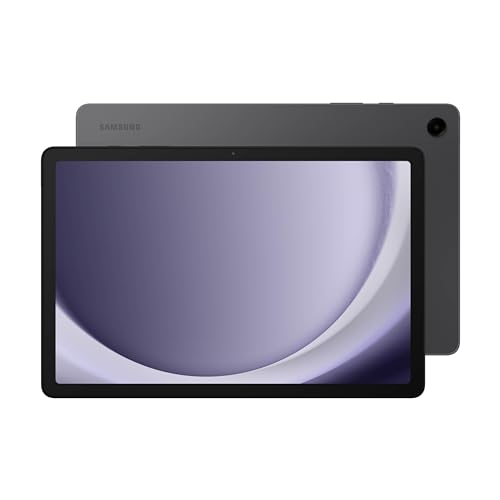
For everyday use, the Samsung Galaxy Tab A9+ Tablet 11” hits an especially appealing middle ground. The 11-inch display provides plenty of room for movies, reading, browsing, and split-screen apps, while its approachable price makes sense for buyers who do not need the power of Samsung’s flagship tablets.
But the A9+ is only one part of the Galaxy Tab story. There are better choices if you want serious productivity, a premium entertainment experience, a compact travel companion, or simply more performance for the years ahead. We have covered those different needs here so you can choose based on how the tablet will fit into your day, not just where it sits in Samsung’s lineup.
Our Top Picks


11-inch 90Hz display Quad speakers with Dolby Atmos Up to 1TB expandable storage Samsung Kids
The TFT LCD is less vivid than Samsung's AMOLED displays
A family tablet tends to move from room to room and user to user, so flexibility matters more than flashy extras. The Galaxy Tab A9+ fits that role nicely with a slim, light, and durable body that is easy to carry between the couch, kitchen, and a child's desk.
Its 11-inch display runs at 1920 x 1200 with a 90Hz refresh rate, giving scrolling and casual games a smoother feel than a basic 60Hz screen. Quad speakers with Dolby Atmos add surprising scale to shows and music, while the upgraded chipset handles video, browsing, and several everyday apps. Multi Window is particularly useful when checking email beside a webpage or keeping notes open during a video.
Samsung's ecosystem adds practical convenience. Quick Share transfers photos and files to Galaxy, Android, or iOS devices, Smart View casts content to a Samsung TV, and calls or messages can continue on the tablet when a compatible phone is elsewhere. Samsung Kids also gives younger users a more controlled space for learning and play. Storage starts at 64GB, but microSD expansion up to 1TB leaves room to grow.
The TFT LCD does not produce the same deep contrast or vivid color as Samsung's AMOLED screens. Still, for casual viewing and general family use, the bright 90Hz panel feels pleasant and responsive, especially at this tablet's more approachable position in the Galaxy lineup.

IP68 water and dust resistance Up to 18 hours of battery life Super Fast Charging Circle to Search
No Wireless Charging
The Galaxy Tab S9 FE feels designed for days that do not stay in one place. Its lightweight body slips into a bag easily, while an IP68 rating provides reassurance around dust, rain, and everyday spills.
The 10.9-inch screen offers enough room for movies, games, and multitasking without becoming awkward to carry. Up to three apps can remain visible during a video call, and the camera automatically adjusts to keep attention on the user. Circle to Search also makes visual research quicker because an item on screen can be searched without leaving the current app.
For handwritten work, the included S Pen is the real attraction. It responds naturally when taking notes, marking documents, or sketching, and it does not require another accessory purchase to begin. The Exynos chipset supports daily work and communication, while up to 18 hours of battery life helps the tablet last through long sessions. Super Fast Charging can restore a full charge in less than 90 minutes, and microSD expansion adds up to 1TB beyond the built-in storage.
Wireless charging is not available, so power still comes through a cable. In practice, the fast wired charging and long runtime make that a manageable tradeoff rather than a constant inconvenience. With Quick Share, dual speakers, and durable construction completing the package, the S9 FE is one of Samsung's most rounded options for work, creativity, and entertainment.

Dolby Atmos sound Samsung DeX Expandable storage Portable and lightweight body
The processor is better suited to everyday tasks than demanding games
Sometimes the most useful tablet is the one that is ready the moment it leaves the box. The Galaxy Tab S6 Lite includes its S Pen, so handwritten notes, document markup, and quick sketches can begin without shopping for another accessory.
The 10.4-inch display gives notes and media enough breathing room while keeping the tablet easy to carry. Its slim metal body slides into a backpack without adding much bulk, making it comfortable for commutes, meetings, or relaxed use around the house. When it is time to unwind, the clear screen and Dolby Atmos sound create a more engaging experience for shows, music, and casual games.
Samsung DeX expands what the tablet can do at a desk. It creates a desktop-style workspace and helps manage several windows across compatible Galaxy devices, which is useful for writing while referring to another document or organizing files. The updated processor keeps common apps moving comfortably, and expandable storage provides room for downloaded media and project files.
That processor is better suited to everyday tasks than demanding games. Lighter titles, streaming, note-taking, and routine productivity remain its natural territory, while graphically intensive games may call for lower settings or a more powerful Galaxy Tab. For buyers focused on handwriting and practical daily use, the included S Pen and DeX support matter more than chasing flagship gaming performance.

Circle to Search Up to 20 hours of battery life Super Fast Charging Water-resistant design
The AI keyboard shortcut requires a separately purchased keyboard
Good tablet features should remove small frustrations instead of adding another menu to learn. The Galaxy Tab S10 FE takes that approach with tools that fit naturally into tasks people already perform.
Circle to Search can identify or research anything visible on the screen without switching apps. Meanwhile, Handwriting Assist straightens and spaces handwritten notes, and Math Solver converts S Pen equations into clean text while helping work through them. These features make the included S Pen feel connected to the software rather than included as an afterthought.
The large, bright display refreshes at 90Hz, so scrolling, games, and interface movement look fluid. Dual speakers support entertainment, while the processor keeps casual multitasking and fast-paced activities responsive. Battery life reaches up to 20 hours, and Super Fast Charging helps shorten interruptions. Water resistance adds confidence during travel or busy daily routines, and storage can expand by up to 1TB with a microSD card.
The dedicated AI shortcut belongs to Samsung's tablet keyboard, which is purchased separately. Users who prefer touch and S Pen input can still access the tablet's core AI tools without it, while frequent typists may see the keyboard as a useful later upgrade. Overall, the S10 FE combines practical intelligence, strong endurance, and creative input in a package that feels modern without becoming overly complicated.

11-inch 90Hz display 6GB RAM and 128GB storage Quad speakers with Dolby Atmos Google Gemini
An S Pen is not included
A shared tablet needs to be welcoming enough for everyone to pick up without asking for instructions. The Galaxy Tab A11+ delivers that simplicity through a bright 11-inch display, a slim body, and performance aimed at the daily rhythm of a household.
The screen refreshes at up to 90Hz, helping menus, video, and games move smoothly. Quad speakers powered by Dolby Atmos give movies and playlists a fuller sound, while the upgraded chipset and 6GB of RAM support common multitasking. The included 128GB of storage can also expand, providing more room for family photos, downloaded shows, and large files.
Samsung adds intelligent features without making them feel intimidating. Google Gemini can assist with everyday questions and tasks, while Circle to Search identifies information directly from whatever is visible on screen. A 5MP front camera keeps video calls clear, and the long-lasting battery is designed to stay active through browsing, streaming, and play. When it finally runs low, fast charging helps the tablet return to use quickly.
An S Pen is not included with this model. That makes the A11+ less immediately suited to handwriting or detailed drawing, though users focused on touch input, media, and family communication may never miss it. The combination of fluid visuals, rich audio, useful AI, and expandable storage makes this a friendly all-purpose Galaxy tablet for a busy home.

11-inch Dynamic AMOLED 2X display Vision Booster 12GB RAM Included S Pen Note Assist
The flagship features come at a higher price than FE-series tablets
The Galaxy Tab S11 makes its premium character obvious before an app even opens. Its 11-inch Dynamic AMOLED 2X display delivers rich color and clear text, while Vision Booster helps the screen remain comfortable and readable through longer work or creative sessions.
Inside, 12GB of RAM allows Android apps to open and switch quickly, making the tablet well suited to a layered workflow. The included S Pen captures notes with precise, paper-like control, and Note Assist can organize those ideas during lectures or meetings. Drawing Assist goes in a more creative direction by turning rough sketches into polished mock-ups or cleaner storyboard concepts.
Gemini Live adds another form of support by interpreting content shown on the display or shared through the camera. This can speed up research, explanation, and decision-making without constantly moving between devices. A microSD slot provides flexible storage for offline media and project files, while the 5.5mm-thin body remains easy to carry. IP68 protection also adds confidence around dust, rain, and spills.
These flagship features come at a higher price than Samsung's FE-series tablets. The difference makes the most sense for users who will benefit from the AMOLED screen, 12GB of RAM, and advanced creative tools regularly. For that audience, the S11 feels less like an occasional media device and more like a capable daily workspace that remains enjoyable after the work is finished.

AT&T 5G connectivity 12.4-inch Dynamic AMOLED 2X display Reduced-glare screen Powerful processor
The 12.4-inch body is less convenient for one-handed use
Leaving Wi-Fi should not bring a productive session to a halt. The Galaxy Tab S10+ 5G keeps streaming, downloads, and connected work moving through AT&T's 5G network, giving compatible customers more freedom to work or relax away from a router.
Its 12.4-inch Dynamic AMOLED 2X display is the visual centerpiece. Reduced glare helps preserve visibility, while the generous canvas gives documents, movies, and creative work room to breathe. The powerful processor supports demanding tablet use, and the included S Pen makes the large screen especially useful for handwriting and illustration.
Galaxy AI adds several thoughtful shortcuts. Note Assist can organize and summarize meeting or lecture notes, while recorded discussions can be turned into transcripts and concise summaries. Sketch to Image transforms simple drawings into more developed artwork, and Circle to Search finds information about objects on screen without interrupting the current app. The tablet is also built to withstand bumps, dust, and splashes, providing extra reassurance during travel.
The 12.4-inch body is less convenient for one-handed use than an 11-inch tablet. It feels more natural supported on a desk, lap, or stand, where the added workspace becomes an advantage rather than extra bulk. For users who value a broad AMOLED canvas, mobile connectivity, and AI-assisted creativity, the S10+ 5G delivers a genuinely capable experience beyond the home network.
What to Look For in a best samsung galaxy tablet?
The best samsung galaxy tablet is a product type that many customers feel hesitant to select because of the challenges in evaluating its features. It comes to trust! When studying a significant purchase, many factors must be considered. Our best samsung galaxy tablet knowledge will help you make an ideal decision.
Our article here will highlight some outstanding items and provide solutions to FAQs and guides to buying. You should keep in mind some main criteria of best samsung galaxy tablet below:
Storage
Hardware Connections
Online Access
Software
Cameras
Battery
Screen & Audio
FAQs
Which Samsung Galaxy tablet is best?
The best model depends on your needs. Galaxy Tab S-series models are ideal for demanding work and creativity, while A-series tablets offer good value for everyday use.
Are Samsung Galaxy tablets good for students?
Yes. They work well for note-taking, studying, online classes, browsing, and entertainment, especially when paired with an S Pen or keyboard.
Can a Samsung Galaxy tablet replace a laptop?
Some high-end Galaxy Tab models can handle many laptop-like tasks, particularly with a keyboard and Samsung DeX, although specialized software may still require a laptop.
About Michael Brown