The Best 20 Inch Monitor For 2026
 By, Michael Brown
Updated
Summary

Philips 22 Inch Computer Monitor

Sceptre 22-Inch Gaming Monitor

Samsung 22" S30GD Monitor
A 20-inch monitor can be a smart choice when desk space matters more than having the biggest screen possible. Its compact footprint works particularly well for small home offices, reception desks, study areas, secondary PC setups, and other spaces where a larger display might feel unnecessary. For everyday browsing, documents, email, and basic work, this size can provide plenty of usable screen space without taking over the desk.
True 20-inch monitors, however, are becoming harder to find. Most manufacturers have shifted toward slightly larger displays, particularly around 22 inches, where buyers can get more screen space while keeping the monitor relatively compact. For that reason, our recommendations include both 20-inch models and selected 22-inch alternatives that serve much the same purpose.
This is where the Philips 22 Inch Computer Monitor makes a strong case for going slightly bigger. The two-inch difference is modest enough that it still works comfortably on smaller desks, but the additional screen space can make documents, web pages, and everyday multitasking easier to manage.
There is no need to treat 20 inches as a strict cutoff. Screen quality, connectivity, ergonomics, and everyday usability can matter far more than a small difference in diagonal size, especially when today's selection of true 20-inch monitors is relatively limited.
Our Top Picks


Crisp Full HD picture Smooth 100Hz refresh Strong VA contrast Wide viewing angles
No built-in speakers
Some monitors earn their place on a desk by simply making everyday viewing feel better, and the Philips 221V8LB does exactly that. Its 21.5-inch viewable area keeps the setup compact, while Full HD resolution gives documents, streaming video, and general desktop use a crisp, detailed appearance.
The jump to 100Hz is especially welcome during routine use. Scrolling looks more fluid, movies and games move with less choppiness, and Adaptive-Sync helps frames stay smooth without distracting stutter. Meanwhile, the VA panel adds visual depth with brighter whites, deeper blacks, and 16.7 million colors, so darker scenes and high-contrast content have more presence than they would on a flatter-looking basic display.
Viewing flexibility is another quiet strength. Philips specifies a 178-degree horizontal and vertical viewing angle, helping colors remain consistent when the screen is seen from the side. That can be useful when sharing the display or working from a slightly off-center chair.
There are no built-in speakers, so audio needs to come from headphones, separate speakers, or the connected computer. For users who already have an audio setup, this is a fairly easy consideration to work around.

Fast 144Hz motion Built-in stereo speakers HDMI and DisplayPort Slim bezel design
Basic stand adjustability
A small screen does not have to feel slow, and that is where the Sceptre E225W-FW144 stands out. Its Full HD panel can reach up to 144Hz, giving mouse movement, scrolling, and fast game sequences a quicker, more responsive character than a conventional 60Hz office monitor.
Sceptre also keeps the surrounding setup refreshingly simple. Integrated speakers provide sound without adding another pair of devices and cables to the desk, which is convenient for videos, casual gaming, and everyday notifications. HDMI and DisplayPort support give users practical ways to connect a computer or compatible gaming system.
Long sessions receive some thoughtful attention as well. Blue-Light Shift reduces blue-light output to make extended viewing more comfortable, while the minimal-bezel design keeps attention on the image. Those narrow borders become even more useful in a dual-monitor arrangement, where the space between two screens feels less visually intrusive.
The stand offers fairly basic adjustability, so anyone who wants more precise screen positioning may prefer to pair it with a compatible alternative mounting solution. On a desk where the standard position already works, its compact footprint and straightforward design remain easy to live with.
Consistent IPS colors Fluid 100Hz viewing Useful Game Mode Slim modern profile
Connectivity options are fairly basic
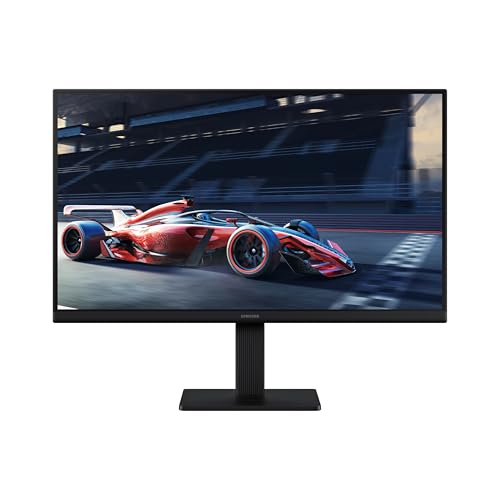
Color consistency becomes much more noticeable when a compact monitor is viewed from different positions. Samsung's IPS panel keeps tones bright and clear across the S30GD's 22-inch screen, with less of the washed-out appearance that can occur when moving away from the center.
The 100Hz refresh rate complements that steady picture nicely. Everyday navigation feels smoother, motion blur is reduced during videos, and games look more fluid when the monitor is configured for the higher refresh setting. Samsung's Game Mode adds another useful layer by adjusting color and contrast so details in darker scenes are easier to see and the image fills the display appropriately.
Comfort and presentation have not been overlooked. Eye Saver features reduce blue light and flicker during longer work or entertainment sessions, while the super-slim body and thin border bezels give the monitor a clean, modern presence. Multiple connection options also make it easier to plug devices directly into the display as the setup evolves.
Connectivity is still fairly basic compared with monitors built around docking or extensive peripheral support. For a straightforward computer setup, however, the available connections keep the experience uncomplicated without distracting from the IPS picture and smooth motion.
Compact desktop footprint Responsive 5ms panel VESA wall mounting HDMI cable included
Narrower TN viewing angles
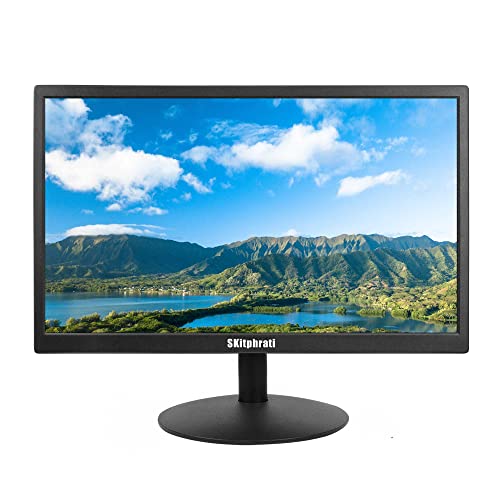
Not every desk needs a large, feature-heavy display. This 20-inch SKitphrati monitor takes a more practical route, providing a compact screen for a desktop or laptop while keeping the controls and setup approachable.
Its 1600x900 panel is intended for everyday home and office work, and the 5ms response time helps on-screen activity transition smoothly. That responsiveness is useful when moving through documents, browsing, or watching casual video, even though the monitor is not positioned as a high-end gaming display.
Installation is flexible in a couple of useful ways. The included stand suits a conventional desktop arrangement, while 100mm VESA compatibility allows the screen to be mounted on a wall with the appropriate accessory. SKitphrati also includes both VGA and HDMI cables alongside the power cable, reducing the chance that an extra cable purchase delays the initial setup.
Because this model uses a TN panel, viewing angles are narrower than those of a comparable IPS display. The picture is therefore best enjoyed from a centered seating position, which is usually manageable when the monitor is used as a personal workstation rather than a shared screen.

Broad input selection USB media playback Two built-in speakers Slim ABS housing
Refresh rate tops out at 60Hz
The Thinlerain feels less like a conventional office-only monitor and more like a compact display hub. Its 20-inch, 1600x900 screen can serve a computer or laptop, yet the available connections also open the door to media players, surveillance equipment, and other video sources.
That flexibility comes from an unusually broad port selection for a screen of this size. HDMI, VGA, AV, and BNC connections sit alongside 3.5mm audio input and output, while the USB port and built-in media player can play compatible movies or videos directly from a USB drive. Two integrated speakers complete the self-contained setup and help reduce extra equipment around the screen.
Thinlerain also describes the LED backlight as suitable for continuous use, including 24/7 surveillance applications. At the same time, the slim ABS housing keeps the unit visually light and provides impact resistance. For ordinary productivity or multimedia, the widescreen format leaves room for documents and video without demanding much desk space.
Its refresh rate tops out at 60Hz, so motion will not look as fluid as it does on newer high-refresh monitors. That matters more for fast competitive play than for monitoring feeds, office tasks, or casual entertainment, which are the situations where its connectivity is most valuable.

Thoughtful eye-care tools Smooth 100Hz display Fast 1ms response VESA mounting support
VA panel has narrower angles than IPS
Long days at a computer tend to reveal whether a monitor was designed with comfort in mind. The MSI PRO MP225V makes that priority clear through its TÜV-certified display, EyesErgo features, and compact 21.45-inch Full HD screen.
Anti-Flicker technology works to reduce a common source of visual fatigue, while MSI Eye-Q Check adds gentle prompts for self-checks and breaks during extended sessions. These features are especially relevant for programming, coding, and website work, where attention can stay fixed on the display for hours at a time.
This monitor does not sacrifice smoothness to deliver that calmer viewing experience. Its 100Hz refresh rate makes scrolling, cursor movement, and general motion feel more fluid than on a standard 60Hz screen. Adaptive-Sync support further helps compatible content appear more coherent, and the 1ms specification suits moments when quick response matters. VESA mounting and tilt adjustment provide practical ways to place the screen within a workspace.
The VA panel has narrower off-angle consistency than an IPS alternative, so the most accurate-looking view comes from sitting relatively close to the center. For a personal workstation, that is a modest tradeoff and can be managed through careful positioning.

Versatile device connections Convenient built-in speakers Space-saving VESA support HDMI cable included
No DisplayPort connection
One day this screen may be attached to a laptop, and the next it may be showing a security feed or content from a streaming stick. The SKitphrati 20-inch monitor is built for that kind of flexible use, bringing several connection types into a compact and uncomplicated package.
HDMI can accommodate computers, consoles, Raspberry Pi systems, cameras, DVRs, or a compatible TV stick. VGA supports older computers and laptops, while BNC and AV provide useful routes for surveillance cameras, DVD players, and TV boxes. Built-in speakers keep audio available without requiring another device on the desk.
The 5ms response time helps scrolling, light gaming, and video playback look reasonably smooth. If desk space is tight, 75mm VESA compatibility allows the monitor to move onto a wall or adjustable arm, and the included HDMI cable means one common connection is ready straight out of the box.
There is no DisplayPort connection, which may matter to users whose preferred computer output relies on that interface. However, HDMI and VGA cover many everyday systems, while the additional BNC and AV inputs make this model better suited to mixed-device setups than its compact dimensions initially suggest.
Several things a reader must do before selecting best 20 inch monitor
Actually, best 20 inch monitor can be discovered by following these simple steps. Individuals should first understand their needs and the requirements which will guide their decision-making procedure.
Then they must investigate all options available to decide which product satisfies those needs and meet those criteria. After that, the buyer can narrow down their options based on factors such as cost and dependability. Let’s check the tips for better purchase:
Refresh Rate
Resolution
Brightness
Screen Size
Panel Type
Response Time
Aspect Ratio
Connections
FAQs
Are 20-inch monitors still available?
Yes, but 20-inch monitors are less common than larger sizes. If your options are limited, a 21.5- or 22-inch monitor can be a practical alternative.
Is a 22-inch monitor much bigger than a 20-inch monitor?
The difference is relatively small, but a 22-inch display provides slightly more screen space while remaining compact enough for most smaller desks.
What are 20-inch monitors good for?
They work well for basic office tasks, web browsing, studying, and secondary-monitor setups where saving desk space is important.
Conclusion
Before making a purchase decision, the reader should do the following. It's critical to keep these factors in mind when looking for the best 20 inch monitor since they can help to ensure that you discover what's worth the investment. If you need another option for best 20 inch monitor, you should look into SKitphrati 20 Inch PC Monitor. Hope you have a nice shopping day!
About Michael Brown