The 7 Best Laptop For Basic Home Use Of 2026
 By, Michael Brown
Updated
Summary

Apple MacBook Air 13-inch M4

Dell Inspiron 15.6"

Apple MacBook Neo 13-inch Laptop
Most people don't need a high-end workstation for everyday computing at home. Browsing the web, checking email, paying bills, joining video calls, streaming movies, managing photos, and working on documents are relatively simple tasks. The challenge is finding a laptop that handles all of them smoothly without paying extra for performance or features you'll rarely use.
For basic home use, convenience often matters more than raw specifications. A good laptop should start quickly, feel responsive with several browser tabs open, offer enough battery life to move around the house without constantly looking for a charger, and have a comfortable display and keyboard. Longevity matters too, since a home laptop is often something you expect to keep for years rather than replace with every new generation.
The Apple MacBook Air 13-inch M4 is our top choice for users who want a particularly polished everyday experience. It offers far more performance than basic home tasks require, but that extra headroom can help it stay responsive as your needs grow.
Still, spending more isn't necessary for everyone. Basic home computing can be handled well at several price points, so the smarter choice comes down to how much you value portability, operating system, screen quality, storage, and long-term usability. Our selections reflect those different priorities, from straightforward affordable machines to more refined laptops built to serve as an everyday computer for years.
Our Top Picks


Fast M4 performance Up to 18-hour battery Vivid Liquid Retina display Excellent camera and audio
No Cooling Fan
A home laptop earns its place by being ready whenever a small job appears. The M4 chip gives this MacBook Air the speed to move smoothly between Microsoft 365, Google Workspace, video calls, photo libraries, and entertainment, while macOS keeps familiar apps responsive.
Its 13.6-inch Liquid Retina display brings more pleasure to ordinary use than the compact size might suggest. Support for one billion colors gives family photos and videos rich contrast, and crisp text makes longer documents easier to read. When a call begins, the 12MP Center Stage camera helps keep the user framed, with three microphones and four Spatial Audio speakers handling the conversation from both sides.
Battery life reaches up to 18 hours, so charging does not need to shape the day. MagSafe keeps power separate from the two Thunderbolt 4 ports, while Wi-Fi 6E, Bluetooth 5.3, a headphone jack, and support for two external displays provide useful flexibility around the house. Apple Intelligence and the close connection with an iPhone also make writing, copying content, answering calls, and moving between devices pleasant.
The absence of a cooling fan keeps the machine quiet during routine home use. During longer, demanding workloads, though, there is no active fan to move heat away as aggressively, which matters more for sustained video editing or graphics-heavy sessions than for everyday computing.

Responsive touchscreen control Generous 32GB memory Spacious 1TB SSD Useful numeric keypad
220-nit screen is fairly dim
Touch control changes the rhythm of simple household computing. On the 15.6-inch Full HD IPS display, scrolling through recipes, enlarging photos, and navigating Windows can be done directly, while the anti-glare finish helps reduce distracting reflections. Narrow bezels keep attention on the image, although the 220-nit brightness is better suited to controlled indoor lighting than a sunlit window.
The quad-core Intel Core i5-1155G7 reaches up to 4.5GHz and works alongside 32GB of RAM and a 1TB SSD in this configuration. Consequently, switching between office files, school portals, email, and video meetings should remain comfortable, with plenty of room for documents and family media.
A numeric keypad is useful for household accounts or spreadsheets, and the connection selection is refreshingly straightforward. Two USB 3.2 Type-A ports, another USB 2.0 Type-A port, HDMI 1.4, an SD card reader, and a headset jack accommodate common accessories without turning every setup into a dongle puzzle. Windows 11 Pro rounds out a machine that favors familiar, practical tools.
The screen's 220-nit output is the one consideration worth planning around. It should look comfortable in a typical room, but placing it away from strong daylight will help the picture retain more clarity and color.
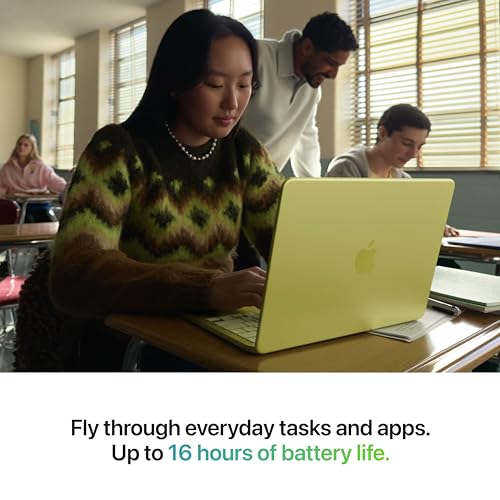
Compact aluminum design Up to 16-hour battery Color-rich Retina display Private AI assistance
Fewer ports than larger laptops
Portability is the quality that quietly shapes this MacBook Neo. Its recycled aluminum enclosure is made for regular movement, and the choice of four colors, including the coordinated keyboard, gives the machine more personality than the usual home-office finish.
The A18 Pro chip handles everyday assignments, presentations, AI-assisted note summaries, and Apple Arcade games, while Apple Intelligence adds writing and organization tools with built-in privacy protections. On the 13-inch Liquid Retina display, support for one billion colors helps photos and shows look lively, yet text remains clean enough for reading and writing sessions.
Video calls are covered by a 1080p FaceTime HD camera and dual microphones, and the side-firing speakers make classes, conversations, and entertainment easier to hear without immediately reaching for headphones. Up to 16 hours of battery life allows the laptop to follow a full day around the home, and Touch ID adds a quick, private way to unlock it. FileVault, Find My, automatic security updates, and the close relationship between macOS and iPhone make the broader experience reassuringly cohesive.
Its smaller chassis naturally leaves fewer physical ports than a larger laptop can accommodate. People who regularly connect several accessories at once may want a compact hub, while lighter setups can benefit from the uncluttered design.
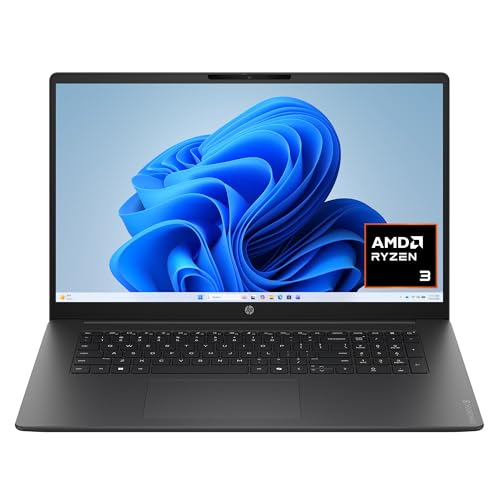
Roomy 17.3-inch display Wide IPS viewing angles Fast battery charging Clearer video conversations
Large chassis for frequent travel
Screen space becomes useful almost immediately on this OmniBook. Its 17.3-inch Full HD IPS panel provides wide 178-degree viewing angles, so a spreadsheet can sit beside a browser window or two people can watch from slightly different positions without the image shifting dramatically.
The AMD Ryzen 3 30 processor is aimed at dependable daily performance, with Radeon 610M graphics supporting entertainment, photo edits, and lighter games. Meanwhile, 8GB of LPDDR5 memory and a 512GB PCIe NVMe SSD balance responsive operation with practical storage for household files and applications.
Long sessions are easier to manage with up to 14 hours and 15 minutes of battery life, and HP Fast Charge can restore approximately 50 percent in about 45 minutes. Calls also receive thoughtful attention: Advanced AI Noise Reduction focuses on the speaker's voice, while the FHD camera uses HDR auto-switching to balance color and contrast in difficult backlighting. Wi-Fi 6, Bluetooth 5.4, Windows 11, and a dedicated Copilot key keep the supporting experience current.
The tradeoff for that roomy display is a larger chassis, which is less convenient to carry frequently than a compact notebook. Around the home or on a regular desk, though, the extra viewing area can be more valuable than shaving a few inches from the bag.

Spacious 16:10 display Efficient Snapdragon platform Useful privacy controls Durable metal chassis
Not very suitable for heavy gaming
The 15.3-inch WUXGA display creates a comfortable place to organize the day. Its 16:10 shape provides extra vertical room for documents and websites, while vivid color, deep blacks, and sharp contrast help videos and creative projects hold attention. The nearly borderless presentation also keeps the metal chassis looking clean rather than bulky.
Inside, the Snapdragon X processor works with a 45 TOPS NPU to power Copilot+ PC experiences, assist with video calls, and manage everyday workflows efficiently. A 60Wh battery supports all-day use, and Rapid Boost is useful when the laptop needs a quick top-up before moving elsewhere.
Practical details continue beyond performance. A physical webcam shutter creates visible privacy, the fingerprint reader speeds up secure sign-ins, and Lenovo's Enhanced Security Suite adds another layer around personal data. The metal body has also passed MIL-STD 810H testing, while an open SSD slot allows storage to grow later without a service-center visit.
However, integrated graphics and the efficiency-focused platform are not especially suited to heavy gaming. The included Xbox PC Game Pass trial still provides plenty to explore, but demanding titles will be happier with modest settings than with every visual option turned upward.
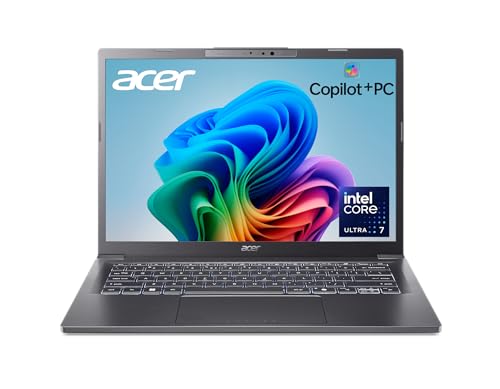
Powerful Core Ultra chip Up to 22-hour battery Detailed WUXGA screen Light aluminum construction Convenient AcerSense controls
AI features may require updates
There is an appealing sense of readiness to the Aspire 14 AI. The Intel Core Ultra 7 256V combines CPU, GPU, and NPU resources, giving routine applications responsive performance while opening the door to AI-assisted productivity and communication. Acer rates battery life at up to 22 hours under its specified video-playback testing, which provides welcome breathing room between outlets.
Its 14-inch WUXGA display uses a 1920 x 1200 resolution, giving the screen more vertical space than a conventional 16:9 panel. That shape suits documents and web pages particularly well, while the detailed image also serves movies, creative work, and AI tools without requiring a large chassis.
AcerSense ties several everyday adjustments together. Pressing its dedicated keyboard key opens controls for system settings, video presence, and communication enhancements, making them easier to reach when a call starts unexpectedly. The aluminum construction remains light and durable, and the 180-degree hinge allows the screen to lie flat when sharing something across a table.
Some Copilot+ experiences, including preview features such as Recall and Click to Do, may require Windows updates and can arrive at different times by market. The core laptop remains usable without waiting on them, but buyers interested in a specific AI function should check its current availability.

Versatile port selection Compact anti-glare display Responsive 10-core processor Camera privacy shutter
Quite expensive
Connecting a mouse, external display, headset, or older USB device should not require much planning here. The Vivobook includes USB-C 3.2, multiple USB-A connections, HDMI, and a combined headphone and microphone jack, while Wi-Fi 6 and Bluetooth cover wireless equipment. A camera privacy shutter adds a simple physical safeguard when video calls are finished.
The 14-inch Full HD IPS display has an anti-glare surface and a 1920 x 1080 resolution. It provides a clean workspace for office tasks, communication, and entertainment, with the compact panel helping the laptop remain convenient for moving between rooms. Brightness is rated at 250 nits, so indoor placement away from direct sunlight will show it at its best.
Intel's 10-core Core 5 120U processor reaches up to 3.8GHz and is paired in this listing with 12GB of RAM. Storage totals 768GB through a 256GB SSD and the included 512GB PLUSERA docking set, giving documents, applications, and personal files useful breathing room. Windows 11 Pro and AI Copilot complete a configuration oriented toward familiar daily work.
One minor downside is that the price is fairly high for a laptop focused on basic home duties, particularly because part of the advertised storage comes through the bundled docking set. Its connectivity and ready-made package may justify the premium for the right setup, but value-conscious shoppers will want to weigh how many of those extras they will actually use.
What to Look For in a best laptop for basic home use?
It may take a long longer to make the best shopping decision. As a result, we are accessible to assist you with your best laptop for basic home use issue at any time of day or night!
There are some highlighted features of best laptop for basic home use you should be aware of before make decision:
RAM
For the most part, 8 gigabytes should suffice for Windows users. However upgrading to 16GB will increase your computer's performance and be a requirement for gamers. Before you purchase RAM, make sure it is properly soldered to your motherboard. It is impossible to replace the RAM if it has been soldered.
Hard Drive
If you have the funds, consider an SSD drive. It should be at least 256 gigabytes. SSDs perform faster than older standards like SATA, particularly if you use NVMe. This allows data to be transferred from the drive quickly.
Operating System
CPUs
Two companies make laptop processors, Intel and AMD.
FAQs
Which Laptops Last The Longest?
Any laptop can be used to create and play games. However, the component of the laptop will determine the content and speed with which it is played and created.You don't require a gaming laptop to play casual web-based games.
You will need more money to buy discrete graphics such as Nvidia's RTX 30 series GPUs.
Gaming screens should have a 120Hz refresh rate or higher to make games run smoothly. Displays that can display 100% of the sRGB colour space are ideal for content creation.
How Much RAM Do I Need?
For most users, we recommend at least 8GB. This should suffice for most web browsing tasks, spreadsheet editing, occasional photo and video editing, as well as basic web browsing. If you use Adobe Photoshop and Premiere regularly, play 3D drafting or work in app or web development, you might consider upgrading to 16GB. You can not add more memory to laptops after they are purchased. This usually costs $100 to $200.We will keep the list of best laptop for basic home use up-to-date once there are new technology and information available. Please check our website frequently to see the most up-to-date information by our editor.
Do you have any questions or comments regarding best laptop for basic home use that you'd like to share with us? We will try to attain even greater comedy as a result of your efforts.
About Michael Brown