The 7 Best Study Tablet For 2026, Tested And Researched
 By, Michael Brown
Updated
Summary

Apple iPad Air 11-inch M4

Amazon Fire HD 10 tablet 10.1"

Samsung Galaxy Tab S10 12.4”
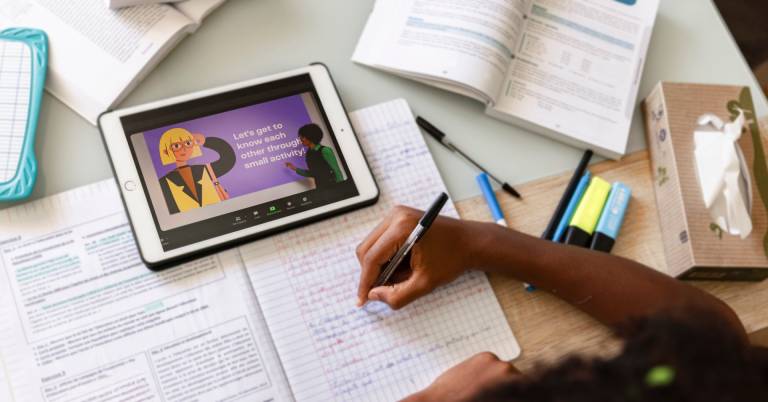
You have a backpack full of heavy textbooks. A laptop that runs out of battery by lunch. Notebooks are scattered across three different bags. There has to be a better way. A study tablet consolidates all of it into one slim, lightweight device that fits neatly next to your water bottle. No more lugging pounds of paper. No more searching for an outlet between classes. Just your notes, your books, and your focus.
What makes a tablet truly great for studying goes beyond the hardware. It is about how the device fits into your daily rhythm. The ability to highlight a textbook with your finger, then instantly turn that highlight into a flashcard. The freedom to pull up a PDF of a research paper, mark it up with handwritten notes, and email it to a professor before you even leave the library. Seamless syncing between your tablet, your phone, and your laptop means you never lose your place, no matter which device you grab.
After researching what students actually need from a study device, we have found that the Apple iPad Air 11-inch M4 hits every mark for the majority of learners. Light enough for a full day of classes, powerful enough for any academic task, and intuitive enough that you spend less time fiddling with settings and more time actually studying.
From battery life and note-taking refresh rates to file management systems and price-to-performance ratios, here are the best study tablets for every type of learner without the marketing hype.
Our Top Picks


M4 chip handles smooth multitasking effortlessly All-day battery life Up to 1TB storage Liquid Retina display with True Tone
Display runs at 60Hz refresh rate
What makes the iPad Air a compelling study companion starts with the M4 chip. This processor delivers advanced graphics and impressive performance for smooth multitasking—something students will appreciate when flipping between a textbook PDF, a note-taking app, and a research browser tab simultaneously. The chip also handles complex AI tasks efficiently, which powers features that can help with everything from handwritten note recognition to study scheduling.
Storage options go up to 1TB, providing ample space for downloading textbooks, saving lecture recordings, and storing apps without constantly managing available space. The 11-inch Liquid Retina display is a standout feature for long study sessions. It incorporates advanced technologies like P3 wide color, True Tone, and ultralow reflectivity, all of which make reading textbooks, reviewing diagrams, and watching lecture videos feel comfortable on the eyes.
The display's quality reduces glare significantly, a practical benefit for studying in library windows or coffee shops with overhead lighting. iPadOS brings a flexible windowing system that lets students control, organize, and manage workflows in ways that mimic a laptop experience while keeping tablet portability. Intelligence also offers a personal intelligence system that assists with creation, communication, and everyday academic tasks while maintaining privacy protections throughout. One thing to note is that the display runs at 60Hz. Still, the Liquid Retina technology, True Tone adjustment, and ultralow reflectivity work together to create a comfortable viewing experience for extended reading and note-taking sessions.

Large 10.1" Full HD display Long battery life up to 13 hours Expandable storage up to 1TB Stylus support for note-taking
Lockscreen ads present by default
The Fire HD 10 focuses on delivering a smooth everyday experience with a bit more screen space to work with. Its 10.1-inch Full HD display brings clear visuals for reading, watching lectures, or streaming shows, making it useful for both study and downtime. The improved performance, with 25% faster speed and 3GB of RAM, helps keep tasks like browsing, note-taking, and casual gaming running without much interruption.
Battery life stretches up to 13 hours, which is helpful for long days on campus without constantly looking for a charger. Storage options of 32GB or 64GB, along with support for up to 1TB via microSD, give flexibility for storing notes, apps, and media. This tablet also supports a stylus with 4,096 pressure levels, allowing for handwritten notes or quick sketches in apps like OneNote. The 5MP front camera works for video calls or online classes, while built-in tools help with tasks like summarizing content or drafting emails.
Its durable design adds peace of mind for everyday use, especially when moving between classes. One minor downside is that lockscreen ads may appear by default, but they can be removed for a cleaner experience if preferred.

Galaxy AI summarizes lectures and notes Circle to Search works without switching apps Included S Pen 12.4" Dynamic AMOLED 2X
No charger included in the box
Students know the struggle: lectures move fast, notes get messy, and finding information often means juggling between five different apps. The Samsung Galaxy Tab S10 12.4" steps in as a study companion that actually understands those pain points. Note Assist captures lecture recordings and automatically generates transcripts and summaries, saving hours of rewatching and rewriting.
Circle to Search with Google lets you look up anything on your screen without switching apps, perfect for quickly defining a term or identifying a diagram without losing your place. Sketch to Image transforms simple doodles into polished visuals, handy for visual learners who prefer drawing concepts. The 12.4-inch Dynamic AMOLED 2X screen delivers breathtaking brilliance with reduced glare, making it comfortable to read textbooks or watch lecture videos from anywhere on campus.
The powerful tablet processor handles multitasking smoothly, while 5G connectivity on the AT&T Network ensures seamless streaming and speedy downloads when Wi-Fi isn't available. Build quality stands up to the backpack life too, with protection against bumps, dust, and splashes. However, no charger is included in the box, so you need to purchase it separately.
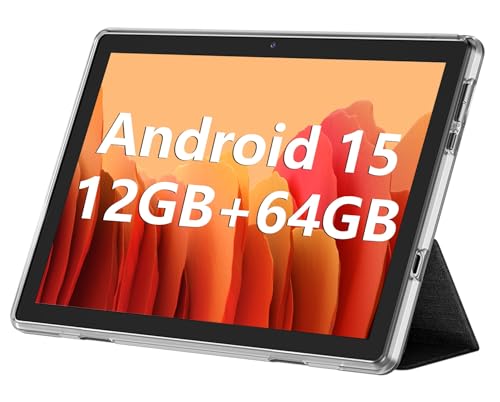
Large 10.1-inch IPS display Expandable storage up to 1TB Smooth performance for daily tasks Decent battery for extended use
Camera quality is average
The ECOPAD 10.1 tablet keeps things straightforward, making it easy to pick up and use for common tasks. Running on Android 15 with a quad-core processor, it handles video playback, browsing, and basic multitasking without much trouble. It’s not built for heavy workloads, but it covers everyday needs comfortably.
Memory and storage are where it adds flexibility. With 12GB of RAM and 64GB of internal storage, along with support for up to 1TB via microSD, there’s plenty of room for apps, media, and files. This makes it practical for users who want to keep everything in one place without constantly managing space. The 10.1-inch IPS display offers a clear viewing experience for movies, reading, or casual use. It keeps visuals simple and easy to follow, which works well for daily entertainment.
Battery life reaches up to 8 hours of video playback, allowing for extended use without frequent charging. Nonetheless, the camera quality sits at an average level. But it still works fine for basic calls and occasional use.

11-inch 90Hz display Quad Dolby Atmos speakers Up to 8GB RAM and 256GB storage Fast charging with a long-lasting battery
The midrange processor may not handle demanding apps smoothly
What makes the Galaxy Tab A11+ interesting is how it balances practical features for shared use. The 11-inch display with a 90Hz refresh rate delivers fluid motion that makes scrolling through homework assignments, watching videos, or jumping between apps feel noticeably smoother than standard 60Hz screens. This is paired with quad speakers powered by Dolby Atmos, creating a cinema-like audio experience that fills a room without needing external speakers.
Under the hood, the upgraded chipset keeps day-to-day activities responsive, whether that's browsing, streaming, or jumping into lighter games. Memory configurations go up to 8GB of RAM paired with 256GB of storage, providing enough space and speed for multitasking across apps and handling large files like downloaded movies or photo libraries. The long-lasting battery supports fast charging as well, so when the tablet eventually runs low, getting back to 100 percent doesn't require an overnight wait.
On the software side, Samsung has integrated some genuinely helpful intelligence features. Google Gemini offers on-the-spot assistance for quick questions or task help, while Circle to Search lets users search anything visible on the screen just by drawing a circle around it. However, the midrange processor may not handle demanding apps as smoothly as flagship models. Even with that, for the core activities of streaming, browsing, light gaming, and everyday productivity, the performance remains more than adequate for most family members.

All-day battery 2.5K IPS display Quad Dolby Atmos-tuned speakers Four built-in learning apps
Only 4GB of memory
Shopping for a college tablet often starts with iPads, but the budget doesn't always cooperate with that choice. The Lenovo Idea Tab enters the conversation as a compelling alternative for students who need productivity without the premium price tag. Its 11" 2.5K IPS touchscreen display delivers sharp visuals for reading textbooks or watching lecture recordings, while the TÜV Rheinland Low Blue Light certification means those late-night study sessions won't leave your eyes feeling fried.
Quad Dolby Atmos-tuned speakers handle the audio side well, making streaming breaks feel immersive without needing headphones. Plus, the MediaTek Dimensity 6300 processor keeps multitasking responsive, and the AI-enhanced capabilities help smooth out everyday campus workflows. When you do need to charge, the included 20W adapter gets you back up quickly.
For students who take notes digitally, the included learning apps are genuinely useful. Lenovo AI Note, Squid, Nebo, and MyScript Calculator help with writing, organizing, sketching, and calculations—all built to match how students actually work. Nevertheless, this tablet comes with only 4GB of memory. But for the core college tasks, the AI optimization helps the system make the most of what's available.
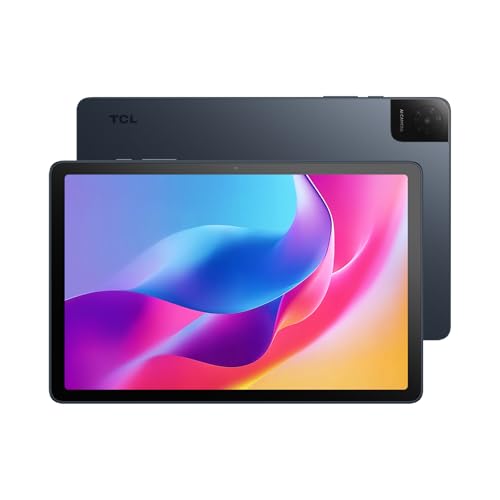
Clear 10.1" FHD IPS display Strong audio with sound boost Expandable storage up to 1TB Slim and lightweight metal design
Fast charger not included
The TCL TAB 10 Gen 4 leans into a well-rounded experience, starting with its 10.1-inch FHD IPS display. The 1920×1200 resolution and 16:10 aspect ratio provide clear visuals for reading, watching videos, or browsing, while TCL NXTVISION enhancement helps improve overall image quality. Paired with dual speakers and a Sound Booster feature, audio becomes more noticeable, especially when watching content without headphones.
Performance is handled by an octa-core processor supported by TCL’s NXTURBO optimization, which helps keep multitasking smooth while managing power usage and heat. Running on Android 15, the tablet feels responsive for everyday tasks like switching between apps, streaming, or light productivity.
Storage and memory add flexibility, with 128GB of internal space, expandable up to 1TB, and additional RAM support to improve responsiveness. The 6000mAh battery supports all-day use, and 18W fast charging helps reduce downtime when recharging. One minor drawback is that a compatible fast charger is not included.
Buying Guide and Tips for better purchase of best study tablet
Merchandise is much more than a physical item. It's the result of someone having an idea, working on it, and making it a reality. When you go out to buy, these would be the factors you should know once looking for best study tablet.
In fact, this is not about how much it costs and what other people think of it, but whether it will suit your requirements and last long enough even for users to have your money's worth out of it. This article will inform consumers about how and why you buy best study tablet.
Online Access
Cameras
Battery
Screen & Audio
Software
Hardware Connections
Storage
FAQs
What makes a tablet good for studying?
A good study tablet should have smooth performance, long battery life, note-taking support, and compatibility with educational apps.
Is a tablet better than a laptop for studying?
It depends on your needs. Tablets are more portable and great for reading and notes, while laptops are better for heavy tasks like coding or advanced software.
Do I need a stylus for a study tablet?
A stylus is not required, but it is very helpful for handwritten notes, diagrams, and annotating documents.
Conclusion
best study tablet are usually made of high-quality materials, come with a warranty in case something goes wrong, and have a lot of positive customer feedback. If you want to buy the best commodity for your necessities, you must first understand what characteristics or qualities constitute an "ideal" item.
You can also look into TCL TAB 10 Tablet 10.1” as an alternative to the options listed above. We hope that this list of excuses why investing in the best is worthwhile will assist you in making an informed decision when shopping online.
About Michael Brown