The Best Smart Tv Compatible With Apple For 2026
 By, Michael Brown
Updated

Summary
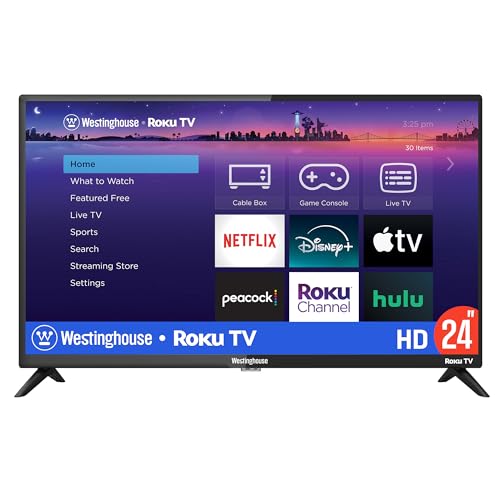
Westinghouse Roku TV 24 Inch

TCL 40-Inch Class S3 TV

VIZIO 50-inch Quantum Pro 4K
If you already use an iPhone, iPad, MacBook, or other Apple devices, your TV becomes more than just a screen. It becomes part of the ecosystem. Being able to cast videos with AirPlay, mirror your screen instantly, share photos from your phone, or stream content without extra adapters can make everyday use significantly more convenient.
The good news is that you no longer need to buy an expensive TV from a premium brand to get those features. Many modern smart TVs now support Apple technologies, including AirPlay 2 and HomeKit, making it easier than ever to integrate a television into an Apple-centric setup. In fact, compatibility often matters more than raw specifications for users who simply want their devices to work together seamlessly.
What makes this category particularly interesting is the wide range of options available. Apple-compatible TVs now exist at virtually every size and budget level, from compact bedroom TVs to large living room displays. The Westinghouse Roku TV 24 Inch is a good example. Despite its small footprint and affordable price, it offers the smart features many Apple users care about most, proving that compatibility does not necessarily require a premium price tag.
Rather than focusing solely on picture quality or gaming features, the TVs in this guide were selected based on how well they fit into the Apple ecosystem. Whether your priority is AirPlay streaming, screen mirroring, HomeKit integration, or simply a smoother experience between devices, the options below are designed to help your Apple products work together more effortlessly.
Our Top Picks


Apple AirPlay 2 Apple HomeKit support Siri compatibility Roku TV platform
Basic brightness and contrast performance
A guest room, kitchen, dorm, or home office often calls for a TV that's easy to live with rather than one packed with premium extras. That's exactly where this Westinghouse model shines. Built on the Roku platform, it provides access to Apple TV+, along with thousands of other streaming apps, without turning navigation into a chore.
Apple users get even more flexibility through AirPlay 2 support. Sharing vacation photos, streaming videos from an iPhone, or sending music from an iPad happens in just a few taps. Apple HomeKit compatibility also allows the TV to fit naturally into a broader smart home setup alongside Siri-enabled devices.
The Roku experience remains one of the biggest strengths here. Free live channels, popular subscription services, and a clean interface help keep entertainment accessible regardless of viewing habits. Multiple HDMI ports also make it easy to connect game consoles, streaming sticks, or audio equipment when needed.
Picture quality is perfectly adequate for its size and purpose. Buyers shopping for a dedicated movie-room display may eventually want more brightness and contrast, but that's not really the role this TV is trying to fill.

FullView bezel-less design Direct LED backlight Roku Smart OS Dynamic Contrast
Audio quality is modest and may require external speakers
The appeal of this TCL starts before the screen even turns on. Its FullView bezel-less design gives the TV a cleaner appearance, helping it blend into modern spaces without drawing unnecessary attention to the frame around the picture.
Once content starts playing, the Full HD panel delivers a noticeable upgrade in clarity compared to smaller HD televisions. Direct LED backlighting and Dynamic Contrast help add depth to movies, TV shows, and sports broadcasts, while Roku's Smart OS keeps popular apps and free content easy to reach.
The Roku ecosystem also works particularly well alongside Apple devices. AirPlay support makes it simple to share videos, presentations, or photos from an iPhone or iPad, while Apple TV+ sits alongside the rest of the major streaming services in a familiar interface.
Sound is one area where the TV keeps expectations realistic. The built-in speakers handle everyday viewing just fine, but movie nights tend to benefit from a soundbar or external audio setup, especially in larger rooms.

Up to 1000 nits brightness Dolby Vision HDR AMD FreeSync Premium Pro Up to 120fps in 4K
Local dimming may occasionally cause blooming in high-contrast scenes
The first thing that grabs attention here isn't the smart platform—it's the picture. Quantum Color QLED technology delivers over a billion colors, while up to 1,000 nits of peak brightness help HDR content look far more dynamic than standard LED TVs. Bright highlights, colorful landscapes, and dramatic movie scenes all gain extra impact.
VIZIO also puts considerable effort into contrast. The Active Full Array Backlight system with local dimming works alongside Dolby Vision HDR and Active Pixel Tuning to create deeper-looking shadows and improved detail throughout the image. Whether it's a late-night thriller or a sports broadcast, the screen consistently looks lively and engaging.
Gaming enthusiasts receive a few welcome bonuses as well. AMD FreeSync Premium Pro certification, support for up to 120fps in 4K, and up to 240fps in 1080p help keep gameplay responsive and fluid when paired with compatible hardware. Meanwhile, Apple users can access Apple TV+ alongside VIZIO's built-in streaming ecosystem.
Complex lighting effects can occasionally reveal the limits of local dimming technology, particularly when bright objects appear against very dark backgrounds. Fortunately, those moments tend to be the exception rather than the main viewing experience.

QLED display Dolby Vision IQ HDR10+ Adaptive Adaptive Brightness
Fire TV interface may feel cluttered with content recommendations and ads
A television spends a lot of time sitting idle, which makes the Fire TV Ambient Experience more useful than it might sound at first. Instead of displaying a blank screen, the TV can showcase artwork, personal photos, and other visual content, helping it become part of the room rather than just another black rectangle.
When it's time to watch something, the QLED panel takes center stage. Richer colors, Dolby Vision IQ, HDR10+ Adaptive, and automatic brightness adjustments work together to create a picture that adapts naturally to different viewing environments. Daytime sports and evening movies both benefit from the TV's ability to react to room lighting conditions.
Voice control is another major attraction. Built-in Alexa support allows users to launch content, control playback, and even power on the TV without touching the remote. Apple households aren't left out either, since the TV supports Apple TV+ and integrates smoothly into mixed-device environments.
Fire TV's content-heavy home screen won't appeal equally to everyone. Viewers who prefer a cleaner interface may need a little time to get used to the number of recommendations presented throughout the system.

Apple AirPlay support Siri voice control Fast app launching Customizable home screen
The standard refresh rate is less suitable for competitive gaming
Few things are more frustrating than waiting for apps to load when all you want to do is start a movie. Roku keeps the experience refreshingly quick, with fast Wi-Fi performance, responsive app launches, and a home screen that can be customized around favorite services instead of forcing viewers through layers of menus.
The platform also excels at content discovery. Between hundreds of free TV channels, live programming, movies, local news, and Roku Originals, there is always something available even before adding subscription services. Automatic software updates help keep the experience current without requiring much user involvement.
Apple compatibility remains one of the biggest reasons to consider this model. AirPlay support makes it easy to send photos, videos, presentations, and music directly from an iPhone, iPad, or Mac. Siri integration adds another layer of convenience for users already invested in Apple's ecosystem.
Fast-paced competitive gaming isn't really the TV's primary mission. The focus here is clearly on accessibility, streaming convenience, and making everyday entertainment as frictionless as possible.

HDR10 support Apple AirPlay compatibility DTS Virtual:X audio HDMI eARC support
No Local Dimming TV
Movie marathons tend to expose weaknesses quickly, especially when a TV struggles with contrast or fine detail. The F50 starts from a solid foundation thanks to its 4K Ultra HD resolution and HDR10 support, delivering a noticeable jump in clarity compared to older Full HD sets. Bright cityscapes, nature documentaries, and sports broadcasts all benefit from the extra detail.
The Fire TV platform also brings a huge amount of content within easy reach. Popular services like Prime Video, Netflix, Disney+, Hulu, and HBO Max are built directly into the experience, alongside free content from Fire TV Channels, Pluto TV, and Tubi. There is very little setup required before finding something to watch.
Apple users get more than basic app support here. AirPlay compatibility allows videos, photos, and music to move seamlessly from Apple devices to the television, while Fire TV's smart-home integration helps connect the TV with compatible devices around the house. HDMI eARC and DTS Virtual:X further enhance the entertainment experience by supporting higher-quality audio solutions.
The TV focuses more on brightness and HDR support than advanced backlight control. During particularly demanding HDR scenes, viewers looking for the deepest possible black levels may notice where higher-end local-dimming models pull ahead.

DTS Virtual:X audio AI Sports Mode Noise Reduction technology VIDAA OS platform
VIDAA app selection may not be as extensive as Roku, Google TV, or Fire TV
Nature footage often reveals whether a TV can produce believable colors. Hisense tackles that challenge with Natural Color Enhancer, a feature designed to make landscapes, greenery, and outdoor scenes appear more realistic rather than overly processed. The result is an image that looks pleasant and approachable during everyday viewing.
Sports fans receive a few useful perks as well. AI Sports Mode sharpens motion and enhances crowd noise, commentary, and game-day atmosphere to create a more engaging experience during live events. Combined with Noise Reduction technology, the TV does a respectable job of cleaning up lower-quality broadcasts and streaming content.
The smart platform takes a different route than Roku or Fire TV. VIDAA OS uses AI-driven personalization to help surface content quickly, while Apple TV users can access compatible streaming services alongside the rest of their entertainment options. DTS Virtual:X also adds a sense of spaciousness to the built-in audio without requiring additional speakers.
The streamlined approach comes with one trade-off. Viewers who frequently jump between niche streaming services may find that VIDAA's app catalog isn't quite as expansive as what's available on larger ecosystems like Roku, Fire TV, or Google TV. For mainstream entertainment, though, the experience remains refreshingly straightforward.
What to Look Through Prior to Selecting the best smart tv compatible with apple?
You may be aware that purchasing something is not actually an easy action. Your everyday life will be affected if you choose the most fantastic product. What variables, though, will make this acquisition successful? Whether you're seeking for best smart tv compatible with apple to meet your needs, you'll be wasting your own time.
Nevertheless, it would be preferable if you weren't so worried. We've enlisted the help of a team of professionals to investigate best smart tv compatible with apple, and we've provided accurate data.
There seem to be several important considerations to make. But only a few of them are really concentrated. Here are some crucial reviews while purchasing best smart tv compatible with apple:
HDMI And Connections
High Dynamic Range (HDR)
Refresh Rate
Smart TVs
Display Types
TV Screen Sizes
Connectivity
Screen Resolution
FAQs
What makes a smart TV compatible with Apple devices?
A smart TV is considered Apple-compatible if it supports features like AirPlay, HomeKit, or the Apple TV app.
Can I mirror my iPhone screen to a smart TV?
Yes, TVs with AirPlay support allow you to wirelessly mirror your iPhone, iPad, or Mac screen.
Do I need an Apple TV device if my TV supports Apple features?
Not necessarily. Many modern smart TVs include AirPlay and the Apple TV app, reducing the need for a separate streaming device.
The figures we've presented here aren't all of them. Alternatively, we continuously update it as new information becomes available. It's advisable to keep in mind the points we discussed related to buying guide.
We always appreciate your feedback and handle it with the utmost importance. As a result, the most up-to-date data will come to your mind as soon as possible. You are supposed to contact us and give us your reviews as well as problems so that we will try to support you. Hope you have a pleasant shopping experience!
About Michael Brown