The 7 Best Samsung Tablet For Students Of 2026
 By, Michael Brown
Updated

Summary
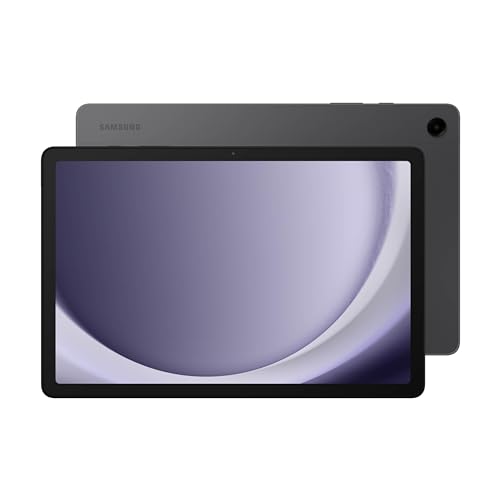
Samsung Galaxy Tab A9+ Tablet 11”

Samsung Galaxy Tab S6 Lite 10.4'

Samsung Galaxy Tab A11+
A tablet can quickly become one of the most useful tools a student owns. It replaces heavy textbooks, stores lecture notes, handles online classes, and doubles as an entertainment device after a long day of studying. For many students, it fills the gap between a smartphone and a laptop, offering a larger screen without the bulk of carrying a computer everywhere.
Samsung has long been a popular choice for students because its tablets cover a wide range of budgets while running the familiar Android ecosystem. Some models are designed for basic note-taking and web browsing, while others include features like S Pen support, split-screen multitasking, and desktop-style productivity that can make schoolwork much easier.
The Samsung Galaxy Tab A9+ Tablet 11” is a particularly well-rounded option for everyday student life. Its large display is comfortable for reading digital textbooks and watching lectures, while the lightweight design makes it easy to slip into a backpack between classes.
Every student has different priorities, whether it's battery life for long days on campus, multitasking for research projects, or simply getting the best value for a limited budget. The Samsung tablets below cater to a variety of study habits, making it easier to find one that fits both your academic needs and your wallet.
Our Top Picks


11-inch 90Hz display Multi Window Quad speakers with Dolby Atmos Up to 1TB expandable storage
S Pen is not included
Group projects rarely stay inside one app, and that is where the Galaxy Tab A9+ feels genuinely useful. Its 11-inch 1920 x 1200 screen provides enough room for Multi Window, allowing an email thread, shared file, and web source to remain visible together instead of turning every small task into a series of switches.
The 90Hz refresh rate gives menus and long pages a smoother feel, while the upgraded chipset handles the everyday mix of video meetings, cloud tools, and light entertainment. Its slim, light, and durable construction also suits a device that may travel daily in a crowded bag without adding laptop-like weight.
Quick Share is particularly handy when several people are contributing to the same presentation. Photos, clips, and working files can move between supported Android, iOS, and Galaxy devices with fewer steps. Smart View provides another option by casting the tablet to a compatible Samsung TV, useful for rehearsing a presentation on a larger screen or watching something after the work is done.
Quad speakers with Dolby Atmos give voices and media a wider, clearer sound. Storage starts at 64GB on this configuration, but microSD expansion up to 1TB creates room for saved videos, apps, and semester-long project folders.
One minor downside is that the S Pen is not included. That makes the A9+ better suited to typed work, collaboration, communication, and media than frequent handwriting, but those strengths still make it a sensible low-cost Samsung tablet for student life.

10.4-inch display Samsung DeX Dolby Atmos sound Slim and lightweight design
The display uses a 60Hz refresh rate
Handwritten ideas are the main reason the Galaxy Tab S6 Lite belongs in a student-focused roundup. The included S Pen responds naturally to quick diagrams, margin comments, photo edits, and document markup, so the tablet can replace part of the paper normally spread across a desk.
Its 10.4-inch display keeps the device compact enough for a small workspace, while the slim metal body slips into a bag without much fuss. That balance is useful for anyone who values a writing surface but does not want to carry one of Samsung's larger 12.4-inch models.
Samsung DeX gives the tablet another personality when more structure is needed. It creates a desktop-style environment and supports multiple windows across compatible Galaxy devices, making the S6 Lite more comfortable for drafting longer text, organizing sources, or finishing a presentation with a keyboard nearby.
The latest processor supports the move between productivity and downtime, and Dolby Atmos adds space to dialogue, music, and games. Expandable storage is also practical for keeping creative files, downloaded media, and marked-up materials available without relying entirely on cloud access.
The display uses a 60Hz refresh rate. It does not have the extra fluidity of Samsung's 90Hz panels, although writing, DeX productivity, and the included stylus remain much more important to the S6 Lite's appeal as an affordable digital notebook.

11-inch 90Hz display 6GB RAM and 128GB storage Expandable storage Google Gemini
The screen uses a TFT panel rather than AMOLED
The Galaxy Tab A11+ earns its place through quick access to information rather than specialized pen features. Circle to Search lets users highlight something already visible and look it up on the spot, while Google Gemini can provide assistance without sending the workflow through a long chain of separate searches.
That convenience sits on an 11-inch display with a refresh rate up to 90Hz. Scrolling through visual references, checking timelines, and moving around large pages feels more natural, while the upgraded chipset keeps common Android tools responsive. The 6GB RAM and 128GB storage configuration also gives multiple apps and growing folders reasonable space to operate.
Its 5MP front camera adds another practical strength. Faces remain clear during tutoring sessions, interviews, club meetings, and group discussions, while quad speakers powered by Dolby Atmos make incoming voices easier to follow and entertainment more enjoyable later.
A long-lasting battery is designed for extended browsing, streaming, and general use. When power finally runs low, fast charging helps shorten the pause, and the slim construction keeps the tablet easy to move from one setting to another.
The screen uses a TFT panel rather than AMOLED. Dark scenes and contrast will not look as rich as they do on Samsung's premium models, yet the responsive performance, AI-assisted discovery, video-call camera, and 90Hz motion make the A11+ a well-rounded option for everyday academic routines.

Water-resistant design Handwriting Assist Circle to Search 90Hz display
A 45W wall charger is required for Super Fast Charging and is sold separately
Equations are often easier to understand when they can be written naturally, corrected, and cleaned up in one place. The Galaxy Tab S10 FE supports that process with Math Solver, which turns S Pen equations into text, and Handwriting Assist, which straightens alignment and adjusts spacing without erasing the personal feel of written work.
That pairing makes the tablet especially relevant for mathematics, engineering, economics, and science courses. The bright display offers room for worked examples and diagrams, while its 90Hz refresh rate keeps pen movement and navigation feeling smooth.
Circle to Search helps when an unfamiliar symbol, diagram, or reference appears on screen. Rather than leaving the current material, users can circle the item and retrieve related results immediately. Dual speakers also make explanatory videos and recorded demonstrations easier to follow.
The tablet is designed to withstand droplets, splashes, and immersion under Samsung's stated conditions. This water resistance brings welcome reassurance around laboratory tables, coffee cups, and busy shared spaces where accidents are difficult to predict.
A 45W wall charger is required for Super Fast Charging and is sold separately. Standard charging does not reduce the value of Math Solver, Handwriting Assist, or the S Pen experience, though anyone relying on short charging windows should account for the faster adapter when planning the purchase.

12.4-inch display S Pen included Up to three apps on screen Up to 20-hour battery
The 12.4-inch body is less convenient for one-handed use
Some subjects simply benefit from more canvas. The Galaxy Tab S9 FE+ offers a 12.4-inch display where a detailed diagram, video call, and working file can share the screen, with support for opening up to three apps at once. That layout feels particularly natural for architecture, design, photography, and other visually dense fields.
The included S Pen extends the space beyond viewing. Its paper-like response suits sketching, annotation, and precise markups, while Circle to Search can identify something on the display without interrupting the creative flow. Quick Share then moves drafts and large files to teammates or other devices with less friction.
An Exynos chipset supports the mix of creation and entertainment, and Samsung rates the battery for up to 20 hours under its test conditions. Super Fast Charging can refill it in less than 90 minutes, which is helpful when a full day of use is followed by an evening deadline.
IP68 resistance provides protection from dust and water, while expandable storage gives image collections, recordings, and project exports room to grow. The automatically adjusting camera also helps keep the user framed during collaborative calls.
The 12.4-inch body is less convenient for one-handed use. It works best on a desk, stand, or lap, but the larger footprint is also what makes this Samsung tablet such a strong student choice for split-screen work and visual projects.

12.4-inch Dynamic AMOLED 2X display Powerful processor S Pen included Note Assist
Some Galaxy AI features require an internet connection and Samsung Account
A recorded explanation can be valuable, but finding one important idea inside an hour of audio is rarely convenient. The Galaxy Tab S10+ addresses that problem with transcription and Note Assist, turning recordings into structured material that can be summarized and reviewed more efficiently.
Galaxy AI also reaches beyond text. Sketch to Image develops rough drawings into polished visual concepts, while Circle to Search identifies objects or information without requiring a move to another app. Together with the included S Pen, these tools give the tablet a clear role in journalism, design, media, and other programs that combine writing with visual thinking.
The 12.4-inch Dynamic AMOLED 2X display provides a vivid, spacious surface with reduced glare. A powerful processor keeps heavier workflows moving, and the large panel leaves room for detailed images, timelines, and multiple windows without making every element feel compressed.
Armor Aluminum construction helps the body handle everyday bumps, while protection against dust and splashes adds confidence when the device travels regularly. The battery is designed for long sessions, allowing the S10+ to move from recording and organization to creative work and entertainment.
However, some Galaxy AI features require an internet connection and Samsung Account. Offline access therefore changes how the assisted tools behave, but the AMOLED screen and local Android applications still give this premium model substantial value for demanding student work.

12GB RAM 512GB storage S Pen included Note Assist and Drawing Assist
A bit pricey
The Galaxy Tab S11 makes the most sense when it is expected to serve as a primary device for several years rather than a casual companion. Its 12GB of RAM supports fast movement among Android apps, while 512GB of internal storage leaves generous space for large creative assets, offline media, and long-running projects. A microSD card can expand that capacity further.
The 11-inch Dynamic AMOLED 2X display keeps the footprint more portable than Samsung's Plus models without giving up flagship picture quality. Vision Booster improves clarity, helping detailed visuals and text remain comfortable during extended sessions.
Its included S Pen connects directly with Note Assist and Drawing Assist. Written ideas can be organized and summarized, while rough sketches can become cleaner concepts or storyboards. Gemini Live adds another route to understanding by analyzing what is shown on the screen or shared through the camera and returning relevant insights.
At only 5.5mm thick, the tablet carries easily despite its high-end hardware. IP68 protection against spills, rain, and dust also suits a device that may move through studios, shared work areas, commutes, and home every day.
The only drawback is that it is a bit pricey. Even so, the combination of premium display quality, ample memory, large storage, S Pen tools, and durable construction can make it a worthwhile long-term Samsung tablet for students who would otherwise need several separate devices.
What to Look For in a best samsung tablet for students?
Some of you may be reluctant to select one of the best samsung tablet for students, to be honest. The main reason is that you didn’t study that before. There are pretty lots of factors that must be considered when investing in best samsung tablet for students. You are expected to count on our expertise in best samsung tablet for students to make the right choice.
So now we move on to the significant factors related to best samsung tablet for students you must keep in mind:
Software
Storage
Cameras
Online Access
Screen & Audio
Battery
Hardware Connections
FAQs
Which Samsung tablet is best for students?
The best choice depends on your needs and budget. Samsung Galaxy Tab A and Galaxy Tab S series tablets are popular options for studying, note-taking, and multitasking.
Is a Samsung tablet good for college students?
Yes. Samsung tablets are great for taking notes, attending online classes, reading textbooks, and completing assignments, especially when paired with a keyboard or S Pen.
Do Samsung tablets support handwritten notes?
Many Samsung tablets support the S Pen, allowing students to write notes, annotate PDFs, and sketch naturally during classes.
About Michael Brown