The Best Samsung Tablet For 2026
 By, Michael Brown
Updated
Summary

Samsung Galaxy Tab A9+ Plus 11” Tablet

Samsung Galaxy Tab S6 Lite 10.4' Tablet

SAMSUNG Galaxy Tab S10 FE Tablet
Samsung’s tablet lineup covers almost every type of user, from people who simply want a larger screen for streaming to professionals looking for a device that can handle notes, documents, and multitasking. That variety is useful, but it can also make choosing the right model surprisingly difficult. The most expensive Galaxy Tab is not automatically the best choice for everyday use.
For most buyers, the ideal Samsung tablet needs to strike a practical balance. It should feel responsive when switching between apps, offer enough screen space for entertainment and light productivity, and provide solid battery life without becoming too heavy or expensive. Software support and integration with other Galaxy devices also matter, especially for anyone already using a Samsung phone or earbuds.
The Samsung Galaxy Tab A9+ Plus 11” Tablet stands out because it delivers that balance at an accessible price. Its spacious display works well for videos, reading, browsing, and split-screen multitasking, while the lightweight design makes it easy to carry around the house or take on a trip. Some users will still benefit from a more powerful model, a smaller screen, or features such as S Pen support. The right choice depends less on finding Samsung’s most advanced tablet and more on matching its capabilities to how you actually plan to use it.
Our Top Picks


11-inch 90Hz display Quad speakers with Dolby Atmos Multi Window support Samsung Kids
S Pen support is not included
It's easy to appreciate the larger 11-inch display after a few minutes of use. Whether someone is catching up on a TV series, scrolling through recipes in the kitchen, or helping the kids with online learning, the screen feels spacious without becoming awkward to carry around. The 90Hz refresh rate keeps animations and everyday navigation looking fluid, making the entire interface feel more responsive.
Audio receives just as much attention. Four speakers tuned with Dolby Atmos create a fuller soundstage than many tablets in this class, making movies, games, and music noticeably more engaging without immediately reaching for Bluetooth speakers.
Samsung clearly had families in mind when designing this model. The upgraded chipset provides enough power for entertainment and multitasking, while Samsung Kids creates a safer environment for younger users. Features like Multi Window and Quick Share help the tablet transition smoothly between work, school, and leisure throughout the day.
Anyone hoping to sketch or handwrite notes should keep one detail in mind before checking out. The Galaxy Tab A9+ does not include S Pen support, making it a better choice for media consumption and everyday productivity than digital drawing.

Samsung DeX Dolby Atmos audio Crystal-clear display Slim lightweight design
Charging speed is relatively slow
The S Pen is the reason many people choose this tablet over more affordable alternatives. Scribbling meeting notes, marking up PDFs, editing photos, or sketching ideas happens naturally without needing to purchase any extra accessories. It turns the tablet into something closer to a digital notebook than a simple media device.
Its slim profile makes it easy to slip into a backpack before heading to class or the office. Samsung pairs that portability with a crystal-clear display, Dolby Atmos sound, and an updated processor, creating a device that's just as comfortable streaming movies after work as it is helping finish assignments beforehand.
There's more productivity hiding beneath the surface, too. Samsung DeX allows the tablet to create a desktop-style workspace where multiple windows can stay open across Galaxy devices, making longer work sessions feel considerably more organized than on a typical Android tablet.
Charging takes a little more patience than the rest of the experience. If the battery runs low during a busy day, expect to spend longer connected to the charger before getting back to work.
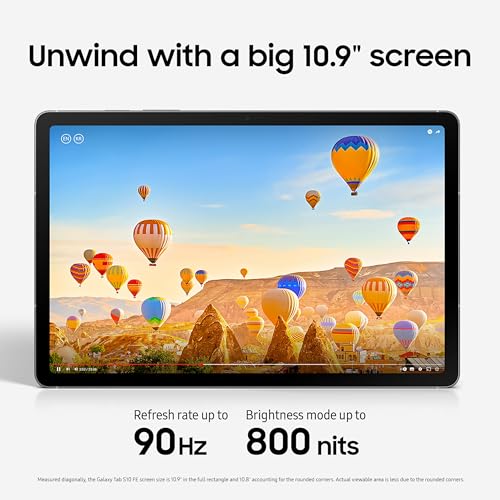
Circle to Search Handwriting Assist 90Hz display Water-resistant design
Charging adapter is typically sold separately
Imagine reading an article and spotting something unfamiliar. Instead of switching apps and typing out a search, Circle to Search lets you draw a circle around the object and get answers instantly. It feels surprisingly natural after using it a few times, especially when researching, shopping, or studying online.
Students will probably get the most value from the software additions. Handwriting Assist automatically straightens messy notes into something much easier to read, while Math Solver converts handwritten equations into text and helps organize calculations. These aren't flashy features, but they're the kind that quietly save time throughout the semester.
When it's time to unwind, the experience remains just as enjoyable. The large display paired with a 90Hz refresh rate keeps videos and games looking fluid, while dual speakers give movies and music a welcome boost without making the tablet bulky. The added water resistance is reassuring for anyone who carries their tablet between school, work, and home. One purchase you'll likely need to plan for is the charger. Samsung typically sells the charging adapter separately, so it may not be included in the box depending on where you buy it.

Compact 8.7-inch design Expandable storage to 1TB Split Screen multitasking 4G LTE connectivity
HD+ resolution is less sharp than Full HD tablets
Its smaller size is exactly what gives this tablet its appeal. Holding it for long reading sessions or carrying it from room to room never feels cumbersome, yet the display remains bright enough to enjoy movies, social media, and casual gaming with smooth 60Hz motion. Even outdoor viewing gets a little help from the bright screen.
Storage flexibility is another practical advantage. With up to 64GB of internal storage and support for microSD cards up to 1TB, there's plenty of room for downloaded shows, photos, documents, and apps without constantly worrying about running out of space.
The tablet isn't limited to entertainment either. Split Screen allows two apps to stay open together, making it easier to reference notes during a video call or keep a browser open while responding to messages. Rich audio from the built-in speakers helps complete the experience when it's time to switch back to movies or music.
The HD+ display doesn't provide the same level of sharpness found on Samsung's higher-end Full HD tablets. Text and images remain perfectly usable, though fine details won't appear quite as crisp.

Bright 60Hz display Expandable storage to 1TB Split Screen support Rich speaker audio
Entry-level performance is best for basic tasks
Morning emails, recipe videos, web browsing, and casual streaming all fit comfortably into the Tab A9's routine. The bright display and 60Hz refresh rate keep navigation smooth enough that the experience never feels sluggish during everyday use.
Space is rarely an immediate concern, either. The built-in 64GB storage can be expanded with a microSD card up to 1TB, making it easy to keep family photos, downloaded content, and favorite apps together on one device.
Samsung includes useful multitasking features as well. Running two apps side by side makes checking email while browsing the web or watching a tutorial while taking notes much more convenient. Rich audio from the speakers adds a little extra immersion when switching over to movies or music at the end of the day.
More demanding workloads are outside this tablet's comfort zone. It's happiest handling everyday tasks, which is exactly what Samsung designed it to do.

IP68 water resistance Up to 18-hour battery 12.4-inch 90Hz WQXGA display Exynos 1380 processor
No Headphone Jack
Whether you're sketching out concepts, annotating PDFs, or brainstorming during a meeting, the included S Pen quickly becomes part of the workflow. Its responsive writing experience makes handwritten notes and drawings feel much closer to pen and paper than tapping away on a virtual keyboard.
Long days away from a charger are much less stressful here. Samsung pairs an IP68-rated design with an impressive battery that can last up to 18 hours, giving the tablet enough endurance for classes, business trips, or back-to-back work sessions. Dust and water resistance add another layer of confidence when carrying it between different environments.
Performance keeps pace with demanding workloads as well. The Exynos 1380 processor, 8GB of RAM, and generous storage help the tablet stay responsive while switching between apps, editing documents, or tackling creative tasks. The 12.4-inch WQXGA display running at 90Hz makes everything look crisp and spacious, while the upgraded cameras improve both video meetings and everyday photography. Anyone who still relies on wired headphones should know that this tablet skips the traditional headphone jack. Wireless audio or a compatible adapter will be the better option.

Dynamic AMOLED 2X display Circle to Search Armor Aluminum frame Galaxy connectivity
Productivity accessories like the keyboard cover are sold separately
The software experience is what immediately separates the Tab S10+ from many other Android tablets. Circle to Search lets you identify objects or look up information without interrupting what you're doing, while Note Assist organizes messy notes into cleaner, easier-to-read documents with only a few taps. These AI tools become genuinely useful once they're part of your daily routine.
Mobility remains one of its biggest strengths. The latest processor and long-lasting battery keep the tablet ready for office work, classroom projects, and entertainment throughout the day. Samsung reinforces that portability with an Armor Aluminum frame and water and dust resistance, making the device feel well prepared for everyday travel.
The 12.4-inch Dynamic AMOLED 2X display easily steals the spotlight whenever the screen lights up. Colors look vibrant, glare is reduced, and everything from photo editing to video calls appears beautifully detailed. Galaxy connectivity adds another layer of convenience by making file transfers and call continuity between Samsung devices feel almost seamless. Building a complete productivity setup can cost a little more than expected. Accessories like the keyboard cover are sold separately, so they're worth factoring into the overall budget.
Which Characteristics To Consider On Selecting best samsung tablet For 2026?
To make a practical purchase, you guys need to be aware of best samsung tablet ultimately. Several key factors must be taken into account and evaluated. Of course, there are some challenges for you during the process of studying products. So we are available here to provide you with comprehensive advice and support.
Thanks to the evaluation supported by high technology, we have come up with some significant features for you to go through. Let’s check it below!
Online Access
Software
Hardware Connections
Cameras
Screen & Audio
Storage
Battery
FAQs
Which Samsung tablet is the best overall?
The best Samsung tablet depends on your needs. Premium Galaxy Tab S models are ideal for power users, while Galaxy Tab A models offer excellent value for everyday tasks.
Are Samsung tablets good for productivity?
Yes. Many Samsung tablets support multitasking, keyboard accessories, and the S Pen, making them great for work, note-taking, and studying.
Can Samsung tablets replace a laptop?
For many users, yes. With Samsung DeX, keyboard support, and productivity apps, higher-end Galaxy Tab models can handle many everyday work tasks.
About Michael Brown