The 7 Best Rated Tablet For 2026, Tested And Researched
 By, Michael Brown
Updated
Summary

Apple iPad 11-inch A16
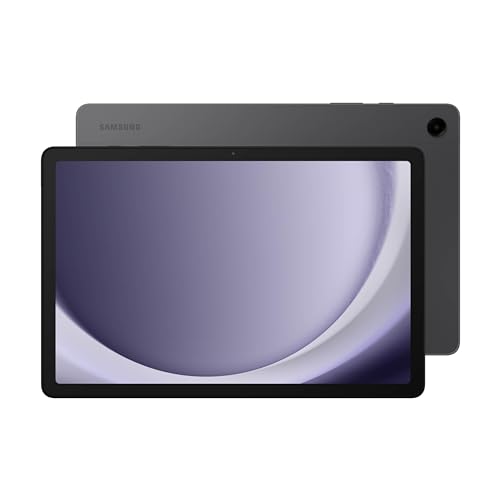
Samsung Galaxy Tab A9+ Tablet 11”

Amazon Fire HD 8 tablet
Walk into any electronics store or scroll through online marketplaces, and you will see hundreds of tablets staring back at you. Different sizes, different prices, different promises. Some claim to replace your laptop. But there is one thing that cuts through all the marketing noise: real ratings from real people.
A "best rated" tablet is not necessarily the most expensive one or the one with the flashiest features. It is the tablet that consistently makes its owners happy. The one where hundreds or even thousands of buyers take the time to say, "This works well. I would buy it again." These are the devices that get the fundamentals right. A screen that looks good. A battery that lasts. Software that does not crash or slow down after a few months. Nothing more, nothing less.
After combing through user feedback, tech forums, and trusted review aggregators, we found a clear picture of which tablets actually earn their high ratings. Below, we have gathered the best rated tablets across different categories and budgets so you can skip the guesswork and choose a device that real people already love.
Our Top Picks


Fast A16 chip Sharp Liquid Retina display Strong app ecosystem USB-C connectivity
Only 60Hz display
Apple clearly designed this iPad around balance rather than pushing one specific feature. Its A16 chip gives the tablet more speed than most casual users will realistically need, so everyday tasks stay responsive even with multiple apps open. Reading articles, streaming content, editing photos, or switching between Safari and note-taking apps happens smoothly without the slowdowns that cheaper tablets sometimes develop after longer use.
The 11-inch Liquid Retina display also works particularly well for reading-heavy use. Text looks crisp, colors stay clean, and True Tone helps the screen adapt better to different lighting conditions throughout the day. Long reading sessions on news apps or digital magazines become noticeably easier on the eyes compared to lower-quality LCD panels.
Another reason this iPad stands out is the overall app ecosystem. iPadOS still offers one of the strongest tablet software experiences available, especially for users who want apps optimized properly for larger screens instead of stretched phone layouts. Of course, Apple still keeps certain premium features reserved for the Pro lineup. The 60Hz display remains one of the more noticeable compromises once you compare it side-by-side with higher refresh rate tablets. Still, for users who mainly want a dependable tablet that stays fast, portable, and easy to use over several years, this model covers an unusually wide range of needs without overcomplicating things.

Smooth 90Hz display Dolby Atmos quad speakers Expandable 1TB storage Multi-window multitasking
Charging speed is relatively slow
Some tablets immediately focus on productivity. This one goes in a different direction. The Galaxy Tab A9+ is built around accessibility and entertainment first. The 11-inch display gives videos, YouTube, Netflix, and casual games much more room compared to smaller budget tablets, while the 90Hz refresh rate helps scrolling and navigation look smoother than expected at this price range.
Samsung also did a surprisingly good job with the audio setup. The quad speakers with Dolby Atmos make the tablet much better suited for media consumption than many entry-level competitors that still rely on weak dual-speaker systems. For households with multiple users, the lighter design becomes another advantage. It is easy to pass around for reading, streaming, homework, or casual gaming without feeling bulky or overly fragile.
Performance-wise, the Snapdragon chipset handles normal daily usage comfortably. Samsung’s multi-window support also makes the tablet more useful for basic productivity than many budget Android devices. The charging speed is not particularly fast, though most users charging overnight probably will not notice it much in daily use.

Compact travel-friendly size Alexa smart integration Expandable microSD storage Long battery endurance
Ads and Amazon-centric UI can affect user experience
This tablet succeeds by keeping expectations realistic. The Fire HD 8 is clearly built around convenience and value rather than performance-heavy workloads. Its compact 8-inch size makes it easy to carry around the house, slip into a bag, or hold comfortably during longer reading sessions. For users who mainly use a tablet for Kindle books, YouTube, Netflix, or social media, the smaller form factor actually becomes an advantage.
Battery life is another strong point here. Amazon rates it for up to 13 hours of use, which makes the tablet reliable for travel, flights, or daily casual use without constantly searching for a charger. Amazon also improved the overall responsiveness compared to older Fire tablets. With more RAM and expandable storage support, simple multitasking feels noticeably smoother than previous generations.
Alexa integration adds some extra convenience too. Smart home controls, reminders, quick searches, and video calls all work naturally within Amazon’s ecosystem. However, the interface remains heavily centered around Amazon services and apps, which may not appeal to everyone. But for users who mainly want a low-cost entertainment tablet for casual daily use, the Fire HD 8 handles the basics surprisingly well without trying to be more than it is.

Powerful M5 performance Ultra Retina XDR display Advanced AI capabilities Premium accessory ecosystem
A bit pricey
There is a noticeable difference the moment this tablet turns on. The display alone immediately separates it from most other tablets on the market. The Ultra Retina XDR panel delivers exceptional brightness, contrast, and color precision, which becomes especially valuable for creative professionals working with photography, video editing, illustration, or design-heavy workflows.
Performance is equally impressive. The M5 chip handles demanding apps with the kind of speed normally associated with high-end laptops rather than tablets. Large files, layered editing projects, AI-assisted tools, and multitasking workloads all run without hesitation.
Apple also continues improving iPadOS in ways that make the device increasingly practical for professional work. Window management, external display support, and app optimization have become much more capable compared to older iPad generations. Of course, premium hardware comes with premium pricing. Even with that, for users who genuinely take advantage of its performance and display quality, the iPad Pro delivers one of the most advanced tablet experiences currently available.
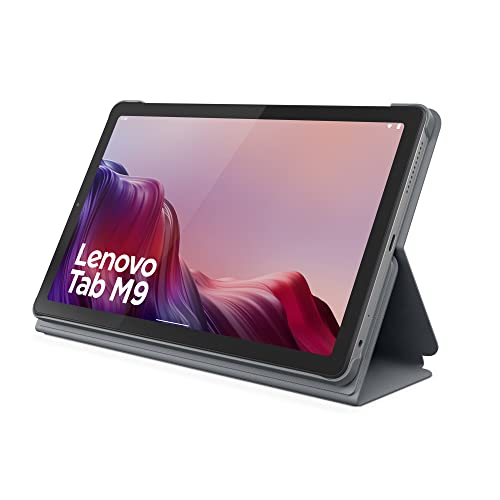
Comfortable 9-inch size Long video playback Google Lens integration Facial recognition login
Cameras are a bit basic
Some tablets try to compete with laptops. The Tab M9 is much more relaxed about its role. The 9-inch display gives the device a more portable character compared to larger tablets that can become awkward to carry around regularly. Reading articles, watching videos in bed, or browsing during travel feels comfortable without needing a large bag or desk setup.
Battery life also works strongly in its favor. Lenovo designed the tablet around lighter entertainment and browsing workloads, allowing it to stretch usage across long periods without much battery anxiety. For casual users, the MTK G80 processor provides enough power for social media, and lighter games without major issues. Facial recognition login is another small convenience that makes the overall experience smoother during everyday use.
One minor downside is that the cameras work fine for occasional video calls and quick snapshots, but photography clearly is not the tablet’s priority. Overall, the Tab M9 works best for users who value portability, battery life, and simplicity more than high-end specifications or demanding productivity features.

Included S Pen support Vision Booster technology Super Fast Charging Helpful AI features
Not ideal for heavy creative workloads
Samsung clearly wanted this tablet to be more interactive than a typical media device. The included S Pen changes how the tablet gets used day to day. Instead of only consuming content, users can naturally switch into handwriting notes, sketching ideas, annotating PDFs, or solving quick equations directly on screen. For students and casual creators, that flexibility becomes one of the tablet’s strongest advantages.
Its 10.9-inch display also strikes a practical balance between portability and workspace. It stays compact enough for travel while still giving enough room for split-screen apps, reading, and drawing comfortably. Performance from the Exynos processor stays solid for multitasking and normal creative workflows too. Apps open smoothly, note-taking remains responsive, and Samsung’s software ecosystem adds useful features like Circle to Search and intelligent note tools.
What makes this tablet appealing is that it does not pressure users into professional-level creative work. Instead, it focuses more on accessibility and flexibility for people who simply want a versatile device for daily life. Heavy artists or advanced video editors may still prefer more powerful flagship tablets, but for lighter creative use, the overall experience remains very balanced.
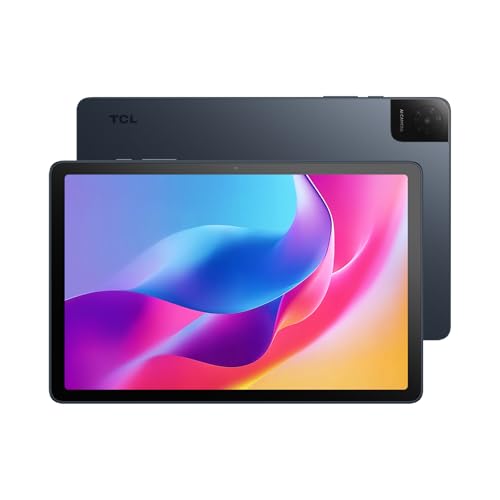
NXTVISION display enhancement 200% Sound Booster audio Expandable RAM support Slim metal construction
No Premium Glass
A lot of budget Android tablets cut corners too aggressively. This one takes a more balanced approach. The 10.1-inch IPS display delivers a surprisingly pleasant viewing experience. TCL’s NXTVISION enhancements also help colors and contrast appear more lively than expected in this category.
Audio performance deserves some credit too. The dual speakers with Sound Booster make videos and casual entertainment much more enjoyable compared to many entry-level tablets that sound thin or quiet. Battery life also holds up well for everyday use. The 6000mAh battery comfortably handles streaming, browsing, and studying across long sessions, while 18W charging helps reduce downtime.
Moreover, the lightweight metal construction gives the tablet a more premium appearance than typical plastic-heavy budget devices. Carrying it around for travel or daily use stays comfortable thanks to the slim profile. Nonetheless, it does not use premium-grade protective glass, so users may want to pair it with a case or screen protector for extra durability.
What to Look For in a best rated tablet?
The best rated tablet is influenced by a multitude of factors, including all those stated below. Depending on the sort of product, the learning process differs. We'll be ready to aid you and propose solutions since we're here to support you.
It's necessary to remember the following factors before selecting best rated tablet:
Online Access
Storage
Software
Hardware Connections
Screen & Audio
Battery
Cameras
FAQs
What is the best rated tablet overall?
Popular top-rated tablets often include models from Apple, Samsung due to their strong performance, display quality, and app support.
Can tablets replace laptops?
Many tablets can handle everyday tasks like browsing, note-taking, and media editing, especially when paired with a keyboard accessory.
What features should I look for in a tablet?
Important features include display quality, battery life, processor performance, storage capacity, and compatibility with accessories like styluses or keyboards.
About Michael Brown