The Best Monitor For 1440p 165hz Of 2026
 By, Michael Brown
Updated
Summary

Samsung 27-Inch Odyssey G55C Monitor

KOORUI Gaming Monitor QHD 24"

Z-Edge 27 inch Curved Gaming Monitor
For many PC gamers, 1440p at 165Hz has become the sweet spot. It offers a noticeable jump in sharpness over 1080p while remaining far easier for modern graphics cards to drive than 4K. At the same time, a 165Hz refresh rate delivers the smooth, responsive gameplay that competitive titles demand without requiring the extreme hardware needed for 240Hz or higher.
Of course, those two specifications alone do not guarantee a great gaming monitor. Panel quality, response time, adaptive sync support, HDR performance, and overall motion handling all play an important role in how games actually look and feel. Two monitors with identical resolution and refresh rates can provide very different experiences once you start playing.
The Samsung 27-Inch Odyssey G55C Monitor is an excellent example of getting the fundamentals right. Its QHD resolution, 165Hz refresh rate, and immersive curved display create a balanced gaming experience that suits everything from fast-paced esports titles to visually demanding AAA games.
The monitors featured in this guide all share the same goal: delivering an outstanding 1440p 165Hz experience. Some emphasize speed and competitive gaming, while others focus on image quality, color accuracy, or overall versatility, allowing you to choose the one that best matches your setup and gaming style.
Our Top Picks


165Hz refresh rate 1000R curved screen AMD FreeSync HDR10 support
The stand does not provide height adjustment
A good 1440p monitor should make the jump from Full HD obvious without forcing the rest of the setup to become complicated. Samsung’s Odyssey G55C does that immediately. Its 2560 x 1440 resolution packs noticeably finer detail into the 27-inch screen, so distant scenery, interface text, and small environmental elements remain crisp.
The 1000R curve is the defining part of the experience. It bends the image around the viewer’s natural field of vision, which works especially well in racing games, expansive RPGs, and first-person titles. Once the action starts, the 165Hz refresh rate keeps camera movement fluid, while the 1ms MPRT response helps fast frames remain readable rather than turning into a blur.
AMD Radeon FreeSync keeps the display synchronized with a compatible graphics card, reducing tearing when frame rates shift. HDR10 then adds more variation between dark and bright areas, helping highlights stand out and making shadow detail easier to notice. Eye Saver Mode and flicker reduction are useful additions during long sessions, particularly when the room gets darker.
The stand does not provide height adjustment, although the screen can still work comfortably when placed on a suitable desk or monitor riser. For anyone seeking a dependable 1440p 165Hz monitor with strong immersion and familiar gaming features, the G55C brings the important pieces together in a polished package.

Nano IPS panel Sharp pixel density Fully adjustable stand Adaptive Sync
No built-in speakers
A 24-inch screen can be a sweet spot when desk space is tight and the player prefers to keep the entire game in view. KOORUI makes especially good use of that size by pairing it with a 2560 x 1440 Nano IPS panel. The high pixel density gives text and game details a clean, precise appearance, while 100% sRGB coverage keeps color lively without losing control.
Motion performance is equally well matched to the compact format. This monitor reaches 165Hz through HDMI or DisplayPort and uses a 1ms response time, so quick turns and sudden target movement remain easier to follow. Adaptive Sync helps smooth out frame-rate changes, while FPS, RTS, and crosshair modes provide quick settings for different genres.
Its stand is more versatile than many models in this price range. A 110mm height range, tilt, swivel, and 90-degree pivot allow the panel to fit different seating positions or rotate for portrait use. The 100 x 100mm VESA pattern also leaves room for a monitor arm. Two HDMI 2.0 ports, DisplayPort 1.4, and an audio interface handle the main desktop connections without fuss.
There are no built-in speakers, but a headset or external speaker system will usually provide clearer and more directional sound for games anyway. KOORUI is an appealing monitor for players who want IPS color, responsive motion, and full ergonomic adjustment in a smaller footprint.

1500R curved panel QHD resolution 165Hz through DisplayPort Four video inputs
Dark scene transitions can exhibit minor ghosting or smearing during fast-paced motion
Curved gaming monitors work best when the curve supports the action without becoming the only reason to buy. Z-Edge backs its 1500R shape with a 27-inch QHD panel, a 165Hz refresh rate through DisplayPort, and a 1ms response time. Together, those specifications create a clear and responsive view for shooters, driving games, and quick action sequences.
The 2560 x 1440 resolution gives the screen enough room to show fine textures and distant objects, while the stated 3000:1 contrast ratio helps dark areas look deeper. That stronger contrast is useful in atmospheric games, where shadow depth contributes as much to the scene as bright color. FreeSync, flicker-free operation, and low blue light support keep movement and longer sessions more comfortable.
Connectivity is unusually generous. Two DisplayPort inputs can reach the full 165Hz refresh rate, and two HDMI inputs support up to 144Hz. That makes it possible to leave multiple computers or consoles attached and switch sources without constantly moving cables. A three-sided frameless design also works nicely in a multi-monitor arrangement, while the 100 x 100mm VESA pattern supports a wall mount or monitor arm.
Dark scene transitions can exhibit minor ghosting or smearing during fast-paced motion. It is most noticeable in specific high-contrast moments rather than throughout every game, and tuning the response setting can help. At its price, Z-Edge remains a good option for buyers who prioritize curvature, contrast, and flexible connections.

34-inch ultrawide screen 3440 x 1440 resolution 165Hz refresh rate FreeSync Premium
Built-in speakers are better suited to basic audio
The first time a game fills a 34-inch ultrawide screen, a standard 16:9 display can suddenly seem restrained. Sceptre’s 21:9 panel provides around 30% more horizontal space, letting landscapes stretch farther and placing more of a racing circuit or strategy map within view. Its 3440 x 1440 resolution keeps that expanded image detailed rather than simply wider.
Fast movement receives the attention it needs. A refresh rate of up to 165Hz works with AMD FreeSync Premium to keep motion smooth when the graphics card’s output changes. The 1ms MPRT setting further improves clarity during rapid scenes, making the screen suitable for action games as well as cinematic adventures. A 1500R curve brings the edges inward, helping the wide picture sit more naturally around the viewer.
The same space is useful outside games. Large timelines, two documents, or several application panels can remain visible at once, which reduces constant window switching. Two HDMI ports and two DisplayPort connections support a multi-device desk, while the colorful rear lighting adds personality when the monitor faces an open room. Built-in speakers handle system sounds, videos, and quick listening without extra equipment.
Built-in speakers are better suited to basic audio, though that leaves gamers free to add headphones or dedicated speakers when stronger bass and positional detail matter. As a 1440p 165Hz ultrawide, this Sceptre is most compelling for players who want speed and a broader sense of place from a single screen.
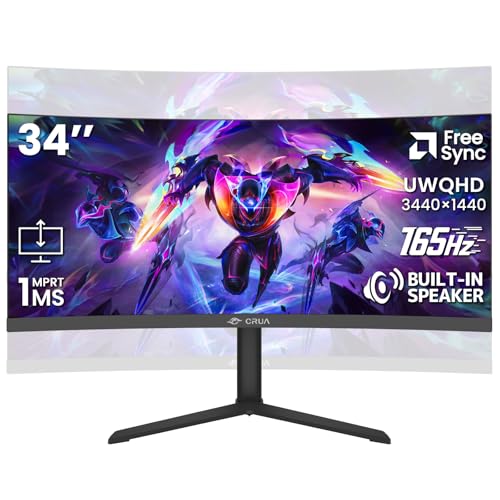
34-inch WQHD display 165Hz FreeSync 120% sRGB coverage Height-adjustable stand
No USB-C or KVM connectivity
Some ultrawide monitors make sense for games but feel awkward once the workday begins. This CRUA model takes a more flexible approach. Its 34-inch 3440 x 1440 display opens enough horizontal room for large game worlds, editing timelines, trading layouts, or several office windows without resorting to a second screen.
The 3800R curve is gentle, so the panel retains a natural desktop feel while still drawing the edges slightly toward the viewer. A 165Hz refresh rate and AMD FreeSync compatibility keep motion fluid and reduce tearing in quick games. Meanwhile, the stated 120% sRGB coverage, 16.7 million colors, 355-nit brightness, and 4000:1 contrast give colorful scenes and creative projects a rich appearance.
Comfort has not been treated as an afterthought. The stand supports both height and tilt adjustment, making it easier to position the large panel at eye level. A 100 x 100mm mounting pattern provides another option for freeing desk space. HDMI 2.0 and DisplayPort 1.4 connect the main gaming and work systems, and the integrated speakers are convenient for calls, videos, or background sound.
There is no USB-C or KVM connectivity, so people building a one-cable laptop workstation will need separate accessories. However, for a conventional PC setup, the available ports cover the essentials well.

576 Mini LED zones DisplayHDR 1000 165Hz adaptive sync 90W USB-C charging
Mini LED settings may require some initial adjustment
Bright highlights have a different impact when the display can control small areas of the backlight instead of lighting the entire panel evenly. KTC uses 576 Mini LED dimming zones to bring more depth to its 27-inch QHD image. Explosions, sunlight, and illuminated signs can stand out against darker surroundings, while DisplayHDR 1000 and Quantum Dot technology expand the range of color and brightness.
That picture technology is paired with genuine gaming speed. The HVA panel runs at 165Hz, supports a 1ms MPRT mode, and works with both G-Sync and FreeSync. Fast camera movement remains smooth, while the 2560 x 1440 resolution keeps character models and environments detailed. The stated Delta E below 2, 99% Adobe RGB, and 99% sRGB coverage also give the monitor useful creative potential.
Connectivity is a major strength. USB-C supplies up to 90W of charging, alongside DisplayPort 1.4, two HDMI 2.0 ports, and three USB 3.0 connections. The built-in KVM switch allows one keyboard and mouse to control multiple connected systems. Dual speakers handle everyday audio, and the quick-release stand provides height, tilt, swivel, and pivot adjustment.
Mini LED settings may require some initial adjustment, since local dimming and HDR preferences can change how desktop content and different games appear. After a little tuning, bright effects gain punch while darker scenes retain more depth. The ability to charge a laptop, share peripherals through the KVM switch, and return to a fast gaming PC makes the screen especially satisfying on a mixed-use desk.

Flat IPS ultrawide 165Hz FreeSync PIP and PBP modes Four display inputs 120% sRGB color
Wobbly Stand
Not every ultrawide setup needs a curved panel. A flat screen can feel more natural for design work, spreadsheets, and layouts with straight lines, while still giving games a wider field of view. CRUA’s 34-inch IPS model takes that route, combining a 3440 x 1440 resolution with 178-degree viewing angles and consistent color across the broad panel.
The 165Hz refresh rate keeps movement clean during competitive shooters, racing games, and rapid scrolling. AMD FreeSync matches the display to a compatible graphics card, helping remove tearing and small stutters when performance fluctuates. Color is another strong point, with 120% sRGB coverage, 8-bit depth, and brightness rated at 380 nits. Those qualities make the monitor useful for photo work and visual projects between gaming sessions.
PIP and PBP modes make the screen more adaptable than a conventional single-input display. Two sources can appear together, so a laptop and gaming PC, a live feed and a work window, or a guide and a game can share the same panel. Two HDMI 2.0 ports and two DisplayPort 1.4 inputs support that arrangement, while built-in speakers and a headphone jack keep audio options straightforward.
A wobbly stand can be noticed on a panel this wide, particularly if the desk moves frequently. Placing it on a stable surface or using the supported 75 x 75mm mount can keep the image steadier. Once secured, the flat IPS surface, split-screen modes, and four video inputs make it easy to move from a wide game view to side-by-side work without changing displays.
What to Look For in a best monitor for 1440p 165hz?
You may have some trouble making a purchase if you don't research it thoroughly. You are expected to invest time and focus on best monitor for 1440p 165hz before investing in them. Usually, it will take you a long time to research a favorite product. But rest assured, we are here to assist you with your best monitor for 1440p 165hz issue, no matter what time of day or night.
Although choosing a product is complicated, it will be more accessible and more available to everyone with today's information technology network. You are now given available sources of information such as famous websites, sale forums, or even customer's feedback. It can be said that information from these sources about best monitor for 1440p 165hz will be beneficial to you.
So now you are expected to focus on needed criteria about best monitor for 1440p 165hz. All of them will come with your investment.
Resolution
Aspect Ratio
Screen Size
Connections
Response Time
Panel Type
Refresh Rate
Brightness
FAQs
Is 1440p 165Hz good for gaming?
Yes. 1440p provides sharper visuals than 1080p, while 165Hz delivers smoother motion and more responsive gameplay.
What GPU do I need for 1440p 165Hz?
A mid-range to high-end GPU is generally recommended, depending on the game and graphics settings you plan to use.
Is 165Hz better than 144Hz?
165Hz is slightly smoother than 144Hz, although the difference is relatively small. Both are excellent refresh rates for gaming.
About Michael Brown