The 7 Best Ipads For Drawing Of 2026
 By, Michael Brown
Updated
Summary

Apple iPad Air 13-inch M3

Apple iPad 11-inch A16

Apple iPad mini A17 Pro
Looking for the best iPad for drawing is like choosing the perfect digital canvas and brush set all in one. It is a thrilling search for a tool that feels like a natural extension of your hand, capable of capturing every creative thought with precision and flow. But with several powerful models and different Apple Pencil generations, the decision can feel surprisingly complex.
You want a device that simply disappears, leaving you alone with your ideas. The right iPad should offer a flawlessly responsive screen, incredible colour accuracy, and seamless performance whether you are sketching quick concepts or working on detailed, multi-layered masterpieces. It is not just about raw power it is about finding a companion that inspires you to create more.
We have carefully explored this creative corner of the Apple ecosystem. By examining the needs of artists, illustrators, and designers, and synthesising insights from professional reviews and artist communities, we have identified the iPads that truly excel as digital studios. This guide will help you navigate your options, from the incredible value of the standard iPad to the immersive power of the iPad Pro, so you can invest in a tool that unlocks your full creative potential.
Our Top Picks


Large, color-accurate 13-inch display Powerful M3 chip for demanding apps Full support for the new Apple Pencil Pro All-day battery life for portability
No ProMotion technology
The Apple iPad Air 13-inch M3 isn't just a tablet; it's a portable studio built to handle advanced creative tasks. With P3 wide color, True Tone, and ultralow reflectivity, it provides a vibrant and clear canvas that makes digital artwork look stunning. That large screen pairs perfectly with the new Apple Pencil Pro, which unlocks features like barrel roll, squeeze gestures, and haptic feedback for an immersive and responsive drawing experience. Powering it all is the M3 chip, which delivers the performance needed for graphics-intensive apps and smooth multitasking without compromising the all-day battery life.
The integration with iPadOS is key, as features like Scribble allow you to write in any text field with the Pencil, and Stage Manager helps organize your workspace, even on an external display. The one consideration for artists used to the absolute top-tier is the display's refresh rate. The screen lacks ProMotion technology, which means it doesn't automatically adapt its refresh rate up to 120Hz for ultra-smooth scrolling and pencil input. For many, the standard performance will feel perfectly fluid and responsive, but those who have become accustomed to the buttery-smooth feel of a ProMotion display might note the difference. Overall, with its powerhouse M3 chip, and deep integration with the advanced Apple Pencil Pro, the iPad Air establishes itself as an incredibly capable and versatile tool for digital creation.

True Tone 11-inch display Excellent performance from the 16-chip Perfect all-day portable companion Direct compatibility with Apple Pencil
The display is not laminated
We love how this iPad balances straightforward capability with genuine creative spark. The superfast A16 chip delivers a tangible boost in performance, handling everything from photo edits to graphics-intensive art apps without a hiccup, all while supporting all-day battery life for truly portable creation. The centerpiece is the gorgeous 11-inch Liquid Retina display. With True Tone adjusting to your environment, it provides a comfortable and color-rich window for both watching movies and drawing your next masterpiece.
iPadOS makes the experience profoundly versatile, letting you run multiple apps at once, use Apple Pencil to write in any text field with Scribble, and dive into over a million apps designed for the iPad. Fast Wi-Fi 6 connectivity keeps your workflow seamless, and with Apple Pencil (USB-C) support, the device transforms into an immersive drawing canvas and note-taking companion, complemented by the versatile, attachable Magic Keyboard Folio.
It’s worth mentioning that the display isn’t laminated, so you may notice a slight gap between glass and screen. For some, this adds a familiar, almost paper-like tactility to each stroke. What you’re really getting here is a thoughtfully balanced creative tool—one that blends performance, portability, and pure fun into a single, inspiring package.

Pocket-friendly design Potent A17 Pro chip performance Full Apple Pencil Pro compatibility Beautiful, color-accurate 8.3-inch display
The screen can feel cramped for split-view multitasking
We’re captivated by how much capability Apple has engineered into this sleek frame. The ultrafast A17 Pro chip delivers serious performance for editing photos, sketching complex illustrations, or playing immersive games, all backed by reassuring all-day battery life. The 8.3-inch Liquid Retina display is a jewel—with P3 wide color, True Tone, and ultralow reflectivity, it makes every detail in your artwork stunningly vibrant.
This iPad mini is built for Apple Intelligence, offering tools to help you write and create with groundbreaking privacy. Pair it with the Apple Pencil Pro, and it transforms into a responsive, feature-rich drawing canvas you can use anywhere, with the slim Smart Folio making it easy to prop up for a quick sketching session.
This ultra-portable design encourages a more focused style of creation. The smaller 8.3-inch screen, while perfect for single-app use and on-the-go sketching, can feel a bit cramped if your workflow heavily relies on having two full apps open side-by-side in split-screen. It naturally excels as a dedicated sketchbook or a powerful companion device rather than a primary workstation for complex, multi-window projects. For the artist who sketches on the commute, jots down ideas in a cafe, or needs a powerful digital pocket journal, this mini is a nearly perfect fusion of potent performance and go-anywhere convenience.

Unmatched M5 chip with AI acceleration World's most advanced Ultra Retina XDR display Seamless integration with Apple Pencil Pro Professional camera and audio system
Premium price point
This device feels like holding the future. Its heart is the formidable M5 chip with Neural Accelerators, bringing next-generation speed and powerful on-device AI to handle pro workflows effortlessly, supported by up to 2TB of storage and 16GB of memory. That power serves the true star: the breathtaking 13-inch Ultra Retina XDR display. With extreme brightness, precise contrast, ProMotion, and P3 wide color, it is, without hyperbole, the world's most advanced tablet display.
iPadOS unlocks this hardware with an intuitive windowing system for managing complex workflows, while Apple Pencil Pro offers precise, intuitive control that feels magical on the nano-texture glass. From the landscape 12MP Center Stage camera to the four-speaker audio system, every detail is engineered for a pro experience.
However, this level of technology and craftsmanship comes at a cost. The iPad Pro sits at a premium price point, a reflection of its cutting-edge components and position as the absolute top-tier model. For the professional or dedicated creator who needs the best possible display, the most powerful chip, and seamless AI integration, that price is the entry fee for a tool that truly has no equal.

Stunning 11-inch Ultra Retina XDR display Outrageous M4 chip performance Perfect pairing with Apple Pencil Pro Incredibly thin and light design
The battery drains faster during intensive tasks
This iPad Pro is the tool that turns complex illustrations and dynamic animations into a fluid, immersive experience. The centerpiece is the breathtaking 11-inch Ultra Retina XDR display, which delivers extreme brightness, exceptional color accuracy, and the buttery-smooth responsiveness of ProMotion. Every brushstroke with the Apple Pencil Pro feels instantaneous and precise, bringing your vision to life with stunning clarity.
Powering this is the outrageous performance of the M4 chip, with its 10-core GPU rendering complex graphics and layers without a stutter. It’s built for Apple Intelligence, offering smart, private tools to help you create, and iPadOS provides a versatile stage with features like Stage Manager for a truly pro workflow.
Of course, all that extreme performance has a subtle effect on practicality. When you're pushing the M4 chip to its limits with intensive tasks like rendering high-resolution artwork or complex 3D models, you might notice the battery life drops a little faster. It's a simple trade-off for having such immense power in such a thin, light frame. For the artist who needs the absolute best display, the fastest performance, and a truly pro-grade companion, this iPad Pro is in a class of its own.

Large color-accurate display Powerful M2 performance Apple Pencil Pro support Smooth multitasking with iPadOS
Setup takes some patience
Spending time with the iPad Air 13-inch M2, it becomes clear why many creatives lean toward it for drawing. The large Liquid Retina display gives your artwork plenty of room to breathe, and the P3 wide color and True Tone technology help colors appear natural and consistent as you work. We appreciated how the ultralow reflectivity keeps distractions to a minimum, even in brighter rooms.
Powering everything is the M2 chip, which handles heavy creative apps, layer-rich illustrations, and multitasking without slowing things down. Switching between drawing apps, reference images, and messages feels smooth, especially with iPadOS features like Stage Manager and Scribble. The Apple Pencil Pro experience adds precision and responsiveness that digital artists rely on for fine details.
Battery life holds up well through a full day of sketching and editing, so you are not constantly hunting for a charger. Storage options going up to 1TB also make it easier to keep large art files and projects in one place. The initial setup can take a bit of patience, but once everything is configured, the iPad Air quickly turns into a reliable and enjoyable drawing companion.
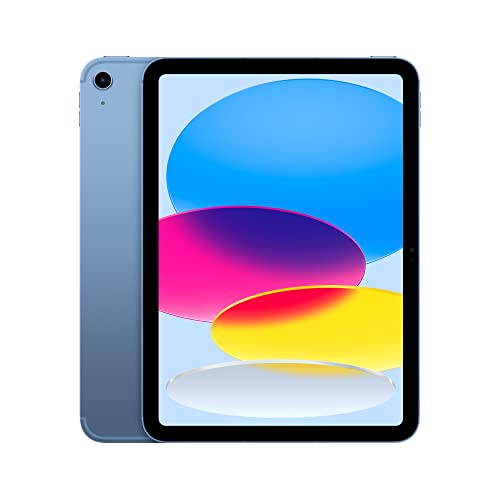
Bright 10.9-inch display Reliable A14 performance Strong Wi-Fi and 5G Apple Pencil drawing support
Pencil charging feels a little awkward
The iPad 10th Generation fits naturally into a creative routine, especially for artists who draw between everyday tasks. The 10.9-inch Liquid Retina display offers a good canvas size for sketching and illustrating, and True Tone helps the screen adapt to different lighting conditions, making longer drawing sessions easier on the eyes. Colors look lively, which adds a bit of joy when working on digital art or simple designs.
Inside, the A14 Bionic chip keeps things running smoothly. We had no trouble switching between drawing apps, browsing references, and answering messages, all thanks to iPadOS multitasking features like Scribble and split-screen apps. Battery life easily lasts through a day of casual drawing, which is helpful when inspiration hits away from a desk. Connectivity is another strong point. Wi-Fi 6 and optional 5G make it simple to download brushes, upload artwork, or stream tutorials wherever you are. With Apple Pencil support, the iPad becomes a capable drawing tool, and the Magic Keyboard Folio adds flexibility for typing and editing.
The charging setup and Apple Pencil compatibility may take a little getting used to, but once you adapt, the iPad 10th Generation proves to be a practical and enjoyable drawing companion.
What to Look For in a best ipads for drawing?
Storage
Battery
Software
Online Access
Screen & Audio
Cameras
Hardware Connections
FAQs
Which iPad is best for drawing and digital art?
The best iPad for drawing depends on your needs, but the iPad Pro is often preferred by professionals due to its smooth display, low Apple Pencil latency, and strong performance. Other iPads can still be great for sketching and casual art.
Do all iPads support the Apple Pencil?
Not all iPads support the same Apple Pencil models. Most modern iPads are compatible with either the first- or second-generation Apple Pencil, so it’s important to check compatibility before buying.
Is the iPad good for beginners who want to learn drawing?
Yes, iPads are excellent for beginners. They offer a natural drawing experience, access to beginner-friendly apps, and flexibility to grow into more advanced tools over time.
Conclusion
So, what's the easiest approach to get the best ipads for drawing you need quickly? You may use what we know about cognitive neuroscience concepts in your marketing approach.
When choosing the ideal product, you must have a clear idea of what you want in terms of price, quality, and function. If you don’t like any model in this list, then the Apple iPad 10th Generation will be your new buddy.
About Michael Brown