The Best Galaxy Tablet For 2026
 By, Michael Brown
Updated

Summary

Samsung Galaxy Tab A9+ Tablet 11”

Samsung Galaxy Tab S6 Lite 10.4'

Samsung Galaxy Tab S9 11”
Looking for the best Galaxy Tablet can be an exciting first step toward upgrading how you work, create, and relax. You know Samsung makes incredible tablets, but with several great models to choose from, it is easy to wonder which one is truly the right fit for you. Is it the one with the most stunning screen for movies, or the powerhouse built for multitasking? Maybe it is the perfect all rounder that does everything well.
We understand that question perfectly. To find the answer, we immersed ourselves in the world of Galaxy tablets. We went beyond the basic specifications and spent time in user forums, reading detailed long term reviews from real people. We analyzed comparisons from leading tech experts and studied which features people actually love using every day. Our goal was to move past the marketing and see which tablets genuinely make a difference for tasks like digital art, business productivity, or home entertainment.
Think of this guide as a friendly conversation, not a technical manual. We have done the research, so you do not have to. We are here to help you sift through the options and connect you with the Galaxy tablet that feels like it was made just for your lifestyle and ambitions. Let us discover your perfect match together.
Our Top Picks


Large smooth 11-inch display Loud quad speakers with Atmos Expandable storage up to 1TB Kid-friendly parental features
No S Pen support
Spending time with the Galaxy Tab A9 Plus quickly shows where Samsung put its focus. The 11-inch screen feels roomy for watching videos, browsing, or letting kids play games, and the 90Hz refresh rate keeps scrolling smooth and comfortable. Brightness is good enough for indoor use, and the display size makes shared viewing much easier during family time.
The quad speakers with Dolby Atmos make the sound fuller and more immersive than you may anticipate at this range, especially when you watch films or play games. Its Snapdragon processor makes it work well for everyday chores, and you can add more RAM and storage as needed. If you download a lot of videos or programs, the fact that you can add more storage space up to 1TB is really useful.
Multitasking is handled nicely, letting us open multiple apps at once and move between them without breaking focus. Parents will also appreciate the Samsung Kids app, which creates a safe, colorful environment for younger users. Even without S Pen support, the tablet still works well for media, browsing, and light productivity, making it a reliable choice for families and everyday use.

Includes a versatile S Pen Lightweight, sleek, and colorful design Immersive Dolby Atmos sound Desktop-like multitasking with DeX
Relatively slow charging speed
The heart of the S6 Lite experience is the included S Pen, which genuinely changes how you interact with the device. It transforms the tablet from a passive screen into a digital notepad and creative studio, making tasks like jotting down notes, annotating documents, or editing photos feel intuitive and direct. For entertainment, the combination of a crisp 10.4-inch display and Dolby Atmos surround sound creates an immersive environment for streaming shows and gaming, powered by Samsung's latest processor for smooth performance.
A major advantage is the Samsung DeX feature, which offers a significant productivity boost. It allows the tablet to function like a more traditional desktop workstation, enabling multitasking across multiple windows for a more efficient workflow. The tablet's design is also a strong point, with a slim, lightweight build and fresh color options like the new Mint, making it easy and stylish to carry anywhere.
We did note that the charging speed is relatively slow. Users accustomed to fast-charging smartphones may need to plan their charging sessions a bit more in advance, as plugging it in for a quick top-up isn't its forte. This is a trade-off for its overall package, but for a device focused on all-day usability, it's a point worth considering in your routine.

Innovative Galaxy AI productivity features Superfast Snapdragon 8 Gen 2 processor IP68 water and dust resistance Brilliant Dynamic AMOLED 2X display
No charger included in the box
Galaxy AI integration marks a significant leap, transforming how you interact with the tablet. Features like transcript-assisted note-taking, automatic summarization, and AI-powered photo editing streamline tasks that used to require multiple apps. This intelligence is powered by the superfast Snapdragon 8 Gen 2 processor, ensuring everything from demanding work apps to graphics-intensive games runs smoothly. The visual experience is anchored by the stunning 11-inch Dynamic AMOLED 2X screen, which offers vibrant colors and deep contrasts, further enhanced by the automatic adjustments of Vision Booster.
A defining pro for the adventurous or accident-prone user is its robust build. The combination of an Armor Aluminum frame and a full IP68 water and dust resistance rating is rare for a tablet, allowing you to use it confidently in more environments. Coupled with a long-lasting battery and Super Fast Charging for quick top-ups, it’s built for endurance.
One point to be mindful of is that the box does not include a charger. This is a common trend, but it means new owners must ensure they have a compatible Super Fast Charging brick to take full advantage of the quick recharge feature, which is an added initial consideration for setup.

Clever Circle to Search feature Helpful Handwriting Assist and Math Solver Durable, water-resistant construction Smooth 90Hz display for media
The screen could be a little better
From the moment you fire it up, the Galaxy Tab S10 FE feels built for kicking back. That big, bright screen with a 90Hz refresh rate makes scrolling through shows or game menus satisfyingly smooth, and the dual speakers really fill the room. It's the kind of tablet you happily pass to a friend to watch a funny clip. But Samsung sprinkled in some genuinely clever helpers, too.
The "Circle to Search" feature is one of those things you didn't know you needed, just circle an actor's face or a product on screen, and it pulls up info instantly. As someone whose handwritten notes often look like abstract art, the Handwriting Assist feature that straightens and aligns my scrawl feels like a small miracle, and the Math Solver is a quiet genius for students.
We have to give a big nod to its rugged spirit. Knowing it's water-resistant, from splashes to dunks, brings a sense of peace. You can use it by the pool or in the kitchen without that constant low-level anxiety. It’s built to be lived with, not just admired. If we had to point out one thing, it’s that the screen could be a little better. When you put it side-by-side with the top-tier tablets, you might notice the difference in sharpness or color pop. But honestly, for cozying up on the couch or tackling your daily to-do list with the excellent, paper-like S Pen, it gets the job done beautifully without making you fuss over it.
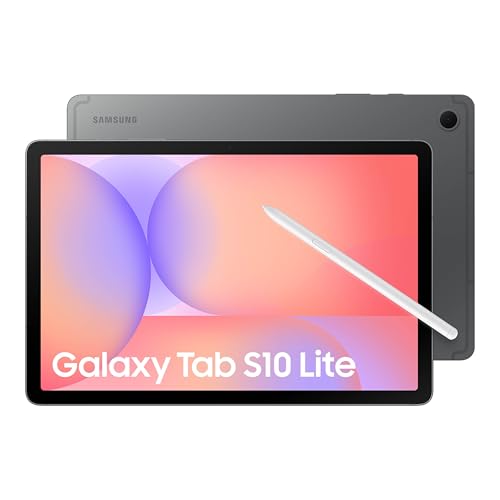
Long-lasting battery life Convenient one-tap AI Hot Key Massive expandable storage capacity Useful Vision Booster display feature
Feels a bit heavy in the hand
This tablet feels like a reliable workhorse from the get-go. Its standout promise is stamina: a battery that can push up to 16 hours means you can binge a season without hunting for a cord, and when you do need power, Super Fast Charging gets you back to full in about two hours. The 10.9" screen with Vision Booster is easy on the eyes for everything from morning recipe checks to late-night reading, automatically adjusting so you don't have to. It's packed with thoughtful smarts, too.
The S Pen that comes with it makes writing and drawing feel natural, and features like Circle to Search and the one-tap AI Hot Key on the keyboard make small chores like finding an actor or setting a reminder easy. We really appreciate how it balances capability with practicality. Having up to 256GB of built-in storage, expandable by a massive 2TB via microSD card, means you never have to play "what can I delete today?" It's a tablet that encourages you to save your memories and keep your apps handy.
It does have a solid, substantial feel in the hand, coming across as a bit heavy. If your primary use is holding it aloft for hours of reading, your arm might notice. But that heft also contributes to a feeling of durability, and for most uses propped on a lap or a table, it translates to a stable, premium presence rather than a burden.

Large, vibrant 12.4 inch display IP68 dust and water resistance Extremely long 18 hour battery life Natural feeling included S Pen
Performance falls short for high end gaming
Sometimes you need a tablet that can keep pace with a busy, sometimes messy, real world. The Samsung Galaxy Tab S9 FE+ Plus feels built for exactly that life. It's bright, crisp, and wonderfully spacious for splitting notes and a video or getting lost in a movie. That large canvas pairs perfectly with the included S Pen, which truly does offer a natural, paper like feel for jotting down ideas or sketching.
We found its reliability to be a major strength. The IP68 rating means you don't have to panic over a spilled drink or dusty backpack, and the 18 hour battery life genuinely supports a full day of classes or work without constant charger hunting. Performance is tuned for productivity. Its fast processor, 8GB of RAM, and generous expandable storage make multitasking between research, note-taking apps, and video calls a smooth experience. It handles everyday tasks and creative workloads with confident ease.
It's worth noting that the performance, while excellent for productivity, falls short for high-end gaming. Graphic intensive titles may not run at their highest settings or smoothest frame rates. However, for its core audience of students and creators who prioritize a large, durable tablet for work and media, it delivers a very compelling and robust package.

Exceptionally slim and portable design Brilliant Dynamic AMOLED 2X display Efficient 3nm processor Useful AI-powered Note and Drawing Assist
A bit expensive price point
Picking up the Tab S11 is its own experience. At a mere 5.5mm, its slim design defies expectations, making it feel more like a premium folio than a powerful computer. Yet, that slender frame houses genuine muscle. The new 3nm processor handles switching between a 4K stream and a complex document without a stutter, making the whole interface feel liquid and immediate. The 11-inch Dynamic AMOLED 2X display is a jewel, offering a brightness and clarity that make everything from spreadsheets to photos genuinely pop.
Samsung has also woven AI into the fabric of the experience in ways that feel practical. Note Assist is a quiet revelation for anyone who leaves meetings with pages of scribbles; having it auto-summarize and format notes is like having a personal assistant tidy your digital desk. Similarly, Drawing Assist can take a rough sketch and refine it into something presentable, which feels less like a gimmick and more like a creative catalyst.
This capability and craftsmanship do command a premium, making it a bit expensive in the market. You’re investing in that leading-edge thinness, the top-tier screen, and the advanced AI features. However, for users who demand the absolute best in portability and intelligent performance, and who value the peace of mind offered by its robust IP68 water and dust resistance, the Tab S11 makes a compelling, if premium, argument for itself.
What to Look For in a best galaxy tablet?
The internet is a platform in which you can get almost everything you want. Finding the best galaxy tablet on whatever you need to know about how something works is an incredible guide for all of your needs.
Unfortunately, because of so many various websites out there which are either fraudulent or untrustworthy, finding what you're searching for on a single website might be difficult. Many consumers are hesitant to purchase the best galaxy tablet because they are unclear if they are making the right selection.
The following post will explain four things to consider when purchasing a best galaxy tablet for your needs.
Battery
Hardware Connections
Software
Cameras
Screen & Audio
Storage
Online Access
FAQs
What makes a Galaxy tablet worth buying?
Galaxy tablets stand out for their vibrant displays, strong performance, and seamless integration with the Samsung ecosystem. They’re great for productivity, streaming, gaming, and creative tasks.
Which Galaxy tablet is best for everyday use?
The best Galaxy tablet for everyday use typically balances performance, display quality, and battery life. Mid- to high-range models offer smooth multitasking and reliable performance for browsing, streaming, and apps.
Are Galaxy tablets good for note-taking and drawing?
Yes, many Galaxy tablets support the S Pen, making them ideal for note-taking, digital art, and design work. The responsiveness and precision of the S Pen enhance productivity and creativity.
Conclusion
The most appealing aspect of this post is that it contains the top models of best galaxy tablet that clients require. It also sells reliable items and has a lot of positive feedback from customers.
Then, you may buy items from well-known companies with confidence through this page since you know they are the greatest on the market. You will also have the opportunity to look at a variety of alternatives for your favorite, particularly the Samsung Galaxy Tab S11.
What is your favorite item? Please let us know! We're continuously on the lookout for new products and services to give our loyal consumers so that we may continue to provide them with high-quality goods at reasonable pricing.
About Michael Brown