The 7 Best Everyday Use Laptop For 2026
 By, Michael Brown
Updated
Summary

Apple MacBook Pro M5

Acer Aspire 3 A315-24P-R7VH 15.6"

Lenovo IdeaPad 3
Some laptops are built for specialists. Others are designed for the rest of us. An everyday laptop is the machine you reach for without thinking—the one that handles morning emails, afternoon streaming, evening homework help, and everything in between. It doesn't need to be the most powerful or the most expensive. It just needs to be reliable, comfortable, and ready whenever you are.
This category is defined by balance rather than extremes. The best everyday laptops combine responsive performance for common tasks, a screen that's easy on the eyes during long sessions, and battery life that doesn't leave you hunting for an outlet by midday. Portability matters too, with a weight that won't weigh you down as you move from couch to kitchen to coffee shop. For those whose everyday use includes professional-grade tasks, creative work, or simply wanting the best of the best, the Apple MacBook Pro M5 stands in a league of its own. Powered by Apple's latest silicon, it delivers blazing-fast performance for demanding applications
Here's how we separate the everyday champions from the also-rans. We consider speaker quality for casual entertainment and the responsiveness of the trackpad for those times you leave the mouse behind. Let us find you a laptop that fits so seamlessly into your routine, you'll wonder how you managed without it.
Our Top Picks


Next-generation M5 chip Stunning 14.2-inch Liquid Retina XDR display Seamless integration with iPhone and iPad All-day battery life under heavy loads
Premium pricing
Our research into the MacBook Pro M5 reveals a machine that pushes the boundaries of what a laptop can do. At its core is the new M5 chip, which doesn't just incrementally improve performance, it reimagines it. With a faster CPU, more powerful GPU, and unified memory that works in perfect harmony, demanding creative workloads like editing in Adobe Creative Cloud or crunching data in Microsoft 365 happen at what can only be described as mind-bending speeds. A
Neural Accelerator built into each core also means AI tasks are handled with incredible efficiency, paving the way for the deep integration of Apple Intelligence. This personal intelligence system helps with writing, expression, and daily tasks, all while maintaining groundbreaking privacy protections that ensure your data stays yours alone.
Beyond the raw power, the experience is defined by thoughtful design and stunning visuals. The 14.2-inch Liquid Retina XDR display is a true standout, delivering a breathtaking 1600 nits of peak brightness for HDR content and a million-to-one contrast ratio for deep, true blacks. Whether editing high dynamic range video or just watching a movie, the screen is an absolute joy. This performance is matched by an all-day battery that doesn't flinch, delivering the same exceptional power whether you're plugged in or on the go.
The only consideration for potential buyers is the premium price tag, which reflects the cutting-edge technology packed inside, making this investment best suited for those who will truly harness its capabilities.

Thin and lightweight design Full HD IPS display Ryzen 3 reliable performance AI noise reduction technology
No backlit keyboard included
From the moment you pick it up, the Aspire 3 gives off a practical, easygoing vibe. Its thin and light build makes it simple to slip into a backpack, which is great if you are moving between home, office, and campus. Once opened, the 15.6 inch Full HD IPS display shows sharp details and crisp colors, and the narrow bezels help keep your focus on what matters on screen.
Inside, the AMD Ryzen 3 7320U processor with Radeon Graphics keeps daily tasks running smoothly. Browsing, document editing, and general productivity feel responsive, especially with 8GB of LPDDR5 memory supporting multitasking. The 128GB NVMe SSD helps with quick boot times and fast access to files, even if the storage space itself is on the modest side.
Video calls are handled thoughtfully. The HD front facing camera uses Acer TNR technology to improve image quality in low light, while Acer PurifiedVoice with AI Noise Reduction works to filter out background distractions. Although it does not include a backlit keyboard, it still offers a comfortable typing experience for well lit environments and everyday use.

Clear Dolby Audio sound Slim, lightweight design Narrow bezel immersive display Physical webcam privacy shutter
Webcam quality is a bit average
Open the IdeaPad 3 and the first thing you notice is the clean display framed by narrow bezels on two sides. The slimmer borders create a more immersive viewing area, whether you are watching videos, browsing, or joining online meetings. Paired with Dolby Audio, the sound comes through clearly, which makes streaming music or chatting with friends more enjoyable than you might expect from a laptop in this range.
For everyday work such as documents, web browsing, and media playback, the Intel Core processor keeps things running smoothly. The thin and light design also makes it easy to carry from room to room or slip into a bag before heading out.
Its built-in 720p camera and twin microphone arrangement let you make video calls as you work or study from home. The battery lasts up to 7.5 hours, so you may use it all day. While the webcam quality is only average, it is still perfectly usable for meetings and casual calls, especially with good lighting. The added physical webcam shutter is a thoughtful touch, offering extra peace of mind whenever you need privacy.
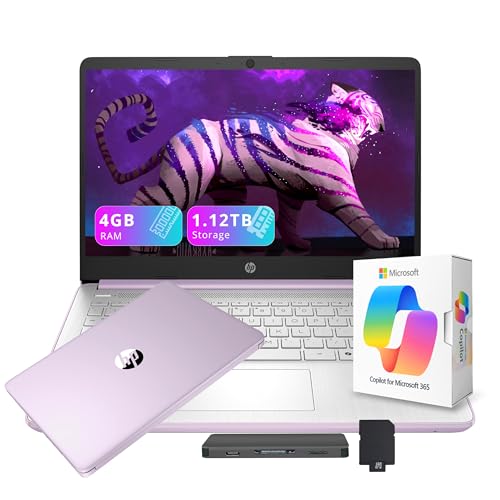
Lightweight and portable build Includes 1TB docking storage Wi Fi 6 connectivity Office 365 subscription included
Storage setup relies partly on an external docking solution
The HP Flagship 14" Laptop is built for everyday productivity with a practical twist. At just 3.24 pounds and 0.71 inches thin, it feels manageable for commuting or moving around the house. The Intel Processor N150 is tuned for daily essentials, so tasks such as document editing, browsing, and streaming run at a steady pace without draining power unnecessarily.
With 4GB of DDR4 RAM, basic multitasking stays responsive, especially for lighter workloads. The 128GB UFS storage helps the system boot quickly, while the included 1TB docking station expands your capacity significantly. It is a thoughtful bundle for users who keep large files, photos, or media libraries. Connectivity is generous. You get USB Type C, two USB Type A ports, HDMI 1.4b, a media card reader, and more. Wi Fi 6 and Bluetooth 5.4 help keep connections stable and fast. The only downside is that the full storage potential depends partly on the external docking solution, but in return, you gain flexibility and expanded capacity right out of the box.

Large 16 inch WUXGA display Strong i5 performance power 16GB RAM smooth multitasking Fast PCIe 4.0 SSD
Battery life may vary under high-performance workloads
Sitting down with the Vivobook 16, the expansive 16 inch WUXGA display immediately sets the tone. The 1920 x 1200 resolution and 16:10 aspect ratio give you extra vertical space, which is surprisingly helpful when working on documents or browsing. With 300 nits of brightness and smooth 60Hz refresh rate, visuals remain clear and comfortable for long sessions.
Performance is driven by the Intel Core i5 13420H processor, built to handle everyday productivity, light gaming, and creative tasks. Paired with Intel Iris Xe Graphics, it covers everything from streaming and editing to casual gaming. The 16GB of memory keeps multitasking fluid, and the 512GB PCIe 4.0 SSD ensures quick file access and fast system responsiveness.
Microsoft Copilot adds an intelligent layer, helping summarize text, generate content, or answer questions when needed. Connectivity through WiFi 5 and Bluetooth 5.1 keeps devices linked without hassle. Battery life can reach up to 8 hours, and FastCharge brings it back to full in about 1 hour and 20 minutes. Under high performance workloads, battery duration may vary, but for balanced daily use, it remains dependable.

32GB RAM for multitasking Fast 1TB NVMe SSD Powerful i7 12th Gen FHD IPS touchscreen display
The touch display may have average brightness
This is the kind of laptop that feels prepared for a busy day before you even sign in. The combination of 32GB high bandwidth RAM and a 1TB PCIe NVMe M.2 SSD means you can open multiple applications, stack up browser tabs, and still expect smooth performance. Boot times are quick, and file transfers move along without hesitation.
At its core is the Intel Core i7 1255U processor, offering 10 cores and speeds up to 4.7 GHz with Intel Iris Xe Graphics. Whether you are handling office tasks, streaming, or working across several programs at once, it keeps everything responsive. The 15.6 inch FHD IPS BrightView touchscreen adds another layer of convenience, especially when navigating documents or presentations directly on screen.
Connectivity is practical and complete, with multiple USB ports, HDMI, an SD card reader, and a headphone and microphone combo. The numeric keypad is a welcome addition for data entry, and Wi Fi plus Bluetooth keep you connected. The touch display may have average brightness, yet for indoor use and typical office settings, it remains clear and functional for daily work.

Extremely long battery life Powerful AI driven performance Thin and lightweight build Vibrant PixelSense touchscreen
Fewer ports compared to many traditional laptops
Pick it up and the first thing you notice is how razor-thin and lightweight it feels. This is a laptop built for life on the go, sliding easily into a bag without weighing you down. Once powered on, the PixelSense 13 inch touchscreen delivers crisp detail and vibrant color, making everything from documents to streaming content look polished and clear.
Performance is driven by the Snapdragon X Plus processor, supported by an AI engine capable of delivering up to 45 trillion operations per second. Everyday tasks feel smooth and responsive, and the built in Copilot tools in Windows 11 add a helpful layer of intelligence. Whether you are summarizing text, rewriting content, or brainstorming ideas, the system is designed to assist while keeping your data and privacy secure.
Battery life is another highlight, reaching up to 23 hours, which means you can move through a full day of work or travel without constantly checking for a charger. Port selection is more limited compared to many traditional laptops, yet this streamlined approach helps maintain its ultra thin design and portability.
What to Look For in a best everyday use laptop?
Hard Drive
If you have the funds, consider an SSD drive. It should be at least 256 gigabytes. SSDs perform faster than older standards like SATA, particularly if you use NVMe. This allows data to be transferred from the drive quickly.
RAM
For the most part, 8 gigabytes should suffice for Windows users. However upgrading to 16GB will increase your computer's performance and be a requirement for gamers. Before you purchase RAM, make sure it is properly soldered to your motherboard. It is impossible to replace the RAM if it has been soldered.
CPUs
Two companies make laptop processors, Intel and AMD.
Operating System
FAQs
What is considered an everyday use laptop?
An everyday use laptop is designed for common tasks like web browsing, streaming, document editing, email, and light multitasking. It focuses on reliability, decent speed, and good battery life rather than high-end performance.
Are everyday laptops good for students and remote work?
Yes, they are well-suited for students and remote workers who mainly use productivity apps, video conferencing tools, and online platforms.
Is battery life important for everyday use?
Yes, long battery life is essential for portability and convenience, especially for students or professionals who work away from a power outlet.
We decide facts since we are product consulting professionals with extensive expertise. Even so, we maintain and update the list of best everyday use laptop so the information is correct and up to date.
After reading this article, you should discover that selecting a best everyday use laptop that is both handy and economical to you is not difficult. Please don't hesitate to contact us if you require assistance.
About Michael Brown