The 7 Best Budget 4k Monitor For 2026
 By, Michael Brown
Updated
Summary

Dell 27 Plus 4K Monitor S2725QS

ASUS TUF 27” 4K Monitor VG27UQ1A

LG 27US500-W Ultrafine Monitor 27-Inch 4K
Shopping for a budget 4K monitor used to mean making compromises. You either settled for washed-out colors, limited connectivity, or a build quality that felt more "cheap" than "affordable." Fortunately, that is no longer the case. As 4K displays have become more common, it is now possible to find monitors that deliver sharp visuals, solid color reproduction, and reliable everyday performance without spending a fortune.
The bigger challenge today is deciding where your money is best spent. Some budget monitors prioritize gaming with higher refresh rates, while others focus on productivity, content consumption, or general office work. A low price alone does not guarantee good value if the display falls short in the areas you use most.
The Dell 27 Plus 4K Monitor S2725QS is a great example of how far the budget category has evolved. It offers crisp 4K resolution, dependable image quality, and the polished user experience Dell is known for, all at a price that feels surprisingly accessible.
Finding the right budget 4K monitor ultimately comes down to matching the display to your everyday needs. Whether you're upgrading your home office, editing photos, watching movies, or simply looking for a sharper workspace, the monitors below prove that you don't need a premium budget to enjoy a premium-looking display.
Our Top Picks


ComfortView Plus 120Hz refresh rate AMD FreeSync Premium 99% sRGB coverage
No USB-C connectivity for single-cable laptop setups
Eye strain tends to creep in gradually, especially when deadlines keep you staring at the screen longer than planned. Dell addresses that with its improved ComfortView Plus technology, reducing blue light emissions while preserving color accuracy. It is the kind of feature you appreciate more at the end of the day than at the beginning.
Once it's time to switch gears, the monitor takes on a different personality. A refresh rate of up to 120Hz, AMD FreeSync Premium, and an ultra-low 0.03ms response time help motion stay fluid whether you're editing videos, scrolling through large documents, or jumping into a fast-paced game.
Image quality doesn't take a back seat either. The IPS panel pairs 4K resolution with 99% sRGB coverage, a 1500:1 contrast ratio, and HDR readiness, producing detailed visuals with convincing depth. Dell even upgraded the built-in speakers, giving movies and videos a fuller sound than the previous generation. The ultra-thin bezel completes the package with a clean design that fits naturally into almost any workspace.
Users hoping to connect a laptop through a single USB-C cable will need an alternative setup. Outside of that limitation, the monitor checks a surprising number of boxes for both work and entertainment.

160Hz refresh rate ELMB Sync technology NVIDIA G-SYNC Compatible AMD FreeSync Premium
IPS glow can be noticeable in dark rooms
Fast camera pans, sudden explosions, and quick target tracking can quickly expose motion blur on an ordinary monitor. ASUS tackles that with a 160Hz refresh rate and ELMB Sync technology, reducing ghosting and tearing while keeping gameplay remarkably clean during high frame rate action.
Compatibility is another strength here. NVIDIA G-SYNC Compatible certification, AMD FreeSync Premium, and Variable Overdrive work together to create a smoother experience across different graphics cards, allowing players to focus more on the game and less on display artifacts.
The monitor isn't limited to gaming speed alone. HDR support and a 95% DCI-P3 color gamut add a welcome boost to visual richness, making open-world adventures, creative projects, and movie nights look more vibrant than a typical gaming-focused display. The result is a screen that balances performance with strong color reproduction instead of forcing users to choose one over the other.
In a dark room, the IPS panel can reveal a faint glow around darker scenes. It rarely stands out during normal gameplay, although movie lovers watching with the lights off may notice it more often.

90% DCI-P3 gamut OnScreen Control Wide viewing angles Ergonomic tilt stand
Basic stand offers tilt adjustment only
Editing a photo becomes much easier when subtle details remain visible without constant zooming. The 4K UHD panel pairs a 1000:1 contrast ratio with wide viewing angles, helping darker areas look deeper while preserving fine textures across the screen. That extra clarity is especially welcome when working with high-resolution images or detailed graphics.
Color is another area where this monitor earns attention. HDR10 support and coverage of up to 90% DCI-P3 give sunsets, landscapes, and digital artwork a richer appearance without making everything look overly saturated. The result is a display that feels equally comfortable editing content or simply enjoying a movie after work.
LG keeps daily use refreshingly straightforward as well. OnScreen Control lets you split the display into different layouts or adjust settings with only a few clicks, while the ergonomic stand makes it easy to fine-tune the screen angle throughout the day. Small touches like these quietly improve the overall experience.
The stand focuses on tilt adjustment, so users who frequently change monitor height may eventually consider a monitor arm. For many desk setups, the included stand will cover the basics just fine.

Flicker-Free technology Low blue light mode 178° viewing angle Dual HDMI and DisplayPort
Color calibration may require manual adjustment
From spreadsheets in the morning to videos in the evening, this monitor adapts comfortably to different routines. Its 4K IPS panel delivers sharp visuals, while the 178-degree viewing angle keeps colors looking consistent even when you're sharing the screen with someone nearby. The slim bezel helps the display blend naturally into both home and office setups.
Long hours in front of a monitor become a little easier thanks to Flicker-Free technology and the low blue light mode. Neither feature grabs attention immediately, yet both contribute to a more relaxed viewing experience during extended work sessions.
Connectivity is another practical advantage. With two HDMI ports, two DisplayPort connections, and an audio output, switching between a desktop, laptop, or secondary device feels straightforward. It suits people who move between work and entertainment throughout the day without constantly swapping cables.
Depending on personal preference, spending a few minutes adjusting the color settings can help you get the picture looking exactly the way you like. Fortunately, that's a one-time task for most users.

AMD FreeSync Premium DFR technology 0.5ms GTG response HDR10 support
IPS contrast may not match VA panels in dark scenes
Some evenings call for competitive shooters, while others are better spent exploring detailed open-world games. Acer's DFR technology lets the monitor adapt to those moments, allowing users to choose between a higher refresh rate or higher resolution based on what they're doing. It's a clever approach that makes the display feel more versatile than many fixed-performance alternatives.
Motion stays under control thanks to AMD FreeSync Premium and a response time of up to 0.5ms GTG. Fast transitions look cleaner, reducing distractions during racing games, sports titles, or other high-speed scenes where ghosting can become noticeable.
Visual quality holds up well outside gaming too. The UHD IPS panel delivers detailed images, HDR10 support expands color expression up to 90% DCI-P3, and the ZeroFrame design makes dual-monitor setups look particularly tidy. It is equally comfortable handling creative work or everyday productivity.
People who spend a lot of time watching dark movies may find VA panels produce slightly deeper contrast. For gaming and general use, the IPS panel offers an appealing balance of color accuracy and viewing angles.

144Hz refresh rate 120% sRGB coverage Full ergonomic adjustment HDMI 2.1 and DP 1.4 4K IPS display
Built-in speakers offer average sound quality
Finding the right viewing angle is surprisingly important once long workdays become the norm. CRUA includes full ergonomic adjustments with height, pivot, tilt, and rotation, making it easy to switch between landscape mode for editing and portrait mode for coding, reading, or handling long documents.
The display backs up that flexibility with performance. A 27-inch 4K panel paired with a 144Hz refresh rate delivers crisp visuals and fluid motion, making the monitor equally comfortable for creative work, office tasks, and gaming. Fine details remain sharp, while movement looks much cleaner during fast-paced content.
Color performance deserves credit too. With 120% sRGB coverage, 350 cd/m² brightness, and a 1000:1 contrast ratio, photos and videos carry plenty of life without looking exaggerated. The built-in speakers add a little convenience for everyday use, while HDMI 2.1 and DisplayPort 1.4 provide support for modern PCs and consoles.
The integrated speakers are perfectly fine for videos, meetings, and casual listening. Anyone who enjoys richer sound for movies or music will probably end up pairing the monitor with external speakers or headphones.
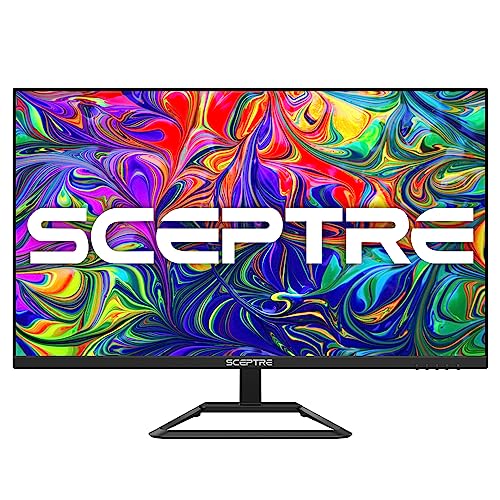
32-inch 4K display Built-in speakers Up to 70Hz refresh rate 4K UHD resolution
60Hz refresh rate isn't ideal for competitive gaming
A 32-inch display naturally creates a different experience than a typical 27-inch monitor. With 4K resolution packing four times the pixels of Full HD, documents look cleaner, images reveal finer details, and there's simply more room to keep multiple windows visible at the same time.
The built-in speakers make everyday use a bit more convenient as well. Whether you're joining a quick meeting, watching videos during lunch, or playing a game after work, having audio built into the monitor helps keep the desk looking tidy without requiring extra accessories.
Motion receives a modest upgrade too. The refresh rate reaches up to 70Hz, offering smoother transitions than a standard 60Hz display and helping reduce screen tearing during general use or lighter gaming sessions. It's a subtle improvement, yet one that contributes to a more pleasant viewing experience.
Competitive players chasing the highest frame rates will naturally gravitate toward faster gaming monitors. For productivity, movies, and everyday computing, the refresh rate remains perfectly comfortable for most situations.
What to Look For in a best budget 4k monitor?
You may know that shopping is one of the essential activities in a human being’s life. Selecting the best product will affect your daily life. However, which factors can make this purchase effective? If you are looking for best budget 4k monitor for your demands, you will waste your time with incorrect data. But it would be best if you weren’t so nervous about that. We have a group of experts to research best budget 4k monitor, and they’ve given reliable information.
There are lots of essential things you should keep in mind. On the other, just some of them are most focused. Here are the critical factors related to buying best budget 4k monitor you may want:
Aspect Ratio
Resolution
Screen Size
Brightness
Refresh Rate
Connections
Response Time
Panel Type
FAQs
Can you get a good 4K monitor on a budget?
Yes. Many affordable 4K monitors offer excellent image quality, solid color accuracy, and useful features for work, entertainment, and everyday use.
Are budget 4K monitors good for gaming?
Some are. If you plan to game, look for models with a higher refresh rate, low response time, and adaptive sync support.
What features should I prioritize in a budget 4K monitor?
Focus on panel quality (preferably IPS), color accuracy, connectivity options, ergonomic adjustments, and refresh rate based on your needs.
Overall, the statistics we described here are not all of them. Instead, we always freshen it up continually as the data is updated and available. It would be best to remember things we mentioned above, including brand’s value, product’s value, product’s highlights, important specs, customer ratings & reviews.
Our readers, you guys, are always respected and treated with top priority so that you are supposed to receive the most up-to-date information on our site. You should feel free to contact us for support with the product’s problems. Thanks for reading, and we wish you a happy shopping.
About Michael Brown