The Best Aoc 16 Inch Monitor For 2026
 By, Michael Brown
Updated
Summary

AOC e1659Fwu Monitor
AOC 16T20 Monitor 15.6"

AOC Monitor 15.6''
Portable monitors sound simple on paper. Just add a second screen to your laptop and suddenly working from a café, hotel, or airport becomes easier. But anyone who has actually used one knows the experience can vary wildly. Some portable monitors feel cramped and awkward to use for more than an hour. Others are technically portable, but so large and heavy that you stop bringing them anywhere after the first week.
That is why so many people end up searching for a 16-inch portable monitor. In theory, it sounds like the perfect middle ground between compact portability and usable screen space. But true 16-inch portable monitors are still surprisingly limited in the market. Many brands, including AOC, focus more heavily on the 15.6-inch category, while larger models target users who want a more desktop-like experience. AOC has quietly built a strong reputation across all of these sizes, offering portable monitors that focus on practicality.
What stood out during our research was how differently people actually use portable monitors. Some want a lightweight second display purely for emails and spreadsheets, while others need enough screen space for creative work, coding, or gaming on the go. That is exactly why screen size matters so much. So while this guide focuses on the best AOC 16 inch monitors, we also include a few strong 15.6-inch and larger alternatives that are simply easier to find and often provide better overall value.
Our Top Picks


Single USB cable setup Plug-and-play compatibility Travel-friendly form factor Easy dual-screen productivity
The USB-powered setup may feel somewhat limiting on certain devices
Portable monitors often become useful the moment laptop screens start feeling too cramped during travel or remote work sessions. The e1659Fwu keeps things extremely straightforward. A single USB 3.0 cable handles both power and signal delivery, so there is no need to carry extra adapters or power bricks for casual setups. That convenience becomes especially useful for business trips, presentations, or temporary workstations in coffee shops and airports.
Its slim and lightweight design is clearly aimed at mobility first. Sliding the monitor into a backpack feels easy compared to carrying a traditional second display, and the compact size works nicely beside smaller laptops without taking over an entire desk.
The HD resolution is not particularly sharp by modern standards, but it remains perfectly usable for spreadsheets, emails, browser tabs, and secondary windows. For users mainly needing extra screen space instead of color-critical creative work, the monitor covers the basics well enough. However, the USB-powered setup works best with devices that provide stable power output, and some users may prefer using a powered adapter for extra convenience during longer sessions.

Full HD IPS display Dual USB-C connectivity Wide viewing angles Smart protective cover included
The built-in speakers work fine for casual use
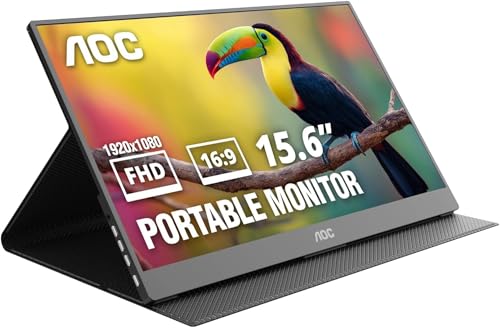
Some portable monitors mainly exist as emergency second screens. The AOC 16T20 goes a step further by trying to function more like a proper everyday display. The 15.6-inch Full HD panel gives noticeably sharper visuals than older portable monitors still stuck at lower resolutions. Spreadsheets, documents, streaming content, and video calls all look clean enough for regular daily use instead of just temporary multitasking.
Its IPS panel also helps quite a bit during collaborative work. Colors remain more consistent when viewing from different angles, which makes sharing content with teammates or clients easier during meetings and presentations.
Connectivity is another area where the monitor stays modern. Dual USB-C ports and Mini HDMI support allow compatibility with laptops, MacBooks, gaming consoles, and handheld devices without needing complicated adapters or drivers. The built-in speakers are present mainly for convenience rather than immersive audio. They work fine for casual video playback or meetings, although users watching movies regularly will probably still prefer headphones or external speakers.

Wide 125% sRGB coverage Reverse charging support USB-C and Mini HDMI connectivity Landscape and portrait support
Stand stability may feel basic during desk use
A lot of portable monitors focus almost entirely on convenience, often sacrificing display quality in the process. This AOC model tries to balance both. The biggest difference here is the color performance. The 125% sRGB gamut immediately gives content more punch compared to standard portable screens, which makes photo editing, presentations, movies, and creative work look noticeably richer. Combined with the IPS panel, colors remain stable even when viewing from different angles.
This monitor also stays impressively portable. At only 1.5 pounds with an ultra-thin aluminum profile, it slides into a backpack almost as easily as a tablet. That portability makes it useful not only for travel, but also for hybrid setups where users regularly switch between home, office, and remote workspaces.
Another practical addition is the reverse charging support. Instead of draining laptop battery through a second screen, it can pass through up to 45W charging while displaying content simultaneously. For people constantly working on the move, that cleaner single-cable setup becomes very convenient. The stand itself is functional for everyday desk use, although users who constantly adjust angles throughout the day may notice it stays simpler compared to more premium portable monitor setups.

Sharp QHD resolution Smooth 180Hz refresh rate Fast response time Wide sRGB color coverage
Built-in speakers are not included
Gaming monitors are not always the first category architects or productivity users look at, but some of them actually make surprisingly good multipurpose displays. The Q27G4XN is a good example of that. Its 2560 × 1440 resolution gives noticeably sharper detail than standard Full HD monitors, while the larger workspace makes handling multiple windows much easier during busy workflows.
Where the monitor really separates itself is motion handling. The 180Hz refresh rate and fast response time make scrolling, camera movement, and navigation look extremely smooth. Even outside gaming, that extra fluidity becomes surprisingly comfortable during long hours of work. The color performance is stronger than many budget gaming monitors as well. With 127.8% sRGB coverage, presentations, videos, and creative projects gain more vibrancy than expected at this price range.
Its slim bezels also help the monitor work nicely in multi-monitor setups. Instead of drawing attention to thick borders, the screen keeps the setup looking cleaner and more modern. One thing to keep in mind is that this monitor does not include built-in speakers. Many users already rely on headphones or external audio systems anyway, but it is something worth knowing before setting up the workspace.

Smooth 144Hz refresh rate Fast 1ms response time Compact desk-friendly size Frameless multi-monitor design Wide color coverage
No USB hub or premium connectivity features
Not everyone wants a giant gaming monitor dominating their entire desk. The 24G51F keeps things more compact while still delivering the smooth experience people usually expect from higher-end gaming displays. Its 144Hz refresh rate immediately makes gameplay, scrolling, and desktop navigation look cleaner compared to standard 60Hz monitors.
The Full HD resolution also fits naturally at this screen size. Games remain sharp without putting excessive load on hardware, which makes the monitor practical for mid-range setups and competitive gaming. AOC also gives the monitor a much cleaner appearance than older budget gaming models. The three-sided frameless design helps the display blend nicely into multi-monitor setups while reducing bezel distractions during gameplay or productivity work.
Color performance is another pleasant surprise here. The wide sRGB coverage helps games, videos, and creative content appear more vibrant instead of looking overly washed out. However, users who mainly focus on advanced workstation features or USB hubs may still prefer more premium models with additional ports and docking support.

Smooth 120Hz refresh rate IPS panel with wide viewing angles Good color accuracy Eye comfort features
No DisplayPort connectivity
Budget monitors often force users to choose between decent image quality and smooth performance. The 24B35H3 manages to offer a bit of both. The IPS panel provides good viewing angles and solid color consistency, which makes the monitor useful not only for office work but also for casual media, creative tasks, and multitasking. Compared to older TN-based budget monitors, the overall image quality looks much cleaner and more modern.
The 120Hz refresh rate is another strong addition at this price level. Even basic activities like web browsing, dragging windows, or scrolling through documents appear smoother and more comfortable during longer sessions. AOC also includes several eye-care features such as Flicker-Free technology and Low Blue Light mode, which become helpful for users spending long hours in front of the screen.
The design stays practical as well. Tilt adjustment and VESA mount compatibility make it easier to fit the monitor into different desk setups without much trouble. Port selection is fairly straightforward with HDMI and VGA connectivity. Users who specifically need DisplayPort for certain higher-end setups may still want to check compatibility before buying, but for general everyday use, the included ports remain perfectly workable.

Smooth 120Hz refresh rate Good sRGB color coverage Low power consumption User-friendly setup
HDR support is basic
Small monitors still make sense for a lot of workspaces, especially where desk space is limited or users mainly focus on lighter daily tasks. The 22B35HM23 handles those situations well by combining a manageable screen size with smoother-than-usual performance. Its 120Hz refresh rate helps desktop movement and scrolling look noticeably cleaner compared to standard office monitors, which makes day-to-day usage more comfortable overall.
Color performance is also surprisingly decent for an entry-level display. The monitor covers over 100% sRGB, helping videos, presentations, and casual creative work appear more lively than many older budget panels. AOC also keeps the monitor user-friendly with practical additions like tilt adjustment, Flicker-Free technology, and VESA mount support. The lightweight design makes the display easy to fit into smaller workstations, dorm rooms, or secondary desk setups.
HDR Ready support is included as well, although it works more as a light enhancement rather than a major visual upgrade. Everyday SDR content still remains the monitor’s strongest area.
What to Look For in a best aoc 16 inch monitor?
Connections
Resolution
Brightness
Aspect Ratio
Response Time
Screen Size
Panel Type
Refresh Rate
FAQs
What is an AOC 16 inch monitor mainly used for?
AOC 16 inch monitors are commonly used as portable second screens for laptops, remote work, travel, presentations, gaming, and multitasking.
Are AOC portable monitors good for productivity?
Yes, AOC portable monitors are popular for productivity because they are lightweight, easy to connect, and provide extra screen space without taking up much desk space.
Do AOC portable monitors need external power?
Some models can run directly through USB-C from a laptop, while others may require additional power depending on the device and brightness settings.
Conclusion
So, what's the easiest approach to get the best aoc 16 inch monitor you need quickly? You may use what we know about cognitive neuroscience concepts in your marketing approach.
When choosing the ideal product, you must have a clear idea of what you want in terms of price, quality, and function. If you don’t like any model in this list, then the AOC 22B35HM23 22" Monitor will be your new buddy.
About Michael Brown