The Best All Purpose Laptop For 2026
 By, Michael Brown
Updated

Summary

Apple MacBook Air 13-inch M5

ASUS Vivobook Go 15.6” Laptop

Acer Aspire 14 14" Laptop
Buying an all-purpose laptop sounds easy until you actually start shopping. Gaming laptops are built for performance. Business laptops focus on productivity. Creative machines prioritize displays and graphics power. But most people are not looking for a laptop dedicated to a single task. They need one machine that can handle a little bit of everything—work during the day, streaming at night, occasional photo editing, video calls, web browsing, and perhaps a few demanding applications here and there.
The problem is that versatility is surprisingly difficult to get right. A laptop can have impressive specifications and still feel frustrating if the battery life is poor, the fan noise becomes distracting, or the portability suffers. Likewise, a lightweight machine is not particularly useful if it struggles the moment you open too many tabs or multitask between applications.
What makes a great all-purpose laptop is balance. The best models rarely dominate a single category. Instead, they consistently perform well across dozens of everyday situations. They are easy to carry, powerful enough for years of use, comfortable for long work sessions, and reliable when you need them most. That balance is exactly why the Apple MacBook Air 13-inch M5 has become such a popular recommendation. It combines excellent battery life, strong performance, a premium build, and a highly portable design without forcing most users to compromise elsewhere.
The laptops below take a similar approach. Some lean more toward productivity, while others offer additional flexibility or value, but each one earns its place by being genuinely useful in a wide range of real-world scenarios.
Our Top Picks


Apple M5 chip Up to 18-hour battery Liquid Retina display Apple Intelligence support
Premium pricing compared to many Windows alternatives
A typical day for most people isn't built around one task. It's a mix of emails, dozens of browser tabs, video calls, spreadsheets, photo editing, and random projects that somehow all happen at once. That's exactly where the MacBook Air M5 shines.
The new M5 chip gives the laptop an effortless personality. Apps launch instantly, switching between windows stays fluid, and even heavier creative workflows feel remarkably responsive thanks to the faster CPU, unified memory architecture, and AI-focused Neural Engine. Whether you're working from a coffee shop, lecture hall, or airport lounge, the experience rarely slows down.
Battery life plays a huge role in making a laptop feel truly versatile. With up to 18 hours available, it's entirely possible to leave the charger at home for the day and never think about it again. The 13.6-inch Liquid Retina display also adds to the appeal, producing sharp text and vibrant visuals with support for 1 billion colors. Video calls look polished too thanks to the 12MP Center Stage camera and upgraded audio system with Spatial Audio support.
The price tag will probably spark the most debate. There are plenty of Windows laptops that cost less and handle everyday work just fine. What separates this machine is the polish—the combination of battery life, portability, display quality, and responsiveness that makes it such an easy laptop to live with day after day.

Ryzen 3 7320U 15.6-inch FHD display Up to 11-hour battery Webcam privacy shutter
Display color accuracy is average for content creation
The ASUS Vivobook Go 15 feels built around practical needs rather than flashy specifications. Open it up and there's plenty of room to work thanks to the 15.6-inch Full HD display, full-size keyboard, and dedicated numeric keypad. For students, remote workers, or families sharing a computer, those little conveniences tend to matter more than benchmark scores.
Under the hood, the Ryzen 3 7320U processor delivers enough performance for the tasks most people actually spend time doing. Web-based work, office documents, online shopping, video playback, and everyday productivity all run comfortably without making the laptop feel sluggish. The integrated Radeon graphics also help keep videos looking smooth and detailed during daily use.
Battery life reaches up to 11 hours, which makes the laptop easy to carry between classes, meetings, or different rooms around the house without constantly hunting for a power outlet. ASUS also includes thoughtful touches like a physical webcam privacy shutter, something many users appreciate more than they expect after a few months of ownership.
The display is geared more toward productivity and entertainment than color-critical work. If editing photos is part of your routine, you may eventually start looking for a panel with wider color coverage. For everyday computing, though, it covers the essentials remarkably well.

Copilot+ AI features Up to 22-hour battery WUXGA display AcerSense AI tools
60Hz refresh rate
Laptop performance tends to matter most when the day gets busy. A video meeting is running in one window, documents are scattered across another, and a dozen browser tabs somehow seem essential. That's where the combination of Intel's Core Ultra 5 processor, integrated AI acceleration, and efficient multitasking starts to show its value.
What makes this machine stand out from many everyday laptops is the Copilot+ experience. Features like improved Windows Search, Recall, and AI-assisted workflows are designed to reduce friction during work rather than adding unnecessary complexity. Finding files, revisiting previous tasks, and interacting with content becomes more natural over time.
The 14-inch WUXGA display also helps the laptop feel more premium than its category suggests. The taller screen provides a little more room for documents and websites, while the sharper resolution keeps text crisp during long reading sessions. Add in up to 22 hours of battery life and it becomes the sort of device that can comfortably travel all day without creating charger anxiety.
People accustomed to smoother high-refresh-rate displays may notice the standard 60Hz panel when scrolling quickly through content. For productivity, study sessions, and office work, it remains a comfortable screen to spend hours in front of.

ExpressCharge support ComfortView technology Ergonomic hinge design Intel Core 3 processor
Overheating under load
A laptop often becomes the place where work, study, finances, and personal projects all collide. The Dell 15 embraces that reality with a roomy keyboard, dedicated numeric keypad, and calculator hotkey that make repetitive tasks noticeably easier. Small details, but the kind that get used every single day.
The Intel Core 3 processor is aimed squarely at everyday computing. Email, web-based work, spreadsheets, video calls, and document editing all run smoothly without demanding much from the user. Dell also includes ExpressCharge support, helping reduce downtime when the battery eventually needs attention.
Long work sessions are another area where the laptop makes sense. ComfortView technology reduces blue light exposure, while the lifted hinge design creates a more natural typing angle for the wrists. Those aren't headline-grabbing features, yet they're exactly the kind of refinements that become appreciated after months of use.
Pushing the system with heavier workloads can generate more heat than casual users are likely to encounter. For office work, online learning, and general productivity, it stays much closer to its intended comfort zone.

Anti-glare display Wi-Fi 6 connectivity Lightweight design Numeric keypad
Not designed for graphics-intensive workloads
Shared family computers often have a surprisingly difficult job. One person is joining a video call, another is researching homework, and someone else is opening far too many browser tabs at the same time. The combination of an Intel N100 processor and 16GB of RAM gives this laptop enough breathing room to handle those situations perfectly.
The portability is another pleasant surprise. Weighing just 3.64 pounds, it's easy to carry from room to room, slide into a backpack, or bring along to class without feeling cumbersome. The anti-glare display also helps during longer sessions where reflections can become distracting.
Connectivity feels refreshingly practical as well. Wi-Fi 6, HDMI output, multiple USB ports, and a full-size keyboard with a numeric keypad make the laptop flexible enough for school, work, and entertainment without requiring extra accessories.
However, photo editors, 3D artists, and video creators may eventually outgrow what the hardware is designed to do. For schoolwork, office tasks, web browsing, and everyday entertainment, it handles the daily routine without much fuss.

Intel Core i9-14900HX RTX 5070 graphics QHD 165Hz display 100% DCI-P3 coverage
Cooling fans can become loud under heavy loads
There are laptops that politely ask what you'd like to do today. This one simply assumes the answer is "everything." The Intel Core i9-14900HX and RTX 5070 combination provides enough performance for demanding games, creative software, heavy multitasking, and AI-assisted workloads without breaking a sweat.
The display helps reinforce that premium experience. A QHD resolution paired with a 165Hz refresh rate creates sharper visuals, smoother motion, and richer color reproduction thanks to 100% DCI-P3 coverage. Whether you're gaming, editing media, or simply watching content, the screen does a lot of the heavy lifting.
MSI's Cooler Boost 5 system also deserves credit. Powerful hardware generates heat, and the dual-fan, multi-heat-pipe design helps sustain performance during longer sessions where lesser laptops might throttle back. The generous port selection is another bonus for people connecting monitors, accessories, and external storage.
All that performance has a soundtrack of its own. During intensive gaming sessions or demanding workloads, the cooling system becomes noticeably more active as it works to keep the hardware operating at full speed.
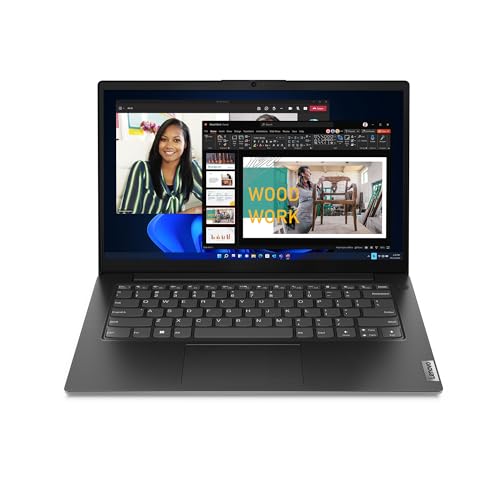
Intel Core i7-13620H Upgradeable memory Upgradeable storage Lenovo Smart Appearance 88% screen-to-body ratio
Battery life is not very long
Business laptops often succeed by staying out of the way. The Lenovo 14 G4 follows that philosophy nicely, combining a Core i7-13620H processor with a compact 14-inch design that remains easy to carry throughout the day. It has enough performance for spreadsheets, presentations, video meetings, and multitasking without feeling overbuilt.
The display contributes more than its size suggests. Thin bezels and an 88% screen-to-body ratio make the workspace feel larger than expected, while Full HD resolution keeps documents and presentations looking crisp. Wide viewing angles are particularly useful during collaborative work or shared presentations.
Remote workers will likely appreciate Lenovo Smart Appearance as well. Video meetings look cleaner, distractions are reduced, and privacy-focused camera enhancements help create a more polished appearance without extra software. Future upgrade options for memory and storage add some welcome flexibility too.
The focus here is clearly productivity rather than endurance. Frequent travelers who spend long stretches away from a power outlet may find themselves carrying a charger more often than they would with some competing ultraportables.
What to Look For in a best all purpose laptop?
The best all purpose laptop is based upon a number of factors. Studying a product differs depending on the product type. So, we're on here to help, counsel, and provide solutions to these problems.
Please keep in mind the following points for selecting best all purpose laptop:
CPUs
Two companies make laptop processors, Intel and AMD.
RAM
For the most part, 8 gigabytes should suffice for Windows users. However upgrading to 16GB will increase your computer's performance and be a requirement for gamers. Before you purchase RAM, make sure it is properly soldered to your motherboard. It is impossible to replace the RAM if it has been soldered.
Operating System
Hard Drive
If you have the funds, consider an SSD drive. It should be at least 256 gigabytes. SSDs perform faster than older standards like SATA, particularly if you use NVMe. This allows data to be transferred from the drive quickly.
FAQs
What is an all-purpose laptop?
An all-purpose laptop is a versatile device designed to handle a variety of tasks, including work, web browsing, streaming, schoolwork, and light creative applications.
Can an all-purpose laptop be used for gaming?
Yes, many all-purpose laptops can handle casual or light gaming, but dedicated gaming laptops are better suited for demanding titles.
What should I look for in the best all-purpose laptop?
Consider performance, battery life, display quality, storage, portability, and overall value to ensure the laptop meets a wide range of needs.
As we are product consulting experts with a wide range of experience, we determine correct information. Apart from that, we keep the best all purpose laptop current. You may rest confident that the data is accurate and up to date.
Besides best all purpose laptop, we can advise you with anything. Please do not hesitate to contact us whenever you need guidance.
About Michael Brown