The 7 Best 17 Inch Laptop For 2026
 By, Michael Brown
Updated

Summary

HP 17.3 inch Laptop

msi Cyborg 17 17.3" Laptop

HP 17 Laptop 17.3"
If screen size is at the top of your laptop wishlist, chances are you've already been looking at 17-inch models. There is something undeniably comfortable about having a larger display. Whether you're juggling multiple documents, editing photos, working with spreadsheets, or simply watching movies, the extra screen space makes everything feel less cramped.
The interesting thing is that the traditional 17-inch category is no longer the only place to find that experience. Thanks to thinner bezels and more efficient designs, many modern 16-inch laptops now offer nearly as much usable screen space while being noticeably easier to carry around. As a result, shoppers who start by searching for a 17-inch laptop often end up considering premium 16-inch models as well.
Among the shrinking number of true large-screen laptops still available today, the HP 17.3 inch Laptop represents the type of device many buyers originally have in mind. Its expansive display, comfortable layout, and straightforward design make it a popular choice for users who value screen real estate above all else.
That said, this roundup is not limited strictly to 17-inch models. We've also included several standout 16-inch laptops that deliver a similarly spacious viewing experience, giving you a wider range of options depending on your priorities, budget, and portability needs.
Our Top Picks


13th Gen Intel Core processor 16GB DDR4 RAM 512GB PCIe SSD HP True Vision HD camera
Intel Iris Xe graphics are not suitable for demanding gaming or 3D workloads
The extra screen real estate is what makes this HP stand out immediately. Whether you're reviewing spreadsheets, keeping multiple browser windows open, or editing photos, the 17.3-inch FHD IPS display creates a noticeably more relaxed workspace with wide viewing angles that stay clear from almost any position.
Day-to-day performance rarely feels stressed either. The 13th Gen Intel Core processor handles office work, video calls, and multitasking without drama, while the combination of 16GB RAM and a 512GB PCIe SSD keeps applications launching quickly and files readily accessible.
Another nice touch is the HP True Vision HD camera. Video meetings look cleaner in challenging lighting conditions, making remote work and online classes feel a little more polished. Windows 11 rounds things out with a familiar, modern environment that stays easy to navigate.
Once heavier gaming titles or demanding 3D software enter the picture, the integrated Iris Xe graphics start reaching their limits. For productivity, entertainment, and everyday computing, that trade-off will matter far less than the spacious display and responsive performance.

17.3-inch 144Hz display NVIDIA GeForce RTX 5060 Intel Core 7-240H 16GB DDR5 RAM
Cooling fans can become noticeable under heavy gaming loads
MSI built the Cyborg 17 around performance first, and it shows. The 144Hz display keeps motion fluid during competitive matches, while the GeForce RTX 5060 unlocks ray tracing, DLSS 4, and AI-enhanced visuals that make modern games look significantly more detailed and responsive.
This machine backs up that graphics power with hardware that rarely gets in the way. An Intel Core 7-240H processor, 16GB DDR5 memory, and a 1TB NVMe SSD create a setup that handles gaming, content creation, and multitasking without feeling overloaded. Large game installs and creative projects have plenty of room to breathe.
Port selection is refreshingly practical as well. USB-C, HDMI, Ethernet, and Wi-Fi 6E make it easy to connect accessories, external displays, or faster wired networks depending on where you're playing. Despite the large screen, the chassis remains surprisingly portable for a gaming-focused machine.
Long gaming marathons push the cooling system to work harder, making the fans more noticeable than they are during lighter workloads. Most players will gladly accept that exchange for the performance available here.
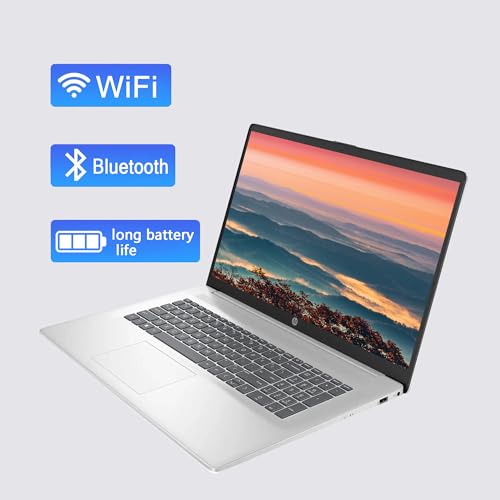
Up to 2TB PCIe SSD Lifetime Office license 17.3-inch display Wi-Fi 6 connectivity
Display brightness may struggle in very bright environments
Some laptops are built around speed. This one is built around capacity. With configurations offering up to 64GB of RAM and up to 2TB of PCIe SSD storage, the HP 17 is the kind of machine that encourages bad habits—in the best possible way. Leave Photoshop open, keep twenty tabs running, start a video call, and it barely notices.
The large 17.3-inch display contributes to that relaxed experience as well. There is simply more room to spread out documents, spreadsheets, and side-by-side windows without feeling squeezed into a smaller workspace. For people who spend most of the day working rather than traveling, the bigger screen quickly becomes difficult to give up.
Another practical bonus is the included lifetime Office license. For students, remote workers, or small business owners, having Word, Excel, and PowerPoint ready from day one removes an extra expense and setup step. Connectivity is solid too, with HDMI, USB-A, USB-C, Wi-Fi 6, and Bluetooth support covering most daily needs.
The screen is perfectly serviceable indoors, although direct sunlight and very bright environments can make it work a little harder to stay comfortable to view. Inside a home office or classroom, that limitation rarely draws much attention.

WQXGA touchscreen display DCI-P3 99% color gamut Intel Core Ultra 7 32GB DDR5 RAM
Touchscreen and high-resolution display may reduce battery life under heavy use
Picking up the LG Gram for the first time is slightly surprising. The screen suggests a large workstation, yet the chassis feels closer to something you'd expect from a much smaller machine. That balance between mobility and screen space is what makes the laptop stand out immediately.
The display deserves plenty of credit as well. Its WQXGA resolution and DCI-P3 99% color coverage create an image packed with detail and vibrant tones, making everything from photo editing to movie watching more engaging. Fine text looks crisp, colors appear more accurate, and creative work gains a little extra breathing room thanks to the taller resolution.
Moreover, the Intel Core Ultra 7 processor, 32GB of DDR5 memory, and 2TB SSD provide enough horsepower for demanding workloads while maintaining the responsiveness expected from a premium productivity laptop. Wi-Fi 7, Thunderbolt 4, HDMI 2.1, and a backlit keyboard round out a feature set that feels thoroughly modern.
Long stretches away from a charger can become shorter than expected when the touchscreen and high-resolution display are pushed heavily throughout the day. Many owners will happily trade a little battery endurance for a screen this capable.

AI-ready performance Fingerprint reader TPM 2.0 security Extensive port selection
Speakers are adequate but not exceptional for entertainment
ThinkPads have earned a reputation for being dependable workhorses, and the E16 continues that tradition. Open a spreadsheet, launch a few business applications, jump into a video meeting, and the system keeps pace comfortably thanks to the Intel Core Ultra 7 processor and DDR5 memory. It even has enough computing power to support mainstream AI workloads locally, which is becoming increasingly relevant in modern workplaces.
Security is another area where Lenovo clearly prioritized business users. Features like a fingerprint reader, TPM 2.0, privacy shutter, and Kensington lock slot help create a laptop that feels ready for professional environments right out of the box.
The 16-inch WUXGA display also strikes a practical balance. Its taller aspect ratio creates extra vertical workspace for documents, coding projects, data analysis, and multitasking. Around the sides, you'll find a healthy selection of ports including USB-C, USB-A, HDMI, Ethernet, and even an SD card reader, reducing the need for extra adapters.
Movie lovers may eventually reach for headphones or external speakers when it's time to relax after work. The built-in audio handles meetings and videos just fine, but entertainment isn't really the E16's primary mission.

16:10 touchscreen display ComfortView Plus Intel Core 5 processor HD camera with WDR Adaptive thermal technology
The glossy finish required for the touchscreen functionality
Hours disappear quickly when you're working on a laptop with a comfortable display. Dell's 16-inch screen uses a taller 16:10 aspect ratio that makes documents, websites, and spreadsheets feel less cramped. The touchscreen adds another layer of flexibility, especially for people who naturally interact with content more directly.
What really separates this model is ComfortView Plus. Blue light reduction features are common these days, but Dell manages to lower eye strain while maintaining more natural-looking colors than many competing implementations. That becomes particularly valuable during long work sessions or late-night study marathons.
The Intel Core 5 processor keeps everyday productivity moving smoothly, while the HD camera uses wide dynamic range and temporal noise reduction to improve video calls in less-than-perfect lighting conditions. Adaptive thermals also quietly optimize performance based on how and where the laptop is being used.
Large office windows and bright sunlight can create extra reflections on the touchscreen surface. Indoor users likely won't think much about it, but frequent outdoor workers may notice the difference sooner.

RTX 5060 graphics Intel Core i7-14650HX 165Hz display Vapor chamber cooling
Can get heat under heavy loads
Fast-paced games are where the Strix G16 really comes alive. The combination of an Intel Core i7-14650HX processor and NVIDIA GeForce RTX 5060 graphics creates a machine capable of handling modern AAA titles, competitive esports games, and demanding creative workloads with confidence. DLSS 4 and NVIDIA's latest architecture help squeeze even more performance from supported titles.
The 165Hz display plays an equally important role. Camera movement looks fluid, enemy tracking becomes easier, and the overall experience feels more responsive compared to traditional 60Hz panels. ASUS also includes an ACR film layer designed to improve contrast while cutting down reflections.
Under sustained gaming loads, the advanced cooling system gets plenty of opportunities to prove itself. Vapor chamber cooling, tri-fan technology, and liquid metal thermal compounds all work together to help maintain performance during extended sessions. The laptop even adds a full-surround RGB light bar for users who enjoy a more customizable gaming setup.
However, extended gaming sessions can eventually push temperatures upward despite the impressive thermal design. Given the level of hardware packed inside, that behavior is hardly surprising.
What Are the Most Critical Aspects of best 17 inch laptop That You Should Concentrate on?
You must know the best 17 inch laptop to make a substantial purchase. There's a slew of additional issues which have to be looked at and assessed. Each commodity has its own set of difficulties. As a result, you can rely on us to give you comprehensive counsel and support.
You might quickly become overwhelmed in your quest for the best 17 inch laptop because there are so many models and features. Avoid being suffocated by an expensive item that only serves to take up room in your cupboard by following our advice.
- Your Financial Situation: Once shopping for a fantastic product, understanding its prices is essential. Since the current version cost spans from low to high, the more high-end products combined with new features, the more unique features are introduced. Choose the right products depending on your needs and your budget.
- Models: You're likely to be overwhelmed by the sheer number of models and sellers available when you first contemplate purchasing a new product. As a result, you should know which type is best for you.
- Warranty Policy: The average warranty period for today's items is rather lengthy. Thus, you can use it without hesitation. Avoid purchasing items with an unknown origin and a limited assured duration if you don't want your money to waste. It's also ideal to look at the product's other characteristics while looking for a great product.
- Added Features: Another factor that should not be overlooked is the additional features. It would be beneficial to become familiar with the new features and essential qualities of a communication system product. It will include new features that are both current and different from earlier goods.
- Ingenious Options: To ensure that the product performs well, avoid wasting money, and avoid making avoidable mistakes while selecting it, you are expected to look at the model's qualities closely. Examine the main procedures and available options that directly impact your needs.
FAQs
Is a 17-inch laptop good for gaming and work?
Yes, 17-inch laptops are ideal for gaming, video editing, and multitasking thanks to their large display and powerful hardware.
What is the difference between 16-inch and 17-inch laptops?
17-inch laptops offer a bigger screen for better immersion, while 16-inch models are slightly more portable with similar performance.
Are 17-inch laptops too big to carry around?
They are less portable than smaller laptops, but still manageable if you prioritize screen size over mobility.
After all, it's time for you to pick up your buddy based on the things above. Don't waste your time at any unreliable site. As mentioned above, our website includes not only interesting information but authoritative one, so that you should come to us as regularly as possible.
We always welcome your feedback, whether positive or negative, since all of them will contribute to improving our site. Please join us for better service and wish you a cherishing shopping!
About Michael Brown