The Best 4k Projector For Apple Tv Of 2026
 By, Michael Brown
Updated
Summary

LG HU810PW 4K 300” Projector

Nebula X1 4K Projector

Hisense C2 Ultra 4K Projector
Our Top Picks


Dual laser projection 97% DCI-P3 color 2700 ANSI lumens AirPlay support
Large chassis requires more installation space than portable models
Walking into the room, the first thing you'll notice isn't the projector, it's the sheer size of the image. With support for screens up to 300 inches, the HU810PW transforms an ordinary wall into something that feels much closer to a dedicated home theater. AirPlay support makes the Apple TV ecosystem feel right at home, whether you're mirroring content from an iPhone or streaming movies through an Apple TV device.
Image quality holds up beautifully across different types of content. The dual laser light engine covers 97% of the DCI-P3 color space, while HDR10, HLG, and a 2,000,000:1 contrast ratio give movies noticeably richer colors and stronger depth. Bright scenes stay punchy, darker moments reveal more detail, and the 2,700 ANSI lumens provide enough brightness for rooms that aren't completely dark.
LG's built-in webOS 5.0 keeps navigation simple, so switching between streaming apps, Bluetooth audio devices, screen sharing, or an Apple TV setup takes very little effort. It ends up feeling less like a projector and more like a full entertainment hub designed for everyday use.
Finding a permanent spot takes a little more planning than it does with compact portable projectors because of the larger chassis. Once everything is in place, it becomes the kind of setup you rarely want to move.
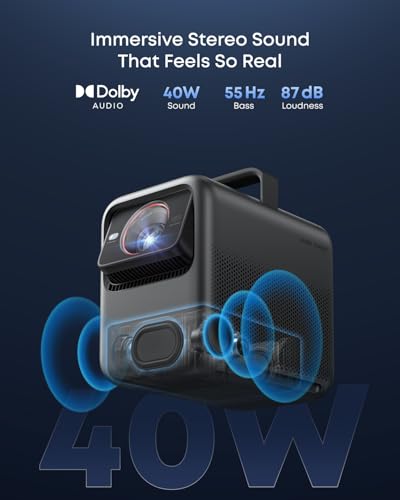
Dolby Vision support ISF-calibrated color 3500 ANSI lumens Auto-alignment
The battery is not built in
Movie lovers tend to notice contrast before they notice brightness, and that's exactly where the Nebula X1 shines. Dolby Vision and ISF-calibrated color accuracy work together to reproduce films with impressive depth, making scenes look much closer to the way they were intended to appear. From late-night thrillers to animated classics streamed through Apple TV, the picture carries remarkable dimensionality.
Its custom 14-element all-glass lens deserves plenty of credit as well. Fine textures stay consistent across the entire image instead of softening around the edges, even when projecting up to 300 inches. Pair that with 3,500 ANSI lumens, and the projector remains convincing whether you're watching indoors or setting up an outdoor movie night before sunset.
Daily use feels refreshingly straightforward. Auto-alignment quickly adjusts the picture without endless manual tweaking, while Spatial Recall remembers preferred settings for different rooms. Moving between a living room setup and a backyard screen becomes much less of a chore, leaving more time to enjoy the movie instead of adjusting the projector.
One thing to keep in mind is portability. Since the battery isn't built in, the projector is happiest in places where power is readily available rather than spontaneous grab-and-go outings.

Pure Triple Color Laser 3000 ANSI lumens AI 4K Upscaler 360° angle adjustment
Best image quality requires careful room lighting control
Not every room is shaped around a projector, which is why the C2 Ultra's flexibility becomes such a welcome advantage. Its adjustable stand offers 360° horizontal rotation along with generous vertical movement, making it easy to switch viewing angles whether you're relaxing on the couch, lying in bed, or hosting a backyard movie night with an Apple TV connected.
Image quality remains the centerpiece. A pure triple laser light source produces richer colors and deeper detail than traditional LED projection, while the AI 4K Upscaler gives older movies, home videos, and streamed content a noticeably cleaner appearance. The 3,000 ANSI lumens and 2,000:1 contrast ratio help maintain a bright, detailed picture across a variety of lighting conditions.
The optical zoom is another feature that quietly improves everyday usability. Instead of physically moving the projector closer or farther away, you can adjust the image size while preserving full 4K resolution and brightness. That makes adapting the projector to different rooms much easier than expected. To get the very best image, the room lighting deserves a little attention. Giving the projector a darker environment allows the triple laser system to show everything it's capable of.

4K PRO-UHD True 3-Chip 3LCD 2800 lumens Under 20 ms input lag
Black levels are not as deep as those of premium laser projectors
Movie nights don't always happen after sunset, so brightness matters more than many people expect. Epson equips the Home Cinema 2350 with 2,800 lumens of both color and white brightness, giving movies, TV shows, and sports enough punch to remain enjoyable even before the room gets completely dark.
Color reproduction is another highlight thanks to Epson's True 3-Chip 3LCD technology. Every frame displays the full RGB color signal, helping animated films, documentaries, and Apple TV originals look natural while avoiding the distracting rainbow artifacts associated with some projection systems. HDR10 and HLG support add more depth to both bright highlights and darker scenes.
The Android TV interface makes streaming straightforward, yet connecting an Apple TV is just as simple if that's already part of your entertainment setup. Switching between apps, live TV, and 4K movies feels seamless, while gamers can benefit from input lag below 20 ms when it's time to plug in a console.
Dedicated home theater enthusiasts who spend most of their time watching movies in a completely dark room may notice that black levels don't quite match premium laser projectors. For mixed everyday viewing, the overall picture remains very satisfying.

4LED light engine 4.2 ms input lag 240Hz refresh rate AirPlay support
Fan noise can increase during gaming sessions
Small rooms often limit projector choices, but the X500i's short-throw design solves that problem nicely. A 100-inch image from roughly 6.5 feet means you don't need an enormous living room to enjoy a genuinely cinematic screen size.
Gaming is clearly one of its strongest suits. The 4LED light engine delivers detailed 4K visuals, while response times as low as 4.2 ms and refresh rates up to 240Hz keep fast-moving action exceptionally fluid. Racing games, competitive shooters, and sports titles all benefit from the extra responsiveness.
Entertainment isn't limited to games, though. Built-in Android TV provides quick access to popular streaming services, and AirPlay support makes casting directly from an iPhone, iPad, Mac, or pairing with an Apple TV feel completely natural. TreVolo audio with Dolby Atmos support rounds out the experience with noticeably fuller sound than many gaming-focused projectors provide.
Long gaming sessions ask a lot from the cooling system, so the fan becomes easier to hear once the action heats up. Most players will probably stay focused on what's happening on screen rather than what's happening behind it.

Triple laser projection 154% DCI-P3 color gamut 450,000:1 contrast ratio Dolby Atmos support
Ultra short throw placement requires a stable, precise surface
Moving furniture around just to fit a projector gets old quickly. The CineBeam S avoids that entirely with its ultra-short throw design, allowing you to enjoy a large cinematic image without placing the projector across the room. It slips naturally into spaces where traditional projectors simply don't fit.
Picture quality easily keeps pace with the clever design. Triple laser projection combines with up to 154% DCI-P3 color gamut and a 450,000:1 contrast ratio to produce bold colors, deep blacks, and plenty of shadow detail. Movies, Apple TV originals, and HDR content gain an extra sense of depth that makes long viewing sessions more immersive.
Its compact footprint deserves recognition too. Measuring just 4.3 by 6.3 inches, the projector blends into shelves and TV cabinets without drawing much attention to itself. Add Dolby Atmos support and smart streaming capabilities, and the setup feels surprisingly complete despite its size. Ultra-short throw projectors reward careful placement. A stable, level surface helps the image stay perfectly aligned and lets the projector perform exactly as intended.
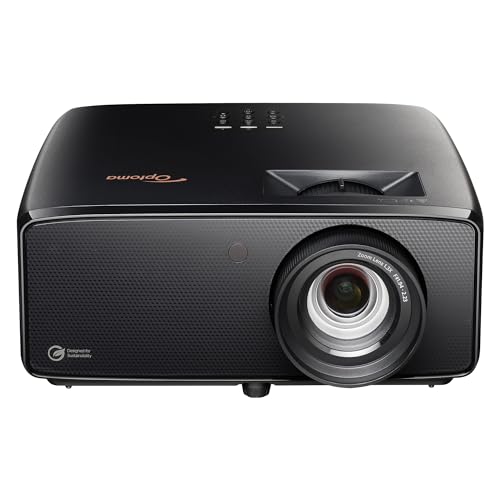
3500-lumen laser PureEngine processing HDR support Up to 300-inch display
Requires external speakers or a sound system for the best audio experience
Kickoff, tip-off, or lights down for movie night, the UHZ36 adapts comfortably to all of them. Its 3,500-lumen laser light source produces a bright 4K image that stays convincing in everyday living rooms, while HDR support gives highlights more intensity and darker scenes better definition. Apple TV content looks especially clean thanks to the added detail of 4K UHD resolution.
Large-screen flexibility is one of its biggest strengths. You can scale the image from 50 inches all the way up to 300 inches, making the projector equally comfortable in compact spaces or dedicated home theater rooms. That versatility means upgrading from a television feels less like a compromise and more like a completely different viewing experience.
Optoma's PureEngine processing quietly works behind the scenes to sharpen textures, deepen contrast, and smooth fast-moving action. Whether it's an action movie streamed through Apple TV or a live sports broadcast, movement remains controlled while colors retain a natural, cinematic appearance. FILMMAKER MODE is a welcome addition for anyone who prefers movies without excessive image processing.
The visual performance easily carries the experience, although pairing the projector with external speakers or a dedicated sound system allows movie nights to sound every bit as impressive as they look.
What to Look For in a best 4k projector for apple tv?
Please follow the bellow points before selecting the best 4k projector for apple tv:
Portability
Brightness
The ambient lighting level, size and material of your projector screen will all affect the brightness. You should buy a professional seller if you are installing a projector in a permanent location, such as at your home, to ensure that you get the best image brightness and the correct screen material.
Contrast Ratio
Contrast ratings can only be used to measure in dark rooms. They don't give any information about ambient lighting. Unusually dark blacks in the projector will result in lower contrast. A brighter projector will perform well in home theaters, but not in living rooms or offices.
Resolution
The calculation for projectors that have 4K ultra high definition (3,840 x 2,160 pixels) is slightly different.
Projection Tech
DLP projectors with single-chip DLP chips could be subject to the so-called "rainbow effect." Sometimes, tiny, bright flashes with rainbow-like colors may appear, especially in dark scenes. Some DLP projectors have a minimal effect, while others can produce a distracting result, especially when there are bright areas against shady backgrounds. The rainbow effect is not a problem with LCD projectors, which are safer if someone in your household has sensitive eyes. There are many DLP projectors that produce excellent images.
Light Source
For longer periods of time, LEDs and lasers retain a greater percentage of their original brightness. While all light sources eventually lose their brightness, lamps lose the most in 500 hours. Then, they slowly decline over time. The brightness of LEDs and lasers will decrease more slowly over the course of their lifetimes.
Connection Methods
Component video, composite video and S-Video all make up the most common connections on large projectors. We're also seeing more projectors that offer direct USB connection to computers via a USB cable. A growing variety of projectors now have USB Type-C ports. The majority of USB-C ports can be used to transfer data or video using the DisplayPort protocol. Most USB-C ports support USB Power Delivery (USB PD), which means that a plugged in projector can supply 100 watts of power to charge a device or to charge it using a USB-C cable (assuming the device is capable of charging over USB-C).
FAQs
Can I use Apple TV with any 4K projector?
Yes, as long as the projector has an HDMI port. Simply connect your Apple TV device via HDMI to start streaming.
Do I need a smart projector to use Apple TV?
No. Apple TV works independently, so even a non-smart projector can stream content when connected to the Apple TV device.
What features should I look for in a 4K projector for Apple TV?
Look for 4K resolution, HDR support, sufficient brightness, low input lag (if you game), and HDMI 2.0 or newer for the best experience.
In general, it's difficult to say who creates the best 4k projector for apple tv since each firm has unique qualities, features, and pricing points that set them apart from the competition. We only suggest products from the most outstanding manufacturers on our site, so you can rest assured about their quality.
Please do not hesitate to contact us if you require assistance with your problems. Wish you a happy shopping!
About Michael Brown