The Best Affordable Laptop For 2026
 By, Michael Brown
Updated

Summary

Apple MacBook Neo 13-inch Laptop

HP 255 G10 Laptop

Lenovo IdeaPad 1 Laptop 15.6”
The word "affordable" has changed quite a bit over the past few years. For many buyers, it no longer means buying theest laptop on the shelf. Instead, it means finding a device that offers the right balance of performance, reliability, battery life, and longevity for the money you're willing to spend. A laptop that still feels fast after several years can often be a more affordable choice in the long run than one that needs replacing much sooner.
Today's market reflects that shift. Affordable laptops now range from entry-level Windows notebooks to premium ultrabooks that have become more accessible through competitive pricing. Depending on your needs, spending a little more upfront can unlock a noticeably better display, stronger performance, or a battery that lasts through an entire workday.
The Apple MacBook Neo 13-inch Laptop perfectly illustrates this idea. It delivers the premium build quality and efficiency Apple is known for while remaining competitively priced within today's laptop market. Rather than setting a strict price ceiling, we've selected laptops that offer exceptional value at their respective price points. Whether you're shopping for school, work, creative projects, or everyday use, these models prove that an affordable laptop can still be an excellent one.
Our Top Picks
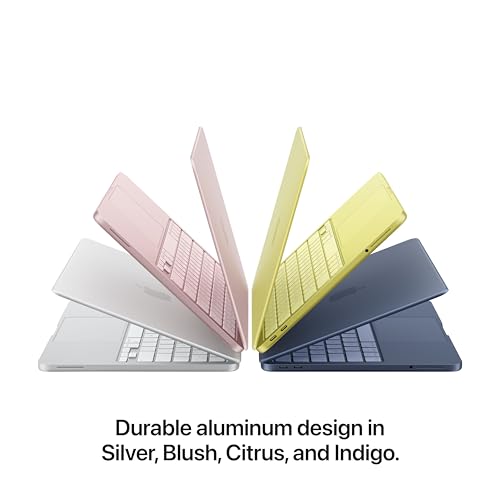

A18 Pro chip Liquid Retina display 16-hour battery life 1080p FaceTime camera
No Touch ID
The aluminum body gives this 13-inch laptop a reassuringly finished character from the moment it lands on a desk. It is portable enough to move between classes, the library, and home without becoming a chore, while the recycled aluminum enclosure adds durability without losing Apple’s clean appearance. Four color choices give the design a little more personality, though Silver remains an easy fit in almost any setting.
Inside, the A18 Pro chip is tuned for everyday assignments, presentations, Apple Arcade games, and AI-assisted work. Apple Intelligence can help summarize notes, shape writing, and organize routine tasks with privacy protections built into the experience. The Liquid Retina display supports one billion colors, giving photos and video a lively appearance while keeping text crisp for long reading sessions. Up to 16 hours of battery life matters just as much: a full day can pass without constantly searching for an outlet.
Video calls benefit from the 1080p FaceTime HD camera, dual microphones, and side-firing speakers. macOS keeps familiar apps moving quickly, and the connection between Mac and iPhone makes it easy to continue an email, access a photo, or place a call across devices. There is no Touch ID on this configuration, so signing in lacks the fingerprint convenience found on some Macs. Even so, the long battery life, bright display, and seamless Apple ecosystem make this one of the most polished affordable laptops for daily use.
Full HD display Four-core Ryzen Thin lightweight design Windows 11 Home
Ryzen 3 processor is better suited to everyday workloads
Open several documents beside a busy collection of browser tabs and the value of 16GB RAM becomes immediately apparent. The HP 255 G10 has enough working space for office software, research, email, and online meetings to coexist without constant housekeeping. Its 256GB SSD keeps startup and file access responsive, while Windows 11 Home provides useful window layouts and improved multi-monitor support when the laptop reaches a larger desk.
The 15.6-inch Full HD display gives spreadsheets and split windows more room than a compact notebook. At 1920 × 1080, text stays clear and video looks appropriately detailed, with AMD Radeon graphics handling routine work and entertainment. HP also keeps the chassis thin and light relative to its screen size, which is useful when the same machine needs to travel between home and an office.
The Ryzen 3 7330U uses a four-core architecture and emphasizes power efficiency alongside daily performance. A Ryzen 3 processor is better suited to everyday workloads, so intensive production work is not its central purpose. That is a fair trade for a laptop built around dependable productivity rather than expensive excess. With 16GB RAM, a large display, and a familiar Windows environment, the HP settles into ordinary work with very little fuss.

20GB system memory 1TB NVMe SSD Full HD screen Wi-Fi 6
Intel Celeron N4500 is most comfortable with lighter tasks
Large folders, downloaded lessons, family photos, and work documents can accumulate faster than expected. The IdeaPad 1 gives them breathing room through a 1TB PCIe NVMe SSD, which also helps Windows and applications start quickly. Its 20GB of high-bandwidth RAM supports numerous browser tabs and active programs, making the machine particularly comfortable for research, office work, and study routines that involve frequent switching.
The 15.6-inch Full HD screen creates a broad workspace at 1920 × 1080. A numeric keypad makes repeated calculations easier, while the port selection covers USB-C, USB-A, HDMI, audio, and an SD card reader. Wi-Fi 6 and Bluetooth handle wireless connections, and HDMI provides a straightforward route to a monitor or television. These practical touches matter more over time than a flashy feature used only once.
Intel’s Celeron N4500 is most comfortable with lighter tasks. For documents, email, online classes, and organized file keeping, those choices remain sensible. The real attraction is simple: far fewer compromises around storage and connectivity than many affordable laptops make.

Fast ChromeOS startup Built-in Gemini Titan C2 security Compact 11.6-inch design
No Backlit Keyboard
Lift the lid for a quick email or a shared document and ChromeOS is ready in under ten seconds. That immediacy suits short tasks especially well: checking a schedule, editing notes, joining an online lesson, or watching a video does not require a long setup. Automatic updates run behind the scenes, while the Titan C2 security chip and built-in protection reduce the amount of maintenance demanding attention.
Google’s ecosystem is central here. Gmail, Docs, Photos, YouTube, and Gemini are built into the experience, and Google Play opens access to familiar services such as Microsoft 365 and Adobe Express. A three-month Google AI Pro offer adds higher Gemini access and 5TB of storage during the promotional period. Gemini can also help with planning, writing, and learning directly from the home screen.
The hardware is intentionally straightforward: an Intel Celeron N4500, 4GB LPDDR4X memory, 64GB eMMC storage, and an 11.6-inch HD ComfyView display. Wi-Fi 5, Bluetooth 5.0, stereo speakers, a 720p webcam, USB-C, and USB-A cover the essentials. There is no backlit keyboard, so dim rooms may call for a little more ambient light. For straightforward web-based work, the compact size and quick ChromeOS experience keep the Chromebook pleasantly approachable.

Lifted ergonomic hinge Dedicated numeric keypad ComfortView software Express Charge support
Intel UHD graphics favors lighter visual workloads
A long spreadsheet session reveals this laptop’s priorities quickly. The lifted hinge creates a more natural typing angle, while the separate numeric keypad and calculator hotkey make repeated figures less tedious to enter. The 15.6-inch format leaves space for a roomy keyboard rather than compressing everything into a smaller chassis.
Dell ComfortView software reduces harmful blue-light emissions during extended viewing, a welcome touch for evenings spent reading documents or clearing the last items from a to-do list. The Intel Core 3 processor is built for everyday computing, and energy-efficient battery behavior helps preserve focus away from an outlet. Express Charge support also makes short charging breaks more useful when the day refuses to slow down.
Intel UHD graphics favor lighter visual workloads, so this is better matched with office tasks, learning, web applications, and entertainment than demanding graphics production. That softer ceiling rarely intrudes during the kind of work the Dell 15 is meant to handle. A year of onsite service adds practical reassurance if a covered hardware issue cannot be solved remotely. The result is an affordable laptop shaped around comfort and routine efficiency rather than headline-chasing specifications.

Ten-core processor 1TB PCIe SSD Full HD IPS Wide port selection
250-nit brightness works best away from strong sunlight
The Vivobook’s 14-inch Full HD IPS panel gives work a clean, well-proportioned canvas without making the computer cumbersome. Its anti-glare surface calms distracting reflections, and the 1920 × 1080 resolution keeps documents, code, and online lessons crisp. At 250 nits, the screen works best away from strong sunlight, making indoor desks, classrooms, and shaded cafés the more comfortable settings.
Performance is the stronger story. Intel’s Core 5 120U combines ten cores and twelve threads with boost speeds up to 5GHz, supporting study, business software, programming, and multi-application workflows. The 12GB RAM and 1TB PCIe SSD configuration gives both working room and substantial local storage, so everyday projects do not immediately push users toward an external drive.
Connectivity is unusually practical for the size. USB-C 3.2, three USB-A connections, HDMI, an audio jack, Wi-Fi 6, and Bluetooth cover peripherals and external displays, while the included 8-in-1 hub expands the setup further. A camera privacy shutter adds control during meetings, and SonicMaster-tuned speakers support calls and media. The 720p front camera is functional rather than a visual highlight, yet the balanced processor, storage, and port selection make the laptop unusually versatile at its price.

17.3-inch IPS display Long battery runtime HP Fast Charge AI noise reduction
17.3-inch chassis is less convenient for frequent travel
The first impression is simply how much room the Full HD IPS panel provides. Wide 178-degree viewing angles keep the image clear when someone sits beside the laptop, while the large format gives spreadsheets, reference pages, and split windows a comfortable scale. It can serve as a straightforward home workstation without immediately needing an external monitor.
The Ryzen 3 30 processor and Radeon 610M graphics focus on responsive everyday work, entertainment, and light photo editing. An 8GB LPDDR5 memory configuration supports routine application use, and the 512GB PCIe NVMe SSD provides quick storage for documents and media. Wi-Fi 6 and Bluetooth 5.4 keep wireless accessories and networks current, while the dedicated Copilot key gives Windows 11 users fast access to its AI assistant.
Calls receive more attention than expected at this price. Advanced AI noise reduction can focus on the speaker’s voice, and the FHD camera uses HDR auto-switching to balance color and contrast in awkward backlighting. Battery life reaches up to 14 hours and 15 minutes, with HP Fast Charge restoring roughly half the battery in about 45 minutes. The 17.3-inch chassis is less convenient for frequent travel, though that extra size is exactly what makes it so pleasant on a permanent desk. Its broad screen turns an affordable laptop into a genuinely comfortable home computer.
What to Look For in a best affordable laptop?
The best affordable laptop is the standard appliance in your life. Seeing that the item is introduced with many models with distinct functions and features, several challenges in selecting. However, anything has its solution, not except for that. We, the high-qualified expert in this area, will be available here to give you support.
Of course, looking for the best affordable laptop which suits you most requires many criteria to consider. You are projected to think carefully about each of the features below so that your choice will be appropriate:
CPUs
Two companies make laptop processors, Intel and AMD.
Hard Drive
If you have the funds, consider an SSD drive. It should be at least 256 gigabytes. SSDs perform faster than older standards like SATA, particularly if you use NVMe. This allows data to be transferred from the drive quickly.
RAM
For the most part, 8 gigabytes should suffice for Windows users. However upgrading to 16GB will increase your computer's performance and be a requirement for gamers. Before you purchase RAM, make sure it is properly soldered to your motherboard. It is impossible to replace the RAM if it has been soldered.
Operating System
FAQs
What is considered an affordable laptop?
Affordable laptops generally cost less than premium models while still providing enough performance for everyday tasks such as browsing, streaming, and office work.
What specs should I look for in an affordable laptop?
Look for at least 8GB of RAM, an SSD, a capable modern processor, and enough battery life for your typical daily activities.
Are affordable laptops good for students?
Yes. Many affordable laptops are well suited to writing assignments, online classes, research, video calls, and other common student tasks.
Look through again. The brand of product you choose will affect the options available to you. Moreover, pricer models will offer more customization options. We've covered top-scoring models varying at some price. So you have more choices to consider. Furthermore, our staff will update the info related to best affordable laptop with the newest data. Let check our site more regularly to get the latest options.
If you want to take practical support from our expert, don't hesitate to give us feedback. Please feel free to contact us. Hopefully, with our buying guide, you can have a happy shopping for the product.
About Michael Brown