The 7 Best 4k Ips Monitor For 2026
 By, Michael Brown
Updated
Summary

Gawfolk 27 inch 4K IPS Monitor

Dell 27 Monitor S2725QS 4K IPS

ASUS ProArt PA279CV 27 Inch 4K IPS Monitor
A 4K IPS monitor is where sharpness and consistency finally meet. The 4K resolution gives text, photos, videos, and interface elements noticeably finer detail, while the IPS panel helps colors remain accurate when viewed from different positions. That combination is especially useful for designers, editors, office professionals, and anyone who spends long hours working across several windows.
Still, seeing “4K IPS” on a product page does not guarantee a great monitor. Some displays look sharp but struggle with brightness or contrast. Others reproduce color well but feel limited by a basic refresh rate. Buyers who divide their time between productivity and gaming may find themselves choosing between image quality and smoother motion.
The Gawfolk 27 inch 4K IPS Monitor approaches that trade-off differently. Its dual-mode functionality gives users the flexibility to prioritize crisp 4K detail for work and creative tasks, then switch to a faster display mode when smoother gameplay matters more. Beyond the top pick, the 4K IPS category includes everything from affordable office displays to professionally calibrated creative monitors and gaming-focused models. We have narrowed the field to the options that use their resolution and panel technology effectively, rather than relying on impressive specifications alone.
Our Top Picks


4K 180Hz mode FHD 360Hz mode 100% sRGB coverage Four high-bandwidth inputs
The RGB back lighting may feel a little bold in understated office setups
Fast games expose the difference between resolution and speed almost immediately. At 4K UHD and 180Hz, the Gawfolk keeps detailed environments, small interface elements, and distant objects looking crisp while movement remains fluid. Switching to Full HD at 360Hz changes the emphasis: fine detail steps back, but quick turns and rapid target movement become easier to track during competitive play.
The IPS panel also gives the monitor a more versatile character away from games. Its 100% sRGB coverage and 10.7-billion-color reproduction through 8-bit + FRC processing create smoother transitions across skies, shadows, and color gradients. Photographs and video timelines retain a natural range of shades, and the wide viewing behavior of IPS is helpful when someone else is looking at the screen from beside the desk.
Adaptive Sync works quietly during changing frame rates, reducing tearing, stutter, and distracting visual breaks. Connectivity is equally practical: two HDMI 2.1 inputs and two DisplayPort 1.4 connections make it easier to leave a gaming PC, console, and another device attached without repeatedly swapping cables. Built-in speakers handle everyday audio, while the height-adjustable, rotating stand gives the screen enough flexibility for longer work or play sessions.
Low-blue-light and flicker-free technology are welcome when an evening session stretches on. The rear RGB lighting adds color around the wall and gives a gaming setup more atmosphere after dark, though it may look a little bold when the same monitor is placed in a restrained office. The ability to move between sharp 4K presentation and extremely fast Full HD motion remains the defining attraction.

Sharp 4K IPS panel Up to 120Hz refresh AMD FreeSync Premium Improved ComfortView Plus
The ash-white finish may not blend as naturally with darker desk setups
Fine text and crowded desktop layouts reveal the value of 4K resolution quickly. On the Dell S2725QS, spreadsheet cells, browser type, and high-resolution images remain clean across the 27-inch IPS panel, giving workspaces room to breathe without making small details look rough. The ultra-thin bezel also keeps attention on the desktop rather than the frame around it.
Color has a balanced, natural appearance thanks to 99% sRGB coverage. A 1500:1 contrast ratio adds useful separation between brighter details and darker areas, while HDR readiness gives compatible photographs, videos, and games more depth. The result works especially well for mixed days that move between documents, image editing, and entertainment rather than staying inside one narrow task.
Motion is noticeably smoother at refresh rates up to 120Hz. Scrolling through long pages looks more composed, cursor movement is cleaner, and AMD FreeSync Premium reduces tearing when frame rates fluctuate during games. Dell also lists an ultra-low 0.03ms response time, which helps rapid movement appear immediate instead of leaving the screen looking sluggish.
ComfortView Plus reduces harmful blue-light emissions to 35% or less while preserving color accuracy, so the picture does not take on the heavy amber tint common to more aggressive eye-comfort modes. That subtlety matters during long afternoons. The re-engineered speakers bring greater output, deeper frequency response, and a wider decibel range than the previous generation, providing convenient sound without adding separate desktop speakers.
The ash-white finish and slim border create a calm, modern presence on a light-colored desk. It may not blend as naturally with darker keyboards, cases, and furniture, although that is more a question of setup aesthetics than daily performance. Crisp 4K detail, smoother 120Hz movement, and thoughtful viewing comfort make the screen easy to live with for hours at a time.

Calman Verified calibration Delta E below 2 100% sRGB coverage 100% Rec. 709
The 65W USB-C output may charge more power-hungry laptops at a slower rate
A photograph can look polished on one screen and unexpectedly different on another. The ProArt PA279CV addresses that uncertainty with factory calibration, Calman verification, and Delta E below 2 color accuracy. Subtle skin tones, neutral grays, and closely spaced shades are easier to judge when the monitor is already tuned for precise work.
Coverage of 100% sRGB and 100% Rec. 709 also gives creative projects a dependable color space. Those standards matter for photographs, graphics, and video intended for common digital displays, where exaggerated saturation can hide mistakes during editing. The 27-inch 4K UHD presentation gives detailed images and dense timelines room to remain clear.
USB-C is central to the desk experience. DisplayPort over USB-C carries the image signal while providing up to 65W Power Delivery, allowing a compatible laptop to connect through one cable. A separate DisplayPort, HDMI input, and USB 3.1 hub leave space for other computers, peripherals, and storage without forcing every device through the laptop.
The included three-month Adobe Creative Cloud access adds practical value for someone beginning a new editing setup, and the five-year warranty combines three years of standard coverage with a two-year extension after online registration. More power-hungry laptops may charge at a slower rate from the 65W USB-C output, so demanding mobile workstations may need their original charger nearby. Accurate color remains the reason this ProArt earns its place on a creative desk.

Sharp 4K IPS panel Smooth 144Hz refresh 120% sRGB coverage Fully adjustable stand HDMI 2.1 connectivity
Built-in Speakers are not very good
Fast motion looks far more convincing when sharpness and refresh rate work together. The CRUA combines a 27-inch 4K IPS panel with a 144Hz refresh rate, keeping detailed game environments clear while camera turns and rapid movement remain fluid. That balance also suits open-world games, high-performance PC setups, and daily work where extra resolution makes small text easier to read.
Color has plenty of energy across the screen. Coverage rated at 120% sRGB, brightness of 350 cd/m², and a 1000:1 contrast ratio give photographs, design projects, and media a rich presentation. The IPS panel helps those tones remain more consistent when the screen is viewed from an angle, which is useful during shared editing or when the monitor is rotated.
The stand is unusually flexible for changing tasks. Height, pivot, tilt, and rotation adjustments make it possible to move from a conventional landscape layout to vertical viewing for code, long articles, or financial data. A 75 x 75mm VESA pattern adds another placement option for wall arms and multi-monitor stations.
HDMI 2.1 and DisplayPort 1.4 connections accommodate modern PCs and consoles, while the built-in speakers reduce the number of accessories on a minimalist desk. Their sound is better treated as a convenient everyday backup than the center of an entertainment setup; listeners who care about fuller audio may prefer separate speakers. The combination of 4K detail, 144Hz motion, and a fully adjustable stand gives the CRUA a lively personality beyond its white finish.

27-inch 4K IPS HDR 400 support Delta E below 2 Versatile USB-C connection
The 60Hz refresh rate is better suited to productivity than competitive high-frame-rate gaming
Fine image detail is easy to appreciate on the 27-inch 3840 x 2160 IPS panel. Its frameless design keeps the display visually open, while the 178-degree viewing angle helps color remain consistent when the screen is seen from the side. Maximum brightness reaches 400 nits, giving bright interface elements and highlights enough presence in a typical workroom.
Color reproduction is handled through 1.07 billion colors using 8-bit + FRC processing, accompanied by Delta E below 2 accuracy. Gradients in photographs and video avoid abrupt steps, and close shades are easier to separate during design or editing. The 1000:1 contrast ratio adds definition between light and dark content, while HDR 400 support brings compatible material a broader brightness and color presentation.
The port layout suits a mixed-device desk. USB-C can connect compatible laptops, Macs, mini PCs, phones, and tablets, while DisplayPort and HDMI cover traditional computers and other sources. A 3.5mm audio jack completes the set, and the plug-and-play approach keeps setup straightforward when devices change throughout the day.
Positioning is equally adaptable. The stand supports 45-degree movement to the left or right, height adjustment of approximately five inches, forward and backward tilt, and pivot up to 90 degrees. A 75 x 75mm VESA pattern allows wall or arm mounting when desk space matters.
At 60Hz, motion is suited more naturally to productivity, photo and video work, and general entertainment than competitive high-frame-rate gaming. That tradeoff keeps the monitor’s identity centered on detailed 4K imagery, flexible USB-C connectivity, and accurate color.

95% DCI-P3 coverage VESA DisplayHDR 400 Black Stabilizer Dynamic Action Sync Flexible Switch app
No USB-C Port
The 27-inch 4K IPS panel gives fine textures, small interface elements, and high-resolution video a clean presentation. Coverage of up to 95% DCI-P3 expands the visible color range, bringing richer reds, greens, and subtle intermediate shades to films, photographs, sports, and games without relying on a narrow palette.
VESA DisplayHDR 400 compatibility adds another layer to supported content. Brighter highlights gain more presence while darker areas retain useful detail, allowing HDR footage to show a clearer distinction between light and shadow. That broader presentation is especially noticeable in colorful cinematic scenes and games with dramatic lighting.
LG’s Black Stabilizer takes a more practical approach to dark imagery by brightening shadowed areas. Hidden opponents and objects become easier to identify without waiting for the entire scene to move into the light. Dynamic Action Sync complements it by reducing input lag, helping controls respond more quickly during active play.
The Switch app turns the display into a more organized workspace. It can divide the screen into as many as six sections, customize layouts, and launch video calls with a hotkey. Shortcuts also simplify movement between a PC and the built-in webOS platform, giving the monitor useful flexibility when work and entertainment share the same desk.
Height, tilt, and pivot adjustments make it easier to position the screen for different chairs, viewing angles, or vertical content. There is no USB-C port, so compatible laptops will need another video connection and a separate charging arrangement. Rich DCI-P3 color and DisplayHDR 400 remain the features that give images their strongest impact.
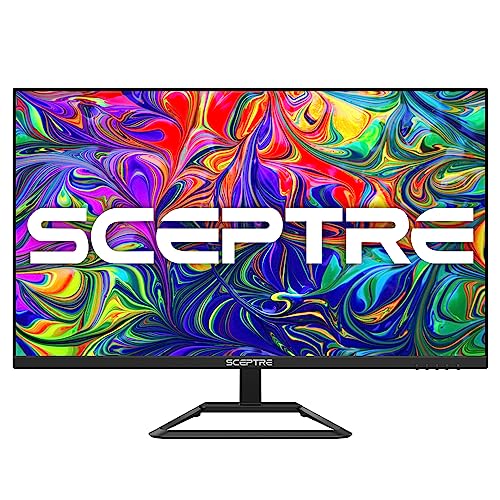
70Hz refresh rate Built-in speakers Rich color variation Reduced screen tearing
Slower response time
Text is often the first thing that benefits from higher resolution. With 4K UHD delivering over eight million pixels, spreadsheets become easier to scan, photos reveal finer details, and videos look far more lifelike thanks to the extra clarity, richer color variation, and stronger contrast. Whether you're editing documents or watching a movie after work, the screen makes everything appear more refined.
Desk space is another area where this monitor keeps things simple. Built-in speakers eliminate the need for a separate pair of desktop speakers, making the setup cleaner while providing solid audio for meetings, videos, and casual gaming. It's a small convenience that quickly becomes part of your daily routine.
The 70Hz refresh rate adds another welcome improvement over a standard 60Hz display. Mouse movements look smoother, scrolling feels more fluid, and screen tearing is reduced during lighter gaming sessions. It's not designed as a competitive gaming monitor, but the extra refresh rate makes everyday use feel more responsive.
Fast-paced games expose the monitor's slower response time more than office work or media consumption. For productivity, movies, and general home use, that trade-off is unlikely to be a major concern.
What to Look For in a best 4k ips monitor?
Some of you may be reluctant to select one of the best 4k ips monitor, to be honest. The main reason is that you didn’t study that before. There are pretty lots of factors that must be considered when investing in best 4k ips monitor. You are expected to count on our expertise in best 4k ips monitor to make the right choice.
So now we move on to the significant factors related to best 4k ips monitor you must keep in mind:
Response Time
Aspect Ratio
Panel Type
Connections
Resolution
Screen Size
Brightness
Refresh Rate
FAQs
What are the benefits of a 4K IPS monitor?
A 4K IPS monitor offers sharp image quality, wide viewing angles, and accurate color reproduction, making it ideal for productivity, creative work, and entertainment.
Is an IPS panel better than a VA or TN panel?
IPS panels are known for superior color accuracy and viewing angles, while VA panels offer better contrast and TN panels typically provide faster response times.
Who should buy a 4K IPS monitor?
A 4K IPS monitor is a great choice for designers, photographers, video editors, office professionals, and anyone who values crisp visuals and vibrant colors.
About Michael Brown