The 7 Best 30 Inch Smart Tv For 2026
 By, Michael Brown
Updated
Summary
INSIGNIA 32" TV

Samsung 32-Inch H5000F Smart TV
Roku 32-Inch TV
A 30-inch smart TV sounds like an ideal fit when you need something compact for a bedroom, kitchen, dorm, or other smaller space. The problem is that true 30-inch TVs have largely disappeared from the current market. Most manufacturers concentrate on standard sizes, and 32 inches has become the closest and far more widely available alternative.
Fortunately, the two-inch difference is small in everyday use. A 32-inch TV still has a compact footprint, but choosing this size gives you access to a much broader range of modern smart platforms, resolutions, and features. It is also easier to compare models from established TV brands without limiting yourself to older or obscure 30-inch options.
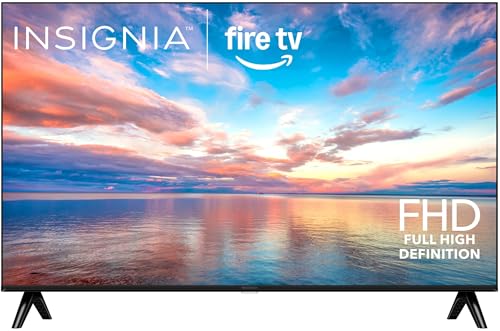
Our top recommendation is the INSIGNIA 32" TV. It pairs a compact screen with Full HD resolution and built-in Fire TV, making it a practical choice for streaming shows, watching movies, or adding a secondary television to the house without taking up too much room.
So, if you arrived here specifically looking for a 30-inch smart TV, don't worry about moving up slightly in size. We've focused on 32-inch models that deliver the same space-saving appeal while giving you considerably more choice in features, picture quality, and overall value.
Our Top Picks


Crisp Full HD picture Convenient Fire TV interface Useful Alexa voice control Broad connection selection
60Hz refresh rate
Some televisions feel more complicated than they need to be, but this INSIGNIA keeps everyday viewing refreshingly straightforward. Its 1080p resolution gives movies, television shows, and live programming a clean Full HD presentation, while the LED-backlit LCD panel adds dependable color and contrast across different types of content.
Fire TV gathers subscriptions, free television, games, and music on one familiar home screen. With access to more than 1.5 million movies and episodes, there is plenty to explore, and the platform continues to receive new Alexa skills and smart-home functions over time. The Alexa Voice Remote also makes it easier to search across apps or switch inputs without repeatedly moving through menus.
DTS TruSurround gives the built-in speakers a broader, more enveloping character. Meanwhile, Apple AirPlay provides a quick route for sharing photos, music, and video from an Apple device. Three HDMI ports, USB, Ethernet, optical audio, a headphone jack, and legacy AV connections leave useful room for consoles, sound systems, and older components.
The 60Hz refresh rate is better suited to films, series, and casual play than high-frame-rate gaming. For normal home entertainment, however, movement remains comfortable and the television's accessible controls are likely to matter more.

Clean minimalist styling Enhanced scene contrast Motion-following virtual sound Seven-year OS updates
Entry-Level Processing
A small television can still feel thoughtfully finished, and Samsung proves that here. The slim profile and narrow bezels keep the hardware visually quiet, allowing the picture to take the focus whether the set is placed on furniture or incorporated into a compact wall arrangement.
Expanded contrast brings more separation between bright and dark areas, helping shapes and textures appear with greater depth. Object Tracking Sound Lite works alongside the image by positioning audio around the movement on screen, so dialogue, action, and effects feel more connected to what is happening in each scene.
One UI Tizen organizes streaming apps, games, and personalized content in an approachable layout. Samsung TV Plus also opens access to more than 2,700 free channels, including over 400 premium channels, without requiring another subscription. Just as importantly, Samsung promises seven years of automatic operating-system updates, while Knox Security uses three layers of protection to help defend passwords, PINs, and connected IoT devices.
Its entry-level processing is designed around dependable daily entertainment rather than the advanced refinement found in Samsung's premium televisions. Even so, the combination of HDR support, responsive navigation, protected personal data, and motion-aware sound creates a well-rounded experience for a smaller room.

Bright Full HD image Quick, simple navigation Wide free-content library Flexible voice assistant support
Basic Audio Power
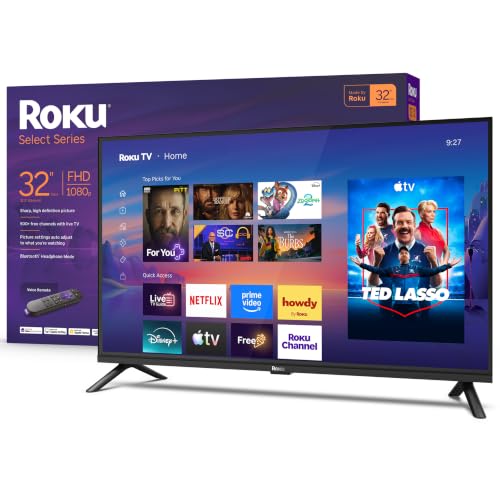
Finding a show should not feel like a project. Roku builds this television around that idea, beginning with a setup that takes only minutes and a clean home screen that keeps apps, inputs, and recommendations within easy reach.
The 1080p Full HD panel supplies a bright, clear image for movies, live television, and everyday programs. Roku Smart Picture analyzes incoming signals, cleans them up, and selects an appropriate picture mode, which is especially helpful when moving between antenna broadcasts, streaming services, and older material. Fast Wi-Fi and quick-loading apps help the experience maintain its relaxed pace.
Free entertainment is woven directly into Roku OS, covering live television, news, sports, movies, and shows. Personalized picks reduce aimless scrolling, while voice search can look across thousands of apps rather than treating each service as a separate destination. Siri, Alexa, Google Assistant, and Apple AirPlay provide additional ways to control or share content.
The built-in audio prioritizes clear speech rather than room-filling power, so viewers who enjoy cinematic bass may eventually want a soundbar. Bluetooth Headphone Mode offers a more personal alternative, letting someone continue watching without disturbing the rest of the home.

Straightforward everyday operation Flexible device compatibility Built-in antenna tuner Helpful parental controls
No built-in smart platform
Not everyone wants another home screen, account, or set of automatic recommendations. This Westinghouse television keeps the experience direct, providing a 32-inch LED display that turns on ready for the device or broadcast source you choose.
Its 720p HD picture uses progressive scan to reduce flicker and keep quick movement looking smoother. HDMI and USB inputs accommodate popular streaming sticks, media players, game systems, and computers, while the VGA connection makes the screen useful with older PCs. An integrated tuner also receives free over-the-air channels through an antenna, or it can work with a conventional cable box.
The modest footprint makes it easy to place in an office, kitchen, children's room, garage, or RV with a suitable inverter. Parents can use the built-in V-chip controls to block programming according to ratings and review guidance for unfamiliar shows, adding a practical layer of control in shared family spaces.
Because there is no built-in smart platform, streaming requires an external player such as a Roku, Fire TV Stick, or Apple TV. That extra device also gives the owner freedom to choose a preferred ecosystem and replace it later without replacing the screen.

Fast Wi-Fi 6 streaming Responsive quad-core performance Helpful presence sensing Natural Alexa+ search
Only two HDMI inputs
Convenience begins before a program even starts on the Amazon Ember. Omnisense sensors detect when someone enters the room and wake the display, either showing selected artwork through Ambient Experience or placing entertainment within immediate reach.
Once it is on, a quad-core processor and Wi-Fi 6 support help apps open quickly and keep streaming smooth. The redesigned 2026 Fire TV interface separates content into useful categories, allows more favorite apps to be pinned, and uses personalized recommendations to shorten the search for something to watch. Free ad-supported programming sits alongside a much larger library of movies and episodes from subscription services.
Alexa+ brings a more conversational style to voice control. Through the enhanced remote, viewers can describe what they want naturally, manage compatible smart-home devices, or ask about other topics. Preset app buttons remain available when a direct shortcut is faster. The television also supports downloadable Appstore games and cloud gaming through Amazon Luna.
Two HDMI inputs cover essential accessories, though households connecting several consoles and media devices may need an HDMI switch. Still, AirPlay offers another convenient route for sharing content from compatible phones, tablets, and computers without occupying a port.
Vivid Hi-QLED colors Clean Roku navigation Effective frame noise reduction Responsive 16ms Game Mode
No True HDR Performance
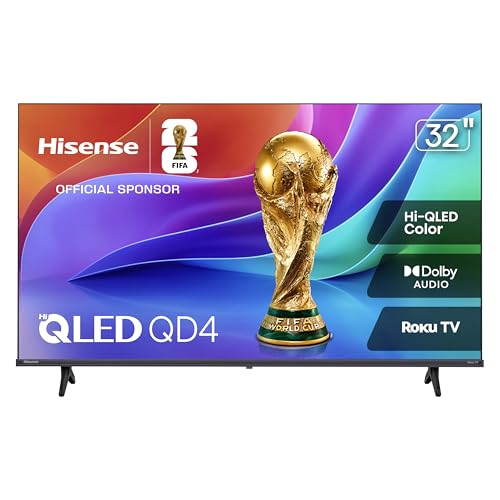
Color is the quality that gives this Hisense its personality. Hi-QLED technology is designed to reproduce shades, scenery, and skin tones with a convincing sense of realism, adding vibrancy without letting people look disconnected from the rest of the image.
Roku Smart Picture quietly handles another part of the viewing experience by optimizing the image for incoming content. Noise Reduction examines individual frames to clean up grain in older video, fast action, and darker scenes. For sports, AI Sports Mode addresses blurred movement while also strengthening crowd noise and commentator voices, helping a match feel more energetic from both a visual and audio perspective.
Roku OS places free and paid channels within an intuitive grid-based interface. The television offers more than 5,000 free movies and shows and over 40,000 hours of free content, while automatic software updates keep apps and features current. Backdrops can turn the idle screen into a gallery using notable artwork, photography, or personal pictures.
True HDR impact is not the main attraction at this screen size and class, particularly in very bright highlights. Instead, the richer Hi-QLED palette, Dolby Audio, and 16ms Game Mode provide noticeable improvements during the content people are most likely to watch or play every day.

Clean ad-free operation Broad streamer compatibility User-controlled viewing platform Free local channel access
No built-in smart OS
Sometimes the most welcome feature is the absence of clutter. TuTu skips a built-in smart operating system, so the television starts as a straightforward display rather than another source of advertisements, account prompts, and background software.
That design makes it easy to pair with a Roku, Fire TV Stick, Apple TV, Google device, TiVo, Xumo player, or game console. Owners can choose the interface they already understand, then upgrade or replace that external player independently as streaming technology changes. The 32-inch HD panel supplies a comfortably sized image for films, sports, and general television, while the energy-conscious hardware avoids the sluggishness that accumulated smart software can sometimes introduce.
An ATSC tuner adds access to free over-the-air HD channels for local news, sports, and emergency information. Dolby Audio supports clear dialogue and fuller built-in sound, reducing the immediate need for separate speakers in many smaller spaces.
There is no built-in smart OS, so online entertainment depends on a connected streaming device. For someone who already has one, this can feel less like a missing function and more like welcome control over the viewing platform and privacy.
Which Criteria Do Our Experts Advice To Consider When Purchasing Of best 30 inch smart tv?
According to our experts, you should understand some sides of the product to get the finest one. Like others, best 30 inch smart tv of 2026 might include many factors for you to take into account. For that, each among best 30 inch smart tv will have unique features and challenges as well to consist of.
The focus on the following features of best 30 inch smart tv is highly recommended, given they have come together with tech-evaluated certification:
High Dynamic Range (HDR)
HDMI And Connections
Connectivity
Display Types
Screen Resolution
Refresh Rate
Smart TVs
TV Screen Sizes
FAQs
What Is OLED TV Burn-in?
A burn-in occurs when a part of an image, such as the channel logo or news ticker on a TV, persists as a ghostly backdrop regardless of what else is onscreen. OLED TVs can burn in, however it is unlikely with regular use. You can prevent burn-in by changing what you are watching.
Do The Best TVs Need 4K Resolution?
The minimum resolution for 4K, as defined by TV companies, is 3840x2160 pixels or 2160p. A Full HD 1080p image measures only 1920x1080 pixels. A 4K screen can show approximately 8 million pixels. This is four times the resolution of a 1080p display.
This best TV guide will not show you anything less than 4K resolution. However, there might be an 8K TV that packs 33 million pixels for greater detail and a higher price.
What Is A Smart TV?
Smart TVs can be any TV with internet capabilities, so they can access streaming services and apps like Netflix, Hulu and Amazon Prime Video.
Each TV manufacturer has its own smart TV platform. These platforms can be used in different ways, including speed and quality. They also have different app support. For those who prefer to bark commands than click, some might not have Disney Plus or have a simpler layout.
Do You Need A Separate Sound System?
Even if you don't plan on using your soundbar to connect to surround sound systems, it's worth considering the audio quality of your set. You want a screen capable of delivering the loudest sound possible without distortion and cabinet rattle. Think about how the dialogue sounds, and what low-end rumble bass can produce.
How Do I Get The Best TV Sound?
Many TVs have poor sound quality due to their small cabinets that don't allow for adequate-sized speakers and bass. An external sound system is necessary to achieve the best possible sound quality. A soundbar can deliver better quality audio than TVs' built-in speakers.
Do I Need HDMI 2.1?
No. No. These features may provide smoother gaming, but they aren't often that significant. TVs without HDMI 2.1 support next-generation consoles perfectly.
How Big A TV Should I Get?
I believe that bigger screens are better and you should spend more money on larger screen sizes than on image quality. It also depends on the size of your room and how far you sit. If you are sitting further from the TV, you will need a larger screen. It also depends upon the size of your room and how far you are from it.
Should You Wall-mount One Of The Best TVs?
To make sure that your flatscreen can be supported by the wall, consult a professional. Next, find out whether the set is wall-mountable and ask for the bracket's inclusion in either the base package or an add-on.
About Michael Brown