The Best 27 Inch 1440p 144hz Monitor For 2026
 By, Michael Brown
Updated
Summary

ASUS TUF Gaming 27" 1440p Monitor VG27AQ

Dell 27 Plus QHD Monitor S2725DSM

MSI PRO MP273Q E14 27-inch 1440P Monitor
There is a reason 27-inch 1440p 144Hz monitors have become the default recommendation for so many PC gamers. They strike a balance that is surprisingly difficult to beat. The screen is large enough to feel immersive without overwhelming your desk, the 1440p resolution delivers a noticeable jump in sharpness over Full HD, and a 144Hz refresh rate keeps gameplay smooth across everything from competitive shooters to story-driven adventures.
Of course, those specifications alone do not guarantee a great monitor. Two displays with the same size, resolution, and refresh rate can deliver very different experiences depending on their panel quality, color accuracy, motion handling, and gaming features. That is why choosing the right model often comes down to more than simply comparing numbers on a spec sheet.
Among the many options available, the ASUS TUF Gaming 27" 1440p Monitor VG27AQ has remained a favorite for years. It combines a fast IPS panel, excellent gaming performance, Adaptive Sync support, and strong overall image quality in a package that appeals to both competitive gamers and everyday users. More importantly, it offers the kind of all-around experience that many buyers expect when shopping in this category.
To help narrow down the choices, we've gathered the standout 27-inch 1440p 144Hz monitors that consistently deliver where it matters most. Whether your priority is competitive gaming, immersive visuals, or getting the best value for your money, you'll find an option that fits your setup.
Our Top Picks


165Hz refresh rate (supports 144Hz) WQHD IPS panel ELMB SYNC HDR10 support
Built-in speakers are adequate for basic use
The pace picks up quickly once a game starts, and that's where the VG27AQ begins to shine. Its 165Hz refresh rate keeps movement looking exceptionally fluid, making fast camera pans, racing lines, and quick target tracking much easier to follow than on a conventional 60Hz display.
Image quality doesn't take a back seat either. The 27-inch WQHD IPS panel packs noticeably more workspace than a standard Full HD monitor, while the 99% sRGB color gamut and wide viewing angles keep colors looking consistent from almost anywhere in front of the screen. HDR10 support adds another layer of depth by letting you choose different HDR modes depending on what you're playing or watching.
Competitive players will appreciate ASUS's ELMB SYNC technology, which works alongside G-SYNC Compatible mode to reduce ghosting and tearing without forcing you to choose one feature over the other. Shadow Boost rounds out the gaming toolkit by brightening darker areas without blowing out highlights, making hidden opponents easier to spot during tense moments. Connectivity remains straightforward with DisplayPort and HDMI support for a wide range of devices.
The integrated speakers are perfectly acceptable for quick videos or system audio, but they lack the fullness many gamers expect from dedicated desktop speakers or a good headset.

QHD resolution 144Hz refresh rate 1ms MPRT TÜV-certified eye comfort
No USB-C connectivity
Sit down in front of the S2725DSM and the extra detail is immediately noticeable. QHD resolution paired with a 1500:1 contrast ratio gives everyday content more depth, whether you're editing documents, catching up on YouTube, or exploring an open-world game after dinner.
Fast motion stays under control thanks to the 144Hz refresh rate and 1ms MPRT response time. Scrolling feels more fluid, games react more naturally, and action scenes carry less blur than they would on a traditional office monitor. The experience never feels exaggerated—it simply becomes easier on the eyes during long sessions.
Dell puts just as much attention into daily comfort. The TÜV-certified display reduces blue light while preserving image quality, helping extended work sessions feel less fatiguing. Ergonomic adjustments make it easy to dial in a comfortable viewing position, while the integrated dual 3W speakers provide enough audio for everyday videos, meetings, and casual entertainment without immediately reaching for external speakers.
Users hoping to connect newer laptops with a single USB-C cable will need to look elsewhere, since this model sticks with more traditional display connections.

WQHD IPS display 144Hz refresh rate Adaptive Sync support Eye-Q Check
Color accuracy may benefit from calibration for creative work
Spend an afternoon switching between spreadsheets, design software, and browser tabs, and the higher WQHD resolution quickly proves its value. The 27-inch IPS panel delivers noticeably more desktop space than Full HD, making documents easier to organize while producing sharper details and richer colors across everyday tasks.
MSI puts just as much emphasis on viewing comfort. TÜV Rheinland-certified Flicker Free and Low Blue Light technologies help reduce eye fatigue during extended sessions, while the built-in Eye-Q Check encourages healthier display habits by letting you assess your viewing conditions directly from the monitor.
Fast-paced content benefits from the 144Hz refresh rate and Adaptive Sync support, keeping gameplay fluid while minimizing tearing and stuttering. The tilt-adjustable stand, VESA compatibility, and ongoing firmware updates add flexibility that many buyers will continue appreciating long after the monitor arrives on the desk. Out of the box, creative professionals may want to spend a little time fine-tuning the color profile for projects where color precision is especially important.

129% sRGB gamut 4000:1 contrast ratio 144Hz refresh rate G-SYNC compatible
HDR10 support provides only modest visual improvements
Dark scenes are often where monitors begin to separate themselves, and the H27T27S makes a strong first impression with its 4000:1 contrast ratio. Combined with its QHD resolution and 144Hz refresh rate, gameplay looks fluid while everyday content gains noticeably better depth and definition.
Color performance is another highlight. The wide 129% sRGB gamut produces vivid images that work equally well for gaming, office tasks, and content creation. HDR10 compatibility adds a little extra punch to supported content, while G-SYNC and FreeSync compatibility help eliminate screen tearing during faster scenes.
The frameless design keeps multi-monitor setups looking clean, and the adjustable stand makes it easy to find a comfortable viewing angle. HDMI, DisplayPort, and a headphone jack provide enough flexibility for PCs, laptops, and gaming consoles without complicating the setup.
HDR10 support adds some extra depth to compatible content, although the improvement is more subtle than the jump offered by higher-end HDR implementations.
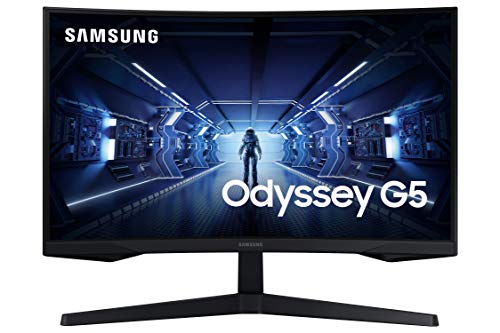
1000R curved panel WQHD resolution 144Hz refresh rate 1ms response time
Stand lacks swivel and pivot adjustments
The first few minutes are enough to understand why Samsung chose a 1000R curve. The screen naturally wraps into your field of view, creating a more focused experience while helping reduce eye strain during extended gaming sessions.
Image sharpness keeps pace with the immersive design. WQHD resolution packs in significantly more detail than Full HD, making environments, textures, and UI elements appear much cleaner. Pair that with a 144Hz refresh rate and 1ms response time, and movement remains crisp even during fast competitive matches.
AMD FreeSync Premium helps smooth out gameplay by reducing tearing and stuttering whenever frame rates fluctuate. The result is a presentation that feels more stable and responsive, especially in racing games, shooters, and other fast-paced titles.
The included stand focuses on the essentials, so anyone wanting swivel or pivot adjustments may prefer pairing the monitor with a compatible monitor arm for greater positioning flexibility.

Factory calibrated Calman Verified 90W USB-C USB hub functionality
The contrast ratio isn't the strongest
Editing photos or finishing a design project becomes much less stressful when the display has already been calibrated before it reaches your desk. The PA278CGV arrives factory calibrated and Calman Verified, giving designers, photographers, and video editors a level of color consistency that's ready from the moment it's powered on.
Desk setups are equally easy to manage. The integrated USB-C connection handles video, data transfer, and up to 90W power delivery through a single cable, while HDMI and DisplayPort expand compatibility with desktops, laptops, and other creative devices. Acting as a USB hub is another practical touch, reducing cable clutter around the workspace.
Comfort hasn't been overlooked either. The ergonomic stand supports height, tilt, swivel, and pivot adjustments, making it simple to switch into portrait mode for coding, document editing, or reviewing long web pages. The quick-release VESA mount speeds up installation if you decide to move the display onto a monitor arm later.
The contrast ratio isn't the strongest part of this monitor, particularly when compared with displays that prioritize deep blacks for entertainment. For color-critical work, accuracy remains the bigger priority.

1500R curved display QHD resolution 129% sRGB coverage Low Blue Light technology
The VA (HVA) panel can show some ghosting in fast-paced games
The 1500R curved panel immediately changes how the screen occupies your vision. Instead of everything sitting on a flat surface, the display feels more natural to follow from edge to edge, helping reduce eye fatigue during extended use. That effect becomes especially noticeable when working with multiple windows or exploring expansive game worlds.
Sharpness holds up nicely thanks to the 2560 × 1440 resolution, while the 144Hz refresh rate keeps scrolling, animations, and gameplay looking fluid. Whether you're editing photos or jumping into a competitive match, movement remains clean and responsive across the entire panel.
Color reproduction is another pleasant surprise. With support for 129% sRGB, 110% DCI-P3, and 16.7 million colors, the monitor delivers lively visuals suited to creative work, entertainment, and everyday productivity. Low Blue Light and Flicker Free technologies quietly help make longer sessions easier on the eyes, while the HDMI and DisplayPort inputs simplify connecting multiple devices.
Fast-moving scenes may reveal a small amount of ghosting from the VA (HVA) panel, although many users will only notice it during particularly demanding competitive games.
What to Look For in a best 27 inch 1440p 144hz monitor?
The best 27 inch 1440p 144hz monitor is based upon a number of factors. Studying a product differs depending on the product type. So, we're on here to help, counsel, and provide solutions to these problems.
Please keep in mind the following points for selecting best 27 inch 1440p 144hz monitor:
Brightness
Resolution
Response Time
Refresh Rate
Screen Size
Connections
Panel Type
Aspect Ratio
FAQs
Is a 27-inch 1440p monitor a good choice?
Yes. A 27-inch display paired with 1440p resolution offers excellent sharpness and plenty of screen space without requiring the power needed for 4K.
Is 144Hz enough for gaming?
Absolutely. A 144Hz refresh rate provides smooth gameplay and responsive performance, making it a popular choice for both casual and competitive gamers.
Can I use a 27-inch 1440p 144Hz monitor for work?
Yes. The QHD resolution provides more workspace for multitasking, while the larger screen makes documents, spreadsheets, and creative projects easier to manage.
As we are product consulting experts with a wide range of experience, we determine correct information. Apart from that, we keep the best 27 inch 1440p 144hz monitor current. You may rest confident that the data is accurate and up to date.
Besides best 27 inch 1440p 144hz monitor, we can advise you with anything. Please do not hesitate to contact us whenever you need guidance.
About Michael Brown