The Best 14 Inch Laptop For 2025
 By, Michael Brown
Updated
Summary

Apple MacBook M4 Pro
HP Elite c640 14" Chromebook

HP 14" Laptop
A 14-inch laptop is often the sweet spot for people who want flexibility without compromise. It is small enough to carry all day, yet comfortable enough to work on for hours without feeling limited. Whether you are answering emails at a café, editing documents during a commute, or relaxing with a movie at home, this size adapts easily to everyday life.
Right now, the Apple MacBook M4 Pro is one of the strongest options on the market. It combines a brilliant display, fast and efficient performance, and impressive battery life in a compact, premium design. That said, choosing the best 14-inch laptop is not only about picking the most powerful model. Some users value a lightweight build for travel, others want Windows compatibility, and many look for a balance between price and long-term durability. Screen quality, keyboard comfort, connectivity, and battery endurance all shape the daily experience more than specs alone.
This guide explores the best 14-inch laptops available today and helps you find the one that fits how you actually work, study, and move through your day.
Our Top Picks


M4 Pro handles heavy workloads Stunning Liquid Retina XDR display Strong performance on the battery Apps optimized for macOS
Higher price than most competitors
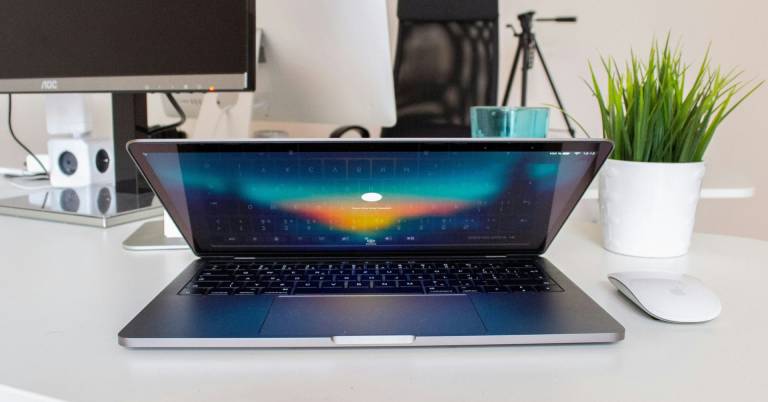
From the moment you open the MacBook M4 Pro, it feels ready for serious work. The M4 Pro chip handles demanding tasks like compiling massive amounts of code without hesitation, making long waits feel like a thing of the past. What’s impressive is that this level of power stays consistent whether the laptop is plugged in or running on battery, so performance does not drop when you’re on the move.
The 14-inch Liquid Retina XDR display adds another layer of enjoyment. With up to 1600 nits of peak brightness, everything looks crisp and vibrant, whether you are editing visuals or just juggling multiple windows. Apps like Microsoft 365 and Adobe Creative Cloud open quickly and run smoothly, thanks to Apple silicon and macOS working closely together.
Apple Intelligence also plays a role behind the scenes, helping with writing and productivity while keeping privacy front and center. It is reassuring to know your data stays protected, even from Apple itself. Although the price sits on the higher side, it still delivers long-term value through top-tier performance, battery life, and a polished experience that few laptops can match.

Built for enterprise environments Clear Full HD anti-glare display Strong multitasking performance Excellent webcam for meetings
Not designed to support gaming
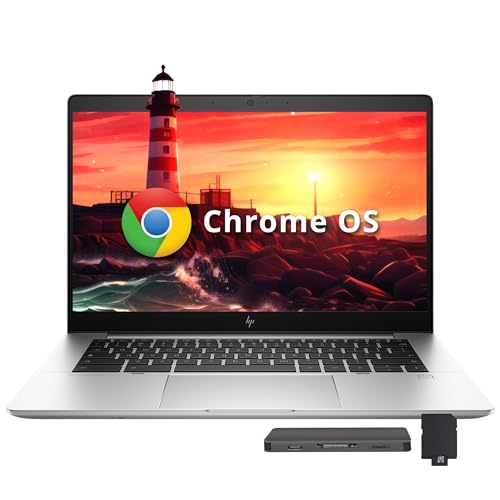
Spending time with the HP Elite c640 Chromebook feels a lot like settling into a well-organized workspace. Everything is where it should be, and nothing feels unnecessary. Powered by the Intel Core i5-1245U processor and backed by 8GB of LPDDR4X RAM, it handles daily productivity with ease. Jumping between documents, video calls, and dozens of browser tabs stays smooth and responsive, even during busy work sessions.
The anti-glare coating makes long hours easier on the eyes, whether you are under office lights or working near a window. Video meetings are another strong point, thanks to the 5MP front camera that keeps you looking clear and professional on calls. Wi-Fi 6E also plays its part quietly, keeping connections stable and fast when multitasking or streaming.
Storage comes as a combination of built-in eMMC and a docking station set, offering plenty of room for files and work materials. While this Chromebook is not designed for gaming, it still excels at what it was built for: secure, reliable, and efficient work inside the Chrome OS ecosystem.

Lightweight and easy to carry Helpful AI productivity tools Smooth everyday task handling Windows 11 Pro features
It can heat up during long use
Life with the HP 14" Laptop feels practical in the best way. It’s the kind of device you grab in the morning without thinking twice, slide into a backpack, and rely on throughout the day. The Intel N150 processor keeps everyday tasks moving smoothly, from browsing and writing papers to video calls and light multitasking. UHD graphics handle these routines quietly, making it a steady option for daily work.
Windows 11 Pro brings structure to busy schedules. Features like Snap layouts and built-in Copilot help organize windows, summarize content, and speed up writing tasks inside Microsoft 365. For students and part-time remote workers, this translates into less time managing tools and more time actually getting things done.
Moreover, the 14-inch size strikes a nice balance between screen space and mobility, making it easy to move between lectures, libraries, and cafés without feeling weighed down. Nevertheless, extended workloads can cause the laptop to warm up faster than expected, especially during long sessions. Even so, it remains dependable for everyday productivity, staying true to its role as a lightweight, go-anywhere notebook designed for modern routines.

Fast SSD and large RAM Smooth multitasking for daily use Sharp Full HD anti-glare screen Wide selection of ports
A bit flimsy
The ASUS Vivobook 14" Laptop is designed for everyday users who want speed, storage, and simplicity without carrying extra weight. Powering it on is quick thanks to the 512GB PCIe NVMe SSD, and once you’re in, the 16GB of RAM makes multitasking easy. Switching between browser tabs, office apps, and media happens without slowdown, which is especially helpful during busy work or study sessions.
Its Intel i3-1215U processor is a capable chip that handles everyday workloads reliably. From writing assignments to managing spreadsheets and casual streaming, it keeps things running smoothly. The 14-inch Full HD IPS-level display adds clarity to daily use, and the anti-glare coating helps keep reflections under control during long hours in front of the screen.
Connectivity is well covered, with multiple USB ports, HDMI, Wi-Fi 6, and a headphone jack, making it easy to plug into accessories or external displays. The chassis does lean toward a lighter build, which may not inspire confidence for rough handling. Still, this tradeoff helps keep the laptop portable and easy to carry, making it a practical choice for everyday routines.
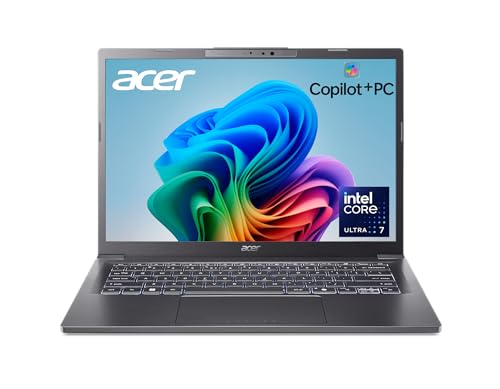
Powerful Intel Core Ultra 7 Long battery life support High-resolution WUXGA display Lightweight aluminum design
The setup process takes extra time
The Acer Aspire 14 tells a story of balance between power and intelligence. At its core is the Intel Core Ultra 7 Series 2 processor, working alongside the GPU and NPU to handle demanding workloads and AI-driven tasks smoothly. Multitasking stays fluid, and the promise of up to 22 hours of battery life means fewer interruptions during long workdays or travel.
The 14-inch WUXGA display opens up more vertical space, making documents, timelines, and creative projects easier to manage. Colors appear vivid, and the added resolution enhances both entertainment and productivity. Windows Copilot+ features, such as improved search and Recall previews, introduce new ways to find content and interact with text and images while keeping privacy in focus.
AcerSense makes things even easier. With a single key, settings and AI optimizations are easy to access, helping improve video calls and daily communication. The aluminum chassis keeps the laptop lightweight yet durable, and the 180-degree hinge adds flexibility when sharing screens or working in tight spaces. Initial setup may take a bit longer than expected, but once everything is ready, the experience settles into a smooth, efficient routine built for modern use.

Powerful i7 business performance Large RAM for heavy multitasking Responsive FHD touchscreen display Clean Windows 11 Pro install
Touchscreen impacts battery runtime
The Dell Latitude 7420 settles easily into a work routine. The Intel Core i7-1185G7 processor keeps everything running smoothly, whether you are handling large spreadsheets, jumping between apps, or managing video conferences back to back. With 32GB of RAM and a fast 512GB NVMe SSD, loading files and switching tasks happen quickly, keeping downtime to a minimum.
The 14-inch Full HD touchscreen makes everyday tasks straightforward. It becomes second nature to scroll through papers, zoom in on presentations, or move around with a quick tap. The 300-nit brightness and anti-glare IPS display help keep everything clear in diverse lighting conditions. The Intel Iris Xe Graphics card also enables clear images for both work and light creative applications.
Battery longevity does take a hit when the touchscreen is in regular use. Even so, the added interactivity and productivity benefits may outweigh that tradeoff for users who value hands-on navigation throughout the workday.

Responsive 12th Gen Intel i5 Fast SSD for daily tasks Touchscreen supports Windows 11 Lightweight with an included sleeve
Not very bright
The Lenovo Flex 5i fits naturally into a daily routine that mixes productivity with convenience. Its 12th Gen Intel Core i5-1235U processor brings enough power to keep apps responsive, even when several programs are open at once. Paired with 8GB of RAM and a 512GB SSD, everyday actions like opening files, launching apps, and switching tasks happen without delay.
Touch interaction plays a big role here. The 14-inch Full HD touchscreen works well with Windows 11, making scrolling, tapping, and quick adjustments easy during work or study sessions. IPS technology helps maintain clear visuals from different angles, which is useful when sharing the screen or switching positions. Intel Iris Xe Graphics also handles visuals smoothly for general use, while stereo speakers and the built-in HD webcam support casual entertainment and video calls.
Weighing just over three pounds and measuring thin, the Flex 5i slips easily into a bag. The included grey sleeve adds a thoughtful touch, keeping accessories organized on the go. Screen brightness does stay on the modest side, which may limit visibility in very bright rooms. Despite this, for indoor use and everyday tasks, the display remains clear and comfortable.
Buying Guides For Efficiently Picking The best 14 inch laptop
Experts advise that it is necessary to take a close look at the style, functionality, and value of the items you love. The most highly recommended way to know if a product is the best is by its quality checking.
The quality of the best 14 inch laptop will be a vital factor, which plays a decisive role in your experience of this product. Moreover, you guys always wanna products with high-quality standards and valuable characteristics, which best suits your desired needs.
So, how can you know if your selected best 14 inch laptop is of the best quality? The buying guide section below will present to you some tips for the most efficient purchase. Take a close look at the following guides!
-buyingguide
FAQs
Why choose a 14-inch laptop instead of 13 or 15 inches?
A 14-inch laptop offers a great balance between screen space and portability. It feels more comfortable for multitasking than a 13-inch model while remaining lighter and easier to carry than most 15-inch laptops.
Is a 14-inch laptop good for work and study?
Yes. Most 14-inch laptops provide enough power and screen size for writing, research, coding, online classes, and everyday professional tasks without taking up much space.
Are 14-inch laptops good for travel?
Absolutely. Their compact size and lighter weight make them easy to carry in backpacks or briefcases, which is ideal for commuting, travel, or working remotely.
Conclusion
In short, we’ve included all the most outstanding best 14 inch laptop found on the market during this time. Simultaneously, the detailed description and useful tips for best 14 inch laptop selection are shown with clarity. In case you cannot afford these options, then the Lenovo Flex 5i 14" Laptop will be your new buddy. If you want more information about the best 14 inch laptop, don’t hesitate to contact us. Our team is always here to support you guys!
About Michael Brown