The Best 120hz Monitor For 2025
 By, Michael Brown
Updated
Summary

PHILIPS 221V8LB3 22'' Monitor

AOC 22B35HM23 22" Monitor

ASUS 24” VA249HG Monitor
If you’re looking for a display that delivers smoother visuals than standard 60Hz screens, a 120Hz monitor is a great choice. With twice the refresh rate, these monitors reduce motion blur, make fast-paced gaming feel more fluid, and even improve everyday tasks like scrolling or video playback. They strike the perfect balance between performance and value, sitting just below the ultra-fast 144Hz and 240Hz options but often at a more affordable price.
When choosing the best 120Hz monitor, it’s important to consider your needs. Gamers will want features like low response times, adaptive sync (G-Sync or FreeSync), and vibrant color accuracy. Professionals or casual users may prefer larger screens, higher resolutions, or ultrawide designs that boost productivity and entertainment.
One great option is the PHILIPS 221V8LB3 22'' Monitor, a reliable 120Hz monitor that combines great color performance and smooth gameplay at an accessible price point. Ultimately, the right 120Hz monitor depends on whether you prioritize gaming, productivity, or an all-around experience. In this guide, we’ll explore the top models to help you find the best fit for your setup.
Our Top Picks


Crisp Full HD resolution Smooth 120Hz refresh rate Wide VA panel viewing angles Eye comfort features included
No built-in speakers
The PHILIPS 221V8LB3 distinguishes itself due to its extraordinarily user-friendly design. At 22 inches, the screen is compact enough for smaller desks yet delivers Full HD resolution that keeps documents crisp and videos clear. The VA panel adds depth with a 3000:1 contrast ratio and wide 178° viewing angles, so colors remain vivid whether you’re sitting directly in front of it or off to the side.
Where it really shines is motion handling. With a 120Hz refresh rate and 1ms response time, the monitor delivers smooth performance for fast-paced tasks, from scrolling through web pages to enjoying casual gaming sessions. Adaptive-Sync technology further reduces tearing and stuttering, keeping visuals consistent and seamless.
For those who spend long hours in front of the screen, Philips has included Flicker-Free technology and LowBlue Mode, which help reduce eye fatigue. One thing this monitor doesn’t include is built-in speakers, so pairing it with external speakers or headphones is necessary for audio. Despite this, considering its strong visuals and smooth performance, it remains a versatile choice for both work and play.

Bright, vibrant color accuracy Smooth 120Hz with Adaptive Sync Eco-friendly, low power usage VESA mount for flexibility
The stand is not fully adjustable
If color is what draws you in, the AOC 22B35HM23 won’t disappoint. Covering over 100% of the sRGB color space and supporting HDR, it produces brilliant tones and dynamic contrast, making videos, photos, and even casual gaming look lifelike. The Full HD screen measures 22 inches and provides a comfortable mix between size and clarity, making it suitable for both home offices and entertainment setups.
Performance feels smooth thanks to its 120Hz refresh rate and 4ms response time, keeping motion crisp whether you’re watching fast-paced content or playing light games. Adaptive Sync support further reduces stutter and tearing, creating a seamless experience across tasks. Practical touches like a tilt-adjustable design, earphone out, and VESA mount compatibility make it easy to adapt to your space.
AOC has also leaned into efficiency, with eco mode reducing power consumption to just 13W, alongside user-friendly features like an on-screen display menu and quick software tools for adjustments. The only drawback is the stand, which offers tilt but no height or swivel adjustments. Still, this can be easily solved with a VESA mount, allowing you to position the monitor just the way you like.
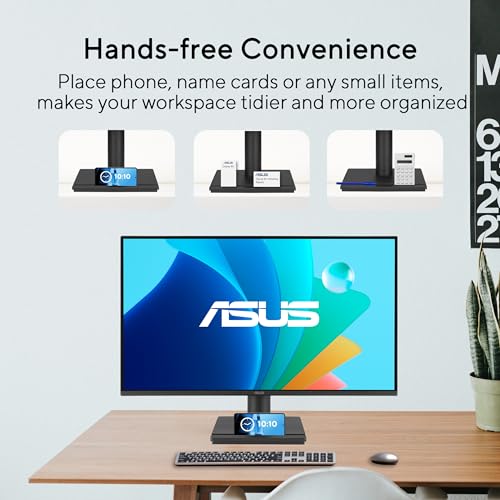
Sleek frameless 24-inch IPS panel Smooth 120Hz with Adaptive-Sync Handy built-in workspace organizer Easy settings with the DisplayWidget app
Power cord slightly short
If you’ve ever wanted a monitor that feels both practical and a little polished, the ASUS VA249HG makes a strong case. The frameless 24-inch IPS panel creates a clean, modern look while delivering consistent visuals from almost any angle, thanks to its 178° wide viewing capability. It doesn’t just look good—it makes multitasking and sharing the screen with others more practical.
Performance is equally impressive, with a 120Hz refresh rate and Adaptive-Sync technology keeping visuals fluid and responsive. Whether scrolling through long documents, editing videos, or playing casual games, motion feels smooth without distracting tearing or stuttering. ASUS also adds a thoughtful touch with its built-in design feature for holding small items like a phone or cards, keeping your workspace more organized.
Connectivity is straightforward, with HDMI and VGA ports for versatility, plus a headphone pass-through for easy audio management. The included DisplayWidget Center software makes adjusting monitor settings with a mouse far easier than fiddling with physical buttons. For long hours of use, ASUS’s blue light filter helps reduce eye strain. However, the power cord is a bit short, which may require some adjustment in the desk setup. Still, with its smart mix of design and performance, this monitor feels like a well-rounded upgrade.

Spacious 27-inch IPS display Smooth 120Hz refresh rate Built-in speakers for convenience Smart workspace organization features
A bit heavy to move
For those who spend hours immersed in coding, design, or creative workflows, the MSI PRO MP271A E2 provides the space and clarity that makes work easier. Its 27-inch screen feels roomy without overwhelming, giving plenty of real estate for multitasking. The IPS panel ensures vivid colors and sharp details from any angle, while Less Blue Light PRO technology helps protect your eyes during long sessions.
Beyond the visuals, MSI has woven in smart functionality to tidy and streamline your desk. The accessory slot keeps small items like adapters neatly stored, while the VESA mount option allows flexible placement, whether on a stand, wall, or paired with an MSI mini-PC for a compact workstation. Even small conveniences like MSI Power Link, which lets you power on a connected mini-PC directly through the monitor’s button, add up to a smoother experience.
Performance-wise, the 120Hz refresh rate isn’t just for gaming—it also makes scrolling, transitions, and even AI-generated content workflows feel more fluid. Built-in speakers keep audio simple without the need for extra clutter. The only trade-off is that the monitor feels a bit heavy, but this solid build also gives it a sturdy presence on your desk.

Slim zero-frame modern design Smooth 120Hz refresh rate 1ms response for sharp motion Adaptive-Sync for tear-free visuals
Color accuracy is not for professionals
For anyone setting up a desk at home, the Acer SB240Y G0bi feels like a monitor that blends smoothly into everyday life. Its 23.8-inch Full HD display offers clear, detailed visuals, while the zero-frame design keeps distractions to a minimum. It's perfect if you enjoy a clean, modern setup or use multiple monitors side by side.
With up to a 120Hz refresh rate and a lightning-quick 1ms response time, motion feels fluid and sharp, whether you’re streaming fast-paced content, gaming casually, or simply scrolling through apps. Adaptive-Sync support keeps visuals tear-free, matching your graphics card output for smoother performance.
In terms of usability, the ergonomic tilt allows you to adjust viewing angles comfortably, and Acer includes both HDMI and VGA ports for flexible connections. The included HDMI cable is a nice bonus, too. Nonetheless, the color accuracy and brightness are more than enough for movies, browsing, and everyday use, but not ideal for professionals who need precise calibration for photography or design. For most users, though, it’s a reliable monitor that balances performance, design, and value in a compact package.

Smooth 120Hz refresh rate Vibrant color coverage (99% sRGB) ComfortView Plus for reduced eye strain Slim, modern design with upgraded speakers
No official NVIDIA G-SYNC support
The S2725QS is unique because of its breathtaking 4K resolution and IPS technology, which guarantees true colors and broad viewing angles. Covering 99% of the sRGB color gamut and supporting HDR readiness, visuals look rich and detailed, making it equally suited for creative projects, streaming, or everyday use. The 1500:1 contrast ratio adds depth, helping images pop with realism.
Furthermore, the motion remains fluid and responsive thanks to AMD FreeSync Premium support, a 120Hz refresh rate, and a reaction time of only 0.03ms. This makes it a versatile option not only for work but also for gaming and multimedia. While it lacks official NVIDIA G-SYNC certification, users with compatible AMD GPUs will still enjoy a seamless experience.
Dell also put thought into comfort and design. The ComfortView Plus technology reduces harmful blue light emissions without compromising color accuracy, making it easier for the eyes to see during long sessions. Its redesigned speakers produce more sound and respond better to frequency, which is something that many monitors miss. The monitor looks great in modern setups thanks to its thin ash-white finish and very thin frames.

Massive 49” Dual QHD curved display 120Hz refresh rate USB-C with 90W charging HDR 400 support
Controls and navigation can be difficult to manage
Working with the 49” Ultrawide instantly changed how we handled projects. Instead of juggling between windows and tabs, we laid everything out side by side, almost like having two monitors without the bezel in between. The 32:9 aspect ratio gave us room to breathe, coding on one side, designs on the other, or presentations paired with notes.
We also loved how the monitor doubled as a docking hub. Its USB Type-C input can provide up to 90W of power, so you can charge your laptop while connecting your keyboard, mouse, and even storage devices straight to the monitor. The desk looked cleaner, more organized, and for once, cable chaos wasn’t a problem.
And when work was done, we leaned back and let the 120Hz refresh rate carry us into smooth gaming sessions. Scrolling through feeds or sprinting through a fast-paced game felt fluid, responsive, and natural. Add in VESA DisplayHDR 400, and the colors were not just bright, but layered with depth and nuance. Blacks looked richer, whites sharper, perfect for both creative work and late-night streaming.
However, navigating settings felt clunky at times, and controlling the display required patience. But when the screen stretched across our entire field of vision, those small frustrations faded into the background.

Sharp QHD resolution FreeSync/G-Sync support Excellent color reproduction Eye-friendly with anti-blue light
It only has one HDMI port
The KTC 27 Inch Monitor is a mid-range display that blends strong visuals, smooth performance, and comfort-focused features. It isn’t trying to compete with ultra-premium displays, but rather aims to give gamers and professionals a versatile option that balances price and functionality. Based on its specs, this monitor is designed for people who want reliable quality in both entertainment and everyday tasks.
With a QHD (2560 × 1440) resolution and a fast IPS panel, the KTC monitor delivers images that appear sharp and detailed across different types of content. The 120Hz refresh rate paired with FreeSync and G-Sync compatibility ensures smoother motion, reducing screen tearing in games and making everyday scrolling feel more fluid.
Supporting 123% sRGB coverage, HDR10, and a 1300:1 contrast ratio, this display can render vivid tones and deeper contrast for gaming and media consumption. The brightness level of 300 nits is sufficient for most indoor environments, though it might not compete with higher-end HDR panels in brightly lit rooms. One minor downside is that it only has one HDMI port.
What to Look Through Prior to Selecting the best 120hz monitor?
You may be aware that purchasing something is not actually an easy action. Your everyday life will be affected if you choose the most fantastic product. What variables, though, will make this acquisition successful? Whether you're seeking for best 120hz monitor to meet your needs, you'll be wasting your own time.
Nevertheless, it would be preferable if you weren't so worried. We've enlisted the help of a team of professionals to investigate best 120hz monitor, and we've provided accurate data.
There seem to be several important considerations to make. But only a few of them are really concentrated. Here are some crucial reviews while purchasing best 120hz monitor:
Panel Type
Refresh Rate
Screen Size
Resolution
Response Time
Brightness
Connections
Aspect Ratio
FAQs
Is a 120Hz monitor good for gaming?
Yes. A 120Hz monitor provides smoother gameplay compared to 60Hz, reducing motion blur and input lag. While competitive gamers often prefer 144Hz or higher, 120Hz is still an excellent option for most casual and mid-level gamers.
Can you see the difference between 60Hz and 120Hz?
Definitely. The jump from 60Hz to 120Hz is noticeable in fast-paced games, action movies, and even daily tasks like scrolling. Motion looks smoother, and interactions feel more responsive.
Do I need a powerful graphics card for a 120Hz monitor?
Yes, to fully take advantage of 120Hz refresh rates, your GPU needs to deliver high frame rates. For gaming at 1080p or 1440p, a mid-range graphics card should be sufficient.
The figures we've presented here aren't all of them. Alternatively, we continuously update it as new information becomes available. It's advisable to keep in mind the points we discussed related to buying guide.
We always appreciate your feedback and handle it with the utmost importance. As a result, the most up-to-date data will come to your mind as soon as possible. You are supposed to contact us and give us your reviews as well as problems so that we will try to support you. Hope you have a pleasant shopping experience!
About Michael Brown