The 7 Best 12 Inch Laptop For 2026
 By, Michael Brown
Updated

Summary

Microsoft Surface Laptop Go 3 12.4"
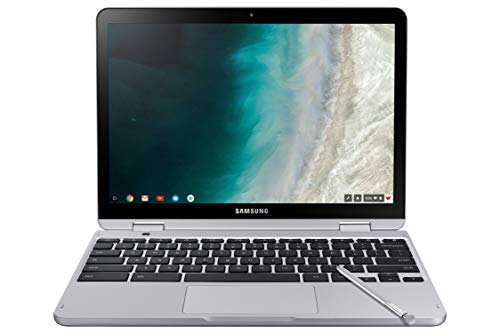
Samsung Chromebook Plus 12.2" V2 Laptop

HP Chromebook X360 12-Inch Laptop
A 12 inch laptop is a popular choice for users who prioritize portability and convenience. Its compact form makes it easy to carry throughout the day, whether you’re commuting, traveling, or working from different locations. For many people, this size feels less bulky and more comfortable to use in tight spaces compared to larger laptops.
In addition to true 12 inch models, this guide also introduces a selection of 14 inch laptops. These are included as alternative options for users who want a similarly portable experience but may appreciate a slightly larger display for everyday tasks such as writing, browsing, or multitasking. In real-world use, the difference in size is often subtle, while the added screen space can improve comfort and usability.
By covering both 12 inch laptops and carefully chosen 14 inch alternatives, this guide aims to give you a broader range of compact options. Whether you prefer the smallest possible footprint or a bit more screen room without sacrificing portability, this list is designed to help you find a laptop that fits your workflow, lifestyle, and budget.
Our Top Picks


Lightweight and travel-friendly Long battery life support Comfortable keyboard and touchpad Bright, responsive touchscreen
Not ideal for demanding creative or gaming tasks
From the moment we picked up the Surface Laptop Go 3, its portability made a strong impression. At under 2.5 pounds, it’s easy to slip into a bag, and the 12.4-inch PixelSense touchscreen feels just right for working on the go. We found the 3:2 aspect ratio especially helpful, since it shows more content vertically, which makes browsing, writing, and multitasking less cramped.
Daily tasks run smoothly thanks to the improved performance options, with up to 16GB of RAM and 256GB of storage handling streaming, office work, and everyday apps without frustration. Battery life is another area where it quietly shines. Up to 15 hours means we could get through a full day without constantly checking for an outlet, and Fast Charging helps when time is short.
The typing experience is comfortable, with a full-size keyboard that feels responsive even during long sessions. We also liked the large precision touchpad, which makes navigation feel natural. Little details add up, such as the fingerprint power button for quick sign-ins and the HD camera that adjusts well to lighting during calls. While it’s not built for heavy creative work or gaming, for everyday use, it strikes a balance that feels thoughtfully done.
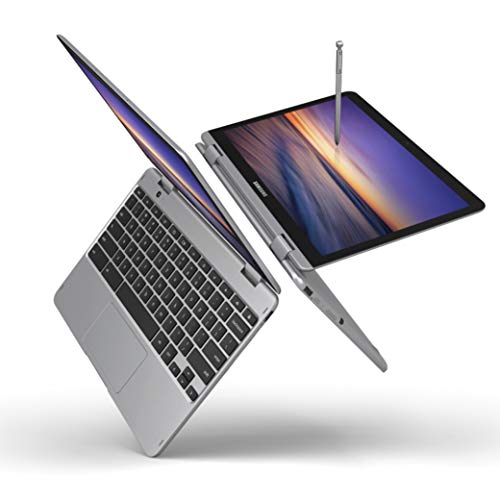
Lightweight and easy to carry Built-in pen always ready Smooth Chrome OS experience Flexible tablet and laptop modes
Built-in speakers lack depth
When we first sat down with the Samsung Chromebook Plus V2, what caught our attention wasn’t a single feature but how naturally everything worked together. The slim, lightweight build makes it easy to carry from room to room, and folding it into tablet mode feels intuitive rather than forced. We found ourselves switching modes often, especially for reading or casual browsing.
The built-in pen quickly became one of our favorite parts. It’s always ready, never needs charging, and makes tasks like note-taking, sketching, or quick edits feel effortless. Paired with Chrome OS, the experience stays smooth and uncluttered, with the Google Play Store adding plenty of familiar apps for daily use. We also appreciated the dual camera setup. In tablet mode, the 13MP world-facing camera with autofocus makes it simple to capture clear photos or zoom in for detail, which feels genuinely useful rather than just a bonus feature.
Performance stays steady thanks to the Intel Celeron processor, and the long-lasting battery keeps things moving through a full day of light work. Storage is modest at 64GB, but the option to expand via microSD helps. The only drawback is that the speakers aren’t particularly strong, but for video calls or headphones, they still serve their purpose.

13th Gen Intel Core i3-1315U processor Large touchscreen display Fast SSD storage Wide port selection
Battery life could be longer
At first glance, the HP Chromebook X360 comes across as a device made to get things done without much fuss. Powering it is a 13th Gen Intel Core i3-1315U processor, which proves capable of handling common daily tasks like browsing, document editing, and video streaming. Paired with a fast 512GB PCIe NVMe SSD, the system stays responsive when switching between apps or managing files, even with 4GB of RAM.
The 15.6-inch touchscreen adds flexibility to how we interact with the laptop. Its micro-edge design helps fit a larger screen into a slimmer body, and the display feels comfortable for long work sessions, especially when reviewing documents or attending online meetings. Integrated Intel UHD graphics are enough for visual tasks without aiming beyond everyday needs.
Another good thing about it is that it connects well. Wi-Fi 6 and Bluetooth 5.3 make connections stable, and the mix of USB-C, USB-A, HDMI, and audio connectors works with most work arrangements. The full-size keyboard with a number pad makes it easy to type, especially for reporting or administrative duties. Battery life isn’t its strongest area, but for desk-based use or shorter work sessions, it still fits neatly into a productivity-focused routine.

Flexible 2-in-1 design Built-in AI Copilot support Long battery life Sharp PixelSense display
Keyboard and stylus sold separately
Looking at the Surface Pro 12” from a broader perspective, its biggest strength lies in how it’s built to adapt. As a 2-in-1 device, it’s meant to move easily between tablet mode for quick tasks and a more traditional laptop setup when paired with the optional keyboard. The built-in kickstand plays a key role here, allowing the device to stay stable across different working positions without adding bulk.
The Snapdragon X Plus processor is at the heart of the experience, and an AI engine can handle advanced multitasking and smart features. This power works closely with Copilot in Windows 11, which is designed to assist with writing, summarizing, and idea generation, helping users move through tasks more efficiently. Its 12-inch PixelSense touchscreen supports this workflow with clear visuals and vibrant color, making it suitable for both productivity and entertainment.
Battery life is another area where the Surface Pro 12” is positioned strongly, with up to 16 hours supporting a full day away from a charger. One consideration is that the keyboard and stylus are sold separately. Although this adds flexibility in choosing accessories, it does mean the complete laptop experience requires additional purchases.

Strong multitasking memory capacity Fast SSD storage performance Sharp Full HD display Versatile port selection
The touchpad can be difficult to use
The ASUS Vivobook 14-inch is positioned as a straightforward Windows laptop built for multitasking and everyday productivity. The Intel Core i3-1215U processor is a 6-core, 8-thread chip built to handle common workloads like document editing, web research, and light multitasking. Paired with 16GB of RAM, the system is well-equipped for keeping multiple browser tabs and applications open at the same time without slowing down. Its 512GB PCIe NVMe SSD supports fast boot times and quick file access, which helps maintain a smooth daily workflow.
The 14-inch Full HD display adds to its practicality. With an IPS-level panel, anti-glare coating, and 250 nits of brightness, it’s suitable for extended viewing during work or streaming sessions. Connectivity is well covered, offering a mix of USB-A, USB-C, HDMI, and audio ports, along with Wi-Fi 6 for stable wireless performance. Windows 11 Home rounds out the experience with a cleaner interface, improved window management, and support for Android apps.
One small area to note is the touchpad. It can take some adjustment, as it isn’t the easiest to use at first. That said, once paired with an external mouse or adapted over time, it remains a workable part of an otherwise balanced setup.
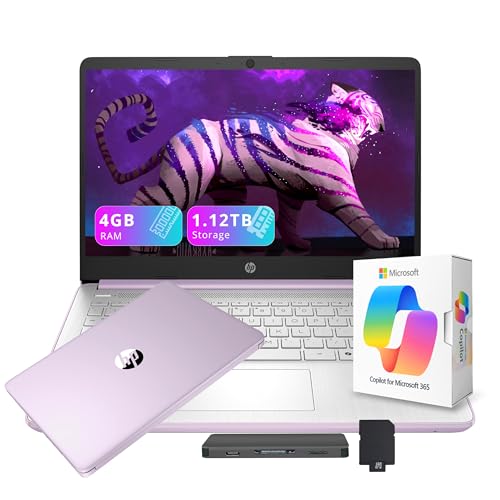
Generous bundled storage package Compact and portable build Wide range of included accessories Solid connectivity options
Initial setup may take time
On paper, this HP Flagship laptop presents itself as a ready-made workstation for everyday tasks. The 14-inch HD display offers a comfortable balance between screen space and portability, making it suitable for document work, video calls, and general browsing. Inside, its Intel Processor N150 is designed for efficiency, supporting smooth performance for routine activities without drawing unnecessary power.
Memory and storage define much of its day-to-day usability. With 4GB of DDR4 RAM, the system is tailored for light multitasking and steady workflows. Storage is where this package expands beyond the laptop itself. The combination of 128GB internal UFS storage and a 1TB docking station adds flexibility, allowing users to manage large files or personal libraries without relying heavily on cloud storage.
Connectivity is well covered, with multiple USB ports, HDMI, a media card reader, and Wi-Fi 6 for stable wireless access. The HD webcam supports online meetings, while Windows 11 S keeps the interface streamlined and secure. A year of Microsoft 365 adds further value for productivity-focused users. Setup can take some time due to the included accessories, but once everything is connected, the system settles into a functional and organized workspace.
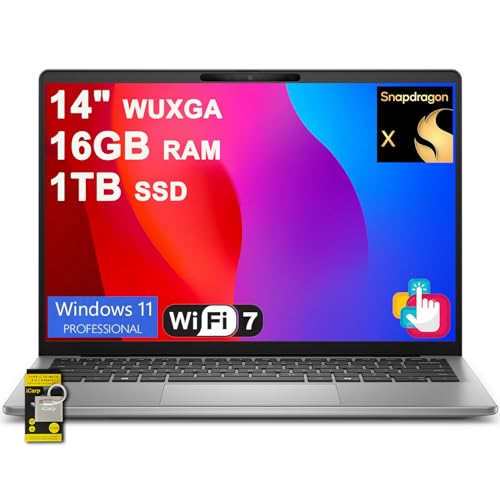
Efficient Snapdragon-based performance Fast RAM and SSD combo Tall 16:10 display Office 2024 included
Fan noise increases under load
The Inspiron 14 5441 reflects Dell’s shift toward energy-efficient computing. The Snapdragon X Plus processor sits at the center of this design, balancing smooth performance with low power consumption. Its ARM architecture allows the laptop to stay cool and quiet during common tasks like browsing, online learning, document editing, or running light AI-powered applications.
Multitasking is well supported thanks to 16GB of LPDDR5X RAM, which runs at high speeds while remaining power-efficient. This machine is ready to boot up swiftly and manage everyday files without any problems when paired with a 512GB PCIe NVMe SSD. The 14-inch FHD+ screen features a 16:10 aspect ratio, providing it with additional vertical space. This is great for spreadsheets, reading, and long documents.
Integrated Qualcomm Adreno graphics are tuned for office work and media playback rather than demanding visuals, which aligns with the laptop’s overall purpose. A 54Wh battery supports extended use away from a charger, and having Windows 11 alongside Office Home & Student 2024 preinstalled means it’s ready for work immediately. Under heavier workloads, the system may generate more heat and fan noise, but this mainly appears when pushing beyond its intended use.
What Should You Know Before Selecting best 12 inch laptop?
Our website is an online source that provides clients with a diverse selection of best 12 inch laptop. Many items on the site perfectly suit the demands of clients and serve their intended function.
So, how can you determine which of the best 12 inch laptop is the best fit for your needs? Don't be concerned! This article will walk you through all you need to know about the best 12 inch laptop before you buy it.
-buyingguide
FAQs
Is a 12 inch laptop suitable for everyday use?
Yes, a 12 inch laptop works well for everyday tasks such as web browsing, writing, video calls, and light productivity. Its main advantage is portability, especially for users who are often on the move.
Why does this guide also include 14 inch laptops?
Some 14 inch laptops offer a very similar portable experience while providing a bit more screen space for daily use. Including them gives readers more practical options without moving too far from the compact laptop category.
Are 12 inch laptops good for work or study?
They can be a good fit for work or study if your tasks are light to moderate. For heavier multitasking or long work sessions, some users may prefer a slightly larger screen for added comfort.
Conclusion
In short, you have just been shown all the things related to best 12 inch laptop, including the top models, buyer’s guides, and the comparison between products as well. At this moment, it’s obvious that you acquire the mentioned information and are ready to pick one among the list of best 12 inch laptop above. In case there is no model that suits your needs, then Dell Inspiron 14 5441 Laptop 14" will be the best to pay attention to. Hopefully, our sharing today will help you choose the best item for your requirement.
About Michael Brown