The Best Mini Projector For Business Presentations Of 2026
 By, Michael Brown
Updated
Summary

HOMPOW Projector
CLOKOWE Mini Projector

AKASO Mini Projector
You walk into a client’s office. The conference room is booked, so you are meeting in a small lounge area. No giant screen mounted on the wall. No complicated AV system ready to go. You pull out a mini projector, set it on the coffee table, and within seconds, your pitch fills the wall. That is the power of a compact business projector, the ability to present professionally wherever the conversation happens.
For business professionals, a mini projector is more than a gadget. It is a tool that removes friction from presentations. The best mini projectors for business prioritize a few key things. Brightness matters because meeting rooms are rarely pitch black. Connectivity needs to be reliable, with HDMI ports that work seamlessly with laptops and perhaps wireless options for quick phone or tablet sharing. Portability means lightweight construction and a form factor that does not add noticeable bulk to your work bag.
Among the compact projectors earning trust from business users, the HOMPOW Projector delivers where it counts. It combines impressive brightness with native 1080p resolution, ensuring slides, charts, and visuals appear sharp and readable even in rooms with ambient light. We have identified the mini projectors that truly serve the needs of busy professionals. The right choice ensures your ideas take center stage, no matter where you are presenting.
Our Top Picks


Native 1080P clear presentation visuals Easy electronic focus adjustment Wide compatibility with multiple devices Flexible screen size and zoom
Fan noise noticeable in quiet rooms
The HOMPOW Projector brings practical features that suit business presentations well. Its native 1080P resolution ensures that text, charts, and visuals appear clear and easy to read, which is essential when presenting detailed information. The higher brightness and 10000:1 contrast ratio help maintain visibility in typical meeting environments, keeping content sharp and defined.
Its variable projection range, which lets you choose from screen sizes between 50 and 300 inches, makes it easy to move around. The electric focus feature, which can be set by a remote, makes it easy to make quick changes without stopping the presentation. The zoom feature makes things even easier by letting you modify the size of the screen without moving the projector.
Connectivity is another strong point, with multiple ports including HDMI, USB, and AV, making it compatible with laptops, USB drives, and other common devices used in meetings. Bluetooth 5.1 also allows pairing with external audio equipment when needed, though the built-in HiFi speakers are sufficient for smaller rooms. One minor downside is that the fan can be noticeable in quieter environments, but it remains manageable during typical presentations where some background noise is expected.

Ultra-portable compact design Built-in apps for quick access Flexible 180° projection angles Wi-Fi 6 wireless connectivity
Works best in dim environments
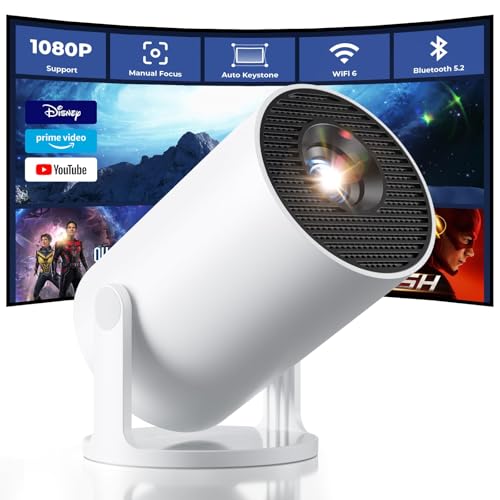
The CLOKOWE Mini Projector focuses on portability and ease of use, making it a practical option for lightweight business presentations. Because it's tiny enough to carry in a bag, you can easily take it with you from conference to meeting. The design that can rotate 180 degrees makes it more flexible, so you can project onto walls or even ceilings without needing extra mounting equipment.
Built-in streaming apps and Wi-Fi make it easier to access material, which means you don't need as many gadgets. Wireless mirroring works on phones, tablets, and computers, which is great for rapid presentations. HDMI and USB ports are good for wired connectivity in more traditional configurations. Plus, this projector can show 1080P images and has a brightness of up to 8000 lux, which makes slides, papers, and basic media look clear. Auto keystone correction keeps the image in line, and adjustable focus lets you make quick changes during setup. Although the brightness works best in controlled lighting, in typical indoor or dim environments, it remains suitable for presentations and content sharing.
Ultra-compact and portable design Built-in battery for wireless use Multiple wired and wireless connections Flexible screen size up to 150”
Speaker output suited for small spaces
The AKASO Mini Projector is centered around portability, making it suitable for small meetings or quick presentations. Its compact DLP design, combined with a built-in rechargeable battery, allows it to run for up to 2.5 hours without needing a constant power source. This makes it convenient for mobile use, especially in settings where outlets may not be easily accessible.
Despite its size, it supports 1080P resolution and offers clear image quality for presentations, videos, or simple visual displays. The adjustable projection size, reaching up to 150 inches, gives flexibility depending on the space. It also works well for more creative uses, such as projecting images for tracing or design work. Connectivity options are well covered, with HDMI, Type-C, AV, and Micro SD ports included, along with support for wireless mirroring via AirPlay or EZCast. This makes it easy to connect to laptops, phones, or storage devices without much setup. One minor drawback is that the compact size may limit speaker output, but it remains suitable for basic audio needs in smaller settings.
180° rotational projection Auto keystone correction WiFi 6 for stable office network connectivity Compact design
Software can be laggy sometimes
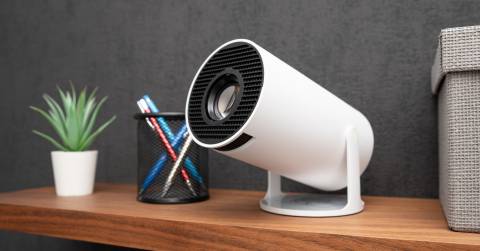
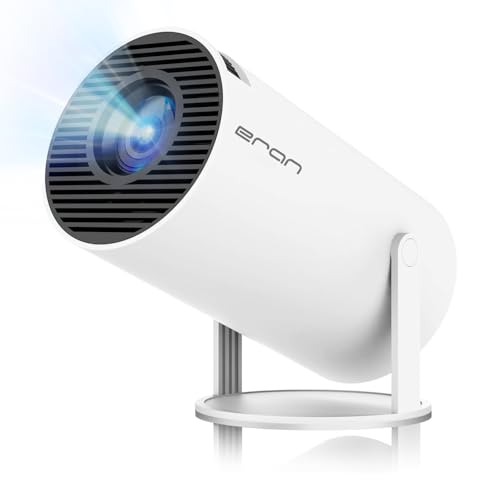
If you walk into a meeting with a big projector backpack, you're already off to a bad start. The Ear&ear HY300 PRO is distinctive. It's compact enough to fit in a briefcase, but it's also flexible enough to handle video calls, presentations, and last-minute huddle room meetings. Its 180° rotational projection means you can aim the image at a wall for traditional slide decks, angle it down onto a table for small group collaboration, or even project upward for standing presentations—all without wrestling with stands or complicated mounting.
The auto keystone correction handles image alignment automatically, so you're not wasting precious meeting time fiddling with settings. For video conferencing and online teaching scenarios, the built-in Android TV 11.0 system offers a rich app ecosystem that includes productivity tools alongside streaming services. WiFi 6 technology ensures stable connectivity even in crowded office network environments, while the 1080P/4K resolution support delivers crisp visuals for detailed spreadsheets, design mockups, or presentation slides.
Moreover, the 200 ANSI lumens and 1500:1 contrast ratio provide sufficient brightness for typical conference room lighting conditions, ensuring text remains legible and graphics stay sharp. However, the Android 11 software can occasionally feel laggy during navigation between apps or settings. Still, once you're in a presentation or video call, the performance stabilizes, and the convenience of having a portable, self-contained projection solution for business settings remains a significant advantage.

Powers on to aligned image in about five seconds 360° tool-free stand Ultra-slim 1.81-inch portable design Native 1080P with sharp text and graphics
Autofocus and keystone may not always be accurate
For business professionals who move between meeting rooms, co-working spaces, and client offices, the VOPLLS Mini Projector offers a compelling blend of portability and setup speed. The slender 1.81-inch profile means it disappears into a briefcase or laptop bag without adding bulk, yet the 360° tool-free adjustable bracket provides remarkable flexibility for different presentation environments.
Whether you're projecting onto a wall in a small huddle room, angling down for a tabletop demo, or even aiming at the ceiling for a casual walkthrough, the stand adapts without requiring additional equipment or tools. The auto focus and 6D all-around keystone correction are particularly valuable for business use. According to the specifications, the system takes approximately five seconds from power-on to a fully aligned image, eliminating the awkward fumbling with manual adjustments that often precedes meetings.
Plus, the built-in displacement gyroscope and smart sensor continuously monitor environmental changes, making real-time image optimizations that keep presentations looking professional even if the projector gets nudged. Native 1080P resolution delivers razor-sharp text and detailed graphics, which matters immensely for spreadsheets, design portfolios, and data-heavy slides. Nevertheless, the autofocus and keystone features may not always hit perfect accuracy on the first attempt. However, the system's ability to continuously optimize means any minor misalignment typically corrects itself within moments, and the overall convenience of near-instant setup far outweighs the occasional need for a quick manual touch-up.

Compact and travel-friendly design Built-in apps for easy streaming Flexible 180° adjustable stand Multiple wireless and wired connections
Needs occasional system updates for apps
The Magcubic HY300PRO Mini Projector is built for users who want a compact, all-in-one solution for casual viewing and quick setups. Its compact build, paired with a 180° rotating stand, makes it easy to position in tight spaces or adjust viewing angles without extra accessories. The external power supply helps maintain stable performance while keeping the device cooler during use.
Connectivity is straightforward, with WiFi and Bluetooth supporting wireless streaming from phones, laptops, and consoles. HDMI and USB ports provide reliable wired options when needed, making it adaptable for both casual entertainment and simple presentations. Additionally, the built-in apps give direct access to a wide range of content, removing the need for additional streaming devices. This keeps the setup minimal and user-friendly, especially for those who prefer an all-in-one solution.
In terms of visuals, the native 720P resolution with 4K support delivers a basic but enjoyable viewing experience. With 200 ANSI lumens and an 8000:1 contrast ratio, it works best for casual use in controlled lighting environments. One thing to note is that keeping the system updated helps maintain smooth app performance, but once updated, the experience remains simple and consistent.

Dual 360° adjustable stands Electric focus controlled remotely Bluetooth 5.4 for stable audio connections Compact design ideal for travel
Bluetooth supports audio devices only, not phone connections
The way the BKZ Mini manages placement and focus is what makes it differentiate itself right away. The built-in dual stands offer 360° x 50° of adjustment, meaning you can angle the projector precisely without hunting for a tripod or stacking books underneath it. This flexibility is especially valuable for business presentations where the projection surface isn't always a perfectly positioned screen.
The electric focus feature makes things even easier. You can make changes from the remote control, so you don't have to walk back and forth to the projector to get the sharpness just right. Smart keystone correction handles image alignment automatically, keeping visuals squared even when the projector sits at an angle. For audio, Bluetooth 5.4 provides a stable, low-latency connection to speakers or headphones.
When you need to stream content, connectivity options cover HDMI, USB-C, and USB flash drive playback, making it easy to plug in a laptop, TV stick, or pre-loaded media. Unfortunately, the Bluetooth function is designed specifically for audio devices like speakers and headphones rather than wireless phone connections. This means you'll still rely on HDMI or USB-C for screen mirroring from mobile devices. Even with that distinction, the setup remains clean and purposeful, with each connection method serving its intended role reliably.
The main aspects you should think about before purchasing best mini projector for business presentations
Would you like to understand exactly what you've been doing before buying something? If that's the case, you should follow this blog article. In it, I'll go over the main factors you should think about before purchasing best mini projector for business presentations.
These features are supposed to keep your purchasing intention as informed as possible and to ensure that you find the best mini projector for business presentations for your needs.
What's holding you back? What other reasons do people give for purchasing inferior products rather than the top-of-the-line product they desire? We'll be around when you're prepared to intervene. Please read the following points to help you select best mini projector for business presentations easier.
Brightness
The ambient lighting level, size and material of your projector screen will all affect the brightness. You should buy a professional seller if you are installing a projector in a permanent location, such as at your home, to ensure that you get the best image brightness and the correct screen material.
Projection Tech
DLP projectors with single-chip DLP chips could be subject to the so-called "rainbow effect." Sometimes, tiny, bright flashes with rainbow-like colors may appear, especially in dark scenes. Some DLP projectors have a minimal effect, while others can produce a distracting result, especially when there are bright areas against shady backgrounds. The rainbow effect is not a problem with LCD projectors, which are safer if someone in your household has sensitive eyes. There are many DLP projectors that produce excellent images.
Contrast Ratio
Contrast ratings can only be used to measure in dark rooms. They don't give any information about ambient lighting. Unusually dark blacks in the projector will result in lower contrast. A brighter projector will perform well in home theaters, but not in living rooms or offices.
Connection Methods
Component video, composite video and S-Video all make up the most common connections on large projectors. We're also seeing more projectors that offer direct USB connection to computers via a USB cable. A growing variety of projectors now have USB Type-C ports. The majority of USB-C ports can be used to transfer data or video using the DisplayPort protocol. Most USB-C ports support USB Power Delivery (USB PD), which means that a plugged in projector can supply 100 watts of power to charge a device or to charge it using a USB-C cable (assuming the device is capable of charging over USB-C).
Light Source
For longer periods of time, LEDs and lasers retain a greater percentage of their original brightness. While all light sources eventually lose their brightness, lamps lose the most in 500 hours. Then, they slowly decline over time. The brightness of LEDs and lasers will decrease more slowly over the course of their lifetimes.
Resolution
The calculation for projectors that have 4K ultra high definition (3,840 x 2,160 pixels) is slightly different.
Portability
FAQs
Are mini projectors bright enough for office use?
Yes, but for well-lit rooms, choose a model with higher brightness to ensure clear and visible presentations.
Can I connect a laptop or phone to a mini projector?
Most mini projectors support HDMI, USB, or wireless connections, making them compatible with laptops, smartphones, and tablets.
What should I look for when choosing one?
Focus on brightness, resolution, portability, battery life, and connectivity to ensure smooth and professional presentations.
Conclusion
When looking for best mini projector for business presentations, it's not always clear where to begin. We produced this list of key factors to serve as a preliminary step prior to actually making your purchase to assist you in making an informed decision.
We hope that these sections will assist you in making the best decision possible and saving you money on items that do not work or are poorly. If you have any questions about our product selections, please visit BKZ Mini Projector. This will be the most fantastic option for your expectations.
About Michael Brown