The 7 Best Oled 4k Monitor For Gaming Of 2026
 By, Michael Brown
Updated
Summary

ASUS ROG 32” 4K OLED Gaming Monitor

LG 32GS95UE 32-inch OLED Gaming Monitor 4K

KOORUI 32 Inch 4K OLED Gaming Monitor
The quest for the Best Oled 4k Monitor For Gaming is the pursuit of visual perfection. An OLED panel represents the ultimate fusion of cinematic quality and competitive edge, where every pixel produces its own light. This technology unlocks a level of contrast previously unattainable, with impossibly deep blacks and luminous highlights that create a hyper-realistic, three-dimensional depth in every scene. For the discerning gamer, this means unparalleled immersion in sprawling open worlds and a critical clarity that can define victory in fast-paced combat.
This elite category is defined by self-lit pixels that deliver instant response and infinite contrast, eliminating motion blur and backlight blooming entirely. A flagship model like the ASUS ROG 32” 4K OLED Gaming Monitor is a benchmark, celebrated for its blistering 240Hz refresh rate and stunning 4K resolution that provides both the silky-smooth performance esports demand and the breathtaking detail that single-player adventures deserve.
Our analysis focuses on how these cutting-edge monitors perform under the pressures of real gameplay. We've evaluated expert reviews on color fidelity and HDR impact, alongside gamer testimonials on longevity and burn-in mitigation features. This guide is designed to help you understand the transformative power of OLED gaming, ensuring you invest in a monitor that doesn't just display your games but truly brings them to life.
Our Top Picks


Stunning 4K QD-OLED color and contrast Exceptional 240Hz refresh rate Near-instant 0.03ms response time Advanced heatsink for panel longevity
Heavy chassis requires significant desk space
From the moment it powers on, the PG32UCDM makes its case with its third-generation QD-OLED panel. The technology delivers on its core promises, producing visuals defined by exceptionally vibrant color saturation, inky blacks that give scenes remarkable depth, and bright highlights that add a convincing sparkle to HDR content. This cinematic 4K detail is then supercharged by a 240Hz refresh rate, a combination that feels exceptionally fluid.
The cited 0.03 ms response time ensures that this fluidity doesn't come at the cost of clarity; fast motion in games remains sharp and defined, significantly reducing the blur and ghosting that can obscure details in frantic scenes. ASUS has clearly designed this monitor with longevity in mind, integrating an advanced custom heatsink. This feature is a thoughtful engineering move, working to manage the panel's temperature to help mitigate the risk of permanent image retention and support consistent performance over years of use.
One minor downside is that the monitor's heavy chassis has a substantial presence, meaning it demands a deep and sturdy desk to properly accommodate its weight and footprint.

Exceptional 4K OLED clarity Ultra-fast 0.03ms response time Innovative Pixel Sound audio from the screen Broad compatibility with G-SYNC and FreeSync Premium Pro
The dual-mode feature is quite hard to use initially
LG's 32-inch OLED panel forms the foundation of an exceptional viewing experience. The 4K resolution delivers sharp detail, while the DisplayHDR True Black 400 certification and extreme 1.5M:1 contrast ratio produce visuals with profound depth, where dark scenes retain clarity and bright elements shine with intensity. This visual fidelity is matched by outstanding motion performance, thanks to the near-instantaneous 0.03ms response time and a 240Hz refresh rate, ensuring fluid and blur-free action.
Support for both NVIDIA G-SYNC and AMD FreeSync Premium Pro guarantees smooth, tear-free gameplay across a wide range of hardware. A standout innovation is the Pixel Sound system, which uses the screen itself as a speaker, creating a uniquely direct and immersive audio field. The monitor's defining characteristic is its world-first, VESA-certified Dual Mode. This technology lets users switch between a 4K resolution at 240Hz for breathtaking single-player adventures and a 1080p resolution at a phenomenal 480Hz for the ultimate competitive edge. Engaging this transformative mode is achieved through the monitor's on-screen display menu, a process that may take a moment to locate and activate for a function that so fundamentally alters the display's performance profile. It's a sophisticated capability designed for gamers who want to tailor their experience precisely.
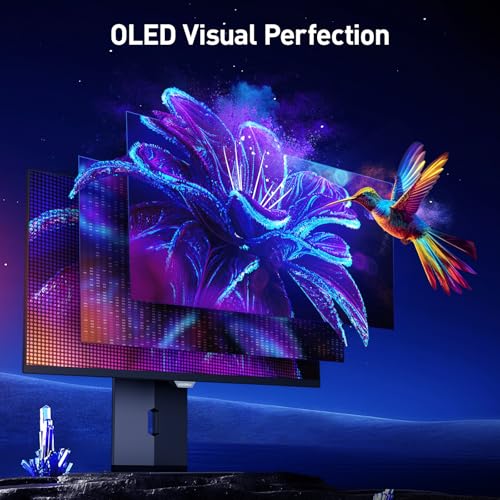
99% DCI-P3 color 0.03ms response time Full ergonomic stand with height and pivot Comprehensive connectivity including HDMI 2.1
No built-in speakers
KOORUI has built this display around a feature set that caters directly to performance-seeking users. The 32-inch OLED panel is the star, providing the deep blacks and infinite contrast the technology is known for, which gives both games and media a rich, immersive quality. This is paired with a sharp 4K UHD resolution and 99% DCI-P3 color accuracy, supported by HDR True Black 400, making it a versatile screen for vibrant entertainment and detailed creative work.
Gamers are served by the potent combination of a 240Hz refresh rate and a 0.03ms response time, ensuring fast-paced action remains fluid and remarkably clear, with AdaptiveSync working to prevent screen tearing. Practicality is a clear strength here, from the fully adjustable stand that offers tilt, swivel, pivot, and 110mm of height adjustment to the comprehensive connectivity, including HDMI 2.1 and a Type-C port for modern consoles and laptops. One minor downside is that you’ll need to provide your own audio solution, as this monitor doesn't have built-in speakers. This common approach allows users to choose their own sound solution, whether that’s a high-quality headset for competitive gaming or a soundbar for a more cinematic experience.

Vibrant QD-OLED color 240Hz refresh rate with 0.03ms response time Fanless heatsink design Multiple built-in screen protection mechanisms
Peak brightness could be higher
The journey to a perfect gaming monitor often involves balancing vibrant color, deep contrast, and reliable performance. The MSI MAG 321UPX enters the fray with a clear focus on this balance, employing QD-OLED technology in a design that emphasizes both vibrant visuals and thoughtful, long-term panel care. This visual performance is harnessed for gaming through a 240Hz refresh rate and an extremely fast 0.03ms response time, a combination certified by ClearMR 13000 for high clarity in motion.
A significant part of the design philosophy is sustainability. MSI incorporates a graphene film and a customized heatsink to manage thermals through silent, fanless operation, a measure intended to support the panel's longevity. To help avoid image retention, this proactive care is supported by three built-in screen protection features: Pixel Shift, Panel Protect, and Static Screen Detection. The ergonomic design is considered, with a 5-way joystick controller conveniently placed on the bottom center of the bezel for easy menu navigation. However, it would be best if the peak brightness could be higher.

4K QD-OLED display Effective Glare Free coating reduces reflections 240Hz refresh rate Advanced cooling system
Premium price point
Samsung leverages its QD-OLED technology to create a uniquely sharp and immersive view on this 27-inch canvas. The 4K resolution results in a high pixel density, making in-game textures and fine details exceptionally crisp. This clarity is bolstered by a thoughtful glare-free coating that significantly cuts reflections, a major benefit for maintaining immersion in well-lit rooms.
The panel's performance is every bit as impressive as its looks, with a 240Hz refresh rate and 0.03ms response time ensuring buttery-smooth, blur-free motion that competitive gamers will appreciate. Compatibility with both G-Sync and AMD FreeSync Premium Pro guarantees this fluidity across a wide range of systems. Perhaps the most compelling narrative here is Samsung's focus on durability.
Plus, the monitor integrates a world-first Pulsating Heat Pipe and a Thermal Modulation System, advanced cooling solutions that work algorithmically to manage temperature and mitigate the risk of screen burn-in. This high concentration of cutting-edge display and preservation technology positions the G8 at the upper end of the market. The investment is reflected not just in the outstanding picture quality but in the sophisticated engineering dedicated to maintaining it over time.

High pixel density Supports Dolby Vision and DisplayHDR True Black 400 Fast 240Hz refresh rate 360-degree ventilation
The screen may glitch sometimes
Pushing pixel density to new heights, the Alienware 27 4K OLED Gaming Monitor AW2725Q makes a focused appeal to gamers who crave extreme detail. By utilizing QD-OLED inkjet printing technology at a 27-inch size, the 4K resolution achieves a very high pixel density, resulting in a noticeably sharp and detailed image where fine textures and on-screen text appear crisp. This visual precision is enhanced by the infinite contrast of OLED and support for both Dolby Vision and VESA DisplayHDR True Black 400, creating vibrant HDR with deep, nuanced shadows.
Gamers are catered to with a fast 240Hz refresh rate, supporting fluid motion for competitive play. The physical design also receives attention, featuring a new 360-degree ventilation system intended to aid cooling within a space-efficient footprint, alongside integrated cable management to keep setups tidy. It is important for users to be aware that, on rare occasions, the monitor's operation may exhibit a momentary visual glitch. This is a behavior that can typically be resolved with a standard power cycle, and keeping the monitor's firmware updated is a recommended step to ensure optimal performance over time.
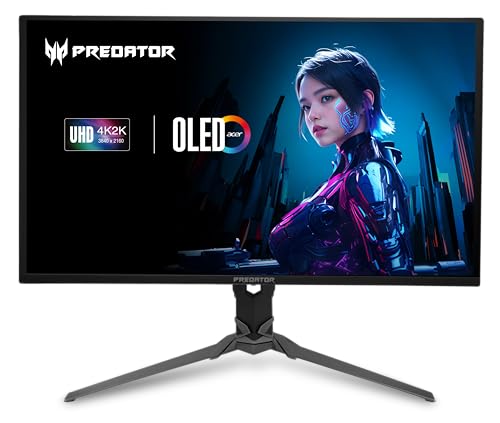
Immersive 31.5-inch 4K OLED High 240Hz refresh rate AMD FreeSync Premium Pro Ergonomic stand and eye-comfort features
OLED panel needs care during long productivity sessions
For the gamer who views their monitor as a command center, size and immersion are non-negotiable. The Acer Predator X32 steps into this role with a commanding 31.5-inch 4K OLED canvas, engineered to dominate your field of view with cinematic contrast and the blistering speed demanded by high-level play. The OLED technology delivers on its promise of stunning contrast and true 10-bit color, bringing a rich, cinematic depth to both games and media. This is enhanced by a 99% DCI-P3 color gamut and VESA DisplayHDR True Black 400 certification, ensuring vibrant, accurate hues.
Performance is squarely aimed at competitive gaming, with a 240Hz refresh rate and a 0.03ms response time working in tandem with AMD FreeSync Premium Pro to deliver exceptionally smooth, tear-free motion. Acer has also thoughtfully included features to support comfort during long sessions, such as flicker-free technology, a blue light filter, and glare reduction. The fully adjustable stand allows for easy positioning to achieve an ideal ergonomic setup. Given its OLED panel, users engaged in lengthy productivity work with static user interface elements should be mindful to utilize the monitor's built-in screen protection features and consider periodic breaks, a common consideration for maximizing the longevity of this display technology.
What to Look For in a best oled 4k monitor for gaming?
Please follow the bellow points before selecting the best oled 4k monitor for gaming:
Screen Size
Aspect Ratio
Brightness
Refresh Rate
Resolution
Response Time
Panel Type
Connections
FAQs
Why choose an OLED 4K monitor for gaming?
OLED panels offer instant response times, perfect blacks, and high contrast, making games look smoother and more immersive compared to traditional LCD monitors.
Are OLED 4K gaming monitors good for competitive gaming?
Yes, many OLED 4K monitors feature very low input lag and fast refresh rates, which benefit competitive gaming, though resolution demands higher GPU power.
What refresh rate should I look for in an OLED 4K gaming monitor?
A refresh rate of 120Hz or higher is ideal for smooth gameplay. Higher refresh rates improve motion clarity, especially in fast-paced games.
In general, it's difficult to say who creates the best oled 4k monitor for gaming since each firm has unique qualities, features, and pricing points that set them apart from the competition. We only suggest products from the most outstanding manufacturers on our site, so you can rest assured about their quality.
Please do not hesitate to contact us if you require assistance with your problems. Wish you a happy shopping!
About Michael Brown