The Best Projector With Auto Keystone For 2026
 By, Michael Brown
Updated
Summary

NICPOW Full HD Projector

XuanPad Projector

Nonete Mini Projector
Setting up a projector shouldn’t take more time than watching the movie itself. That’s why projectors with auto keystone correction have become so popular. This feature automatically adjusts the image to stay square and aligned, even when the projector isn’t placed perfectly straight, making it ideal for home use, travel, and quick setups.
If you’re looking for a reliable all-around option, the NICPOW Full HD Projector is a good choice. It combines automatic keystone correction with strong image quality and a compact design, allowing you to set it up almost anywhere without manual adjustments. Of course, the best projector with auto keystone depends on how you plan to use it. Some models focus on portability and ease of setup, while others prioritize brightness and resolution for dedicated home viewing. In this guide, we highlight the top projectors with auto keystone, helping you choose the right model based on your space, habits, and budget.
Our Top Picks


Sharp native 1080p resolution Easy electric focus control Auto vertical keystone adjustment Bluetooth 5.1 audio support
The power cord is a bit short
Set up in a living room or taken outdoors, the NICPOW Full HD Projector keeps things refreshingly simple. Its native 1920x1080 resolution delivers clear visuals, making movies and presentations easy on the eyes. With 240 ANSI lumens, the image remains bright enough for spaces with some ambient light, so you are not limited to complete darkness every time you turn it on.
One feature that quickly becomes useful is the electric focus. A quick press of the F button sharpens the image in seconds, saving you from manually adjusting knobs. Auto vertical keystone correction also helps here, automatically fixing image distortion within ±15 degrees, which is especially handy when the projector is not perfectly centered. The zoom range from 50 to 100 percent gives extra flexibility when adjusting screen size without moving the device.
Sound is handled by the built-in speaker, which works well for casual viewing. Bluetooth 5.1 adds another layer of convenience, allowing easy connection to external speakers or headphones for a fuller audio setup. While the power cord does not extend very far, placing the projector closer to a power outlet usually solves this without disrupting the overall experience.
Built-in licensed streaming apps Dolby audio with low noise Sharp glass-lens image clarity Flexible gimbal mounting design
Auto focus sometimes needs tweaking
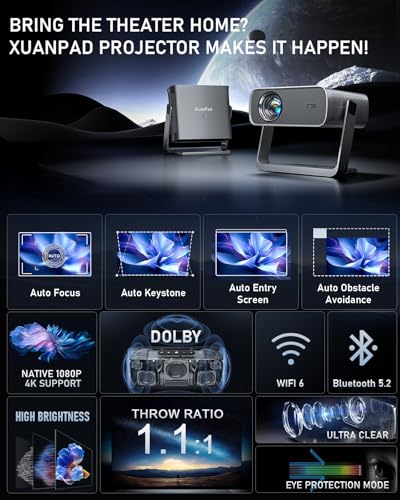
Movie nights with the XuanPad Projector start quickly, thanks to its officially licensed built-in apps that remove the need for streaming sticks or extra cables. With just a tap, you can jump into movies, TV shows, or kids’ content, making it especially convenient for shared family use. Everything feels centralized and easy to access.
Visual quality is supported by native 1080p resolution with 4K decoding, paired with an all-glass lens system that improves clarity and uniform brightness across the screen. The short-focus design and 1.1:1 throw ratio work well in tighter spaces, letting you project a large image without pushing furniture around. Long viewing sessions are handled smoothly too, as the pure copper heat pipe improves cooling and helps maintain stable brightness.
Audio plays a bigger role here than expected. The dual-diaphragm 5W speaker combined with Dolby audio produces room-filling sound while staying impressively quiet during operation. Auto-focus and smart keystone correction take care of alignment, though in certain room layouts, a quick manual tweak may still be needed. Thankfully, the adjustable gimbal mount makes repositioning easy, keeping setup flexible rather than frustrating.

Built-in Android TV system Dual control with the mouse Flexible rotation and zoom Strong wireless connectivity
Edge sharpness drops slightly
At first glance, the Nonete Mini Projector feels designed for people who like options. Control can be handled through the included wireless mouse or the remote, which makes navigating the built-in Android TV OS more comfortable than relying on buttons alone. Popular apps such as YouTube and Prime Video are accessible without adding a TV stick, keeping the setup clean and portable.
Visual performance is driven by LCD projection technology with HDR support. While the native resolution is 720p, it supports 1080p and 4K video playback, resulting in improved contrast and richer colors for movies and photos. Auto keystone correction smooths out image alignment, and the 270-degree rotation makes it easy to project onto walls or ceilings. Digital zoom from 35 to 100 percent adds flexibility without requiring constant repositioning.
Plus, WiFi 6 delivers faster and more stable wireless streaming, while two-way Bluetooth 5.2 allows audio to be sent or received from speakers or headphones. The built-in speaker covers casual viewing well. Toward the edges of the image, sharpness can soften slightly, but keeping the screen size within the recommended range helps maintain a satisfying viewing experience.

Built-in Android TV 11 Supports 4K video playback Immersive 360° surround sound Fast WiFi 6 connectivity
The Android system may feel slow
What makes the ENUOSUMA Projector easy to live with is how little preparation it asks for. Android TV 11 is already built in, opening the door to millions of videos across major streaming platforms like Netflix, Prime Video, and YouTube. Turning it on feels more like launching a smart TV than setting up a traditional projector.
Image quality is supported by 4K resolution compatibility, paired with LED projection technology that keeps colors vivid and details crisp. With 260 ANSI lumens and an 8000:1 contrast ratio, visuals appear bright and well-defined for casual home viewing, especially in controlled lighting. Movies, shows, and online content all benefit from the added depth and clarity.
Audio is handled by integrated 360-degree surround speakers, which create a fuller sound than expected from a compact projector. For wireless performance, WiFi 6 and Bluetooth 5.2 provide stable connections across both 2.4G and 5G networks, making streaming and pairing accessories straightforward. While the Android system may occasionally take a moment to respond, content playback remains smooth once apps are running, keeping the overall experience enjoyable rather than disruptive.

Native 1080p with HDR10 Built-in certified streaming apps Fast auto keystone and focus Lightweight and highly portable
Light source lifespan is shorter
The Maypug Mini Projector sets the tone right away with its native 1080p resolution and 200 ANSI lumens, producing clear visuals that hold up well even with some ambient light. Support for 4K decoding and HDR10 adds depth to scenes, with deeper blacks, brighter highlights, and more accurate colors. Motion stays smooth thanks to the 60Hz refresh rate, making it suitable for action movies and casual gaming.
On the software side, the self-developed Lilac OS removes the need for extra streaming devices. Officially certified apps like Netflix, Prime Video, and YouTube are readily available, alongside Miracast and AumiCast for Android and iOS screen sharing. The Bluetooth remote keeps navigation simple, while access to Google Play and the TV Store opens up thousands of additional apps.
Setup is where this projector saves the most time. Automatic vertical keystone correction and electric focus quickly produce a well-aligned image, even when placed at an angle. Weighing just 1.44 pounds, it is easy to move between rooms or pack for travel. Although its light source may not last as long as premium models, it still delivers dependable performance for everyday viewing and frequent use.

Flexible multi-angle projection Fast laser focus correction Android TV with wide content Enhanced indoor audio tuning
Not ideal for bright environments
The SKUOU Projector approaches home projection from a practical angle, starting with its Android TV 11 system that gives access to a wide range of built-in streaming apps. With over half a million film and TV resources available, it reduces the need for external devices and keeps everything within one interface. Performance is supported by a Mali-G31 GPU and WiFi 6, helping apps load and stream more smoothly.
Placement is where this projector shows its versatility. A 210-degree rotating design and reinforced swivel bracket allow projection onto walls, ceilings, or even the floor. The short-focus lens can produce a 100-inch image from just two meters, making it well suited for smaller rooms. Intelligent corrections step in quickly, with laser focus and six-way auto keystone delivering a flat image in under a second.
Image quality is driven by a four-channel LED light source with HDR10 and dynamic decoding, paired with a native 1080p resolution that supports 4K input. While it performs best indoors, controlled lighting allows it to deliver an engaging cinematic experience.
Android 14 smart system Light 350-gram build Flexible 180° projection design Long light source lifespan
Fan noise is noticeable
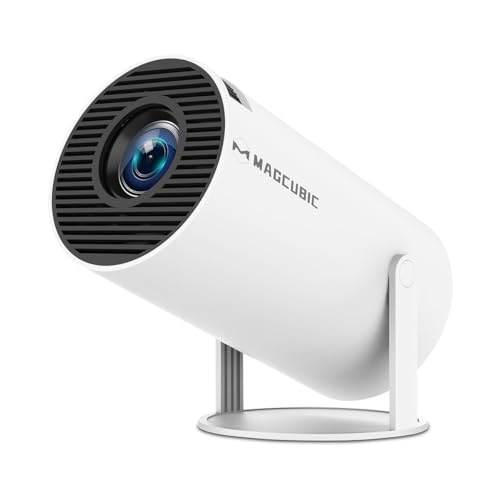
Rather than staying tied to one spot, the Magcubic HY300PRO Projector is made to move with you. Software updates help keep things compatible with newer services, and system upgrades can resolve most app-related issues, which adds a layer of reassurance for long-term use.
Its physical design leans heavily toward flexibility. The 180-degree rotatable body allows projection from almost any angle, including onto the ceiling, without permanent installation. Dual-band WiFi 6 helps maintain smoother connections, particularly during streaming or video calls, where lower latency makes a noticeable difference. Bluetooth 5.4 further expands audio options, allowing easy pairing with speakers or headphones when needed.
Despite its compact size and light 350-gram build, this projector includes built-in speakers that work well for casual viewing, keeping setups clean and clutter-free. The light source is rated for up to 50,000 hours, supporting frequent use over time. During quieter scenes, fan noise can be noticeable, but in most viewing situations, audio playback tends to mask it, allowing the focus to remain on the content rather than the hardware.

Android TV 13 system Full 360° rotation design Bright native 1080p visuals Built-in surround sound
Requires continuous power connection
The Ear&ear Projector brings together smart software and adaptable hardware in a way that suits everyday indoor use. Running on Android TV 13, it provides access to major streaming platforms like Netflix, Prime Video, and YouTube, supported by a large content library. With a Mali-G31 GPU and WiFi 6, navigation and streaming remain responsive, even when switching between apps.
The 360-degree rotation lets you project onto walls, ceilings, or even the floor, so it's great for movie evenings, kids' learning sessions, and more. Automatic keystone correction rapidly squares up the image, and manual focus enables you to make small adjustments to clarity when the positioning changes.
Visuals are delivered through native 1080p resolution with 4K support, backed by LED projection technology that produces bright, vivid images. With 800 ANSI lumens and a 1500:1 contrast ratio, colors appear lively and details stay sharp in indoor lighting conditions. Audio comes from a built-in 360-degree surround sound system, adding depth to movies without external speakers. Since there is no internal battery, the projector needs a constant power connection, but this also means stable performance during longer viewing sessions.
What to Look For in a best projector with auto keystone?
Is it necessary for you to purchase best projector with auto keystone in 2026 from Amazon within the next few hours? Perhaps you've just learned about something which can benefit friends or family members but aren't sure where to turn or who to trust.
So, we're here to help. Our new article will show you how to purchase the best item for your necessities quickly so that it arrives on time and as expected. It's that easy!
Contrast Ratio
Contrast ratings can only be used to measure in dark rooms. They don't give any information about ambient lighting. Unusually dark blacks in the projector will result in lower contrast. A brighter projector will perform well in home theaters, but not in living rooms or offices.
Projection Tech
DLP projectors with single-chip DLP chips could be subject to the so-called "rainbow effect." Sometimes, tiny, bright flashes with rainbow-like colors may appear, especially in dark scenes. Some DLP projectors have a minimal effect, while others can produce a distracting result, especially when there are bright areas against shady backgrounds. The rainbow effect is not a problem with LCD projectors, which are safer if someone in your household has sensitive eyes. There are many DLP projectors that produce excellent images.
Connection Methods
Component video, composite video and S-Video all make up the most common connections on large projectors. We're also seeing more projectors that offer direct USB connection to computers via a USB cable. A growing variety of projectors now have USB Type-C ports. The majority of USB-C ports can be used to transfer data or video using the DisplayPort protocol. Most USB-C ports support USB Power Delivery (USB PD), which means that a plugged in projector can supply 100 watts of power to charge a device or to charge it using a USB-C cable (assuming the device is capable of charging over USB-C).
Resolution
The calculation for projectors that have 4K ultra high definition (3,840 x 2,160 pixels) is slightly different.
Light Source
For longer periods of time, LEDs and lasers retain a greater percentage of their original brightness. While all light sources eventually lose their brightness, lamps lose the most in 500 hours. Then, they slowly decline over time. The brightness of LEDs and lasers will decrease more slowly over the course of their lifetimes.
Portability
Brightness
The ambient lighting level, size and material of your projector screen will all affect the brightness. You should buy a professional seller if you are installing a projector in a permanent location, such as at your home, to ensure that you get the best image brightness and the correct screen material.
FAQs
What is auto keystone correction on a projector?
Auto keystone correction automatically adjusts the projected image to keep it straight and rectangular when the projector is placed at an angle.
Is auto keystone better than manual keystone?
Auto keystone is more convenient because it adjusts the image automatically, saving setup time. Manual keystone can offer finer control but requires extra steps.
Are auto keystone projectors good for portable use?
Yes, auto keystone is especially useful for portable and travel projectors since it allows quick setup in different locations without precise positioning.
Conclusion
Its features, not its name, are what define best projector with auto keystone in 2026. This may seem self-evident, but it's easy to become fixated on a specific company or brand due to its reputation. We strongly advise you to consider your needs and determine which products will assist you in meeting them. With our options above, if you can't choose any suitable one, let's check Ear&ear Projector. Wish you a nice shopping day!
About Michael Brown