The Best Monitor For Photographer Of 2026
 By, Michael Brown
Updated
Summary

SAMSUNG 27-Inch S7 Monitor

KOORUI 27 Inch 4K Monitor

ASUS ProArt 24” Monitor PA248CRV
For photographers, the monitor you use can quietly shape the quality of your work. Even a great camera and lens can’t compensate for a display that shows colors inaccurately or hides fine detail. In practice, many photo edits that look “off” later can often be traced back to a monitor that simply isn’t made for color-critical work.
From experience, the biggest difference between an average monitor and a photography-focused one comes down to color consistency and trust. A good photo monitor lets you edit with confidence, knowing that skin tones won’t shift unexpectedly and that shadows and highlights are shown as they should be. Once you work on a properly calibrated display, it’s hard to go back.
That’s why this guide focuses on the best monitors for photographers—models that prioritize accurate color reproduction, stable panels, and resolutions that make fine retouching easier. Whether you’re editing for print, client delivery, or online portfolios, choosing the right monitor can make your workflow smoother and your results more predictable.
Our Top Picks


Sharp 4K UHD resolution Accurate HDR10 color support Tool-free easy setup stand Eye care for long sessions
No USB-C connectivity
Editing photos on the SAMSUNG 27-Inch S7 feels like working with a larger, more detailed canvas. The 4K UHD resolution opens up extra screen space, making it easier to zoom into fine textures, adjust complex layers, or compare images side by side without constant scrolling. This level of detail is especially useful when working on high-resolution photography or intricate compositions.
Images look more real with a wider colour range and HDR10. The shadows are darker and the highlights are brighter, which helps photographers estimate contrast more accurately. When fine-tuning exposure, it's important that dark parts keep their detail and bright areas stay under control. Connectivity is refreshingly straightforward. HDMI, DisplayPort, USB-A, and USB-B ports allow cameras, computers, and peripherals to connect without juggling adapters. Setting up the monitor itself is just as simple, thanks to the Easy Setup Stand that snaps into place without tools.
Eye comfort is another quiet advantage. Automatic brightness and color temperature adjustments, paired with TÜV-certified eye care and Eye Saver Mode, help reduce fatigue during long editing sessions. Although it does not include USB-C connectivity, traditional ports still provide a stable and reliable setup for most photography workstations.

Sharp 4K image clarity Wide professional color coverage IPS wide viewing angles Flicker-free technology
The stand may wobble slightly
Sitting down to edit on the KOORUI 27 Inch 4K Monitor, the first thing you notice is the clarity. The UHD 3840 x 2160 resolution delivers crisp images, making it easier to inspect fine details and subtle textures in high-resolution photos. This extra sharpness is especially helpful when working on large prints or detailed retouching work.
Photos look bright and well-balanced because they can show 1.07 billion colours and cover 95% of DCI-P3 and 99% of sRGB. Bright colours look lively, and gradients change easily. This helps photographers believe what they see on screen while they are fixing colours. The IPS panel keeps colors and brightness consistent even when viewed from different angles, which is useful in shared studios or multi-monitor setups. Comfort View features like flicker-free technology and LowBlue Mode quietly reduce eye strain during long editing sessions.
Adjustability also plays a role, with tilt support and VESA compatibility allowing the monitor to fit into different workspace layouts. While the stand can feel slightly wobbly at times, it still supports daily use well, and pairing it with a VESA mount can easily create a more stable and personalized setup.

Factory-calibrated color accuracy Extra vertical 16:10 workspace Excellent wide color coverage Powerful single-cable USB-C
The built-in speakers are not very good
Working on the ProArt PA248CRV feels reassuring in a way many monitors don’t. Right out of the box, it’s factory pre-calibrated to Delta E < 2, which means you can start editing with confidence instead of immediately reaching for calibration tools. For photographers and colorists, that trust in what you’re seeing is a big deal, especially when fine-tuning skin tones or subtle gradients.
The 16:10 aspect ratio quietly improves day-to-day editing. That extra vertical space makes scrolling through Lightroom catalogs or timelines in video projects noticeably more comfortable. Color performance is exactly what you’d expect from a ProArt display, with 97% DCI-P3 and 100% sRGB coverage bringing out fine details in both photos and digital artwork without oversaturation.
Connectivity is another area where this monitor feels thoughtfully designed. The USB-C port handles display, data, and up to 96W laptop charging through a single cable, keeping desks cleaner and workflows simpler. It also doubles as a USB hub, which is surprisingly convenient when connecting external drives or peripherals. The built-in speakers are not very good, but for most creative professionals who already use headphones or studio monitors, that limitation rarely gets in the way of what this display does best.
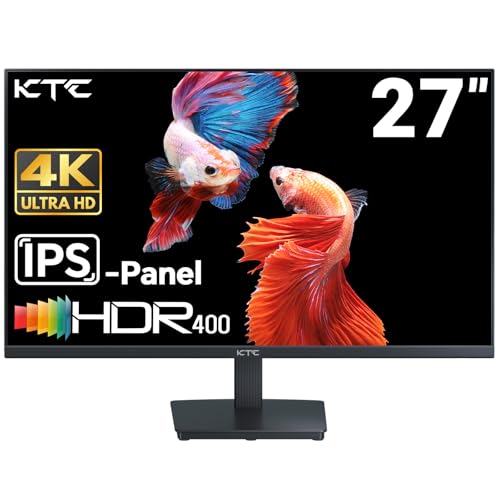
Sharp 4K editing workspace Natural, vivid color reproduction HDR improves contrast depth Tilt adjustment and VESA support
Device connection can be a bit tricky
Spending time editing on the KTC 27 Inch 4K Monitor, the extra screen space immediately becomes something you don’t want to give up. The 4K resolution makes images look crisp and clean, and it’s genuinely helpful when zooming in to check sharpness or working with multiple panels open at once. For photographers who juggle catalogs, layers, and reference images, that clarity adds up quickly.
This monitor also does well in terms of colour performance. Photos look rich without being too much because the screen covers 95% of the DCI-P3 colour space and can show 1.07 billion colours. We like that it leans toward natural vibrancy rather than pushing colors too hard, which makes it easier to trust what you’re editing. HDR 400 adds a bit more depth to highlights and shadows, and while it’s not cinematic, it does help reveal contrast when working on creative projects.
Connectivity is practical, with dual HDMI 2.0 ports and DisplayPort 1.4 covering most setups. Tilt adjustment and VESA support make it simple to position comfortably, and the flicker-free screen with a blue light filter helps during longer sessions. Connecting devices can be quite hard sometimes, but once everything is in place, the monitor runs smoothly and stays out of the way, which is exactly what a photographer’s display should do.

Sharp and detailed 4K display Ultra-smooth high refresh rate Wide-angle Fast IPS colors Flexible connectivity and mounting
The manual is not very clear
The Z-Edge 27 Inch IPS Monitor is one of those displays that tries to do more than just one job. Its 3840 x 2160 resolution delivers crisp detail, which is especially useful when checking fine textures or sharpening work. Images look clean and well-defined, and the added contrast helps photos appear more lifelike on screen.
What really sets this monitor apart in daily use is how smooth everything looks. The 160Hz refresh rate and 1ms response time make scrolling through galleries or zooming in and out feel noticeably fluid. While those specs are often aimed at gamers, we actually enjoyed how responsive the display felt during creative work, especially when moving quickly between images or tools.
The Fast IPS panel keeps colors consistent from virtually any angle, which is helpful when sharing edits with clients or collaborating in the same space. Connectivity is generous, with two DisplayPort and two HDMI ports that make switching between devices simple. The frameless design and VESA mount support also make it easy to integrate into different desk setups, while flicker-free and low blue light features help reduce eye strain during longer editing sessions. One minor downside is that the manual is not very clear, so initial setup may take a bit of patience, but once everything is configured, the monitor performs smoothly and confidently for both creative tasks and everyday use.

Productive 3:2 aspect ratio Sharp, detailed high resolution Smooth, accurate color transitions Flexible ports and mounting
Controls placement feels a little awkward
What we like most about the Gawfolk 28 Inch 4K Monitor is how practical it feels for everyday creative work. The 3:2 aspect ratio sounds like a small change, but in use, that extra vertical space really matters. When editing photos or working through catalogs, there’s simply less scrolling, which makes long sessions more comfortable and a bit more focused. The 3840 x 2560 resolution keeps everything sharp, so even with more content on screen, details don’t get lost.
Color performance is another area where this monitor earns trust. With 10-bit color support and 128% sRGB coverage, colors appear smooth and well-controlled rather than overly punchy. We appreciate that gradients look clean and natural, which is important when working on skies, skin tones, or subtle lighting adjustments. It feels reliable for both professional retouching and casual viewing.
Moreover, DC dimming and low blue light features help reduce eye strain during long hours, and Adaptive Sync keeps motion smooth for everyday tasks and video playback. Connectivity is flexible, with multiple HDMI and DisplayPort options that make switching between devices easy. However, the on-screen display controls and button placement can be a bit inconvenient. Nonetheless, once everything is set, it’s something you rarely need to revisit.

Sharp, detailed 4K clarity Rich, accurate color reproduction Extremely smooth motion handling Flexible Dual Mode performance
Price sits on the high side
At first glance, the LG 27G810A-B looks like it belongs squarely in a gamer’s setup, but spend a moment with its specs and it becomes clear why photographers might be drawn to it too. Its 27-inch 4K UHD IPS panel delivers clean, highly detailed visuals that make it easy to inspect sharpness and fine textures. The 95% DCI-P3 color coverage gives images depth and vibrancy without pushing them into unnatural territory, which helps when editing photos that need to stay true to life.
DisplayHDR 400 doesn’t dramatically change your workflow, but it does improve contrast and highlight detail enough to make images look more dimensional, especially when reviewing finished work or visual content. Switching between modes is surprisingly intuitive, and while photographers may stick to 4K at 180Hz, the Dual Mode option shows how adaptable this monitor really is.
Motion handling feels effortlessly smooth thanks to the 1ms response time and frame-sync support. Even outside gaming, scrolling through large photo libraries or making quick adjustments feels responsive and fluid. FreeSync Premium and G-SYNC compatibility also help maintain consistency across different systems. The only drawback is its price point. It asks for a higher investment, but for creatives who want premium performance without separating work and play into two monitors, that cost starts to make sense.
Our Tips to decide which one among best monitor for photographer is the best
Researchers all know how difficult it is to make a decision when there are so many options. It's something that originally stood out, and you want to get the most bang for your buck, but our advice will help you make good decisions.
Before making a purchase, please read the following key factors to save oneself time and prevent trouble later.
Screen Size
Resolution
Response Time
Refresh Rate
Brightness
Connections
Panel Type
Aspect Ratio
FAQs
Do photographers really need a dedicated monitor?
Regular monitors often look fine at first, but they can shift colors or lose detail in shadows. A photography-focused monitor gives you consistency, which matters when your edits need to look right on other screens or in print.
Is color accuracy more important than resolution for photo editing?
Both matter, but color accuracy comes first. A high-resolution screen is useful for detail work, but if colors aren’t accurate, the extra pixels won’t help your final image look correct.
Do I need to calibrate a monitor made for photographers?
Even a good monitor benefits from calibration. Many photography monitors are already well-tuned out of the box, but regular calibration helps keep colors consistent over time, especially for professional work.
Conclusion
Follow these guidelines to ensure that you purchase best monitor for photographer in 2026. Take into account what characteristics are most essential for your topmost issue right now, and then look into different products that meet those requirements. If you are unable to choose a product, please see LG 27G810A-B 27-inch 4K Monitor for another option.
With this advice, you should be able to find a great new product with much less difficulty! Do you have any inquiries? Please notify us as soon as possible.
About Michael Brown