The 7 Best Apple Tablet For Drawing Of 2025
 By, Michael Brown
Updated
Summary

Apple iPad 11-inch A16
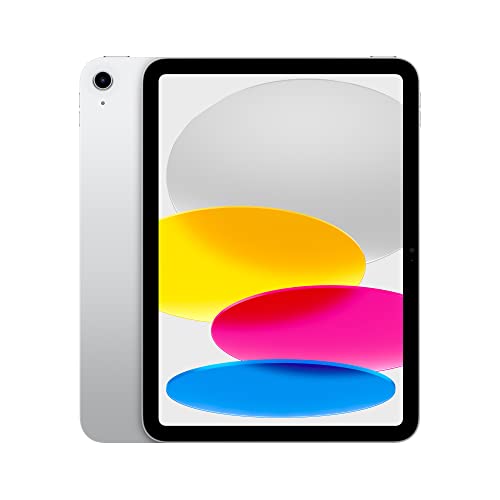
Apple iPad 10th Generation A14

Apple iPad Air 11-inch M3
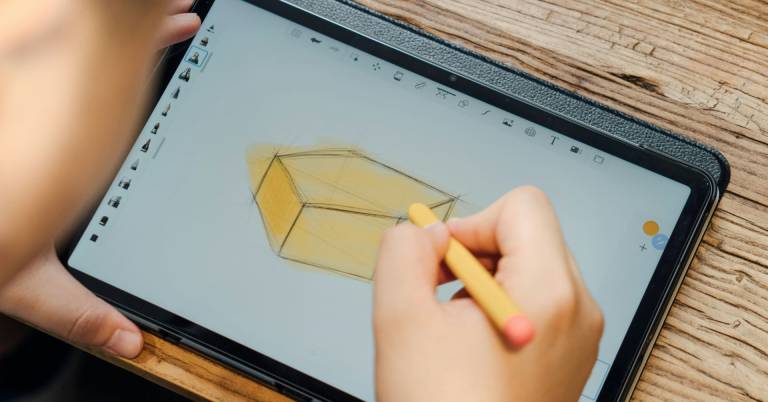
Apple tablets have become a go-to choice for artists, designers, and creative hobbyists, thanks to their smooth performance, accurate displays, and excellent stylus support. With Apple Pencil compatibility across multiple models, iPads offer a responsive and intuitive drawing experience that closely mimics working on paper, while providing the flexibility of powerful creative apps.
Choosing the best Apple tablet for drawing depends on how you plan to create. Display quality, screen size, Apple Pencil support, and processing power all affect how comfortable and precise drawing feels. Some artists prefer larger screens for detailed illustration, while others value portability for sketching on the go.
Below, we highlight the best Apple tablets for drawing, comparing their strengths, limitations, and value. Whether you’re a beginner exploring digital art or a professional illustrator looking for a reliable creative tool, this list will help you find the right iPad to match your style, workflow, and budget.
Our Top Picks


Fast A16 chip performance Bright Liquid Retina display Excellent Apple Pencil support Long all-day battery life
No Face ID authentication
This 11-inch iPad builds its drawing experience around speed and clarity. The A16 chip keeps brushes responsive and layers moving smoothly, even when you jump between drawing, photo editing, and everyday tasks. Paired with all-day battery life, it is easy to sit down for a long sketching session without worrying about finding a charger halfway through your work.
The Liquid Retina display plays a big role here. Colors look balanced, lines appear crisp, and True Tone quietly adjusts the screen to match your room’s lighting, which makes longer drawing sessions more comfortable on the eyes. When connected to an Apple Pencil, the screen turns into a flexible canvas, while iPadOS adds helpful tools like Scribble and multitasking so you can reference images or notes while you draw.
Storage starting at 128GB gives you room for apps and artwork, and Wi-Fi 6 helps keep cloud files and app downloads moving quickly. Security is handled through Touch ID rather than Face ID, which may feel familiar and reliable for many users. Although it does not offer Face ID, the fingerprint sensor still provides quick, secure access and keeps the experience straightforward.

Smooth A14 chip performance Large 10.9-inch drawing area Strong Apple Pencil compatibility Wi-Fi 6 keeps cloud files syncing quickly
More screen glare indoors
Apple’s 10th Generation iPad is designed to be flexible, and that shows the moment you start drawing. The A14 Bionic chip keeps apps responsive, whether you are sketching, adding layers, or jumping into photo edits. Paired with all-day battery life, it supports long creative sessions without constant charging breaks.
The 10.9-inch Liquid Retina display provides ample space for drawing and viewing reference images side by side. True Tone subtly adapts the screen to your environment, helping keep colors comfortable to look at over time. With Apple Pencil support, the iPad becomes a capable canvas for handwriting, illustrations, and quick design ideas. iPadOS adds to this experience by allowing multitasking, Scribble for handwritten text input, and easy sharing once your work is done.
Moreover, Wi-Fi 6 keeps cloud files syncing quickly and makes downloading large apps or brushes feel smooth. Storage options give you a choice depending on how much artwork you plan to keep on the device. One thing to be aware of is the display construction. Because the screen is not laminated, reflections can be more noticeable in bright environments. That said, with a slight angle adjustment or controlled lighting, it still works well for most drawing situations.

Powerful M3 chip performance Accurate P3 color display Advanced Apple Pencil support Flexible multitasking with Stage Manager
The battery may drain faster under load
This iPad Air is built to keep up with creative workflows that move quickly. The M3 chip handles heavy creative tasks smoothly, whether you are stacking layers, switching brushes, or running multiple apps side by side. iPadOS and Stage Manager make it easy to resize apps or connect to an external display, which is helpful when you want more space for reference material while you draw.
The Liquid Retina display makes the experience better with its P3 broad colour, True Tone, and reduced reflectivity. The colours look rich and controlled, and the screen stays pleasant in different lighting situations. When paired with Apple Pencil Pro or Apple Pencil USB-C, the iPad Air turns into a responsive drawing surface that supports both quick sketches and detailed work. Storage options going up to 1TB also give room for large project files and creative apps.
Wi-Fi 6E keeps transfers fast, and Touch ID offers simple, secure access. However, rather than lasting exceptionally long under heavy creative workloads, the battery tends to drain faster during demanding tasks. Still, with smart breaks and nearby charging, it remains practical for daily drawing sessions and portable creative work.

Extremely portable drawing tablet Powerful A17 Pro performance High-quality Liquid Retina display Apple Pencil Pro compatibility
The layout can feel tight when working with multiple apps at once
What makes the iPad mini appealing for drawing is how much power it delivers in such a small frame. The A17 Pro chip handles drawing apps, photo edits, and layered sketches smoothly, while all-day battery life keeps it ready for spontaneous creative moments. It is the kind of tablet you can pull out quickly, add a few lines to a sketch, and put away just as easily.
The 8.3-inch Liquid Retina display may be smaller, but it brings P3 wide color, True Tone, and low reflectivity, which help artwork look clean and balanced under different lighting conditions. Paired with Apple Pencil Pro or Apple Pencil USB-C, the screen becomes a responsive canvas for detailed notes, illustrations, and quick concept drawings. iPadOS adds useful tools like Scribble and multitasking, making it simple to switch between creative apps and reference material.
Because of its compact size, the layout can feel tight when working with multiple apps at once. Instead of spreading out across split-screen views, it works best when you focus on one task at a time. For artists who value portability and speed over large workspaces, this trade-off is easy to accept.

Massive Ultra Retina XDR display Exceptional M4 creative performance Smooth Apple Pencil Pro experience Advanced multitasking and storage
Premium price point
The 13-inch iPad Pro with the M4 chip is the kind of device that invites you to slow down and create. Its Ultra Retina XDR display stretches wide, giving illustrations room to breathe and letting fine details shine through. With high brightness, deep contrast, and accurate color, every stroke and shade stays clear, even during long drawing sessions. ProMotion keeps lines fluid, which makes sketching and inking feel natural and uninterrupted.
Power comes quietly from the M4 chip. Heavy files, layered artwork, and graphic-intensive tasks move smoothly, allowing you to focus on the creative process instead of waiting on the device. iPadOS and Stage Manager help turn that large screen into a flexible setup, where reference images, tools, and sketches can live side by side or extend to an external display.
Apple Pencil Pro completes the experience, turning the screen into a responsive, spacious canvas. The only consideration is cost. Rather than being a casual purchase, it is an investment, best suited for creators who plan to fully use its power and expansive display.

Large 13-inch drawing canvas Strong M2 multitasking performance Accurate P3 color display Apple Pencil Pro support
No ProMotion and OLED
Opening the 13-inch iPad Air feels like laying a blank canvas on a desk. The Liquid Retina display stretches out comfortably, giving your drawings room to develop while keeping colors consistent thanks to P3 wide color and True Tone. Low reflectivity helps reduce distractions, which is especially welcome during longer creative sessions.
The M2 microprocessor makes the experience smooth as you go between sketching, editing, and doing other things at the same time. Layers move swiftly, brushes stay smooth, and iPadOS makes it easy to add comments or reference pictures to your artwork. Stage Manager gives you even more options by letting you resize apps or connect to an extra display when you need to operate on more than one screen.
Apple Pencil Pro pairs naturally with this larger display, turning it into a responsive drawing surface that works just as well for detailed illustrations as it does for broad strokes. The screen focuses on clarity and color accuracy rather than cutting-edge display tech. Instead of ProMotion or OLED, it relies on a traditional Liquid Retina panel, which still delivers an enjoyable drawing experience for most artists who value space and performance over advanced display extras.

Powerful M5 creative performance Ultra Retina XDR clarity Smooth ProMotion drawing experience Storage options reaching up to 2TB
Initial setup takes time
Working on the iPad Pro 11-inch starts with the screen. The Ultra Retina XDR display is bright, detailed, and smooth, making lines glide naturally thanks to ProMotion. Colors remain accurate and balanced, which helps when fine-tuning illustrations or switching between drawing and editing. Even in changing lighting, True Tone keeps the display comfortable to look at over long sessions.
Behind that display, the M5 chip quietly handles heavy lifting. Large files, layered artwork, and AI-powered tools move without hesitation, allowing creative ideas to stay in motion. iPadOS 26 adds a more flexible windowing system, so you can arrange tools, reference images, and canvases in a way that matches your workflow rather than forcing you into one layout.
Apple Pencil Pro completes the setup, offering precise control for sketching, shading, and detailed line work. With storage options reaching up to 2TB, there is space to grow entire project libraries. Getting everything ready does require some patience. Instead of being instant, the initial setup and configuration take time, but once complete, the experience becomes fluid and rewarding for long-term creative use.
What to Look For in a best apple tablet for drawing?
The best apple tablet for drawing is a product type that many customers feel hesitant to select because of the challenges in evaluating its features. It comes to trust! When studying a significant purchase, many factors must be considered. Our best apple tablet for drawing knowledge will help you make an ideal decision.
Our article here will highlight some outstanding items and provide solutions to FAQs and guides to buying. You should keep in mind some main criteria of best apple tablet for drawing below:
Software
Battery
Screen & Audio
Cameras
Online Access
Storage
Hardware Connections
FAQs
Which Apple tablet is best for drawing?
The best Apple tablet for drawing depends on your needs, but iPad Pro models are popular for their large displays, high refresh rates, and excellent Apple Pencil responsiveness.
Do all iPads support Apple Pencil for drawing?
Most modern iPads support Apple Pencil, but compatibility varies by model and Pencil generation. Always check which Apple Pencil version works with the iPad you choose.
Is an iPad good for beginners learning digital drawing?
Yes, iPads are very beginner-friendly. They offer intuitive drawing apps, smooth stylus performance, and a simple learning curve compared to traditional drawing tablets.
About Michael Brown