The 7 Best Laptop In Battery Life For 2025
 By, Michael Brown
Updated
Summary

MacBook Air 13-inch M4

HP Touchscreen Laptop

Lenovo IdeaPad 15.6 inch Laptop
A laptop with a lengthy battery life is a must if you are always on the road for work, school, or travel. The best laptops in battery life combine efficient processors, optimized displays, and smart power management to keep you productive all day without constantly searching for an outlet. Whether you’re editing documents, streaming content, or attending virtual meetings, a durable battery ensures uninterrupted performance wherever you are.
To help you choose, we researched top-rated laptops across different brands, focusing on real-world battery endurance, power efficiency, and portability. Our top pick is the MacBook Air 13-inch M4. With up to 18 hours of battery life, this sleek and lightweight laptop leads the pack.
That said, the best long-lasting laptop for you depends on your needs. Some prioritize lightweight design for mobility, while others offer larger screens and higher performance for multitasking. We’ll share the best laptops with outstanding battery life to keep you charged from morning to night.
Our Top Picks


Blazing-fast M4 chip performance Exceptional 18-hour battery life Brilliant 13.6-inch Liquid Retina display Lightweight and whisper-quiet design
No fan cooling for heavy workloads
Apple’s MacBook Air 13-inch M4 continues the tradition of sleek innovation, packing incredible performance into a design that feels almost impossibly thin. The new M4 chip makes everything perform more smoothly, from switching between demanding programs to editing films to conducting complex workflows. When you add in macOS optimisations, the Air seems quick and efficient even when you're doing a lot of work.
Battery life remains one of its most impressive strengths, lasting up to 18 hours whether plugged in or not, allowing all-day productivity without worry. The 13.6-inch Liquid Retina display supports a billion colors, delivering crisp text, detailed images, and vivid contrast that enhances everything from design work to streaming. Complementing the visuals, the 12MP Center Stage camera and Spatial Audio speakers ensure that you both look and sound great on every call.
One thing to note is that the MacBook Air M4 doesn’t include a fan for active cooling. Still, for everyday users, students, and professionals seeking a balance of speed, portability, and elegance, the MacBook Air 13-inch M4 is a near-perfect choice for work and play.
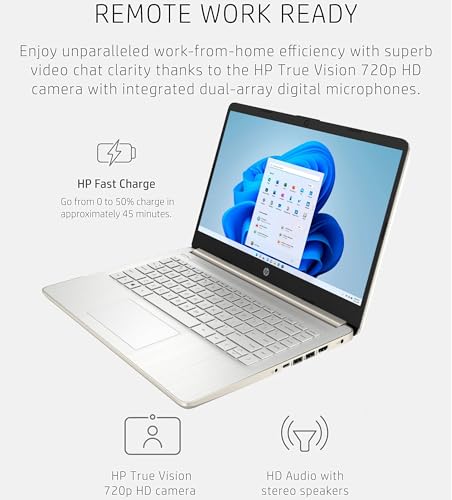
Smooth performance for daily tasks Crisp HD touchscreen display Long-lasting battery for all-day use Includes 1-year Microsoft 365
A bit heavy for its size
The HP 14" Touchscreen Laptop brings everyday computing to life with a simple yet capable design. Running on the Intel Celeron N4500 processor, it delivers steady performance for day-to-day needs like writing reports, attending virtual meetings, or watching your favorite shows. Its 14-inch HD touchscreen display, enhanced with BrightView and anti-glare technology, offers a clear and comfortable viewing experience even during long study or work sessions. The slim bezels make the screen feel more expansive, while the HP True Vision HD webcam ensures you look sharp on every video call.
With 4GB of DDR4 RAM and 64GB of eMMC storage, it's still practical for light jobs, documents, and work done in the cloud. A one-year subscription to Microsoft 365 adds even more value, keeping productivity tools right at your fingertips. With Wi-Fi 6 connectivity and multiple ports, including USB-C, HDMI, and an SD card reader, it’s ready to adapt to your daily needs.
One minor downside is that it may feel slightly heavier than some ultraportables. However, the solid build and balanced performance make it a dependable choice for anyone seeking a practical and affordable touchscreen laptop for work, study, or travel.

Reliable Intel Celeron performance Comfortable 15.6" anti-glare display Multiple connectivity options Long-lasting 11-hour battery life
No dedicated graphics for heavy visuals
The Lenovo IdeaPad 15.6-inch Laptop offers a straightforward, dependable experience that’s ideal for students, professionals, or anyone who needs a practical device for everyday use. The Intel Celeron N4500 CPU makes sure that routine operations like checking emails, organising spreadsheets, and streaming internet video run smoothly. Its built-in Intel UHD Graphics make graphics look clear and natural, so web videos and casual entertainment look great.
One of its best qualities is the 15.6-inch anti-glare display, designed for comfort even during long hours of use. With 220 nits of brightness, it performs well under most lighting conditions. Another great thing about this device is its connectivity. It has a full variety of connectors, including USB-C, HDMI, and an SD card reader, so it's easy to connect peripherals or external screens. Battery life of up to 11 hours means you can get through a full day of work or study without searching for an outlet.
While this laptop doesn’t include dedicated graphics, it still handles everyday visuals smoothly and efficiently. For light productivity and entertainment, the performance feels well-balanced.

Comfortable lift-hinge typing design Spacious keyboard with numeric pad Eye-friendly ComfortView display Smart adaptive thermal management
Fans can get a bit loud
Using the Dell Inspiron 3530 Laptop feels like working with a device that understands your rhythm. The first thing you notice is the thoughtful design; the lift-hinge raises the keyboard just enough to create a more natural typing position. It’s a small detail, but one that makes long hours of writing or browsing feel noticeably easier. Add in the spacious layout and separate numeric keypad, and everyday tasks like data entry or homework become effortless.
The display is easy on the eyes, thanks to Dell’s ComfortView technology, which helps reduce blue light during extended screen time. Whether you’re working late into the night or enjoying a weekend movie marathon, your eyes stay comfortable longer. The built-in HD webcam also makes video calls feel more personal, capturing your image clearly with warm tones that flatter your surroundings.
Moreover, Dell's clever thermal system knows when you're using the laptop on your lap or on a desk and makes changes to keep everything cool and running smoothly. Although the fans can get a bit loud when the system’s working hard, it’s a fair trade for consistent performance and reliability throughout your day.

Dual 14” OLED touch displays Powerful Intel Core Ultra 9 performance Lightweight and ultra-thin portability Long-lasting 75Wh all-day battery
The charging cord for the pen is a bit short
The ASUS Zenbook DUO is more than simply a laptop; it represents a bold rethinking of what productivity looks like. The dual 14-inch Lumina OLED displays open up like a creative canvas, offering crisp 2880x1800 resolution, vibrant HDR color, and an ultra-smooth 120Hz refresh rate. Switching between modes is smooth and easy, whether you're editing, designing, or just using a lot of apps at once. It feels like you have a whole workstation that fits neatly in your bag.
Despite its power and versatility, the Zenbook DUO remains surprisingly portable. Weighing just 3.64 pounds and measuring 0.57 inches thin, it’s light enough to carry anywhere. The detachable Bluetooth keyboard and kickstand let you set up your workspace however you like, while the FHD IR camera ensures clear video calls on the go.
Built to last, it meets military-grade durability standards and keeps you going all day with a robust 75Wh battery—up to 16 hours in Laptop Mode. The only small quirk? The charging cord for the pen could be a bit longer. But that’s a minor note in an otherwise outstanding duet of design and performance.

Fast Intel Core 7 performance Crisp 15.6" Full HD display Long 15-hour battery with fast charging Built-in Microsoft Copilot AI assistant
Quite slow sometimes under heavy load
The Samsung Galaxy Book4 is a modern all-rounder designed to make work and entertainment feel effortless. Under the hood, its Intel Core 7 processor delivers solid power for everyday computing, letting you jump between apps, manage projects, and enjoy streaming without slowing down. The 15.6-inch Full HD screen has 300 nits of brightness and dynamic clarity. It strikes a perfect match between colour, contrast, and comfort, whether you're at a desk or working from a café.
Battery life is another strong point, lasting up to 15 hours on a single charge, and the convenience of USB-C fast charging keeps you going without downtime. The inclusion of Microsoft Copilot AI adds a layer of smart assistance—helping summarize notes, manage tasks, and even sync your Galaxy phone for a more connected experience. Combined with Dolby Atmos speakers, a fingerprint reader, and a backlit keyboard, it’s thoughtfully crafted for students and professionals alike.
While performance is generally smooth, it may occasionally feel a bit slow during heavier multitasking or demanding workloads. However, for most users seeking a sleek, intelligent, and dependable laptop that enhances daily productivity, the Galaxy Book4 remains a compelling and stylish choice.

Efficient 8-core Intel Core 3 processor Crisp 15.6" Full HD IPS display Built-in Copilot AI assistant Eco-friendly and recyclable design
No backlit keyboard
The Acer Aspire 15 Slim Laptop offers reliable performance for users who value efficiency and comfort. Its 8-core Intel Core 3 processor and 8GB of memory ensure smooth performance across everyday tasks, whether you’re browsing, streaming, or managing documents. The 15.6-inch Full HD IPS display with narrow bezels delivers sharp, detailed visuals that make everything from movies to spreadsheets look clean and vibrant, while Acer BluelightShield helps reduce eye strain during long sessions.
One of the fantastic features is Copilot in Windows, your built-in AI assistant that helps streamline workflows, summarize information, and handle quick tasks with a single touch. AcerSense adds another layer of user convenience, allowing easy management of battery, storage, and performance settings. Connectivity is equally modern, with Wi-Fi 6, HDMI 2.1, and dual USB-C ports that support charging and data transfer.
While the Aspire 15 doesn’t include a backlit keyboard, its comfortable layout, solid build, and thoughtful features make it a strong everyday laptop choice. And with eco-friendly packaging and recycled materials, it’s a smart pick for users who care about both performance and sustainability.
Which Characteristics To Consider On Selecting best laptop in battery life For 2025?
To make a practical purchase, you guys need to be aware of best laptop in battery life ultimately. Several key factors must be taken into account and evaluated. Of course, there are some challenges for you during the process of studying products. So we are available here to provide you with comprehensive advice and support.
Thanks to the evaluation supported by high technology, we have come up with some significant features for you to go through. Let’s check it below!
-buyingguide
FAQs
Does battery life depend on how I use my laptop?
Yes. Battery life varies depending on usage. Tasks like video editing, gaming, or high brightness settings drain power faster than browsing, document editing, or streaming videos.
How can I extend my laptop’s battery life?
You can extend battery life by reducing screen brightness, turning off Bluetooth or Wi-Fi when not needed, using battery saver mode, and keeping your software and drivers updated.
Are gaming laptops good for battery life?
Generally, no. Gaming laptops focus on high performance and graphics power, which consume more energy. However, some models offer hybrid GPU modes or power-saving settings to improve endurance during light use.
About Michael Brown