The 7 Best Optoma Short Throw Projectors For 2025
 By, Michael Brown
Updated

Summary
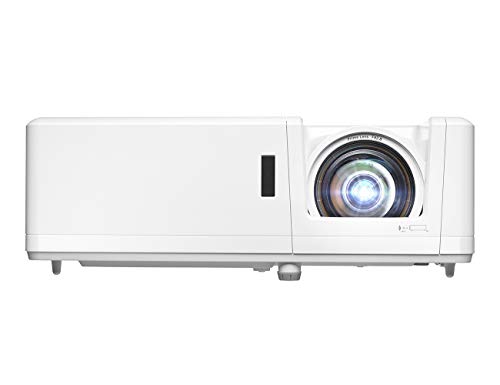
Optoma GT1090HDR Short Throw Projector

Optoma GT1080HDRx Short Throw Projector

Optoma UHD35STx Short Throw Projector
Imagine turning a small room into a cinematic experience without rearranging your furniture or struggling with long projection distances. That’s exactly what a short throw projector offers, and Optoma has become a trusted name for delivering crisp, vibrant visuals in compact setups. These projectors are perfect for home theaters, classrooms, or gaming spaces where every inch counts, letting you enjoy big-screen entertainment without the hassle of traditional projectors.
Choosing the right Optoma short throw projector comes down to understanding your needs. Key factors include brightness for well-lit rooms, resolution for sharp, detailed images, connectivity options for seamless streaming or gaming, and throw distance to fit your space perfectly. Balancing these features ensures you get a projector that works flawlessly in your environment.
One top pick is the Optoma GT1090HDR Short Throw Projector, which offers bright, clear visuals and a compact design that fits even small rooms. Below, we’ll explore the best Optoma short throw projectors, highlighting models that combine image quality, ease of setup, and space-saving design to help you choose the perfect projector for your home or office.
Our Top Picks


Bright picture in any room Long-lasting laser light source Short-throw placement flexibility Easy correction and setup tools
Manual focus is extremely sensitive
There is something satisfying about placing a projector just a few feet from the screen and watching a massive 120-inch image appear. The GT1090HDR handles that trick easily thanks to its short-throw lens, which makes it especially helpful for smaller rooms where space is tight. The laser light source is another convenience. Knowing it can run up to 30,000 hours without lamp changes takes a lot of long-term worry off the table, and the IPX6 dust-resistant design adds a reassuring layer of durability.
Picture quality holds up well across different types of content. Its 1080p resolution (with 4K input support) delivers crisp detail, and the 300,000:1 contrast ratio helps deepen the shadows during movie nights. HDR10 and HLG support bring brighter highlights too. With 4,200 lumens, the image remains bright even when the lights are on, making it ideal for gaming sessions or outdoor setups. Setup feels straightforward with auto keystone and four-corner correction, smoothing out alignment.
Although the manual focus is extremely sensitive, which can make fine-tuning a bit tricky, once it is dialed in, the clarity is impressive and remains stable during use.

Smooth low-latency gaming mode Bright full HD image quality Short-throw placement convenience Accurate RYGCWB color wheel
Lamp-based model needs future bulb replacements
Setting up the GT1080HDRx feels straightforward, especially since it only needs a short distance to create a huge image. That flexibility is great for apartments, bedrooms or gaming setups where space is limited. Once powered on, the mix of 3,800 lumens and its 50,000:1 contrast ratio gives the picture a crisp, lively look. HDR10 support with 4K input also helps brighten highlights and deepen dark scenes, while the RYGCWB color wheel and sRGB/REC.709 profiles keep colors looking accurate.
Gamers will get an extra bonus with the enhanced gaming mode. The 8.4ms response time and 120Hz refresh rate make fast-paced scenes smoother and more responsive, giving it an edge over many standard home projectors. Connectivity doesn’t feel restrictive either since dual HDMI ports handle consoles, streaming devices, and more with ease.
As for its drawback, the model relies on a traditional lamp, meaning you’ll eventually need to replace the bulb. Even so, the 15,000-hour lamp life stretches that maintenance far into the future, so it’s not something you’ll be dealing with often.

True 4K resolution Ultra-fast gaming response Short-throw setup flexibility Strong HDR and contrast
No lens shift for placement adjustments
The UHD35STx's ability to turn a modest space into a real theatre instantly is what sticks out right away. Being able to produce a 100-inch picture from just over three feet makes placement far less stressful, and once the image lights up, the true 4K resolution really shows its strength. With 8.3 million individually addressable pixels and a 1,000,000:1 contrast ratio, detail in both bright and shadow-heavy scenes feels remarkably sharp. HDR10 and HLG support, along with Optoma’s tone mapping and Dynamic Black, push colors, highlights and dark levels to a more cinematic level.
Moreover, the improved gaming mode has a response time of 4ms at 1080p 240Hz, which keeps motion fluid and quick. The 16ms response time is very rapid for a projector, even at 4K. This gives console players a lot of options for how they want to play, whether they want the most detail or the fastest speed. One minor downside is that it has no lens shift. Despite this, careful placement solves it easily and doesn’t affect overall performance once set up.
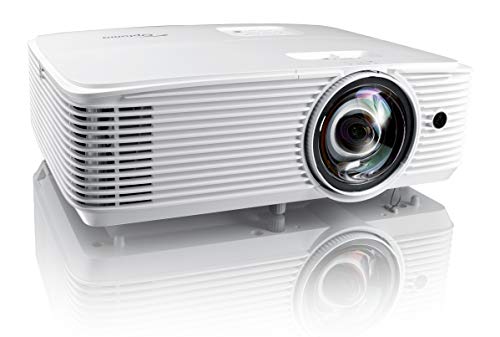
Bright in well-lit rooms Short-throw placement convenience Wide connectivity options Accurate Rec.709 color
The built-in speaker is a little weak
In day-to-day use, the EH412ST proves especially helpful for environments where people gather close to the screen. Placing it only 4.5 feet away still fills the wall with a large image, which makes small meeting rooms or classrooms feel more spacious. The 4,000 lumens are a big advantage here. Even during bright daytime sessions, slides and videos stay sharp, and the 50,000:1 contrast ratio helps darker content retain depth rather than washing out.
When connected to modern media sources, HDR input support makes things much clearer. Colors look well-balanced thanks to the Rec.709-based color profile, and switching between devices is simple because the projector offers plenty of ports, including dual HDMI, VGA, audio in/out and RS232. For quick setups, the built-in 10-watt speaker handles basic audio without requiring additional gear.
While the speaker works fine for smaller rooms, it doesn’t deliver much power for larger spaces. That said, connecting external speakers is easy, so upgrading the audio takes little effort if you need more volume.

Energy-efficient footprint Long-lasting DuraCore laser 4K HDR source Responsive gaming performance
Colors not as vibrant as pricier laser models
The GT2000HDR has a way of simplifying the home-theater routine. Instead of rearranging furniture or clearing out a long throw distance, you can place it a few feet from the wall and still fill the room with a huge image. Its 1080p resolution keeps visuals crisp, and the 300,000:1 contrast brings out details that help movies and games feel more immersive. Because the projector uses a DuraCore laser, it runs quietly and doesn’t require lamp changes, which is a relief for anyone who prefers tech that just works.
Gaming sessions feel responsive thanks to the enhanced mode, which reduces input lag. Pairing it with a 4K HDR source adds extra depth to darker scenes and bright highlights, and the compact body makes it easy to move or set up in different rooms. It also uses significantly less power than many lamp-based models, so it’s a practical option for long movie marathons.
The only area where it trails some competitors is color richness. Larger laser projectors in this price range deliver more vibrant saturation. Still, the clarity, contrast and convenience make it a balanced option for smaller spaces.

Ultra-compact portable design Vivid RGB triple-laser color Low input lag for gaming Optional EZC-USB converter
No built-in smart streaming functionality
Despite its tiny footprint, the ML1080ST offers a surprisingly immersive viewing experience. The RGB triple-laser system brings out vivid cinematic color with 100% Rec.709 coverage and nearly full DCI-P3 wide color gamut, which makes movies and games feel rich and vibrant. Because it has a short throw and superior auto focus, it's easy to set up and you can project a big image on practically any surface without any trouble.
Gamers will love the minimal input lag of just 23ms for both 1080p60 and 4K60. The Enhanced Game Mode and ALLM support make fast-paced action fluid and snappy. For a projector this tiny, it has a lot of ways to connect: The HDMI 2.1, USB-C, USB-A, media player, and built-in speaker satisfy most needs. The optional EZC-USB converter lets you use streaming apps. It can be used for business or play because it has nine display modes, casting, screen mirroring, and signage mode.
On the flip side, it doesn’t include a built-in smart platform. You’ll need a Fire TV Stick, Roku, Shield, or similar device to stream content. While it adds a small extra step, the picture quality and portability more than make up for it.

20-inch image Long-lasting DuraCore laser source Fast response times Fast gaming response times
No horizontal keystone correction
With the GT2100HDR, you can get a massive cinematic experience without needing a long throw distance. The 4’4” placement for a 120-inch image makes it ideal for tighter spaces like bedrooms or small living rooms. Image quality is strong, thanks to 1080p resolution paired with 4K HDR input, which delivers sharp detail and vivid colors. The 300,000:1 contrast ratio ensures that dark scenes remain rich and bright highlights pop, making movies and games feel immersive.
Furthermore, its enhanced game mode and fast response times reduce input lag and keep action fluid. Its compact design, measuring just 8.5" x 10.79", keeps it easy to move or reposition. It also consumes only 45% of the energy that typical lamp-based projectors use. HDMI and USB interfaces enable easy operation of a wide range of consoles and streaming devices.
Nevertheless, it doesn't come with horizontal keystone correction, which requires careful placement to perfectly align the image. Still, once set, the picture remains sharp and consistent, making it a practical choice for home entertainment in small spaces.
What Are the Most Critical Aspects of best optoma short throw projectors That You Should Concentrate on?
You must know the best optoma short throw projectors to make a substantial purchase. There's a slew of additional issues which have to be looked at and assessed. Each commodity has its own set of difficulties. As a result, you can rely on us to give you comprehensive counsel and support.
You might quickly become overwhelmed in your quest for the best optoma short throw projectors because there are so many models and features. Avoid being suffocated by an expensive item that only serves to take up room in your cupboard by following our advice.
Brightness
The ambient lighting level, size and material of your projector screen will all affect the brightness. You should buy a professional seller if you are installing a projector in a permanent location, such as at your home, to ensure that you get the best image brightness and the correct screen material.
Portability
Resolution
The calculation for projectors that have 4K ultra high definition (3,840 x 2,160 pixels) is slightly different.
Light Source
For longer periods of time, LEDs and lasers retain a greater percentage of their original brightness. While all light sources eventually lose their brightness, lamps lose the most in 500 hours. Then, they slowly decline over time. The brightness of LEDs and lasers will decrease more slowly over the course of their lifetimes.
Connection Methods
Component video, composite video and S-Video all make up the most common connections on large projectors. We're also seeing more projectors that offer direct USB connection to computers via a USB cable. A growing variety of projectors now have USB Type-C ports. The majority of USB-C ports can be used to transfer data or video using the DisplayPort protocol. Most USB-C ports support USB Power Delivery (USB PD), which means that a plugged in projector can supply 100 watts of power to charge a device or to charge it using a USB-C cable (assuming the device is capable of charging over USB-C).
Projection Tech
DLP projectors with single-chip DLP chips could be subject to the so-called "rainbow effect." Sometimes, tiny, bright flashes with rainbow-like colors may appear, especially in dark scenes. Some DLP projectors have a minimal effect, while others can produce a distracting result, especially when there are bright areas against shady backgrounds. The rainbow effect is not a problem with LCD projectors, which are safer if someone in your household has sensitive eyes. There are many DLP projectors that produce excellent images.
Contrast Ratio
Contrast ratings can only be used to measure in dark rooms. They don't give any information about ambient lighting. Unusually dark blacks in the projector will result in lower contrast. A brighter projector will perform well in home theaters, but not in living rooms or offices.
FAQs
What is a short throw projector?
A short throw projector can display a large image from a short distance, making it ideal for small rooms or spaces where a traditional projector isn’t practical.
Why choose an Optoma short throw projector?
Optoma projectors are known for bright, sharp images, reliable build quality, and easy setup, making them a trusted choice for home theaters, gaming, and classrooms.
How do I pick the right model?
Consider brightness for your room, resolution for image clarity, throw distance to fit your space, and connectivity options for devices like laptops, gaming consoles, or streaming players.
After all, it's time for you to pick up your buddy based on the things above. Don't waste your time at any unreliable site. As mentioned above, our website includes not only interesting information but authoritative one, so that you should come to us as regularly as possible.
We always welcome your feedback, whether positive or negative, since all of them will contribute to improving our site. Please join us for better service and wish you a cherishing shopping!
About Michael Brown