The 7 Best Ipads For Kids Of 2025
 By, Michael Brown
Updated
Summary
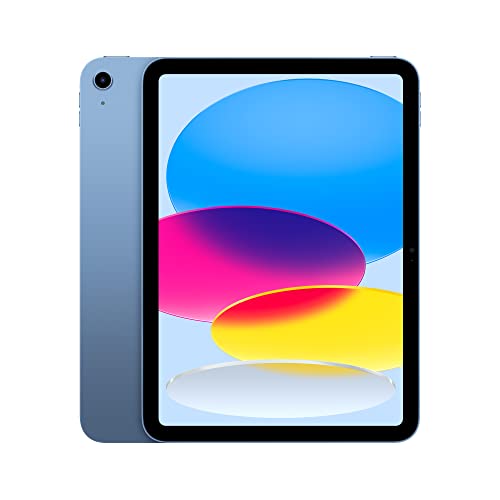
Apple iPad 10th Generation A14

Apple iPad Air 11-inch M2

Apple iPad 11-inch A16
Choosing the right iPad for your child can feel like choosing a new gateway to learning, creativity, and safe entertainment. With so many apps that support schoolwork, drawing, reading, and problem-solving, the right device can quickly become their favorite tool for both fun and education. Among today’s options, the Apple iPad 10th Generation A14 is the top pick for most families thanks to its bright display, smooth performance, and great overall value.
However, not every model fits every age or learning style. Some families prefer a more affordable option for basic educational apps, while others want something more powerful like the iPad Air for advanced school projects or creative hobbies such as digital art or video editing. Important factors to consider include storage, screen size, durability, and built-in parental controls that help you manage content and screen time.
This guide highlights the best iPads for younger users and explains what makes each one worth considering. With the right choice, your child gets a device that encourages curiosity and confidence, and you gain peace of mind knowing it is reliable, easy to use, and built to last.
Our Top Picks


Responsive A14 Bionic performance Bright 10.9-inch Liquid Retina screen Smooth multitasking with iPadOS Fast connectivity through Wi-Fi 6
Non-laminated display
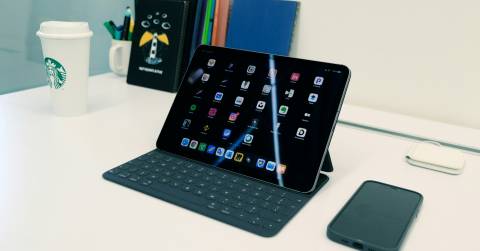
The iPad 10th Generation quickly becomes one of those devices you reach for throughout the day. The all-screen 10.9-inch Liquid Retina display pulls you in whether you’re watching a movie or sketching with the Apple Pencil. True Tone quietly adapts the screen to your lighting, making everything more comfortable to look at. Powering it all is the A14 Bionic chip, which handles games, browsing, and photo editing with ease, and the all-day battery means you aren’t rushing for a charger halfway through the afternoon.
Multitasking is smoother thanks to iPadOS, especially when jumping between apps or using Scribble to jot notes directly in text fields. And for those who want a more laptop-like setup, the Magic Keyboard Folio adds extra flexibility with its magnetic, two-piece design. Wi-Fi 6 keeps streaming and downloading quickly, so it stays responsive even during busier tasks.
Although the display isn’t laminated, it still maintains bright colors and sharp clarity for everyday use, especially for browsing, media, and basic creative work. It’s a small compromise that many won’t notice unless they’re specifically seeking a more premium screen.

Strong and efficient M2 performance Vivid Liquid Retina color quality Fast Wi-Fi 6E connectivity Excellent Pencil Pro support
No 120Hz ProMotion display
From the moment you start exploring the iPad Air 11-inch M2, it becomes clear how much it’s built to adapt to different parts of your day. The Liquid Retina display brings rich P3 wide color and low reflectivity, so everything from reading to editing photos looks crisp and easy on the eyes. True Tone quietly adjusts the screen to your surroundings, which makes it comfortable to use indoors or outdoors.
Powered by the M2 chip, the tablet handles demanding apps, smooth multitasking, and graphics-heavy games without slowing down. When paired with iPadOS features like Stage Manager, you can arrange overlapping windows or even extend your workspace to an external display. Apple Intelligence adds another layer by helping you write, organize, and complete tasks while keeping your data protected.
Accessories bring even more flexibility. Apple Pencil Pro turns the device into a precise drawing or note-taking space, and the Magic Keyboard provides a satisfying typing experience with a built-in trackpad. While it doesn’t include a 120Hz ProMotion display, the visuals remain sharp and fluid for everyday use, and most users will still enjoy the overall smoothness of the screen.

Fast performance with the A16 chip Bright 11-inch Liquid Retina screen Smooth multitasking with iPadOS Reliable Wi-Fi 6 connectivity
Touch ID instead of Face ID
Once you start moving through apps on the iPad 11-inch A16, the speed becomes immediately noticeable. The A16 chip pushes everything forward with ease, making gaming, photo editing, and everyday browsing quick and uninterrupted. The all-day battery life is another great feature, especially when you need to move between work and play without a charger handy.
The 11-inch Liquid Retina display also offers sharp detail, whether you're streaming a movie or working on a sketch. True Tone’s automatic adjustment makes the screen comfortable in different lighting, which helps during longer sessions. iPadOS ties it all together by keeping multitasking smooth. You can jump between multiple apps, make use of Scribble with the Apple Pencil, or organize projects using built-in apps like Safari and Keynote. Plus, Wi-Fi 6 keeps everything online without delays, so streaming and downloading stay dependable.
As for the one drawback, it only has Touch ID. Despite this, it remains quick and secure once you get used to it, so the experience is still seamless.
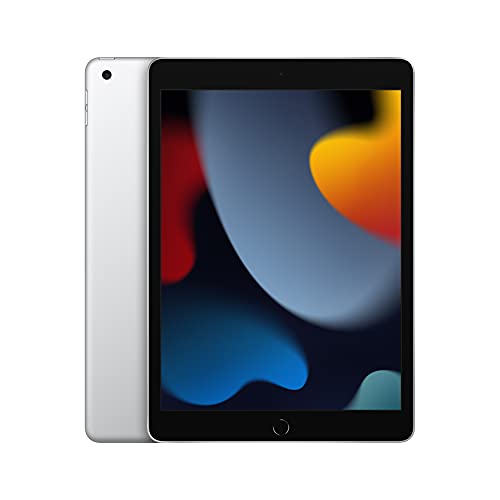
Reliable performance Bright 10.2-inch Retina display Smooth multitasking on iPadOS Strong all-day battery life
No USB-C
The iPad 9th Generation A13 has a way of fitting naturally into routines. You might start your morning checking messages or browsing Safari, and the A13 chip keeps everything quick without being overworked. As the day moves on, it shifts easily into study or work mode, especially when paired with the Smart Keyboard. Typing notes, switching between apps, or sketching out ideas with the Apple Pencil are all surprisingly effortless for a tablet at this price.
The 10.2-inch Retina display brings a warm, inviting look to movies and photos. True Tone quietly adjusts the colors to match your surroundings, making late-night reading or daytime multitasking gentler on your eyes. Battery life stays steady throughout, so you’re not hunting for an outlet while you move from task to task.
iPadOS ties everything together by allowing multiple apps to run side by side, making schoolwork, planning, or creative projects more organized. Although the port isn’t USB-C, it still handles charging and accessories without trouble, so everyday use remains simple and predictable.

Perfect small size for kids Fast A17 Pro chip speed Bright 8.3-inch Liquid Retina screen Great Apple Pencil Pro support
The camera could have also been updated
There’s something especially convenient about handing a child a device that’s powerful but still perfectly sized for them, and the iPad mini A17 Pro fits that role beautifully. Its 8.3-inch Liquid Retina display is good for kids browsing learning apps, sketching with Apple Pencil Pro, or watching videos during downtime. The True Tone and P3 wide color support make everything look crisp and easy on the eyes, whether they’re reading or creating.
The A17 Pro chip gives the mini surprising strength for its size. Even when kids switch quickly between games, homework tools, and photo editing, the tablet keeps everything smooth. And since the battery lasts all day, parents don’t have to worry about recharging in the middle of a lesson or trip. Multitasking is still straightforward with iPadOS, and the enormous collection of apps, from creative tools to instructional programs, makes it easy to customise the device to a child's interests.
One thing worth noting is the camera. While it’s still good, it could have received an update. Even so, it handles calls with Center Stage and everyday snapshots just fine, especially for younger users who don’t need professional-level photos.

Large screen Fast and efficient M3 chip Works with Apple Pencil Pro Long battery life
It doesn’t include ProMotion
The Apple iPad Air 13-inch M3 brings a bigger canvas and even more power for older kids who love drawing, gaming, or school projects. The expansive Liquid Retina display gives kids a roomy space to draw, watch lessons, or work on multi-window tasks. True Tone, P3 wide color, and ultralow reflectivity help keep their eyes comfortable, whether they’re sketching for fun or reading in bright rooms.
The M3 chip brings impressive power, giving older kids and teens plenty of room for advanced school projects, graphics-heavy games, and multitasking with apps side by side. Apple Intelligence also steps in, helping them express ideas or stay organized in a smarter, more intuitive way. With all-day battery life, it’s ready to go from morning classes to evening hobbies without mid-day charging.
iPadOS adds even more flexibility. Features like Stage Manager let kids resize and overlap apps, making homework more natural and computer-like. Accessories such as Apple Pencil Pro and Magic Keyboard turn it into a digital sketchbook or laptop-style workspace. The only downside is that it doesn’t include ProMotion. But the display still looks smooth and vibrant enough for learning, entertainment, and creative play.

Amazing large display Super fast M2 chip Works with Apple Pencil (2nd gen) Great for heavy tasks
A bit pricey
The iPad Pro 12.9-inch M2 is like giving someone a whole creative studio and study area in one small gadget. Its expansive Liquid Retina XDR display brings incredible brightness, detail, and contrast—ideal for watching educational videos, illustrating with Apple Pencil, or working on detailed school assignments. Everything looks sharp and vibrant, even in bright environments.
Powered by the M2 chip, this model delivers exceptional speed. Whether switching between apps, editing videos, or running graphics-heavy games, the experience stays smooth and responsive. The combination of performance and long battery life ensures it can keep up from morning tasks to evening relaxation without slowing down.
Stage Manager is one of the tools that make iPadOS more productive. It lets users overlap and resize apps just way they can on a computer. This makes it easier and faster to do more than one thing at a time, such as writing, researching, or looking up notes. There is plenty of room for programs, projects, images, and big files because it can hold up to 2TB of data. The only drawback is the price, but the level of power, display quality, and longevity make it a solid long-term investment.
What to Look For in a best ipads for kids?
We're sure you've purchased something and afterward regretted it. We are all concerned about the items we purchase. The easiest method to prevent these concerns is to conduct a thorough study before purchasing the best ipads for kids.
That is also why we decided to introduce this post in order to provide you with advice on how to avoid buying errors when selecting the best ipads for kids.
Cameras
Hardware Connections
Battery
Online Access
Storage
Screen & Audio
Software
FAQs
Is an iPad safe for younger children to use?
Yes. iPads include built-in parental controls that let you manage screen time, block unsuitable content, approve app downloads, and monitor usage, making the device safer for younger users.
How much storage do kids need on an iPad?
For basic learning apps and streaming, 64GB is usually enough. If your child saves lots of videos, games, or creative projects like drawings and recordings, 256GB is a better choice.
Do kids need an Apple Pencil or additional accessories?
Not always, but accessories can help. The Apple Pencil is great for drawing and handwriting practice, while durable cases and screen protectors are highly recommended to prevent damage.
Conclusion
Finally, the best ipads for kids may be readily used and offers a range of options to meet your needs. When looking for another kind of best ipads for kids, which we recommend Apple iPad Pro 12.9-inch M2, all of these characteristics are significant.
We've combed through all of this data in order to assist you in making the best decision possible. Let us know if there's anything else we can do to help you discover the best ipads for kids in the comments section below!
About Michael Brown