The Best Monitor For Game Development Of 2026
 By, Michael Brown
Updated
Summary

KOORUI 34-inch Ultrawide Gaming Monitor

CRUA 32" Curved Gaming Monitor
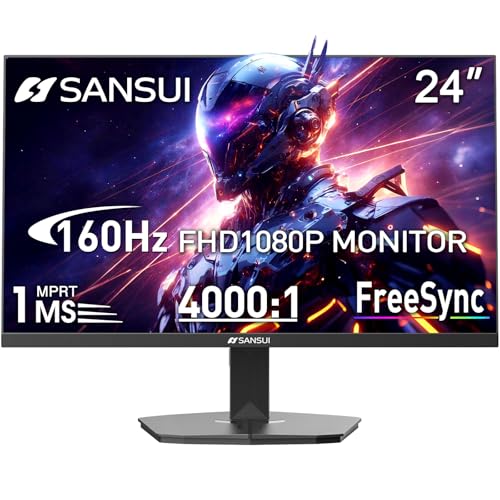
SANSUI 24 Inch Gaming Monitor
Game development is one of those workloads that quietly demands more from a monitor than most people expect. You are not just playing games on it. You are building them. That means your screen may spend the morning inside Unreal Engine, the afternoon filled with Blender assets or code editors, and the evening testing lighting, animations, or UI scaling across different resolutions. A monitor that feels great for gaming alone does not always hold up once development work enters the picture.
The challenge is that game developers rarely need just one thing. Some prioritize color accuracy for environment art and textures. Others care more about refresh rates and motion clarity for gameplay testing. And then there is sheer workspace. Between timelines, asset libraries, preview windows, and multiple tool panels, cramped screens become frustrating very quickly.
While researching different setups used by indie developers, and programming-focused teams, one monitor kept appearing surprisingly often: the KOORUI 34-inch Ultrawide Gaming Monitor, The appeal is fairly easy to understand. An ultrawide display gives developers far more room for timelines, engine windows, code editors, and multitasking without needing a second monitor immediately. In this guide, we break down the best monitors for game development across different budgets, screen sizes, and workflows to help you find the setup that actually fits the way you build games.
Our Top Picks


Large ultrawide workspace Smooth 180Hz refresh rate Strong color coverage Curved immersive design PIP and PBP multitasking support
Out-of-the-box color calibration may require manual tweaking
A regular 16:9 monitor starts feeling cramped very quickly once Unity, Unreal Engine, Visual Studio, Blender, Discord, and browser tabs are all open together. The 34-inch ultrawide format immediately solves a big part of that problem. The extra horizontal space makes multitasking far more comfortable, especially for developers constantly switching between coding, level editing, and testing gameplay builds. Instead of stacking windows on top of each other, everything stays visible at the same time.
The curved 21:9 panel also helps immersion during testing sessions. Open-world environments, cinematic sequences, and large game maps gain noticeably more depth compared to standard flat displays. With DCI-P3 95%, 125% sRGB, HDR400 support, and high contrast, environments and textures appear much richer than expected for this price category. That becomes useful not only for gaming, but also for artists and developers working with lighting, materials, and visual assets.
This monitor also balances productivity and gaming nicely. The 180Hz refresh rate and 1ms response time make movement extremely smooth while testing animations, camera systems, or fast gameplay mechanics. Out of the box, some users may still want to spend a little time adjusting color settings for more professional creative work. Fortunately, once dialed in properly, the display becomes much more versatile than a typical gaming-only monitor.

Sharp 4K resolution High 144–160Hz refresh rate Large 32-inch screen Wide color coverage
Built-in speakers are basic
Game development monitors need to handle more than just gaming. One moment the screen is filled with code, engine tools, and asset management windows. The next moment, it is running gameplay tests, cinematic scenes, or high-speed action sequences. The CRUA 32-inch manages both sides surprisingly well.
The 4K resolution provides excellent detail for development work. UI elements, textures, scripts, and timelines remain sharp even with multiple windows open simultaneously. Its larger 32-inch size also gives engines like Unreal or Unity far more breathing room compared to smaller displays. At the same time, the high refresh rate keeps movement smooth during gameplay testing. Animations, camera movement, and fast interactions become easier to evaluate when the monitor can properly display higher frame rates instead of being stuck at standard 60Hz.
Its 1500R curved design also helps reduce the “flat wall of screen” effect that large monitors sometimes create. During longer work sessions, the display stays more comfortable to focus on, especially when multitasking heavily. Color performance is another nice bonus here. The 120% sRGB coverage and strong contrast ratio help environments and lighting effects appear more vibrant, which benefits both developers and artists working on visual polish.
The built-in speakers are included mainly for convenience. They work perfectly fine for quick testing and casual audio playback, although many developers will probably still rely on dedicated headphones or desktop speakers during longer sessions.

Smooth 160Hz refresh rate Fast 1ms response time Gaming assistant features Good sRGB coverage
No built-in speakers
Not every game development setup needs an expensive 4K ultrawide monitor. For developers mainly working on competitive titles, gameplay systems, or performance optimization, responsiveness often matters more than sheer resolution. That is exactly where this SANSUI monitor works surprisingly well.
The 160Hz refresh rate immediately helps gameplay look smoother during testing sessions. Character movement, aiming mechanics, animations, and UI responsiveness become easier to evaluate compared to standard office monitors. Its Full HD resolution also works nicely for developers prioritizing frame rate stability. Running builds at high frame rates becomes much easier on mid-range hardware, which is especially useful for indie developers or smaller studios testing across multiple system configurations.
The gaming assistant features are another practical addition. Crosshair overlays, timers, FPS modes, and FreeSync support give developers a convenient way to test competitive gameplay elements directly on the monitor itself.
The monitor keeps things fairly streamlined overall, including the audio setup. Most developers already rely on headphones or external speakers during testing anyway, so the lack of built-in speakers will probably not matter much for many setups.

Sharp 4K resolution Smooth 160Hz refresh rate Fast IPS technology Strong DCI-P3 color coverage Excellent motion handling
4K at 160Hz requires a powerful GPU to fully utilize
Game development often switches constantly between two priorities: visual quality and smooth performance. The XG27UCS handles both sides extremely well. Its 4K resolution gives developers excellent clarity while working inside engines, editing assets, reviewing textures, or managing UI layouts. Fine details remain sharp even with dense interface-heavy workflows.
At the same time, the 160Hz refresh rate keeps gameplay testing exceptionally smooth. Fast camera movement, combat systems, animation timing, and physics interactions become much easier to evaluate accurately when motion stays fluid. ASUS also includes Fast IPS technology and ELMB Sync, which help reduce ghosting and motion blur during testing. That matters especially for developers building competitive or fast-paced games where responsiveness is critical.
The monitor clearly expects fairly powerful hardware though. Running modern games or development environments at full 4K and 160Hz requires a strong GPU to fully take advantage of everything the display can offer. Still, for developers who want one monitor capable of handling coding, content creation, and high-performance gameplay testing together, the XG27UCS covers all three surprisingly well.

Smooth 200Hz refresh rate Sharp QHD resolution FreeSync Premium support Good color consistency
Contrast is average
Competitive games expose monitor weaknesses very quickly. Input delay, ghosting, screen tearing, and blurry motion become much easier to notice once developers start testing fast-paced combat, movement systems, or multiplayer gameplay loops. The Odyssey G5 handles those situations very comfortably.
The combination of QHD resolution and a 200Hz refresh rate creates a nice middle ground between image clarity and speed. Developers get sharper visuals than Full HD without jumping all the way to the heavier GPU demands of 4K workflows.
Samsung also does a good job keeping motion smooth. FreeSync Premium support, fast response times, and low latency help gameplay stay responsive during testing, especially in shooters, racing games, and action-heavy environments. The IPS panel helps here too. Wide viewing angles and solid color reproduction make game environments look cleaner and more vibrant during development sessions, while HDR10 support adds extra depth to lighting and shadows.
Some users focused heavily on deep black levels or cinematic contrast may still prefer OLED or mini-LED panels. Even so, the G53F balances performance, resolution, and smoothness very well for developers prioritizing gameplay testing first.

Ultra-smooth 240Hz refresh rate Sharp QHD resolution 1000R curved screen Wide color gamut
No USB Hub
There is a noticeable difference between 144Hz and 240Hz once gameplay testing becomes part of everyday work. Fast camera movement, animation timing, aim tracking, and player responsiveness all become easier to evaluate accurately when motion stays extremely smooth. The KTC monitor leans heavily into that experience.
The 240Hz refresh rate is clearly the headline feature, but the monitor avoids sacrificing image quality to achieve it. The QHD resolution still provides enough sharpness for development tools, coding windows, and content creation without overwhelming hardware like some 4K high-refresh monitors do.
Its 1000R curved panel also helps keep large scenes more engaging during longer sessions. Whether testing gameplay environments or multitasking between tools, the curve helps reduce the flat, stretched appearance some widescreen monitors create. Color performance is another surprisingly strong area. The wide color gamut and factory-tuned sRGB mode make textures, environments, and visual effects appear more polished than expected from many esports-focused displays.
Connectivity stays fairly streamlined, though. Users mainly wanting docking features or integrated USB hubs may still prefer more workstation-oriented monitors. But for developers building competitive shooters, racing games, or action-heavy titles, the KTC monitor delivers the kind of responsiveness that becomes difficult to step away from afterward.

Massive 45-inch ultrawide display Sharp 5K2K resolution USB-C and HDMI 2.1 connectivity PIP and PBP support
Desk & space requirements
The INNOCN 45C1R takes multitasking to another level with its enormous 45-inch ultrawide display. Its 32:9 ultrawide format creates enough horizontal space to comfortably keep Unreal Engine, Visual Studio, browser documentation, Discord, debugging tools, and asset folders visible together without constantly minimizing windows.
The 5120 × 1440 resolution also helps maintain sharpness despite the enormous screen size. UI elements remain readable, timelines stay organized, and multitasking becomes far less cluttered during longer development sessions. Its 120Hz refresh rate keeps gameplay testing smooth as well, particularly for open-world projects, racing games, simulators, and cinematic experiences where wide field-of-view support matters more.
PIP and PBP modes add another layer of flexibility, too. You can run multiple devices or systems on the same display simultaneously, which becomes useful for cross-platform testing workflows. The only thing you should realistically plan around is desk space. A monitor this large naturally works best with deeper desks and more open setups.
What to Look For in a best monitor for game development?
Until now, numerous customers trust the information and advice we offer them, which means our offers to you are accurate and up to date all the time. This objective is being pursued with tremendous zeal and attention.
It's necessary to keep in mind the following points for selecting best monitor for game development:
Panel Type
Aspect Ratio
Refresh Rate
Connections
Brightness
Screen Size
Response Time
Resolution
FAQs
What is the best monitor size for game development?
Most game developers prefer 27-inch to 34-inch monitors because they provide enough space for coding, game engines, asset management, and multitasking.
Are ultrawide monitors good for game development?
Yes, ultrawide monitors are excellent for game development because they provide more horizontal workspace for timelines, editors, and multiple windows without needing dual monitors.
Is a high refresh rate important for game development?
A high refresh rate can help during gameplay testing and animation work, especially for action or competitive games, but it is less critical for coding-focused workflows.
About Michael Brown