The 7 Best Budget Tv For Ps5 Of 2026, Tested By Our Experts
 By, Michael Brown
Updated
Summary

Sony 55-Inch 4K BRAVIA 3 TV

INSIGNIA 50" Class F50 4K TV

TOSHIBA 43" Class C350 4K TV
You have just unboxed a PlayStation 5. The sleek curves, the white shell, that controller with actual feedback in your hands. But then you look at your old TV and realize something. You are about to play a next-generation console on a screen that can barely handle the previous one. The truth is, the PS5 demands more than just a big display. It needs a TV that can keep up with 4K resolution, fast refresh rates, and low input lag. Otherwise, you are spending hundreds on a console but only seeing half of what it can actually do.
The good news is that you do not need to empty your wallet for a high-end OLED or a flagship Samsung. A growing number of budget-friendly TVs now deliver the essential features that PS5 players actually need. Smooth gameplay without motion blur. Colors that pop without looking fake. And HDMI features that let your console communicate properly with the screen.
After combing through thousands of gamer reviews, tech forums, we found that one budget TV keeps appearing in conversations about getting the most out of the PS5 without breaking the bank is the Sony 55-Inch 4K BRAVIA 3 TV. It delivers solid 4K picture quality, respectable input lag, and the kind of reliability that makes those long gaming sessions genuinely enjoyable. Read on to discover the best budget TVs that help your PS5 perform at its best.
Our Top Picks
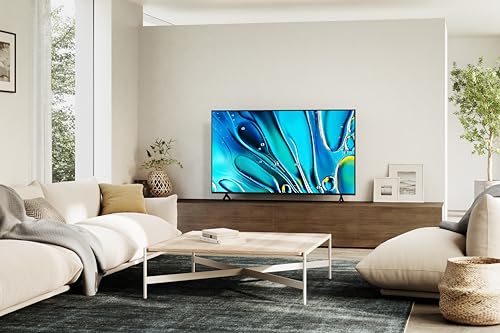

Natural-looking colors and strong image processing Google TV interface is easy to navigate Dolby Vision and Dolby Atmos support add versatility Motion handling performs well during gaming
HDR brightness is solid but not class-leading
Sony has always handled motion and image processing differently from many budget TV brands, and that becomes obvious pretty quickly here. Even before adjusting settings, PS5 games already look polished. Colors appear more natural, movement stays controlled during fast scenes, and the overall image avoids the overly sharpened or artificial look that cheaper gaming TVs sometimes produce.
The 4K HDR Processor X1 does a good job cleaning up scenes automatically, especially in story-driven games where lighting and color matter more than raw brightness numbers. Titles like God of War Ragnarök or Horizon Forbidden West benefit from Sony’s processing approach because environments maintain depth without looking oversaturated.
Google TV also helps the experience stay straightforward. Switching between streaming apps, gaming, and voice controls feels smoother compared to some cluttered smart TV systems in the budget category. Another advantage is that this TV works well beyond gaming alone. Dolby Vision, Dolby Atmos, and Triluminos Pro help movies and sports content look genuinely enjoyable, which makes the BRAVIA 3 easier to justify as a living room TV instead of a “gaming-only” purchase.
Brightness is probably the main area where the TV reminds you it belongs in the budget range. HDR still looks solid overall, but it does not reach the intense highlights or deeper contrast levels found on more expensive Mini-LED or OLED models. Still, for PS5 players who value balanced picture quality over chasing the highest specs possible, Sony delivers a cleaner and more refined experience than many similarly priced competitors.

4K resolution adds much sharper image quality Extensive streaming support DTS Virtual-X Easy setup for casual users
Fire TV interface may feel cluttered to some users
For gamers mainly upgrading from an older 1080p TV, the jump here still feels significant. 4K resolution immediately makes PS5 games look cleaner and more detailed, while HDR10 support adds extra contrast and color depth that older budget TVs often struggle to provide. Open-world games especially benefit from the added sharpness, particularly on the 50-inch screen size.
The Fire TV platform is another reason this model stays appealing for budget setups. Streaming apps, free channels, and voice controls are already built in, so the TV works nicely as an all-around entertainment screen without requiring additional hardware. One area where the TV performs better than expected is audio. DTS Virtual-X helps create a larger sound presentation than the built-in speakers alone would normally suggest, which is useful for users who are not planning to buy a soundbar immediately. Although the Fire TV interface is content-heavy, many users will adapt to it quickly after regular use.

Good gaming support with ALLM and VRR 4K upscaling performs surprisingly well Dolby Vision and Dolby Atmos improve immersion Sharp image quality at closer viewing distances
Fire TV interface includes noticeable promotional content
A smaller screen actually has some advantages for PS5 gaming, especially when sitting relatively close to the TV. At 43 inches, the C350 keeps games looking sharp while making it easier to track fast movement across the entire screen. Competitive titles like Call of Duty, Fortnite, or Rocket League become easier to follow compared to oversized displays where your eyes constantly move around.
Toshiba also puts more effort into picture processing than many people expect at this price range. The REGZA Engine ZR and AI 4K Upscaler help older content and lower-resolution streams look cleaner instead of soft or muddy. Even non-4K YouTube videos and older PS4 games hold up reasonably well.
Game Mode support with ALLM and VRR is another welcome addition for budget PS5 buyers. Gameplay stays responsive enough for casual and mid-level competitive gaming without requiring constant settings adjustments. This TV also benefits from Dolby Vision and Dolby Atmos support, which gives movies and cinematic games more depth than most entry-level TVs manage.
The Fire TV system does include noticeable promotional recommendations throughout the interface, though most users will probably stop paying attention to them after a while. Overall, the C350 works best for players who prioritize practicality. It is compact, gaming-friendly, and easy to fit into tighter setups while still offering enough modern features to pair comfortably with a PS5.

Mini-LED backlighting 144Hz panel VRR and FreeSync Premium HDR highlights
Interface performance may vary depending on app usage
This TV focuses heavily on making games stand out visually. Its Mini-LED backlighting system is the first thing most players will notice. Compared to standard LED TVs, contrast looks dramatically better during darker scenes, while bright areas gain more punch without washing out the rest of the image. PS5 games with strong HDR lighting benefit the most here, especially titles with dramatic environments and heavy cinematic effects.
Motion performance is another major strength. The native 144Hz panel keeps movement unusually smooth for a TV in this price range, and the Game Mode Pro settings with AMD FreeSync Premium help reduce tearing and stuttering during fast gameplay. The difference becomes especially obvious in racing games, shooters, and sports titles where fast camera movement can easily expose weaker TVs.
One thing worth knowing is that the smart interface can occasionally slow down slightly depending on background apps and usage patterns. Still, purely from a gaming-value perspective, the U6 gives PS5 owners access to features that used to cost significantly more only a few years ago.

High brightness gives HDR games stronger impact QLED colors appear vivid and punchy 120fps and 240fps gaming support FreeSync Premium Pro
Menu navigation may take time to get used to
Some budget TVs look fine during daytime gaming but start falling apart once HDR effects become more demanding. The Quantum Pro handles those situations much better than expected. The combination of Quantum Color QLED technology and high peak brightness helps PS5 games look noticeably more dynamic. Bright explosions, neon lighting, reflections, and colorful environments all gain more intensity without completely crushing darker areas of the image.
This becomes especially noticeable in HDR-heavy games where contrast and highlight control matter a lot more than simple resolution numbers. Gaming performance is another strong point. Support for AMD FreeSync Premium Pro and high refresh rate gameplay helps movement stay responsive during competitive titles. The TV can even handle up to 120fps in 4K or 240fps at 1080p, which gives it more flexibility than many similarly priced competitors.
One thing that may take a little adjustment is the menu system. Compared to platforms like Google TV or webOS, navigation can initially seem less intuitive until users spend some time with it. But once gameplay starts, the Quantum Pro quickly reminds you why it stands out in the budget gaming category. The HDR brightness and gaming responsiveness simply punch above what most people expect at this price point.

Large 65-inch screen 144Hz refresh rate QLED colors look vibrant and lively Google TV interface is clean and easy to use
Motion smoothing may need adjustment out of the box
The first thing this TV does well is scale up the gaming experience itself. At 65 inches, PS5 games immediately become more cinematic. Racing games look faster, open-world environments gain more impact, and split-screen multiplayer becomes far more comfortable compared to smaller displays.
TCL also packs in features that are normally difficult to find together at this price. The 144Hz refresh rate helps gameplay stay smoother during fast movement, while the QLED panel gives colors more vibrancy than standard LED TVs typically manage. Games with strong art direction benefit especially from this combination because environments appear richer without looking overly saturated.
The AIPQ Pro Processor also helps keep the image clean during motion-heavy scenes. Fast camera pans and action sequences remain clearer than expected for a budget-focused large-screen TV. Out of the box, motion smoothing settings can look a little aggressive for movies and gaming. Fortunately, this is something that can easily be adjusted within the settings after initial setup. In general, the T7 works especially well for PS5 owners wanting a genuinely large gaming screen without immediately jumping into premium OLED pricing.

WebOS interface is smooth and user-friendly Gaming features like VRR and FreeSync are included Bright and colorful QNED panel performance Strong smart TV ecosystem
Contrast performance cannot fully match OLED models
One of the nicest things about this TV is how polished the overall experience feels day to day. The webOS platform stays fast, organized, and easy to navigate, which matters more than people sometimes realize. Moving between streaming apps, cloud gaming services, and PS5 sessions happens quickly without the sluggishness that cheaper smart TVs occasionally struggle with.
Picture quality also holds up well for the price range. LG’s Dynamic QNED Color technology gives games brighter and more vivid tones, while HDR10 Pro helps improve highlights and contrast during HDR gameplay. Sports games and colorful open-world titles benefit especially from the extra punch in color performance.
Gaming support is strong too. Features like FreeSync, VRR, and the Game Optimizer dashboard help gameplay stay responsive, while Xbox Cloud Gaming and GeForce NOW support add extra flexibility beyond the PS5 itself. Compared to OLED models, contrast performance is naturally more limited, especially during darker scenes. However, considering the significantly lower price point, the QNED82A still delivers a balanced and versatile gaming setup for most PS5 users.
What to Look For in a best budget tv for ps5?
The internet is a platform in which you can get almost everything you want. Finding the best budget tv for ps5 on whatever you need to know about how something works is an incredible guide for all of your needs.
Unfortunately, because of so many various websites out there which are either fraudulent or untrustworthy, finding what you're searching for on a single website might be difficult. Many consumers are hesitant to purchase the best budget tv for ps5 because they are unclear if they are making the right selection.
The following post will explain four things to consider when purchasing a best budget tv for ps5 for your needs.
High Dynamic Range (HDR)
Smart TVs
Display Types
Connectivity
Screen Resolution
TV Screen Sizes
Refresh Rate
HDMI And Connections
FAQs
What is the best budget TV for PS5?
The best budget TVs for PS5 usually include models from TCL, Hisense, and Samsung that support 4K resolution, 120Hz refresh rate, and HDMI 2.1.
Is HDMI 2.1 important for PS5?
Yes, HDMI 2.1 allows 4K at 120Hz, VRR (Variable Refresh Rate), and lower input lag for the best gaming experience.
Can I use a 60Hz TV for PS5?
Yes, but you’ll be limited to 4K at 60fps, meaning you won’t fully experience the PS5’s high-performance gaming modes.
Conclusion
The most appealing aspect of this post is that it contains the top models of best budget tv for ps5 that clients require. It also sells reliable items and has a lot of positive feedback from customers.
Then, you may buy items from well-known companies with confidence through this page since you know they are the greatest on the market. You will also have the opportunity to look at a variety of alternatives for your favorite, particularly the LG 43-Inch QNED AI 4K QNED82A TV.
What is your favorite item? Please let us know! We're continuously on the lookout for new products and services to give our loyal consumers so that we may continue to provide them with high-quality goods at reasonable pricing.
About Michael Brown