The 7 Good 4k Monitor For 2026
 By, Michael Brown
Updated
Summary

LG 27UP650K-W 27-inch 4K Monitor

BenQ MA270U 27” 4K Monitor

SAMSUNG 27" S8 4K Monitor
A good 4K monitor has become an accessible and transformative upgrade, offering exceptional sharpness and detail for work, creativity, and entertainment. It delivers a significant leap in pixel density over Full HD, rendering text with incredible crispness, images with stunning realism, and video with immersive depth. Whether you are editing high-resolution photos, organizing complex spreadsheets, or enjoying the latest streaming series, a good 4K monitor brings a new level of visual precision to your daily routine without requiring a premium budget.
Selecting the right model means finding the ideal balance of key features that matter most for your use. For consistent color in different lighting, an IPS panel with wide viewing angles is often the best choice. A widely praised model that exemplifies this balance is the LG 27UP650K-W 27-inch 4K Monitor, renowned for its sharp 4K IPS display and sleek design that simplifies your workspace.
Our focus is on identifying monitors that offer outstanding value and reliable performance. Read on to navigate the options and find a good 4K monitor that provides a crisp, clear, and comfortable viewing experience for years to come.
Our Top Picks


Vibrant 4K IPS with 95% DCI-P3 gamut Includes HDR400 and gaming features Useful Switch app for screen multitasking Ergonomic, adjustable stand
The audio could be louder
Finding one monitor that can juggle the vibrant colors of creative work, the fast pace of gaming, and the convenience of streaming is a common challenge. The LG 27UP650K-W enters as a versatile 4K contender. It covers 95% of the DCI-P3 color gamut and supports VESA DisplayHDR 400. This combination aims for accurate, dramatic visuals, whether you're editing photos or watching a movie.
LG includes thoughtful gaming enhancements like Black Stabilizer to brighten dark scenes and Dynamic Action Sync to help reduce input lag. The Switch app also lets you customize and split the screen into multiple layouts for efficient multitasking directly from a hotkey. Its built-in speakers offer basic audio for system sounds or casual video playback, though their maximum volume may feel restrained for filling a room with sound during an action movie or gaming session. For a more immersive audio experience, connecting external speakers or headphones is a simple step that pairs well with the monitor's otherwise strong multimedia performance.

Exclusive Mac color tuning Adjust brightness/volume Nano Matte Panel reduces glare Simplified Mac-like settings software
High price point
The core promise of the MA270U is its exclusive Mac color tuning, designed to deliver consistent P3 wide color gamut performance that mirrors your MacBook’s own vibrant and accurate palette. This focus on color harmony is a significant benefit for creative professionals who need reliable visuals across devices.
The integration goes deeper with convenient features like adjusting the monitor’s brightness and volume directly from the MacBook’s keyboard, and the BenQ Display Pilot 2 software aims to simplify settings with a Mac-like interface. User comfort is also prioritized through an innovative Nano Matte Panel and comprehensive Eye-Care technology to reduce glare and strain during long work sessions.
This tailored experience and specialized technology come at a premium compared to more general-purpose 4K monitors. The investment is directly aligned with the value of seamless Mac integration and color fidelity. But for users whose workflow depends on perfect visual consistency with their Apple hardware, the cost reflects a targeted solution.

Sharp 4K UHD resolution Tool-free, highly adjustable stand TÜV-certified intelligent eye care HDMI, DP, and USB-A ports
No USB-C connectivity
Setting up a new monitor is like an upgrade, not a chore. The Samsung 27" S8 4K Monitor promises this streamlined experience from the moment you take it out of the box. Its 4K UHD resolution provides the sharp, detailed canvas that designers and content creators need, with HDR10 support adding depth and realism to colors and contrast. The tool-free Easy Setup Stand is a genuine convenience, allowing you to build a stable base and start working in moments.
That stand is also highly functional, offering a full range of height, tilt, swivel, and even 90-degree pivot adjustments to find the perfect ergonomic position for any task. Connectivity is robust for a wired setup, with a selection of HDMI, DisplayPort, and USB-A ports to hook up your peripherals and devices directly. Unfortunately, it doesn't have USB-C connectivity. For traditional desktop PCs and workstations, however, the provided ports are more than sufficient and contribute to the monitor's clean, tool-free assembly.

Ultra-smooth 240Hz performance Exceptional OLED color accuracy Strong HDR contrast and blacks Advanced heat management design
Needs brightness tuning in bright rooms
Living with the ROG Swift 32-inch 4K monitor quickly reminds you why OLED has become so desirable. The combination of a 240Hz refresh rate and an incredibly fast 0.03 ms response time makes motion feel fluid and controlled, especially in fast-paced games where timing matters. Images appear clean and precise, with none of the blur or lag that can pull you out of the experience.
Whether you're working on creative projects or playing games, the pictures appear rich and accurate thanks to 99% DCI-P3 coverage, genuine 10-bit color, and a Delta E below 2. DisplayHDR 400 True Black makes HDR content look better by creating deep shadows and clear highlights without losing details. ASUS also adds useful features like a constant brightness option that keeps the screen's brightness level steady over extended sessions.
Behind the scenes, the custom heatsink, airflow design, and graphene film work together to manage heat and reduce burn-in risk, offering peace of mind over time. Tools like DisplayWidget Center make it easier to adjust settings and access OLED care features without diving through menus. In brighter rooms, though, the screen performs best when brightness is managed thoughtfully, rewarding controlled lighting with a more balanced viewing experience.

Sharp 4K image clarity Wide IPS viewing angles Multiple device connectivity Clean, minimalist design
No HDR support
Sitting down in front of the Z-Edge U27P4K, the first thing that stands out is how clear everything looks. The 3840 x 2160 resolution brings out fine details, making games, videos, and even everyday desktop work feel more polished. Images appear clean and balanced, and the improved color accuracy helps visuals look natural rather than overly boosted.
Plus, with wide 178-degree viewing angles, colors stay consistent no matter where you’re sitting, which is especially helpful when sharing content or shifting positions throughout the day. At 60Hz, motion feels smooth enough for general gaming and media use, and FreeSync support helps reduce screen tearing and stuttering during gameplay.
On the practical side, the monitor makes connecting devices simple. Two HDMI ports and two DisplayPorts allow multiple systems to stay plugged in at once, switching between them without hassle. The slim, three-sided edge-to-edge design keeps the look modern, and VESA mount support adds flexibility for wall or arm setups. Eye comfort features help during extended use, though it’s worth noting that the monitor skips HDR support, relying instead on strong native contrast and color accuracy to carry the experience.
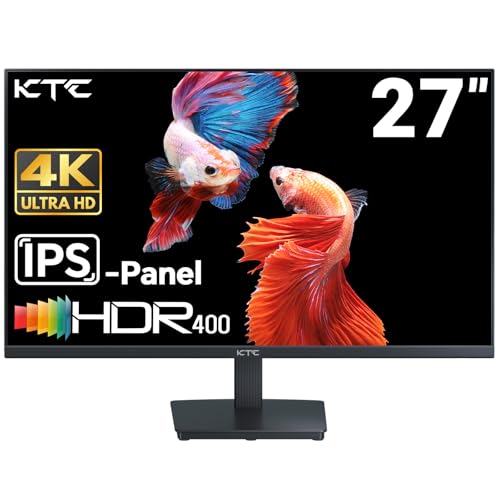
Crisp UHD image clarity Wide, accurate color range Multiple device connectivity Eye-friendly viewing features
Initial setup takes effort
There’s a certain moment when a monitor earns your attention, and with the KTC 27-inch 4K, that moment comes when you start noticing the small details. Text looks clean without strain, images carry depth, and colors appear full rather than oversaturated. The UHD resolution makes a difference during creative tasks, giving plenty of room to work without constantly zooming in and out.
Color performance is where this monitor starts to feel reassuring. The 95% DCI-P3 coverage and support for 1.07 billion colors help visuals remain consistent and refined, especially when accuracy matters. HDR 400 gives contrast a small increase, which makes highlights and shadows stand out more when watching videos or working on designs. At 60Hz, motion stays smooth, which is good for work and play, even if it's not meant for competitive gaming.
Daily usability is clearly part of the design. Multiple HDMI and DisplayPort inputs make it easy to connect several devices, and the tilt adjustment combined with VESA wall-mount support helps fine-tune the viewing angle. Flicker-free technology and a blue light filter quietly do their job during long sessions. One minor downside is that the setup process can take more effort than expected before everything clicks into place.

Unique 3:2 aspect ratio 10-bit color with 128% sRGB gamut Multiple eye-care technologies included Versatile dual HDMI and DP connectivity
Built-in speakers are basic and not very deep
The defining feature of this monitor is its distinctive 3:2 aspect ratio. The 3840x2560 UHD resolution on a 28-inch IPS panel provides significantly more vertical real estate than a standard widescreen, making a noticeable difference when scrolling through long web pages, coding, or working with vertical documents. This productivity boost is matched by strong color performance, with 10-bit depth and 128% sRGB coverage aiming for precise, vibrant hues suitable for photo editing.
User comfort is also a priority, thanks to the inclusion of DC dimming and low blue light technology for extended sessions. The generous port selection, including two HDMI 2.0 and two DisplayPort 1.4 connections, makes it easy to switch between multiple source devices. Its built-in speakers provide convenient audio for system sounds or video calls, saving you from an extra peripheral. Their output is functional for these basic purposes, but not very deep for immersive music or movie playback. For a monitor so capable in visual performance, pairing it with dedicated speakers or headphones is recommended for any serious media consumption.
What to Look Through Prior to Selecting the good 4k monitor?
You may be aware that purchasing something is not actually an easy action. Your everyday life will be affected if you choose the most fantastic product. What variables, though, will make this acquisition successful? Whether you're seeking for good 4k monitor to meet your needs, you'll be wasting your own time.
Nevertheless, it would be preferable if you weren't so worried. We've enlisted the help of a team of professionals to investigate good 4k monitor, and we've provided accurate data.
There seem to be several important considerations to make. But only a few of them are really concentrated. Here are some crucial reviews while purchasing good 4k monitor:
Brightness
Connections
Panel Type
Resolution
Response Time
Screen Size
Refresh Rate
Aspect Ratio
FAQs
What makes a 4K monitor “good”?
A good 4K monitor offers sharp resolution, consistent brightness, accurate colors, and reliable performance suited to its intended use, whether for work, gaming, or entertainment.
Is a good 4K monitor worth it for everyday use?
Yes, a good 4K monitor provides clearer text and more screen space, which can improve productivity and viewing comfort during daily tasks.
Do I need a powerful computer to use a 4K monitor?
For basic use, most modern computers can handle 4K displays. More demanding tasks like gaming or video editing benefit from a stronger graphics card.
The figures we've presented here aren't all of them. Alternatively, we continuously update it as new information becomes available. It's advisable to keep in mind the points we discussed related to buying guide.
We always appreciate your feedback and handle it with the utmost importance. As a result, the most up-to-date data will come to your mind as soon as possible. You are supposed to contact us and give us your reviews as well as problems so that we will try to support you. Hope you have a pleasant shopping experience!
About Michael Brown