The Best Affordable 4k Monitor For 2026
 By, Michael Brown
Updated
Summary

LG 27US500-W Monitor 27-Inch 4K

ASUS 27” 4K Monitor

Dell 27 Plus 4K Monitor S2725QS
A 4K monitor used to be considered a luxury, but today there are plenty of affordable options that deliver sharp detail and plenty of screen space without a premium price tag. For work, content creation, and everyday use, an affordable 4K monitor can significantly improve clarity and productivity compared to lower-resolution displays.
One model that consistently offers strong value is the LG 27US500-W Monitor 27-Inch 4K. It provides a crisp 4K resolution, accurate colors for its price range, and a clean, practical design that fits well in both home and office setups. It’s a solid example of how far budget-friendly 4K monitors have come.
Not all affordable 4K monitors are the same. Panel quality, color accuracy, refresh rate, and connectivity can vary widely, even at similar prices. Understanding which features matter most for your specific use case can make a noticeable difference in daily comfort and performance. Read on to see which affordable 4K monitors deliver the best value, what trade-offs are worth accepting, and which models stand out right now.
Our Top Picks


Crisp 4K UltraFine display Strong contrast and depth HDR10 color enhancement Helpful Onscreen Control software
No USB-C connectivity
Clarity is where the LG 27US500-W immediately makes its case. The 4K UHD resolution pairs with a 1000:1 contrast ratio to present darker blacks and well-defined highlights, which helps detailed imagery appear more layered and precise. Wide viewing angles keep visuals consistent across the screen, making it easier to collaborate or shift positions without losing color accuracy.
HDR10 support adds another dimension to the viewing experience. With up to 90% DCI-P3 coverage, colors appear richer and more expressive, especially when working with HDR-enabled content or consuming high-quality media. This makes the display a comfortable fit for photographers, designers, or anyone who values faithful color reproduction.
Day-to-day interaction is simplified through LG’s Onscreen Control software. Instead of digging through physical buttons, users can split the display or adjust basic settings with a few mouse clicks, which quietly speeds up multitasking. Physically, the ergonomic stand allows for tilt adjustments, helping users find a comfortable viewing angle without fuss. Connectivity is kept straightforward. While HDMI covers most setups, those relying on a single-cable USB-C workflow may need an adapter or alternative solution. Still, for traditional desktop environments, this simplicity keeps things reliable and easy to manage.

Sharp 4K IPS visuals Advanced eye-care features Smooth Adaptive Sync performance Antibacterial bezel protection
Only one HDMI input available
From the moment it is powered on, the 27-inch 4K UHD display delivers detailed imagery that stays consistent thanks to its IPS panel and wide 178-degree viewing angles. Text appears clean, visuals stay sharp, and colors remain stable even when viewed from the side. HDR-10 support further refines the picture by balancing bright highlights and darker scenes, adding depth without overwhelming the image.
Motion is handled smoothly through Adaptive Sync, which helps reduce tearing and visual artifacts across varying frame rates. This makes everyday scrolling, video playback, and light gaming noticeably more fluid. The TÜV Rheinland-certified Blue Light Filter is easy to adjust through the onscreen menu or DisplayWidget Center, allowing users to tailor protection based on time of day or task.
An unusual but practical addition is ASUS’s antibacterial treatment on the bezels and hotkeys, designed to inhibit bacterial growth and keep frequently touched areas cleaner over time. Connectivity remains simple, though users managing multiple HDMI devices may need to plan around the single HDMI port. Still, for focused setups, this streamlined approach keeps things uncluttered.

Smooth 120Hz FreeSync visuals Excellent color accuracy coverage Improved eye comfort technology Clean ultra-thin bezel design
No setup instructions included
Comfort is clearly at the heart of the S2725QS. Dell’s Improved ComfortView Plus works quietly to reduce harmful blue light emissions to 35% or less, helping protect your eyes during extended sessions without distorting colors. Paired with an IPS panel, the display maintains accurate tones and consistent brightness across the screen, which makes long workdays easier to manage.
Visual performance is equally well-balanced. The 4K resolution, 99% sRGB coverage, and a 1500:1 contrast ratio come together to deliver images with solid depth and clarity. HDR readiness adds subtle enhancement to highlights and shadows, giving content more dimension without pushing things too far. Motion stays smooth thanks to AMD FreeSync Premium, a refresh rate up to 120Hz, and an ultra-low 0.03ms response time, making scrolling, video playback, and casual gaming feel fluid and controlled.
Sound is another area Dell quietly improves. The re-engineered speakers provide fuller audio with more power and a wider frequency range than previous generations, which is useful for meetings or casual media without external speakers. Design-wise, the ultra-thin bezels and ash white finish give the monitor a refined presence. Setup may take a bit more patience, though, as the box does not include printed instructions, encouraging users to rely on experience or online guidance.

Sharp 4K UHD resolution Wide color gamut support Eye-care viewing technologies Adaptive-Sync smooth visuals
The stand only supports tilt
At the center of this monitor is its 27-inch UHD panel, delivering a 3840 x 2160 resolution that keeps text crisp and images clean even when viewed up close. The IPS panel maintains consistent colors and sharpness from different viewing angles, which is especially helpful if your workspace is shared or constantly adjusted.
Another great thing about it is how well it shows colour. The screen can show 1.07 billion colours and covers 95% of DCI-P3 and 99% of sRGB, so images look bright and clear. This makes it good for picture editing, watching videos, and doing other creative work. Flicker-Free technology and Low Blue Mode work quietly in the background to make long sessions easier on the eyes.
This monitor also stays flexible in everyday setups. Tilt adjustment and VESA mount support allow users to adapt it to their desk or mounting arm, while HDMI and DisplayPort ensure easy connections across devices. Adaptive-Sync further smooths motion, keeping visuals stable during fast-changing scenes.
That said, the included stand keeps things simple. While tilt adjustment covers basic comfort needs, users who prefer height, swivel, or pivot adjustments may want to pair it with a VESA mount to unlock more ergonomic freedom.

Large immersive curved display Strong contrast and color range Smooth FreeSync-supported motion Clean white modern design
Startup takes slightly longer
Bigger displays affect how you interact with everyday chores, and the CRUA 32" 4K Monitor truly embraces that concept. Its 4K resolution stretches comfortably across the large screen, keeping details sharp while the curve gently wraps the image into your field of view. This makes long movie sessions, content editing, or simple browsing more cohesive, especially when sitting directly in front of the display.
Color and contrast play a big role here. With 120% sRGB coverage and a 3000:1 contrast ratio, darker scenes appear deeper while brighter elements remain clear and defined. The brightness level of 260 cd/m² keeps visuals balanced for indoor use without appearing harsh. Built-in speakers handle everyday audio needs, which helps reduce desk clutter for users who prefer a minimalist setup.
Performance stays steady rather than aggressive. A 75Hz refresh rate paired with AMD FreeSync keeps motion smooth and free from tearing, which suits casual gaming and daily productivity well. Connectivity is flexible through HDMI 2.0 and DisplayPort 1.4, and the 75 x 75mm VESA support allows easy wall mounting.
One thing to note is startup behavior. The monitor may take a little extra time to fully power on, but once it does, it settles into a stable and visually immersive experience that remains consistent throughout use.
Accurate wide color reproduction Clear HDR-enhanced visuals Multiple device connectivity options Eye-friendly viewing technologies
No built-in speakers
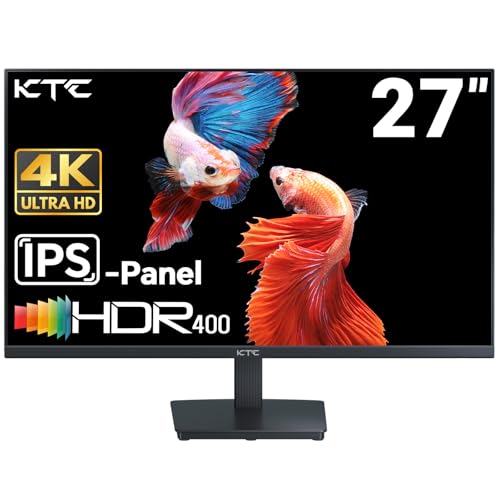
Everything about this monitor starts with image precision. The 27-inch 4K UHD panel presents crisp details that remain clean even during close-up work, which is especially helpful for design tasks or content review. Color reproduction is handled with care, offering 95% DCI-P3 coverage and support for 1.07 billion colors. This allows gradients and tones to appear smooth and natural, lending confidence when working on visuals that demand accuracy.
HDR 400 support adds another layer to the experience by improving contrast and revealing more detail in both bright and darker areas. Videos and images gain subtle depth rather than exaggerated highlights, keeping the presentation balanced. Motion stays controlled at a 60Hz refresh rate, which is well-suited for professional workflows and general entertainment without unnecessary strain on hardware.
Connectivity is straightforward and flexible. With two HDMI 2.0 ports and a DisplayPort 1.4, switching between devices feels easy and efficient. Ergonomic adjustment comes through tilt support and 100 x 100mm VESA compatibility, allowing the screen to fit neatly into various desk or wall-mounted setups. Flicker-free technology and a blue light filter quietly support eye comfort during extended use. Audio, however, is left to external solutions, as this model does not include built-in speakers, encouraging users to choose sound options that best match their workspace.

Sharp and detailed 4K display Wide IPS viewing angles Multiple input connectivity options Clean minimalist screen design
Slightly heavy to handle
Spending time with the Z-Edge U27P4K quickly becomes about noticing the little details. The 3840 x 2160 resolution spreads comfortably across the 27-inch screen, revealing fine textures and clean lines that make images and text look polished. Paired with enhanced color accuracy and contrast, visuals appear more grounded and realistic, which suits both gaming sessions and creative tasks.
The IPS panel plays a quiet but important role. With a 178-degree viewing angle, colors stay stable no matter where you sit, making it easy to share the screen during work or simply lean back without losing clarity. This consistency adds a sense of reliability, especially during long hours at the desk.
Connectivity is generous, offering two HDMI ports and two DisplayPorts, allowing multiple devices to remain plugged in without constant swapping. Free Sync support keeps motion smooth by reducing tearing and stutter, while the low blue light feature helps maintain eye comfort during extended use. Design-wise, the three-sided edge-to-edge screen and ultra-slim stand keep the setup visually light and focused on content. The monitor does have a bit of weight to it, which can make initial setup feel more deliberate, but once mounted on a desk or arm, it stays solid and reassuring.
What to Look For in a best affordable 4k monitor?
Please follow the bellow points before selecting the best affordable 4k monitor:
Panel Type
Screen Size
Resolution
Response Time
Connections
Brightness
Aspect Ratio
Refresh Rate
FAQs
Is an affordable 4K monitor worth buying?
Yes. Affordable 4K monitors offer noticeably sharper text and more screen space than lower-resolution displays, making them a great upgrade for work, browsing, and media consumption.
What compromises should I expect with a budget 4K monitor?
Budget models may have lower refresh rates, simpler stand adjustments, or limited HDR performance, but they can still deliver excellent image clarity for everyday use.
Are affordable 4K monitors good for gaming?
They can work well for casual gaming. Most affordable 4K monitors focus on 60Hz performance, which is suitable for slower-paced and console gaming.
In general, it's difficult to say who creates the best affordable 4k monitor since each firm has unique qualities, features, and pricing points that set them apart from the competition. We only suggest products from the most outstanding manufacturers on our site, so you can rest assured about their quality.
Please do not hesitate to contact us if you require assistance with your problems. Wish you a happy shopping!
About Michael Brown