The Best Budget 24 Inch Monitor For 2025
 By, Michael Brown
Updated
Summary

KOORUI 24" Monitor

Sceptre 24-inch Gaming Monitor

SANSUI 24 Inch Monitor
A 24-inch monitor is a versatile choice for both work and entertainment, striking the perfect balance between screen space and desk real estate. It’s large enough to handle productivity tasks, multitasking, and media consumption, yet compact enough to fit comfortably in small home offices or gaming setups. Whether you’re editing documents, streaming videos, or enjoying casual gaming, a 24-inch display offers crisp visuals and a comfortable viewing experience.
When shopping for the best budget 24-inch monitor, it’s important to look at more than just price. Key features to consider include resolution, panel type, refresh rate, and connectivity options. Full HD resolution ensures clear and detailed visuals, while IPS panels provide vibrant colors and wide viewing angles. For gaming or fast-paced content, a higher refresh rate and low response time can make a significant difference.
In this article, we give you our top recommendations for the best budget 24-inch monitors, combining reliable performance, good design, and excellent value for every type of user.
Our Top Picks


144Hz gaming performance Vibrant IPS panel colors Flicker-free, low blue light mode Ergonomic tilt and VESA mount
No built-in speakers
The KOORUI 24" Monitor offers speed, clarity, and eye-friendly. The 144Hz refresh rate paired with FreeSync support makes gameplay incredibly smooth, minimizing screen tearing even during fast action scenes. This makes it a solid choice for competitive gamers who want responsiveness without compromise.
Colors really pop on the 24-inch IPS panel, covering 99% of the sRGB spectrum and 72% NTSC. Whether you’re watching movies, editing photos, or gaming, the visuals remain crisp and vibrant from nearly any angle, making it perfect for multi-purpose setups. Long gaming or work sessions are easier on the eyes thanks to flicker-free technology and a low blue light mode. Tilt the screen from -5° to 15° for a comfortable view, or mount it on a VESA-compatible wall or arm to save desk space. Connectivity is straightforward, with HDMI, VGA, and audio-out ports supporting a variety of devices.
The only minor drawback is the lack of built-in speakers. Although it doesn’t include onboard audio, this lets users pair the monitor with high-quality external speakers or headphones, which can enhance the overall experience.

100Hz gaming performance 100% sRGB color accuracy Built-in speakers for desk convenience Blue Light Shift reduces eye strain
The stand can feel a bit wobbly
The Sceptre 24-inch Gaming Monitor is designed to blend performance, comfort, and style. Its 100Hz refresh rate ensures smooth motion in fast-paced games, while the FPS and RTS preset modes allow gamers to fine-tune their display for competitive play. Paired with a 1920 x 1080 resolution and an edgeless design, it provides a more immersive viewing experience that draws you into every scene.
It also has a good color performance with 100% sRGB coverage, delivering vivid, lifelike tones. Whether you’re editing media, streaming, or battling through games, the monitor produces consistent and accurate colors across a wide range of applications. Blue Light Shift reduces eye strain during extended sessions, making it comfortable to work or play for hours.
Its built-in speakers produce surprisingly clear audio for both gaming and casual media, freeing up desk space and reducing the need for extra peripherals. Connectivity is versatile, with HDMI 2.0 and DisplayPort options that easily support multiple devices. The only downside is that the included stand can feel a bit wobbly. Although it provides basic stability, many users may prefer a VESA wall mount or an adjustable monitor arm for a sturdier setup, which the monitor fully supports.
Ultra-fast 200Hz refresh rate Crisp 1ms response time 110% sRGB with HDR support Multiple gaming & work modes
HDR is basic, not high-end
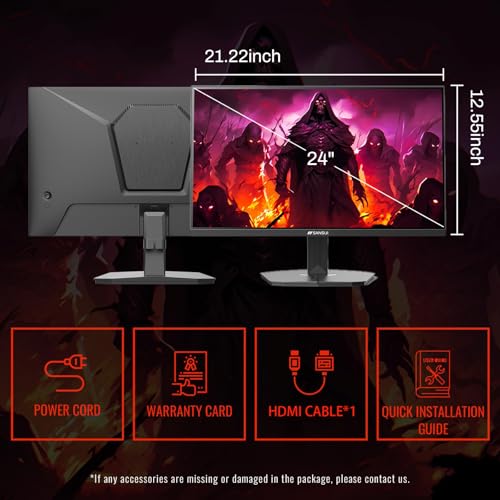
Step into a world of smooth motion with the SANSUI 24-inch Monitor. Its ultra-fast 200Hz refresh rate, combined with a 1ms response time, virtually eliminates motion blur and screen tearing. Whether you’re racing through fast-paced games or juggling multiple work tasks, every frame feels crisp and responsive.
Colors are vivid and well-defined, thanks to 110% sRGB coverage, a 4000:1 contrast ratio, and HDR support. While the HDR is not top-tier, it still boosts brightness and contrast enough to make games, videos, and work visuals pop. FreeSync technology further smooths gameplay by reducing stuttering, giving you a more enjoyable, immersive experience.
Connectivity is straightforward, with HDMI and DisplayPort ports supporting high refresh rates. This monitor also offers multiple preset modes from FPS and RTS to Racing and cinematic settings so you can instantly optimize visuals depending on what you’re doing.

Crisp Full HD 1920x1080 visuals VA panel for deep contrast Wide 178°/178° viewing angles Sleek, bezel-free modern design
The power cable is a bit short
The PHILIPS 24 Inch Monitor offers a clean and sharp visual experience for both work and entertainment. Its Full HD resolution ensures sharp and detailed visuals for movies, videos, and office work, while the VA panel enhances contrast, delivering bright whites, deep blacks, and richer colors for a more immersive viewing experience. Whether you’re editing documents, watching videos, or browsing the web, the monitor maintains consistent colors thanks to its wide 178/178-degree viewing angles.
The monitor’s sleek design is another highlight. Virtually bezel-free on three sides, it creates a clean, modern look and allows for easy multi-monitor setups to boost productivity. EasyRead mode is especially handy for those long hours of document reading, reducing eye strain by mimicking a paper-like appearance. Connectivity is straightforward, making it suitable for home offices, professional workspaces, or casual media consumption.
Although the power cable is a bit short, it’s a minor inconvenience compared to the overall value. The PHILIPS 24 Inch Monitor is a reliable choice for anyone seeking clear visuals, ergonomic viewing, and a minimalist design that complements any workspace.

HD 1920x1080 visuals IPS panel with wide viewing angles Flexible connectivity options Energy-efficient, eco-friendly design
The manual can be quite hard to understand
The Amazon Basics 24-inch IPS Monitor delivers a straightforward and dependable performance that suits a wide range of everyday tasks. With its Full HD resolution and IPS technology, it produces accurate colors and clear visuals across a wide viewing angle, so whether you’re collaborating with colleagues or enjoying a movie, images remain sharp and lifelike. The 24-inch screen is a comfortable size for multitasking, letting you keep multiple windows open without feeling cramped.
Connectivity options are flexible, including HDMI, DisplayPort, VGA, and audio in/out jacks, allowing seamless connection to laptops, PCs, and other devices. The included adjustable stand supports tilt from -5 to 23 degrees, and VESA compatibility makes it easy to mount on walls for a cleaner setup. Energy Star certification ensures it operates efficiently without driving up electricity costs.
While the included manual can be a bit tricky to follow, once set up, the monitor performs reliably for work, entertainment, and study. Overall, this monitor is an affordable, practical choice for anyone looking for solid performance and consistent color quality in a compact package.

Ultra-fast 180Hz refresh rate 1ms response time Black Equalizer for dark scenes Ergonomic, adjustable gaming stand
No HDR support
The Samsung Odyssey G3 24-inch Monitor is designed to give gamers a competitive edge while keeping long sessions comfortable. Its 180Hz refresh rate and 1ms MPRT response time ensure smooth, blur-free gameplay, letting you react instantly in fast-paced scenarios. AMD FreeSync keeps the graphics card and monitor perfectly in sync, reducing screen tearing so action and cinematic scenes stay seamless.
This monitor also enhances visibility in darker game areas with Black Equalizer, helping you spot enemies hiding in shadows, while Virtual Aim Point provides an on-screen crosshair for more precise targeting. Eye Saver Mode reduces blue light exposure, and the flicker-free display keeps your eyes comfortable during marathon sessions.
Design-wise, the three-sided borderless screen offers a modern look and maximizes screen real estate, making dual-monitor setups clean and immersive. The ergonomic stand allows swivel, tilt, pivot, and height adjustments, so you can find the most comfortable position for extended gameplay.
While it doesn’t support HDR, the Odyssey G3 still delivers vibrant colors and crisp visuals for everyday gaming and media use. It’s an excellent choice for gamers seeking speed, responsiveness, and a customizable, immersive experience.

Vibrant Full HD IPS display 120Hz refresh rate Eye-care features reduce strain Flexible tilt and VESA mount
Only one HDMI port
The AOC 24B35H3 24" Monitor offers a reliable performance in a sleek, energy-efficient package. Its 24-inch Full HD IPS display provides wide 178-degree viewing angles, so images stay sharp and colors remain true even when viewed from the side. Color accuracy is strong, covering 100% sRGB and 84% NTSC gamuts, giving you rich and detailed visuals for work, movies, or casual gaming.
This product can handle motion smoothly thanks to its 120Hz refresh rate and Adaptive Sync technology, which minimizes tearing and stuttering for a more fluid viewing experience. For extended use, Flicker-Free technology and Low Blue Light mode help reduce eye strain, keeping your eyes comfortable during long work or gaming sessions.
Connectivity options include VGA and HDMI ports, along with a 3.5mm headphone out for private listening. The tilt-adjustable stand and VESA mount compatibility provide flexibility to set up the monitor exactly how you like it. Although it only has one HDMI port, the AOC 24B35H3 still delivers strong performance, color fidelity, and smooth visuals in a compact, user-friendly design suitable for both home and office use.
What to Look Through Prior to Selecting the best budget 24 inch monitor?
You may be aware that purchasing something is not actually an easy action. Your everyday life will be affected if you choose the most fantastic product. What variables, though, will make this acquisition successful? Whether you're seeking for best budget 24 inch monitor to meet your needs, you'll be wasting your own time.
Nevertheless, it would be preferable if you weren't so worried. We've enlisted the help of a team of professionals to investigate best budget 24 inch monitor, and we've provided accurate data.
There seem to be several important considerations to make. But only a few of them are really concentrated. Here are some crucial reviews while purchasing best budget 24 inch monitor:
Brightness
Refresh Rate
Aspect Ratio
Connections
Screen Size
Response Time
Panel Type
Resolution
FAQs
Is a 24-inch monitor good for work?
Yes. A 24-inch monitor provides ample screen space for productivity tasks, multitasking, and document editing while remaining compact enough for most desks.
What resolution should I look for in a 24-inch monitor?
Full HD (1920×1080) is standard and offers sharp, clear visuals. Some models also offer higher resolutions for improved detail and workspace.
Are 24-inch monitors suitable for gaming?
Yes. Look for monitors with higher refresh rates (75Hz or above) and low response times to ensure smooth gameplay and reduced motion blur.
The figures we've presented here aren't all of them. Alternatively, we continuously update it as new information becomes available. It's advisable to keep in mind the points we discussed related to buying guide.
We always appreciate your feedback and handle it with the utmost importance. As a result, the most up-to-date data will come to your mind as soon as possible. You are supposed to contact us and give us your reviews as well as problems so that we will try to support you. Hope you have a pleasant shopping experience!
About Michael Brown