The Best Tv For Color Grading Of 2026
 By, Michael Brown
Updated
Summary

LG 48-Inch Class OLED 4K C5 TV
TCL 65 Inch Class QM8K TV

LG 65-Inch Class OLED evo C4 TV
Color grading is one of those tasks where small differences matter. A slight shift in shadow detail, skin tones, or color accuracy can completely change how a final project looks on other screens. That is why professionals typically rely on dedicated reference monitors. However, not everyone has the budget for specialized equipment that can cost thousands of dollars.
Fortunately, modern premium TVs have become surprisingly capable alternatives for certain color-critical workflows. Advances in OLED technology, wider color gamut coverage, HDR performance, and factory calibration mean some TVs can deliver image quality that comes remarkably close to professional displays for independent filmmakers, video editors, and content creators.
Among the current options, the LG 48-Inch Class OLED 4K C5 TV has earned a strong reputation for exactly that reason. Its self-lit OLED panel produces exceptional contrast, deep blacks, and accurate color reproduction, making it a compelling choice for creators who want a large-screen display for reviewing footage, grading projects, or checking HDR content without investing in a dedicated reference monitor.
Of course, a TV should never replace a true professional reference monitor when absolute color accuracy is required for broadcast or cinema work. But for many creators, the models below offer an excellent balance of color performance, HDR capability, and overall value, making them some of the best TVs currently available for color grading and creative production.
Our Top Picks


Alpha 9 AI Processor Gen8 Perfect Black technology Perfect Color technology Dolby Vision support
Premium price compared to similarly sized LED TVs
Dark scenes are often the quickest way to judge whether a display is truly capable of color-critical work. Thanks to more than 8.3 million self-lit pixels, the C5 produces Perfect Black alongside Perfect Color, making subtle transitions, fine shadow details, and highlight separation much easier to evaluate without guessing where the image begins to clip.
Behind the panel sits LG's Alpha 9 AI Processor Gen8, which continuously refines picture quality through AI Super Upscaling. While editors typically work with native footage, the processor becomes useful when reviewing lower-resolution references or client materials, helping preserve detail across different content sources.
Dolby Vision and FILMMAKER MODE make this TV even more appealing for post-production work. HDR footage can be reviewed with richer contrast and more realistic brightness, while FILMMAKER MODE presents movies closer to the creator's original intent. Dolby Atmos rounds out the package for anyone checking both picture and sound during final playback.
Its biggest obstacle is simply cost. Compared to similarly sized LED televisions, the investment is noticeably higher, although OLED image quality largely explains where that extra budget goes.

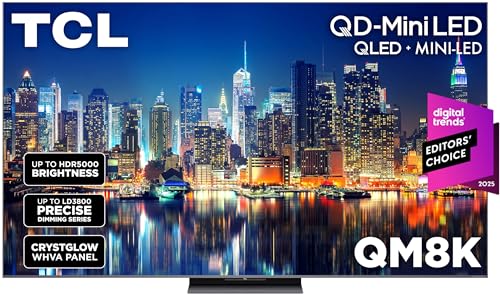
TCL Halo Control System CrystGlow WHVA panel Up to 288 VRR Hands-free Google TV
Google TV interface may feel busy to some users
Ambient light can easily distort the way colors and contrast are perceived. TCL's QD-Mini LED panel, working alongside the Halo Control System, does an excellent job preserving shadow definition while minimizing blooming around bright objects. That cleaner separation helps when evaluating fine tonal differences across HDR footage.
Viewing angles deserve plenty of credit too. The CrystGlow WHVA panel combines an anti-reflective finish with wide-angle performance, making colors stay convincing even when stepping away from the center of the screen. That's particularly useful during collaborative editing sessions where several people may be reviewing footage together.
Beyond content creation, the TV brings impressive responsiveness through Game Accelerator 288 with up to 288 VRR. Although gaming isn't the primary focus for color grading, the fast panel demonstrates how quickly the display reacts to motion without introducing unnecessary blur. Google TV with hands-free voice control keeps everyday navigation simple between editing sessions.
Google TV places a huge amount of content front and center, which some people may find busier than a cleaner interface designed around quick access to settings and inputs. Fortunately, that doesn't affect the panel's image quality once the content starts playing.

100% Color Volume 100% Color Fidelity Brightness Booster Alpha 9 AI Processor Gen7
Built-in speakers are good but still benefit from a dedicated sound system
Pull up a scene filled with dark shadows, bright reflections, and natural skin tones, and the C4 quickly shows why OLED remains a favorite for creative work. More than eight million self-lit pixels deliver 100% Color Volume and 100% Color Fidelity, helping colors stay consistent from the deepest blacks to the brightest highlights.
Brightness is another welcome improvement. LG's Brightness Booster gives each pixel extra intensity, making HDR footage easier to evaluate without sacrificing the OLED contrast that editors depend on. Whether you're reviewing cinematic footage or grading commercial content, the image carries an impressive sense of depth.
The Alpha 9 AI Processor Gen7 handles picture processing in the background while AI Super Upscaling cleans up lower-resolution footage when needed. Multi View adds another practical touch by displaying two sources simultaneously, making side-by-side comparisons much easier during editing or reference work. Dolby Vision, Dolby Atmos, and FILMMAKER MODE complete a feature set that feels well suited to professional content review.
Audio performs well for everyday viewing, though editors working on projects with detailed sound design will probably end up pairing the TV with dedicated speakers or studio monitors.

XR Contrast Booster 15 XR Triluminos Pro XR Processor Studio Calibrated Picture
Only two HDMI 2.1 ports
Accuracy starts with contrast, and Sony gives this display an excellent foundation. Over eight million self-lit pixels work alongside XR Contrast Booster 15 to reveal deep blacks without crushing subtle details, making it easier to spot fine tonal differences during color correction.
Color reproduction is equally convincing. XR Triluminos Pro expands the available color palette while the XR Processor continuously refines contrast, color, and clarity on a scene-by-scene basis. Instead of producing an exaggerated image, the processing aims to preserve realism—exactly what editors want when reviewing finished work.
Sony's Studio Calibrated Picture modes are especially valuable here. Dedicated presets for Netflix, Prime Video, and Sony Pictures Core allow movies to be viewed much closer to the way they were mastered. Google TV keeps major streaming platforms, including the Apple TV app, easily accessible whenever reference content needs to be checked.
Connectivity is the only place where some compromises appear. With just two HDMI 2.1 ports available, users running several next-generation devices may need to be a little more selective about what stays connected.

NQ4 AI Gen3 Processor 128 AI neural networks AI 4K upscaling HDR-like enhancement
No DTS audio decoding
Editors often jump between pristine camera footage and heavily compressed reference videos. Samsung's NQ4 AI Gen3 processor analyzes each scene through 128 neural networks, intelligently upscaling lower-resolution content into a cleaner 4K presentation without making the image look artificially sharpened.
HDR work benefits from more than just resolution. The processor boosts brightness on a scene-by-scene basis, revealing subtle texture inside highlights while maintaining strong contrast throughout darker portions of the frame. SDR footage also receives HDR-like enhancement, bringing extra life to older or standard dynamic range material during playback.
Outside creative work, the panel is equally capable of handling fast-moving content. Motion remains fluid with support for VRR up to 4K 144Hz, while Samsung's AI motion processing helps reduce blur during sports and action scenes. Those strengths simply reinforce how responsive the display is under demanding workloads.
Viewers with DTS-based movie libraries may want to keep one small detail in mind. The TV doesn't support DTS audio decoding, although that won't affect most streaming services or everyday viewing.
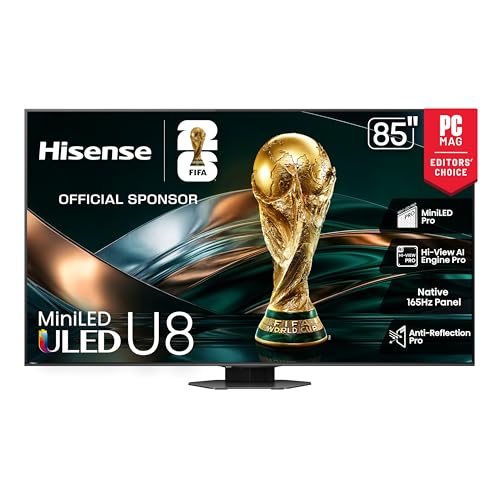
MiniLED Pro backlight Up to 5000 nits Up to 5600 local dimming zones Hi-View AI Engine Pro
Large size requires ample installation space
HDR grading often depends on how confidently a display handles contrast, and the U8QG has plenty to work with. Its MiniLED Pro backlight reaches up to 5,000 nits of peak brightness and uses up to 5,600 local dimming zones, producing brighter highlights, deeper shadows, and far better control over blooming than conventional LED TVs. That extra precision makes it much easier to judge difficult HDR scenes with confidence.
Hisense's Hi-View AI Engine Pro keeps refining the image as different content appears on screen. The processor analyzes color, depth, and overall picture characteristics in real time, helping footage maintain a natural look across everything from cinematic projects to commercial work.
Reflection control deserves recognition as well. Anti-Reflection Pro minimizes glare across the panel, making the TV easier to use in editing spaces that aren't completely dark. The built-in 4.1.2-channel Dolby Atmos audio system creates a far more immersive playback experience when reviewing finished productions, while the native 165Hz panel simply demonstrates how responsive the display remains under fast-moving content.
An 85-inch television naturally demands plenty of room before it can really shine. Smaller studios or apartments may struggle to accommodate a screen of this scale comfortably.

Cognitive Processor XR QD-OLED panel XR Triluminos Max Apple AirPlay support
Best performance in darker rooms
Natural color reproduction sits at the heart of this TV. Sony combines its Cognitive Processor XR with QD-OLED technology and XR Triluminos Max to create an image packed with lifelike colors, rich contrast, and exceptional brightness. Delicate gradients remain smooth, skin tones appear convincing, and dark scenes retain texture instead of disappearing into black.
Reviewing reference material is equally convenient. Google TV gathers major streaming services in one place, while Apple AirPlay makes it easy to send footage directly from compatible devices. BRAVIA CORE expands the experience even further with access to high-quality 4K movies, providing useful reference material when comparing color, contrast, and mastering quality.
Although this article focuses on color grading, the display clearly has plenty of power left for entertainment. HDMI 2.1 features such as 4K/120, VRR, ALLM, and Sony's Game Menu make the panel equally capable for gaming once the editing session is finished. While the picture looks impressive in most settings, movie nights in a darker room reveal the full depth of the QD-OLED panel.
What to Look For in a best tv for color grading?
The best tv for color grading is influenced by a multitude of factors, including all those stated below. Depending on the sort of product, the learning process differs. We'll be ready to aid you and propose solutions since we're here to support you.
It's necessary to remember the following factors before selecting best tv for color grading:
Refresh Rate
TV Screen Sizes
Screen Resolution
HDMI And Connections
Display Types
High Dynamic Range (HDR)
Connectivity
Smart TVs
FAQs
Can a TV be used for color grading?
Yes, a high-quality TV with excellent color accuracy and HDR performance can be useful for reviewing graded content, though professional reference monitors remain the industry standard.
What features should I look for in a TV for color grading?
Look for high color accuracy, wide color gamut coverage, HDR support, consistent brightness, and good calibration options.
Is 4K resolution important for color grading?
Yes. A 4K TV lets you view fine details more clearly, making it easier to assess image quality and work with high-resolution footage.
About Michael Brown