The Best Tablet For Professionals Of 2026
 By, Michael Brown
Updated
Summary

Apple iPad Pro 11-Inch M4

Samsung Galaxy Tab S10 Lite

Apple iPad Pro 13-inch M5
For many professionals, a tablet is no longer just a secondary device. It has become part of the daily workflow. Meetings happen on it, documents get reviewed on it, presentations are delivered from it, and quick edits are often completed before a laptop is even taken out of a bag. The line between tablets and traditional computers has become increasingly blurred, which makes choosing the right one more important than ever.
The problem is that professional use can mean very different things. A consultant may need a lightweight device for travel and note-taking. A designer might prioritize display quality and stylus support. An entrepreneur could be looking for something that handles email, video calls, presentations, and multitasking without slowing down. As a result, the best tablet for professionals is not simply the most powerful model available—it is the one that fits seamlessly into a demanding work routine.
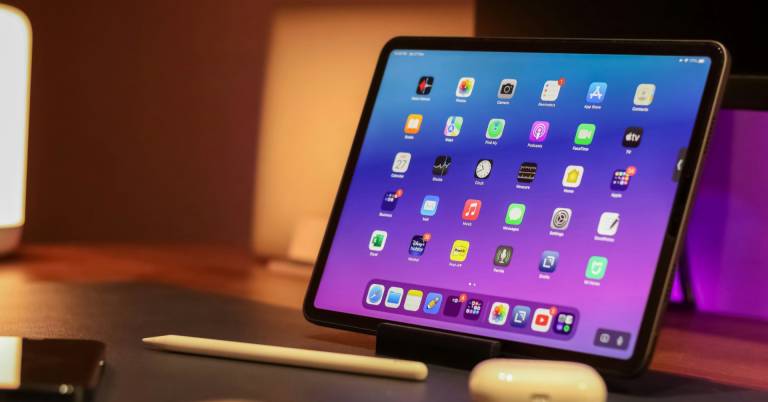
Among today's options, the Apple iPad Pro 11-Inch M4 represents how far professional tablets have evolved. With desktop-class performance, a premium display, and support for advanced accessories, it offers capabilities that would have seemed impossible in a tablet just a few years ago. The tablets featured below are designed for people who expect more than casual browsing and media consumption. Whether your priority is productivity, creativity, mobility, or all three, these are the tablets that stand out for getting real work done.
Our Top Picks


M4 chip performance Ultra Retina XDR display Apple Intelligence support Stage Manager multitasking
Accessory costs
A crowded workday usually means juggling more than one task at a time. The iPad Pro handles that environment exceptionally well thanks to the M4 chip, which combines a 10-core CPU and 10-core GPU with productivity-focused features built directly into iPadOS. Resizable windows, overlapping apps, Stage Manager, and external display support help the tablet operate much closer to a laptop than a traditional tablet.
The display is equally impressive. Apple's Ultra Retina XDR panel delivers exceptional color accuracy, extreme brightness, and advanced technologies such as ProMotion, True Tone, and P3 wide color support. Whether you're reviewing presentations, editing images, or sketching concepts with Apple Pencil Pro, the screen remains one of the standout parts of the experience.
Apple Intelligence adds another layer of utility for professionals. Writing assistance, communication tools, and productivity features are integrated directly into the system while maintaining Apple's strong focus on privacy protections. Combined with all-day battery life and storage options reaching up to 2TB, the device is capable of handling demanding workloads without constantly forcing users to think about limitations.
Out of the box, the experience is already excellent. That said, many of the productivity features really shine when paired with optional accessories, making the ecosystem a little more expensive to build around.
Vision Booster display Up to 2TB expansion Exynos 1380 processor Included S Pen
No external monitor support
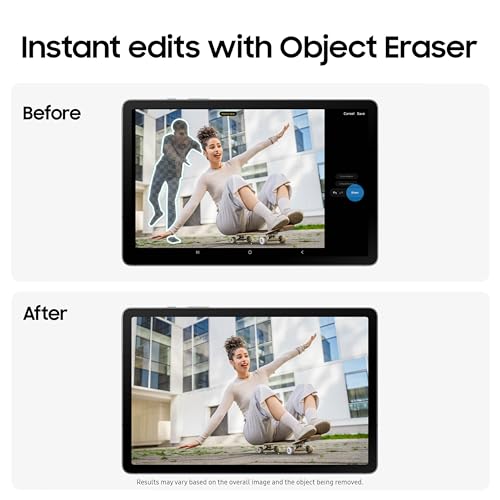
Some tablets shine because of raw performance. Others earn their place through flexibility. The Galaxy Tab S10 Lite leans heavily into the second category by pairing a responsive S Pen experience with a collection of AI-powered tools designed to simplify everyday work. Writing notes, solving equations, organizing information, and searching content directly from the screen all feel naturally integrated into the workflow.
Long work sessions are helped by the 10.9-inch display, which automatically adjusts brightness through Vision Booster technology. It's equally comfortable for reviewing documents in the office, catching up on research at home, or reading through reports during a commute.
Storage flexibility is another practical advantage. With up to 256GB of built-in storage and support for up to 2TB through microSD expansion, users have plenty of room for files, presentations, notes, and media without constantly deleting older content. The Exynos 1380 processor keeps everything moving smoothly when switching between apps or handling several tasks at once.
The Galaxy Tab S10 Lite does a great job as a portable workspace, especially for note-taking and everyday productivity. Users who regularly connect their devices to larger displays may simply find its setup options a bit more limited than some alternatives.

Ultra Retina XDR display Apple Intelligence Up to 2TB storage Up to 16GB memory
No SD or microSD card slot
There are projects that simply benefit from having more room to work. Whether you're arranging documents side by side, reviewing design assets, or managing multiple applications at once, the 13-inch Ultra Retina XDR display gives everything a little more breathing room. Extreme brightness, precise contrast, ProMotion, True Tone, and P3 wide color all contribute to a viewing experience that feels exceptionally polished.
Beneath that display sits Apple's M5 chip, backed by up to 16GB of memory, Neural Accelerators, and storage configurations reaching 2TB. The result is a tablet that feels remarkably comfortable handling AI-assisted workflows, professional apps, and productivity-heavy tasks without hesitation.
Apple has also continued refining iPadOS with an updated windowing system designed to help users organize and manage workflows more efficiently. Combined with Apple Intelligence, the software experience feels increasingly tailored toward professionals who want flexibility without carrying a traditional laptop.
The available storage capacities are generous, so most users won't think much about expansion. Those who prefer carrying large media libraries on removable storage, however, should keep in mind that there isn't an SD or microSD card slot available.

MediaTek Dimensity 6300 Quad Dolby Atmos speakers AI Note integration Up to 12-hour battery
Geared more toward everyday productivity than advanced professional workloads
Ideas have a habit of appearing in the middle of meetings, lectures, or research sessions. Lenovo clearly had those moments in mind when building the Idea Tab, equipping it with AI-powered productivity features alongside apps such as Lenovo AI Note, Squid, Nebo, and MyScript Calculator to help organize information more efficiently.
Searching for information is equally streamlined. Circle to Search allows users to highlight content directly on the screen and instantly pull up results or translations without interrupting their workflow. Small conveniences like this tend to save more time than expected over the course of a busy week.
The MediaTek Dimensity 6300 processor keeps multitasking responsive, while quad Dolby Atmos-tuned speakers and 72% NTSC color coverage create a more enjoyable environment for video content, presentations, and study materials. Battery life also remains a strong point, with up to 12 hours of YouTube playback and support for 20W charging when it's time to top up.
This isn't the tablet aimed at creative professionals chasing the highest-end display technologies or workstation-class performance. Instead, it excels as a practical companion for research, note-taking, organization, and day-to-day productivity.

Dynamic AMOLED 2X display Included S Pen 12GB RAM Expandable microSD storage
Large AMOLED display may consume more battery during intensive use
Not every productivity feature needs to come from raw processing power. Samsung takes a different approach by blending AI tools directly into the workflow. Note Assist helps keep meeting notes organized, while Drawing Assist can transform rough concepts into cleaner visual mockups and storyboards. For professionals who regularly move between ideas and execution, those tools can become genuinely useful.
The included S Pen plays a major role in that experience. Writing, annotating, sketching, and capturing ideas feels natural, while the pen-on-paper precision makes it easy to move from traditional notebooks to a digital workspace.
Samsung also gives the tablet enough hardware to support demanding daily use. The 11-inch Dynamic AMOLED 2X display delivers rich colors and clear text, while 12GB of RAM helps maintain a responsive experience when switching between multiple Android applications. Expandable storage via microSD adds flexibility for professionals working with larger files and media libraries.
The vivid AMOLED panel is one of the tablet's biggest strengths, although professionals who spend hours pushing brightness levels during intensive workloads may notice a greater impact on battery usage compared to simpler display technologies.
NXTPAPER 3.0 technology 4096-level T-PEN 10,000mAh battery Multi-window productivity
Charger not included
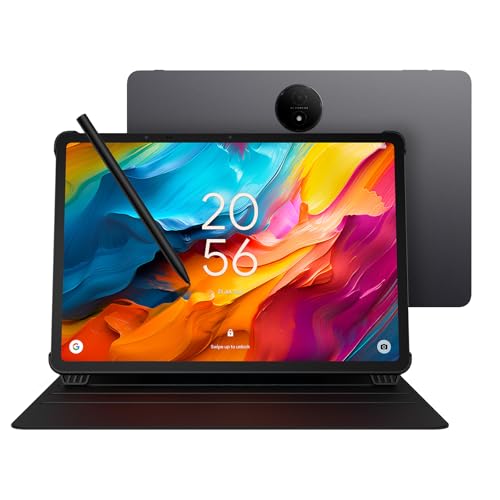
By mid-afternoon, screen fatigue usually starts creeping in. TCL tackles that problem head-on with its NXTPAPER 3.0 display technology, which combines an anti-glare surface, blue light reduction, and DC dimming to create a more paper-like viewing experience. Long reading sessions feel noticeably less demanding than they do on many conventional displays.
Versatility is another major part of the appeal. The dedicated NXTPAPER Key allows instant switching between different display modes, whether you're reviewing documents, reading digital books, sketching ideas, or working on creative projects. The 14.3-inch 2.4K display also provides plenty of workspace for multitasking and content creation.
Creative professionals should appreciate the included T-PEN stylus with 4096 pressure levels, while productivity-focused users can take advantage of floating windows, split-screen support, screen mirroring, and extended display functionality. Backing it all is a 10,000mAh battery with 33W fast charging and reverse charging support for extra flexibility throughout the day.
TCL includes plenty in the package, although one small detail catches some users off guard at first. To take advantage of the fast-charging capabilities right away, you'll need to supply your own charger.

90Hz refresh rate Quad Dolby Atmos speakers Metal unibody design 9000mAh battery
Software update support may not be as extensive as Apple or Samsung
Not every workday involves demanding creative software or AI-heavy workflows. For professionals who spend more time reviewing documents, attending meetings, answering emails, and managing projects, the Redmi Pad 2 offers a surprisingly balanced experience. Its 11-inch 2.5K display provides sharp visuals, while the 16:10 aspect ratio creates extra room for documents and web pages.
Reading comfort receives plenty of attention as well. Xiaomi includes TÜV Rheinland Low Blue Light, Flicker Free, and Circadian Friendly certifications alongside DC dimming technology, helping make extended screen sessions easier on the eyes.
Entertainment capabilities are stronger than expected too. Quad speakers with Dolby Atmos and Hi-Res Audio create a richer audio experience for video calls, presentations, and media playback. The metal unibody design adds a more refined appearance, while the Helio G100 Ultra processor and 9000mAh battery help keep the tablet responsive throughout the day.
Xiaomi delivers strong value here, particularly for users who prioritize hardware over ecosystem perks. Those who tend to keep devices for many years may simply place more importance on long-term software support than budget-conscious buyers typically do.
What to Look For in a best tablet for professionals?
To buy any product seems easy, but to choose the best one is not straightforward. The time you take to research its outcome is significant. The same matter also comes to best tablet for professionals of 2026 that we include in this article. But you can relax instead of spending too much time learning the products. It’s our duty!
Here are the main features of best tablet for professionals that all of you guys should keep in mind when deciding to make a purchase:
Hardware Connections
Cameras
Software
Online Access
Storage
Screen & Audio
Battery
FAQs
What makes a tablet suitable for professionals?
A professional tablet should offer strong performance, multitasking capabilities, long battery life, and support for productivity accessories like keyboards and styluses.
Can a tablet replace a laptop for professional work?
For many professionals, yes. Modern tablets can handle emails, presentations, video meetings, and document editing, though specialized software may still require a laptop.
Do professionals need a keyboard with their tablet?
A keyboard is highly recommended for tasks such as writing reports, managing spreadsheets, and responding to emails more efficiently.
About Michael Brown