The 7 Best Tablet For Adults Of 2026, Researched By Us
 By, Michael Brown
Updated
Summary

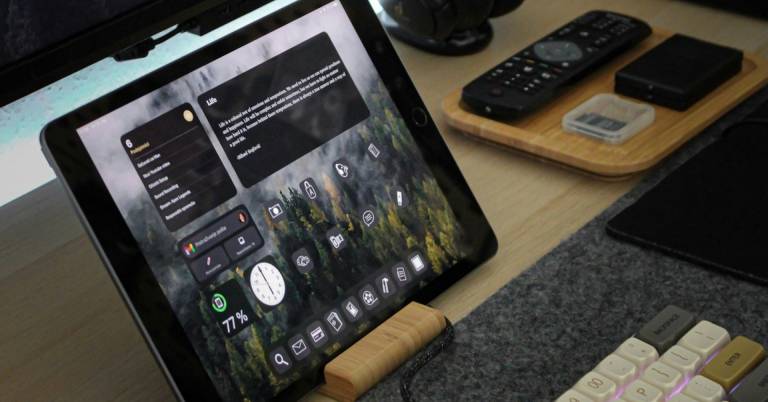
Apple iPad Air 11-inch M4
Samsung Galaxy Tab A9+ Tablet 11”

Lenovo Idea Tab Plus 12.1″
Buying a tablet as an adult is often more complicated than it sounds. Unlike kids, who may use a tablet primarily for games or videos, adults tend to expect one device to handle a little bit of everything. It might serve as an ebook reader in the morning, a video streaming device in the evening, a productivity tool during work hours, and a travel companion on weekends. The challenge is finding a tablet that can comfortably wear all of those hats without feeling specialized in just one area.
That is why the best tablet for adults is rarely the one with the biggest screen or the most powerful processor. What matters more is balance. A great tablet should be portable enough to carry around easily, powerful enough to stay responsive for years, and versatile enough to adapt to different routines and lifestyles. Features like battery life, display quality, app support, and overall usability often end up being more important than benchmark scores.
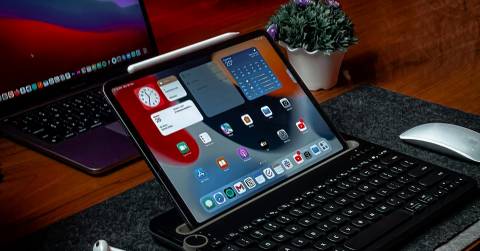
The Apple iPad Air 11-inch M4 is a good example of that balance. It is powerful enough for creative work and multitasking, yet lightweight enough to use comfortably for reading, browsing, streaming, and everyday tasks. Of course, not everyone uses a tablet in the same way. Some people prioritize entertainment, others focus on productivity, and some simply want a reliable device for staying connected. The tablets below represent a range of options that cater to different needs while still delivering the versatility that makes a tablet worth owning in the first place.
Our Top Picks


Apple M4 chip Apple Intelligence support Liquid Retina display Wi-Fi 7 connectivity
Premium pricing compared to many Android alternatives
Not every tablet can comfortably jump from video calls to photo editing to productivity apps without missing a beat. Thanks to Apple's M4 chip, the iPad Air handles demanding workloads with remarkable ease, whether you're managing multiple apps, working with AI-powered tools, or simply keeping a busy day organized.
Part of the appeal comes from how polished the entire experience feels. iPadOS makes multitasking far more flexible than many people expect, allowing windows, apps, and workflows to stay organized without turning the screen into a cluttered mess. The addition of Apple Intelligence adds another layer of convenience for writing, communication, and day-to-day productivity.
The 11-inch Liquid Retina display also deserves attention. With P3 wide color, True Tone, and ultralow reflectivity, everything from articles and recipes to movies and digital magazines looks clean and inviting. Combined with all-day battery life and Wi-Fi 7 support, the tablet adapts easily whether you're relaxing on the couch or working away from your desk.
Apple clearly positions the iPad Air toward buyers who value refinement and performance. That approach brings plenty of benefits, although it also places the tablet in a higher price bracket than many Android competitors on the market.

Dolby Atmos speakers Multitasking support Up to 1TB expandable storage Samsung Kids mode
Charging speeds are relatively modest
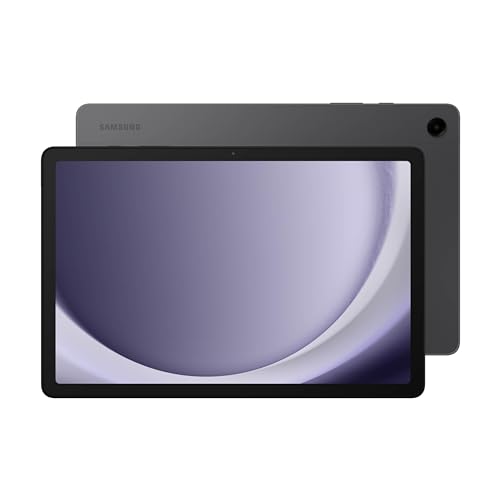
Weekend mornings often start with someone borrowing the tablet. A recipe in the kitchen becomes a cartoon in the living room, which later turns into a video call or a few rounds of gaming. The Galaxy Tab A9+ suits that kind of shared usage particularly well thanks to its bright 11-inch display and fluid 90Hz refresh rate.
Sound quality is another pleasant surprise. Samsung equips the tablet with quad speakers powered by Dolby Atmos, creating a fuller audio experience that makes movies, music, and videos more enjoyable without immediately reaching for headphones.
This tablet also does a respectable job when multiple tasks compete for attention. Samsung's multitasking features make it possible to keep several apps open simultaneously, while expandable storage up to 1TB leaves plenty of room for downloads, photos, and entertainment. Parents will likely appreciate the Samsung Kids environment as well, which provides a dedicated space for younger users.
Samsung focuses more on affordability and versatility than outright speed. Charging takes a little more patience than on some higher-end tablets, but once powered up, the Galaxy Tab A9+ remains an easy device to share around the household.

12.1-inch 2.5K display Up to 800 nits brightness Circle to Search Dolby Atmos speakers
Larger 12.1-inch design is less portable than compact tablets
A good study session usually starts with a comfortable screen. Lenovo gives the Idea Tab Plus a 12.1-inch 2.5K display with up to 800 nits of brightness, making articles, documents, and educational content easier to view whether you're indoors or sitting near a bright window. TÜV Rheinland Low Blue Light certification also helps reduce strain during longer reading sessions.
The software experience takes a noticeably different direction from many tablets in this category. Circle to Search allows quick lookups without jumping between apps, while learning-focused tools such as Lenovo Notepad, Squid, Nebo, and MyScript Calculator help organize ideas, calculations, and handwritten notes more naturally.
Entertainment isn't neglected either. MediaTek's Dimensity 6400 processor keeps navigation responsive, while quad speakers tuned with Dolby Atmos create a richer listening experience for podcasts, videos, and music. Add up to 13 hours of YouTube playback, and the tablet easily transitions from productivity to relaxation.
The larger display is part of what makes the tablet enjoyable to use, although it also means it occupies more space in a bag than smaller models. In return, you get a screen that's genuinely pleasant to spend hours looking at.

11-inch 90Hz display Google Gemini integration Circle to Search Dolby Atmos speakers
Screen reflections can be noticeable in bright environments
A tablet often becomes the device people grab when they don't feel like opening a laptop. The Galaxy Tab A11+ fits that role comfortably, delivering enough performance for daily tasks while remaining approachable for users of all ages. Samsung's upgraded chipset helps keep navigation responsive whether you're managing emails, watching videos, or switching between apps.
There's also plenty of room to grow into the device. Configurations with up to 8GB of memory and 256GB of storage provide space for files, downloads, and apps, while the 11-inch display with a refresh rate up to 90Hz keeps movement looking fluid during everyday use.
Samsung adds a few modern touches that make the experience feel more current. Google Gemini integration offers quick assistance for everyday tasks, and Circle to Search helps find information without disrupting whatever you're doing on screen. Meanwhile, Dolby Atmos-powered quad speakers add a welcome sense of depth when watching movies or listening to music.
Bright rooms can occasionally remind you that this is a mainstream tablet rather than a premium flagship. Reflections are easier to notice under direct lighting, but indoors and during typical daily use, the display remains perfectly enjoyable.
12.2-inch 2.4K display 120Hz refresh rate Google Gemini AI Split-screen multitasking
Processor is designed for general use rather than high-end gaming
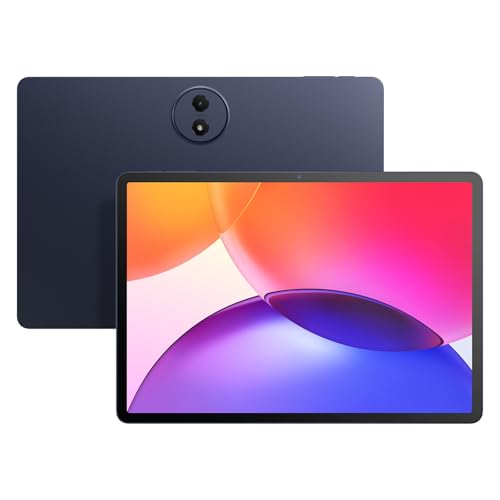
The first thing many people notice is the screen. TCL equips the TAB A1 Plus with a 12.2-inch 2.4K display, a 120Hz refresh rate, and 100% sRGB coverage, creating an experience that feels roomy and visually engaging whether you're reviewing documents, reading articles, or catching up on a favorite series.
A strong collection of AI features helps separate it from many similarly priced alternatives. Google Gemini, Circle to Search, Writing Assist, Text Assist, and Smart Translator all work toward the same goal: reducing friction when researching, writing, planning, or organizing information.
The multitasking experience also deserves recognition. Split-screen support, floating windows, Extend Mode, and Mirror Mode make it easier to keep several tasks moving simultaneously. Taking notes while attending a meeting or referencing documents during a video call feels much more natural on a display this large.
Gaming enthusiasts looking for flagship-level performance may want something built specifically around that purpose. TCL clearly aimed this tablet at productivity, learning, and daily entertainment rather than chasing the highest frame rates available.

12GB RAM Up to 1TB expansion 10.1-inch IPS display 6000mAh battery
Cameras are basic and intended mainly for video calls
Sometimes a tablet's job is simply to be available whenever you need it. Sitting on the coffee table for quick searches, joining a video call, reading an ebook before bed, or catching up on a few episodes during a flight—those are the situations where the ECOPAD makes the most sense. Its 10.1-inch IPS display provides enough space for comfortable viewing without making the device awkward to hold for longer periods.
Storage flexibility is arguably the biggest selling point here. The tablet includes 12GB of RAM, 64GB of internal storage, and support for up to 1TB of expandable storage via SD card. For users with large photo collections, downloaded videos, or extensive document libraries, that extra capacity can be surprisingly useful.
Battery life also aligns well with casual everyday use. The built-in 6000mAh battery supports up to eight hours of video playback, making it suitable for travel, entertainment, and general household use without constantly reaching for a charger. Android 15 helps keep the overall experience current and familiar.
Photography clearly isn't the main mission. The front and rear cameras handle video calls and quick snapshots adequately, but the tablet's strengths are much easier to appreciate when it's being used for media consumption, reading, or day-to-day tasks.

Chrome OS platform 12.3-inch display 8GB memory 64GB SSD
Chrome OS app compatibility can vary depending on the application
A surprising number of adults spend most of their computing time inside a browser. Email, Google Docs, spreadsheets, research, video meetings, and cloud-based tools often live in separate tabs rather than dedicated apps. The Pixel Slate fits naturally into that workflow thanks to Chrome OS and its desktop-inspired approach to productivity.
Underneath the display sits an 8th Gen Intel Core m3 processor paired with 8GB of memory and a 64GB SSD. That hardware combination feels closer to a lightweight laptop than a traditional tablet, helping the device handle web-based work, multitasking, and everyday productivity more comfortably than many entry-level tablets.
Google also bundles the Pixelbook Pen, opening the door to note-taking, sketching, annotation, and handwritten input. For adults who like marking up documents or jotting down ideas directly on screen, it's a practical addition rather than an afterthought.
Chrome OS brings several advantages, particularly for users invested in Google's ecosystem. At the same time, certain applications may not behave exactly as they would on Android, Windows, or iPadOS devices, making software compatibility worth checking before committing to the platform.
Things To Look For When Buying best tablet for adults
There are numerous factors to consider when looking for the best tablet for adults to purchase. The easiest way to figure out the right one is to read reviews from people who have already purchased it.
Throughout this article, we will go over certain most important factors to consider when purchasing best tablet for adults. Please take your time reading and studying the items listed below!
Online Access
Cameras
Screen & Audio
Storage
Hardware Connections
Battery
Software
FAQs
What is the best tablet for adults?
The best tablet depends on your needs, but factors like performance, display quality, battery life, and ease of use are important considerations.
Are tablets good for everyday use?
Yes, tablets are great for browsing the web, streaming content, reading, video calls, and light productivity tasks.
What size tablet is best for adults?
Most adults prefer tablets between 10 and 13 inches, offering a good balance between screen space and portability.
Conclusion
The best tablet for adults would be those who suit your needs and demands at the lowest possible cost. With more and more options available, it could be simple to find a design that satisfies all of these criteria. If you're not sure which one is best for you, take into account the Google Pixel Slate 12.3" Tablet for another option.
About Michael Brown