The 7 Best Epson Wifi Projector For 2025
 By, Michael Brown
Updated

Summary

Epson EpiqVision Flex CO-FH02 Projector

Epson EpiqVision Mini EF12 Projector

Epson Pro EX11000 3-Chip 3LCD Projector
If you’re tired of dealing with tangled HDMI cables or limited placement options, a WiFi-enabled Epson projector can make your setup much easier. These projectors allow you to connect wirelessly from your laptop, smartphone, or tablet, giving you more flexibility whether you’re streaming movies at home, running a business meeting, or teaching in a classroom.
Epson is known for its reliable projection technology, and its wireless models combine strong brightness, sharp image quality, and easy connectivity. But not every projector is the same, some prioritize portability for travel, while others focus on delivering the brightest display for larger rooms.
One of the top picks is the Epson EpiqVision Flex CO-FH02 Projector, which offers 3,000 lumens of brightness and stunning Full HD visuals. It’s an excellent all-around choice for both work and entertainment. Before making your decision, think about what matters most, whether it’s image quality, brightness, portability, or wireless features. This guide will walk you through the best Epson WiFi projectors available today so you can choose the one that fits your needs.
Our Top Picks


Full HD display up to 300" Bright 3,000-lumen projection Built-in Android TV streaming Portable, backpack-friendly size
No mounting hole for ceiling setup
Picture yourself setting up for movie night or a quick work presentation, the Epson EpiqVision Flex CO-FH02 is built for moments like these. Its compact design slips easily into a backpack, yet it projects stunning Full HD visuals up to 300 inches. That’s four times the size of a standard flat panel, making everything feel larger and more engaging.
Furthermore, with 3,000 lumens and Epson’s 3LCD technology, colors stay vibrant and true-to-life, even in rooms that aren’t completely dark. The built-in speaker delivers clear sound, which means you don’t always need extra equipment to enjoy movies or make presentations. Plus, with Android TV and a voice-enabled remote control, you can access Netflix, Disney+, Prime Video, and more without juggling cables, just connect to WiFi and start streaming.
One minor downside is that this projector doesn't have a mounting hole, but it is not a big deal. Overall, if you want a WiFi projector you can easily take from room to room, the CO-FH02 is a reliable choice.
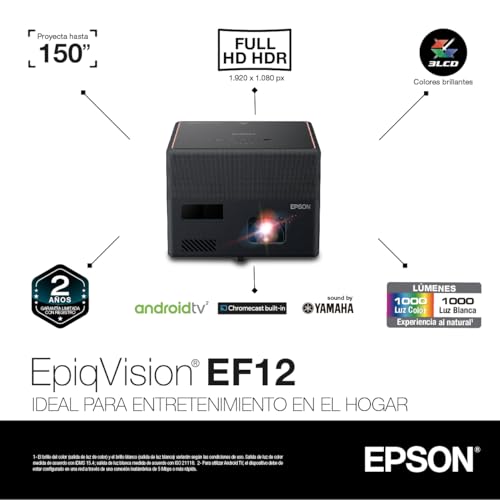
Stylish, compact modern design Stunning Full HD HDR visuals Yamaha-tuned built-in speaker Android TV with voice remote
No lens protection included
The first thing you notice about the Epson EpiqVision Mini EF12 is its design. Sleek and compact, it blends into your décor instead of standing out as bulky tech equipment. But once it powers on, the EF12 quickly proves it’s built for far more than looks. With Epson’s MicroLaser Array technology and advanced scene-based color correction, it produces bright, richly detailed Full HD HDR visuals—up to 150 inches in size. Whether you’re streaming movies, gaming, or watching sports, the picture feels natural, vibrant, and immersive.
Audio is another highlight. The projector features a Yamaha-designed speaker system that delivers room-filling sound with clarity and depth, rivaling many standalone soundbars. You can even use it as a Bluetooth speaker when you don’t need the visuals. Streaming is simple thanks to built-in Android TV and a voice-enabled remote, giving you direct access to apps like Hulu, HBO, YouTube, and more.
Nevertheless, it doesn't come with a lens cover, which means you’ll want to be a bit careful when transporting or storing it. Still, given its compact form, this projector feels more at home on a shelf or table than in constant travel.
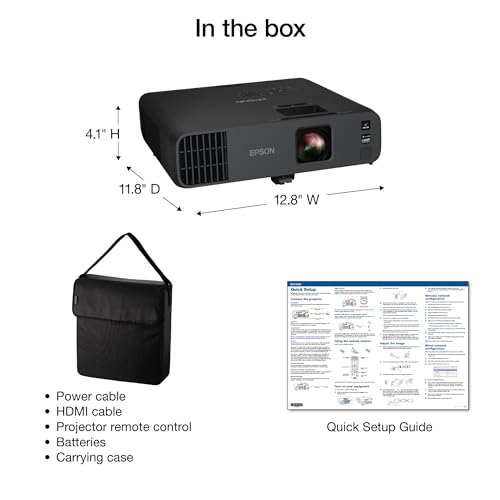
Exceptional 4,600-lumen brightness Long-lasting 20,000-hour laser light Large 300" Full HD display Strong connectivity with Miracast/HDMI
Louder fan at the brightest setting
The strength of the Epson Pro EX11000 shows the moment it powers on. With 4,600 lumens of color and white brightness, presentations, video conferences, and even detailed spreadsheets remain sharp and easy to follow, no matter the lighting conditions. It projects images up to 300 inches, creating an immersive experience where you can display both participants and content side by side without losing clarity.
The laser light source can last up to 20,000 hours without the need for bulb replacements, which is ideal for offices or institutions that want minimal maintenance. Epson’s 3LCD technology ensures vivid, accurate colors with none of the distracting rainbow effects seen in some projectors. Connectivity is equally strong, offering Miracast screen mirroring, dual HDMI ports, and USB power for streaming devices like Roku, Fire TV, or Apple TV.
A built-in 16W speaker provides clear sound for most rooms, and features like optical zoom, auto vertical correction, and a skew sensor make setup quick and stress-free. Although on the brightest setting, the projector’s fan can get a bit loud, this is only noticeable in quieter environments and is easily offset by the benefits of its powerful brightness. For professional presentations that demand both scale and precision, the EX11000 makes a commanding choice.

Ultra short throw, space-saving design Crisp 4K PRO-UHD resolution Bright and colorful 3LCD display Easy setup with mobile app
Menus can feel a bit slow sometimes
The appeal of the Epson EpiqVision Ultra LS650 lies in its ability to create a cinematic experience right at home without complicated installation. Unlike traditional projectors, its ultra-short throw design lets you place it close to the wall and still enjoy an image up to 120 inches. This makes it a perfect fit for living rooms, where space and convenience matter most.
The picture quality is where it shines. 4K PRO-UHD resolution paired with Epson’s 3LCD technology ensures crisp detail and vibrant colors, even in well-lit environments. Whether it’s family movie night, streaming a new series, or gaming, the visuals feel sharp and immersive. Setup is also simplified thanks to the Epson Setting Assistant app, which helps you align and optimize the image in minutes.
The LS650 includes built-in smart streaming, so you can access your favorite apps and channels without extra devices. While the menus can sometimes feel a bit slow when navigating between options, it’s a minor pause in an otherwise seamless experience. For those who want the big-screen magic of a projector with the practicality of a TV replacement, the LS650 strikes an excellent balance.

4,000 lumens for bright environments WiFi screen mirroring with Miracast Dual HDMI ports for streaming devices Built-in 16W speaker
Can get warm during longer sessions
The Epson Pro EX9240 is one of the best Epson WiFi projectors for professionals who need reliable wireless performance without sacrificing image quality. Its 4,000 lumens of color and white brightness make it suitable for large rooms where lighting can’t always be controlled. The 1080p Full HD resolution ensures slides, spreadsheets, and videos look sharp and professional.
The real highlight is its wireless connectivity. With built-in Miracast, you can quickly mirror your laptop or mobile device, while the dual HDMI ports allow for easy use of streaming sticks like Roku, Apple TV, or Fire TV. This makes the EX9240 highly versatile, whether you’re in a boardroom or turning a wall into a big screen at home.
Audio comes through a built-in 16W speaker, which is more powerful than most projectors in its class. Setup is also user-friendly with features like 1–1.6x optical zoom, auto vertical correction, and a skew sensor that keeps your image square and professional. While it does tend to get a bit warm during extended use, overall performance is solid and reliable.
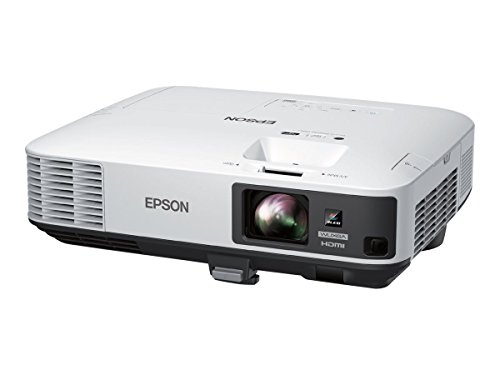
Brilliant 5,000-lumen brightness Sharp WUXGA resolution with Full HD support 3LCD technology Split-screen and versatile connectivity options
Higher upfront cost
The Epson PowerLite 2250U is engineered for serious business and education environments where clarity and brightness matter most. With 5,000 lumens of both color and white brightness, it projects vibrant images that remain sharp even under fluorescent lights or in large spaces. The WUXGA resolution (1920 x 1200) ensures presentations, text, and data-rich content look professional and easy to read.
Epson’s 3LCD technology gives the 2250U a clear edge over single-chip DLP competitors, eliminating distracting rainbow effects and delivering a wide color gamut for vivid accuracy. For those managing multiple projectors, it also comes with remote management and monitoring software, including Crestron RoomView compatibility, a valuable tool for IT and AV departments.
Flexibility is another strong point: with options like split-screen projection, extensive connectivity (HDMI, MHL, VGA, RJ-45), and even optional wireless networking with enterprise-level security protocols, this projector can adapt to nearly any professional setup. The lamp has a life of up to 10,000 hours in ECO mode, which helps offset running costs, though the upfront price tag is on the higher side. Still, for organizations that demand top-tier performance, the investment is justified.

4,000 lumens for bright rooms Accurate colors with 3LCD tech HDMI for easy device connection Built-in speaker included
Setup can be a bit tricky
For offices and classrooms where clarity matters, the Epson Pro EX7280 delivers dependable performance. Its 4,000 lumens of brightness ensure presentations, videos, and spreadsheets remain sharp and visible even with lights on, so there’s no need to dim the entire room. The WXGA resolution may not match 4K models, but it’s more than crisp enough for professional-quality slides and everyday content.
Epson’s 3LCD technology is another benefit, guaranteeing accurate colors without the rainbow effects often found in single-chip projectors. Connectivity is straightforward with HDMI support, making it easy to plug in streaming devices or laptops. The built-in speaker also means you’re ready for both video and audio without needing extra gear.
Setup can take some patience. While features like optical zoom, horizontal slider, and auto vertical correction are included to help, first-time users may find alignment tricky. However, once it’s dialed in, the EX7280 produces excellent results with a dynamic contrast ratio of up to 16,000:1 for rich detail in both text and visuals.
How Can You Choose The best epson wifi projector Among Numerous Products From Different Brands?
It can take you much time to research the outcome of best epson wifi projector. It doesn't mean you can’t get the best one for yourself. We are the experts specializing in studying market and products. We will help you with your best epson wifi projector issues, no matter what time it is!
Please have a closer look at the things below to evaluate and then choose the right best epson wifi projector for your need:
Brightness
The ambient lighting level, size and material of your projector screen will all affect the brightness. You should buy a professional seller if you are installing a projector in a permanent location, such as at your home, to ensure that you get the best image brightness and the correct screen material.
Projection Tech
DLP projectors with single-chip DLP chips could be subject to the so-called "rainbow effect." Sometimes, tiny, bright flashes with rainbow-like colors may appear, especially in dark scenes. Some DLP projectors have a minimal effect, while others can produce a distracting result, especially when there are bright areas against shady backgrounds. The rainbow effect is not a problem with LCD projectors, which are safer if someone in your household has sensitive eyes. There are many DLP projectors that produce excellent images.
Contrast Ratio
Contrast ratings can only be used to measure in dark rooms. They don't give any information about ambient lighting. Unusually dark blacks in the projector will result in lower contrast. A brighter projector will perform well in home theaters, but not in living rooms or offices.
Light Source
For longer periods of time, LEDs and lasers retain a greater percentage of their original brightness. While all light sources eventually lose their brightness, lamps lose the most in 500 hours. Then, they slowly decline over time. The brightness of LEDs and lasers will decrease more slowly over the course of their lifetimes.
Resolution
The calculation for projectors that have 4K ultra high definition (3,840 x 2,160 pixels) is slightly different.
Connection Methods
Component video, composite video and S-Video all make up the most common connections on large projectors. We're also seeing more projectors that offer direct USB connection to computers via a USB cable. A growing variety of projectors now have USB Type-C ports. The majority of USB-C ports can be used to transfer data or video using the DisplayPort protocol. Most USB-C ports support USB Power Delivery (USB PD), which means that a plugged in projector can supply 100 watts of power to charge a device or to charge it using a USB-C cable (assuming the device is capable of charging over USB-C).
Portability
FAQs
What is the advantage of a WiFi projector over a regular projector?
A WiFi projector eliminates the need for cables, allowing you to connect wirelessly from laptops, smartphones, or tablets. This makes setup easier and gives you more flexibility in where you place the projector.
Can Epson WiFi projectors stream movies directly from my phone?
Yes, many Epson WiFi projectors support Miracast or wireless screen mirroring, letting you stream content directly from your smartphone or tablet without extra devices.
Are Epson WiFi projectors good for home theater use?
Absolutely. Models with Full HD or 4K enhancement, high brightness, and good contrast ratios deliver an excellent home cinema experience, even in well-lit rooms.
About Michael Brown