The 7 Best Dell 4k Ultrasharp 27 Inch Monitor For 2026
 By, Michael Brown
Updated
Summary
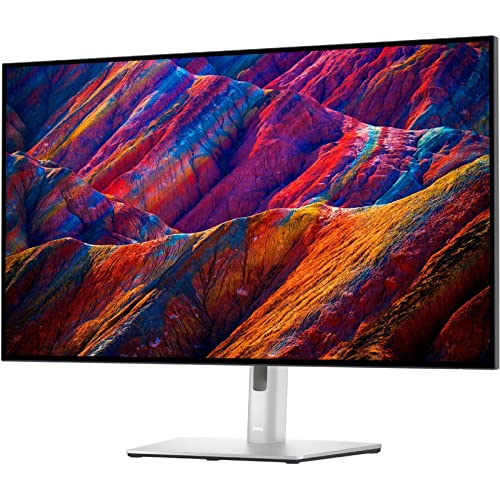
Dell UltraSharp U3223QE 31.5" 4K Monitor

Dell UltraSharp U2723QE 27" 4K Monitor

Dell UltraSharp U2725QE 27 Inch 4K Monitor
For many professionals, Dell's UltraSharp series has become the default benchmark for what a productivity monitor should be. Sharp 4K resolution, accurate colors, thoughtful ergonomics, and reliable build quality have made UltraSharp displays a staple in offices, studios, and home workspaces for years. And among all the available sizes, 27 inches is often considered the sweet spot—large enough for multitasking, yet compact enough to fit comfortably on most desks.
The reality, however, is that many shoppers who start looking for a 27-inch UltraSharp monitor quickly discover that Dell offers compelling alternatives in larger sizes as well. Some users prefer the extra workspace of a 31.5-inch display for spreadsheets, design work, or video editing. Others find that ultra-large options around 40 inches can replace dual-monitor setups entirely, creating a cleaner and more immersive workspace.
That raises an interesting question: is the best Dell 4K UltraSharp monitor necessarily 27 inches, or is it simply the one that best fits your workflow? To answer that, we've taken a broader approach. While 27-inch models remain a major focus of this guide, we've also included standout 31.5-inch and 40-inch UltraSharp displays that deserve consideration. After all, when you're investing in a premium monitor you'll likely use every day for years, choosing the right size can be just as important as choosing the right specifications.
Our Top Picks


32-inch 4K UHD display 400-nit brightness 5ms GTG response time VESA mount compatibility
Large footprint requires significant desk space
There’s a certain point where extra pixels stop being about sharpness and start becoming about breathing room. With a 32-inch 4K UHD panel packing more than 8 million pixels, the U3223QE makes multitasking feel less crowded and more effortless. Multiple windows can remain open side by side without constantly resizing or switching tabs.
Brightness is another area where the monitor remains comfortable to use throughout the day. The 400-nit panel keeps content looking crisp, whether you're reviewing reports, watching videos, or working through large datasets. Combined with the 16:9 layout, the display feels equally at home in office environments and home workstations.
Flexibility also plays a major role here. HDMI connectivity makes it easy to switch between laptops, desktops, media devices, and gaming consoles, while VESA mount compatibility opens the door to wall mounting or monitor arms for a cleaner setup. The trade-off for all that screen real estate is fairly predictable. A monitor this size tends to dominate smaller desks, so giving it enough space to sit comfortably becomes part of the planning process.

90W USB-C power delivery RJ-45 Ethernet port Anti-glare coating Extensive port selection
Built-in speakers are not included
Laptop users know the routine: connect a charger, plug in a hub, attach Ethernet, then connect the monitor. The U2723QE simplifies much of that process with an extensive collection of ports that can support an entire workstation through a single display. USB-C with up to 90W power delivery, multiple USB ports, DisplayPort connectivity, and RJ-45 networking help transform the monitor into a full desktop hub.
Beyond connectivity, the display itself remains highly practical. The 4K resolution delivers excellent clarity across documents, spreadsheets, and web content, while the anti-glare coating helps maintain visibility under brighter office lighting. The 400-nit brightness level also keeps text and visuals looking clear throughout the day.
Another advantage is how adaptable the monitor becomes in multi-device environments. Whether connecting a work laptop, desktop PC, or additional peripherals, the available ports reduce the need for extra adapters and accessories scattered across the desk. It's a setup that feels remarkably tidy once everything is connected.
Most professionals already use headsets, dedicated speakers, or conference equipment, which is fortunate because Dell chose not to include built-in speakers here. The focus remains firmly on productivity and connectivity.

Factory-calibrated IPS Black panel 99% DCI-P3 coverage 120Hz refresh rate Thunderbolt 4 connectivity 140W power delivery
More expensive than most 27-inch 4K monitors
Not every 4K monitor is designed with color accuracy as a priority. The U2725QE approaches things differently with a factory-calibrated IPS Black panel and 99% DCI-P3 coverage calibrated to Delta E below 1.5. For photographers, designers, and content creators, that translates into a display that arrives ready for serious work rather than requiring extensive tweaking from day one.
This monitor also feels unusually modern in day-to-day use. A 120Hz refresh rate keeps movement fluid while reducing blur during fast-paced workflows, whether that means scrolling through large documents, moving between creative applications, or juggling multiple windows at once. It's one of those upgrades that becomes surprisingly difficult to give up once you've experienced it.
Connectivity is another highlight. Thunderbolt 4 handles video, data, and up to 140W of power delivery through a single cable while supporting daisy chaining for additional 4K monitors. Dell complements that with HDMI 2.1, USB-C, USB-A, Ethernet, and full ergonomic adjustments that make the display easy to tailor to different workspaces.
The premium feature set naturally places the U2725QE above many competing 27-inch 4K monitors in terms of cost. For users who can actually take advantage of its color accuracy, Thunderbolt integration, and workflow-focused features, the value proposition becomes much easier to appreciate over time.

95% DCI-P3 coverage 99% sRGB coverage 99% Rec.709 coverage 1.07 billion colors
Contrast ratio is average compared to modern IPS Black panels
The strength of the U2720Q isn't just its 4K resolution, it's the amount of color information packed into every image. With 95% DCI-P3 coverage, 99% sRGB, and 99% Rec.709 support, the monitor is clearly aimed at creators who want confidence in what they're seeing on screen. Photos, videos, and digital artwork benefit from a wider range of tones and more natural-looking color transitions.
Dell also puts considerable emphasis on color depth. The panel supports 1.07 billion colors, helping gradients appear smoother and reducing the banding that can become distracting in creative work. Combined with VESA DisplayHDR 400 support, brighter highlights and darker shadow details gain additional definition.
Detail is another area where the monitor shines. The 4K UHD resolution and 163ppi pixel density provide an exceptionally crisp image, making it easier to evaluate fine textures, retouch photographs, and review high-resolution content without constantly zooming in.
Newer IPS Black panels have raised expectations for contrast performance in recent years. While the U2720Q continues to deliver excellent color reproduction, buyers comparing it directly against Dell's latest UltraSharp models may notice the difference in deeper blacks and overall contrast handling.

32-inch 4K UHD display Integrated Thunderbolt hub Expansive screen real estate Slim bezel design
Focuses on productivity features rather than gaming enhancements
Open a spreadsheet, a video call, a browser, and a few documents at the same time, and the benefit of a 32-inch display becomes obvious. The U3225QE creates an expansive workspace that makes multitasking feel less restrictive, reducing the need to constantly switch between applications throughout the day.
The visual experience also stays comfortably refined. Dell pairs the large screen with a 4K UHD resolution that keeps text crisp and images detailed, making everything from presentations to creative projects easier to review. Long work sessions feel less taxing when there’s enough room to see more content at once.
Connectivity plays a major role as well. The integrated Thunderbolt hub helps consolidate peripherals and accessories into a more streamlined setup, allowing the monitor to function as the centerpiece of a modern workstation. Combined with the slim-bezel design and premium finish, the display looks every bit as professional as it performs.
Competitive gamers will likely find themselves looking elsewhere for specialized gaming features and high-end gaming enhancements. Dell clearly designed this monitor with productivity, multitasking, and professional workflows at the forefront.

100% Adobe RGB 98% DCI-P3 coverage Factory calibrated Uniformity Compensation
Low Brightness
Color-critical work leaves very little room for compromise. Dell addresses that challenge with factory calibration and support for 100% Adobe RGB, 80% BT.2020, and 98% DCI-P3 coverage. For photographers, designers, and video professionals, that means greater confidence that what appears on screen closely reflects the intended result.
The attention to detail extends beyond color coverage. Uniformity Compensation helps maintain consistent brightness across the panel, while the included magnetic hood minimizes ambient light interference. Together, those features create a more controlled viewing environment where subtle adjustments become easier to judge.
Dell also simplifies workspace management through Thunderbolt 3 connectivity. A single cable can transfer video and data while supplying up to 90W of charging power, helping reduce desk clutter without sacrificing functionality. The 4K resolution and 163ppi pixel density further support detailed editing work where precision matters.
This monitor prioritizes color fidelity above almost everything else. Users working in bright environments may wish for additional brightness, but in properly controlled editing spaces, the strengths of the display become much more apparent.

39.7-inch display 600-nit brightness USB Type-C connectivity 5ms response time
The rear-facing ports can be a bit difficult to access
A display approaching 40 inches changes how a workspace functions. Instead of arranging windows around limited screen space, the U4025QW gives applications room to coexist naturally. Dashboards, spreadsheets, communication tools, and creative projects can remain visible simultaneously without feeling squeezed together.
Moreover, this monitor delivers enough brightness to stay comfortable in well-lit environments. With 600 nits available, content remains easy to see throughout the day, whether the task involves productivity work, video playback, or reviewing detailed documents. Dell complements that with a fast 5ms response time that keeps motion looking controlled during entertainment and general use.
Connectivity remains a key part of the experience. USB Type-C helps transfer data efficiently while supporting a cleaner desk setup, allowing the monitor to serve as a central connection point for modern laptops and accessories. For professionals managing multiple devices, that convenience becomes part of the appeal.
The sheer size of the monitor means most interactions happen from the front, which makes the rear-facing ports a little less convenient to reach when frequently swapping devices. Fortunately, that's something most users deal with only occasionally once the setup is in place.
What to Look For in a best dell 4k ultrasharp 27 inch monitor?
A range of elements, including those listed below, influence the best dell 4k ultrasharp 27 inch monitor. The study process varies depending on the material. We'll be able to assist you and provide solutions since we're here to help you.
Please keep in mind the following points before selecting best dell 4k ultrasharp 27 inch monitor:
Panel Type
Screen Size
Response Time
Brightness
Aspect Ratio
Resolution
Connections
Refresh Rate
FAQs
Why is a 27-inch Dell UltraSharp monitor so popular?
A 27-inch screen offers an excellent balance of workspace, sharpness, and desk-friendly size, making it ideal for professional and everyday use.
Are Dell UltraSharp monitors good for creative professionals?
Yes, many UltraSharp models feature excellent color accuracy and wide color gamut coverage, making them suitable for photo editing, video production, and design work.
Is 4K resolution worth it on a 27-inch monitor?
Yes, 4K provides crisp text, detailed images, and extra screen space, which can significantly improve productivity and visual quality.
When updated data are available, our system and editor will update a list of best dell 4k ultrasharp 27 inch monitor. Please periodically review our website for the newest data.
We can help you with more than just finding best dell 4k ultrasharp 27 inch monitor. Please do not hesitate to contact us when you need assistance.
About Michael Brown