The 7 Best 7 Inch Tablet For 2026
 By, Michael Brown
Updated

Summary

Apple iPad mini A17 Pro 8.3-inch

Lenovo Tab One 8.7"
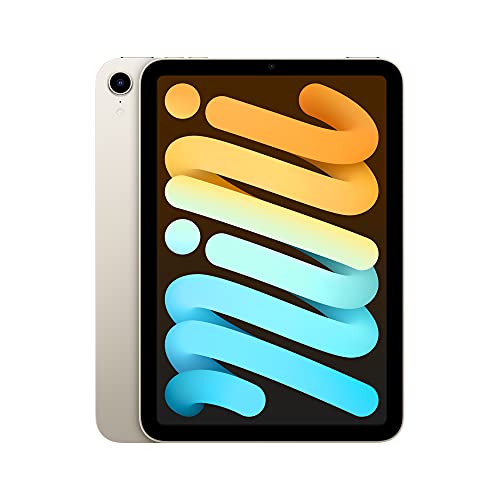
Apple iPad mini 6th Generation 8.3-inch
There was a time when 7-inch tablets were everywhere. They were small enough to fit into a jacket pocket, comfortable to hold with one hand, and perfect for reading, browsing, and watching videos on the go. Today, however, that category has largely disappeared. Most manufacturers have shifted toward slightly larger displays, with 8-inch to 8.7-inch tablets becoming the new standard for compact devices.
The good news is that the extra inch makes very little difference in portability while providing noticeably more usable screen space. Modern 8-inch tablets remain easy to carry and hold for extended periods, but they offer a more comfortable experience for reading ebooks, streaming movies, gaming, and everyday browsing than the older 7-inch models ever did.
Among today's compact tablets, the Apple iPad mini A17 Pro 8.3-inch is one of the strongest options available. It delivers the portability people expect from a small tablet while offering flagship-level performance, a premium display, and enough power to handle everything from casual entertainment to creative work.
Since true 7-inch tablets have become increasingly rare, this guide focuses on the closest and most practical alternatives currently available. We've included the best tablets in the 8- to 8.7-inch range that capture the same compact feel while delivering a much better overall experience than most aging 7-inch devices.
Our Top Picks


A17 Pro chip 8.3-inch Liquid Retina display Apple Pencil Pro support Wi-Fi 6E connectivity
No expandable storage via microSD card
There are moments when a full-size tablet simply feels like too much. Holding the iPad mini in one hand while reading documents, sketching ideas, or replying to emails feels surprisingly natural, yet it never gives the impression that you're sacrificing capability for portability.
Performance is where this model really earns its name. Powered by the A17 Pro chip, it handles demanding creative apps, multitasking, and graphics-intensive projects with ease. Apple Intelligence expands that experience further by helping with writing, productivity, and everyday tasks, while privacy remains a major focus throughout the system.
The 8.3-inch Liquid Retina display is equally impressive. P3 wide color, True Tone, and ultralow reflectivity combine to produce an image that's vibrant without looking exaggerated. Pair it with the Apple Pencil Pro, and the tablet becomes an excellent companion for handwritten notes, document markup, or quick photo edits. USB-C and Wi-Fi 6E help everything move along quickly when it's time to transfer files or stay connected.
Users who rely on expandable storage won't find a microSD slot here. Choosing the right storage capacity from the beginning becomes more important than it does on many Android tablets.

Up to 12.5-hour battery 480-nit HD display Dual Dolby Atmos speakers MediaTek Helio G85
Cameras are basic for photography or video creation
Waiting at an airport, sitting through a long commute, or relaxing in a café becomes a little more enjoyable with a device that's easy to carry everywhere. Weighing less than a pound, the Lenovo Tab One slips comfortably into a small bag while its 8.7-inch display remains large enough for videos, reading, or casual gaming.
Battery life plays a huge role in that portable experience. Lenovo rates it for all-day use with up to 12.5 hours of YouTube playback, and faster 15W charging helps reduce the amount of time spent searching for a power outlet. It's the kind of tablet that's happy spending an entire day away from home.
Entertainment receives plenty of attention too. The HD display reaches 480 nits of brightness, while dual Dolby Atmos speakers create a much fuller sound than you might expect from a compact tablet. The MediaTek Helio G85 processor keeps navigation responsive, supporting fluid browsing, gaming, and media playback on the 60Hz display.
Photography isn't really the Lenovo Tab One's strongest suit. The cameras work well enough for video calls and quick snapshots, though people expecting detailed photos or content creation tools may want something more capable.

A15 Bionic chip 8.3-inch Liquid Retina display USB-C connectivity Apple Pencil support
Face ID isn't available
There's something refreshing about a tablet that never feels bulky. Whether you're reading on the sofa, catching up on emails during a commute, or jotting down ideas between meetings, the compact design makes the iPad mini easy to pick up without thinking twice.
Inside, the A15 Bionic chip delivers the kind of performance that keeps everything moving effortlessly. Switching between apps, editing photos, or sketching notes with Apple Pencil feels quick and fluid, while the all-day battery means the tablet rarely asks for a charger halfway through your routine. Storage options up to 256GB leave plenty of room for apps, media, and projects.
The 8.3-inch Liquid Retina display remains one of its biggest strengths. Text looks crisp, colors appear rich, and USB-C connectivity makes transferring files much easier than older Lightning-based models. Fast Wi-Fi keeps downloads and cloud-based work moving smoothly wherever you happen to be. Add the optional Smart Folio, and the tablet becomes an even more capable companion for work or travel.
Face ID isn't available on this generation, so unlocking relies on other authentication methods. For most daily tasks, it becomes something you stop thinking about after a few days of use.

Up to 1TB expandable storage Split Screen multitasking 64GB built-in storage Sunlight visibility
4GB RAM can affect multitasking with multiple apps open
Weekend afternoons tend to disappear quickly once a good series starts playing. The Galaxy Tab A9 makes those moments enjoyable with a bright display and a 60Hz refresh rate that keeps scrolling, videos, and everyday navigation looking fluid. Even outdoor viewing is easier thanks to the screen's ability to stay bright under sunlight.
Storage flexibility is another welcome advantage. Built-in storage handles everyday files comfortably, and adding a microSD card expands capacity up to 1TB for anyone with large photo libraries, downloaded movies, or offline content. That means less time deleting files just to make room for new ones.
The tablet proves surprisingly useful once work enters the picture too. Split Screen allows two apps to remain open simultaneously, making it easier to take notes during a video call, compare documents, or browse while messaging. Those small conveniences quickly become part of the daily workflow.
Running several demanding apps at the same time can eventually expose the limits of the 4GB memory configuration. For streaming, web browsing, and general multitasking, the experience remains comfortably smooth.

Up to 13-hour battery Expandable storage up to 1TB Alexa integration Built-in AI tools
A bit slow charging
Morning cartoons, afternoon reading, evening movies—this is the kind of tablet that quietly adapts to whatever the day brings. Its thin and lightweight body makes it comfortable for younger users and adults alike, while the 8-inch HD display handles entertainment without adding unnecessary bulk.
Amazon improved responsiveness by increasing the RAM compared to the previous generation, helping apps launch more smoothly throughout the day. Up to 13 hours of battery life keeps the tablet going through travel, school breaks, or long weekends, and expandable storage up to 1TB leaves plenty of space for downloaded content.
The software adds a few thoughtful extras beyond entertainment. Built-in tools help summarize webpages, polish emails, and create wallpapers, while Alexa remains available for reminders, music, weather updates, smart home controls, and video calls through supported apps like Zoom. It's a practical mix of productivity and convenience without becoming overly complicated.
Charging takes more patience than the rest of the experience. Fortunately, the battery lasts long enough that reaching for the charger isn't something you'll need to do very often.

MediaTek Helio G99 Expandable microSD storage 6,650mAh battery USB-C connectivity
Software update support may be shorter than Apple or Samsung devices
A smaller tablet has a habit of fitting into places where larger models stay behind. The Redmi Pad SE 8.7 slips comfortably into a handbag or backpack, making it easy to pull out for a quick video, reading session, or catching up on messages while you're away from home.
The MediaTek Helio G99 processor gives the tablet a welcome boost for everyday performance. Paired with 4GB of RAM and expandable storage, it handles common apps, media playback, and light gaming with enough consistency to keep the experience enjoyable. Android 14 with Xiaomi HyperOS provides a familiar interface that remains easy to navigate.
Its hardware covers the basics without overlooking modern conveniences. An 8.7-inch HD display, USB-C connectivity, Bluetooth 5.3, a headphone jack, and expandable microSD storage make it flexible enough for both media consumption and casual productivity. The generous 6,650mAh battery adds another layer of reassurance for longer days away from home.
Software support may not extend as long as what Apple or Samsung typically provide with their tablets. Buyers planning to keep the device for many years may want to factor that into their decision.

90Hz refresh rate Bright display Outdoor visibility Premium-inspired design
Display quality is adequate but not ideal for detailed creative work
The Galaxy Tab A11 immediately gives off a more refined impression than many entry-level tablets. Inspired by Samsung's Galaxy S series, its streamlined body and minimalist finish make it look equally comfortable on a coffee table, in a classroom, or tucked inside a work bag.
Entertainment is clearly where this tablet shines. The bright display stays visible even outdoors, while the 90Hz refresh rate keeps scrolling, videos, and games looking noticeably more fluid than traditional 60Hz panels. That extra smoothness is one of those upgrades people tend to appreciate more after using it for a few days.
Video calls receive attention as well. Samsung highlights clearer face-to-face conversations, making the tablet a comfortable choice for checking in with family, joining online classes, or attending virtual meetings without needing another device nearby.
However, designers and artists working with detailed illustrations or photo editing may find themselves wanting a sharper, more color-accurate display over time. For movies, games, social media, and everyday communication, the screen delivers exactly what most people will expect.
What to Look For in a best 7 inch tablet?
Buyers are frequently hesitant to purchase best 7 inch tablet. Certain factors should be considered while making a significant purchase. Our understanding and expertise with best 7 inch tablet will assist you in making the right decisions.
Please take the following points into consideration before selecting best 7 inch tablet:
Hardware Connections
Software
Screen & Audio
Online Access
Battery
Cameras
Storage
FAQs
Are 7-inch tablets still available?
True 7-inch tablets are becoming rare, with most manufacturers now offering compact models in the 8- to 8.7-inch range instead.
Is an 8-inch tablet a good replacement for a 7-inch tablet?
Yes. An 8-inch tablet is only slightly larger but provides more screen space while remaining easy to carry and use with one hand.
What are 7-inch tablets best used for?
Compact tablets are great for reading, web browsing, streaming videos, gaming, and travel thanks to their lightweight and portable design.
We constantly update the list of best 7 inch tablet as new data becomes available. For the most up-to-date information, please visit our website regularly.
Please feel free to contact us if you have any queries or concerns with best 7 inch tablet. If you ask, we'll do our hardest to help you in any way we can!
About Michael Brown