The Best Small Tablet For Reading Of 2026
 By, Michael Brown
Updated
Summary

Apple iPad mini A17 Pro 8.3-inch
Samsung Galaxy Tab A7 Lite 8.7" Tablet
Apple iPad mini 6th Generation 8.3-inch
A small tablet can be one of the most comfortable devices for digital reading. It gives you more screen space and flexibility than a phone without the extra weight of a full-size tablet, making it easy to hold while reading in bed, carry on a commute, or slip into a bag for travel. Unlike a traditional e-reader, it can also handle news apps, magazines, PDFs, web browsing, and other everyday tasks on the same device.
Screen size is only part of what makes a compact tablet good for reading. Weight matters when you're holding it for a long novel, while display sharpness can make smaller text easier on the eyes. Battery life, brightness, storage, and access to your preferred reading apps can also make a noticeable difference over time.
The Apple iPad mini A17 Pro 8.3-inch brings together the qualities that make a small tablet enjoyable to read on. Its compact form factor is particularly well suited to reading, while the capable hardware and broad app ecosystem allow it to move easily between ebooks, articles, documents, entertainment, and more demanding tasks.
For readers, the sweet spot is a tablet that almost disappears in your hands. The options we've selected keep portability at the forefront while offering different strengths for books, comics, magazines, PDFs, and everyday browsing.
Our Top Picks


Excellent one-handed size Beautiful low-reflection display Fast A17 Pro performance Strong annotation tools
Premium price
Few tablets disappear into one hand as naturally as the iPad mini. Its 8.3-inch size feels closer to a paperback than a laptop screen, so settling into an ebook on the sofa or carrying a library in a small bag never feels cumbersome. The Liquid Retina panel adds P3 wide color, True Tone, and very low reflectivity, helping text and illustrated pages remain comfortable across changing light.
Behind the display, the A17 Pro chip keeps page turns, large documents, and app switching fluid. A starting capacity of 128GB leaves generous room for downloaded books, audiobooks, magazines, and other media, while Wi-Fi 6E makes cloud libraries and new downloads quick to reach. All-day battery life also means readers can move through work, travel, and an evening chapter without constantly checking the charger.
iPadOS expands the experience beyond consumption. Split views make it easy to keep reference material beside notes, and Apple Pencil support turns margins into a place for annotations or ideas. The 12MP rear camera can scan printed documents, while the Ultra Wide front camera with Center Stage handles calls when the book is closed.
The premium price is noticeable, especially for someone who mainly wants a simple ebook device. However, the refined display, powerful performance, and wider creative tools give that extra cost a purpose for readers who also annotate, study, or work on the same screen.

Lightweight metal construction Huge expandable storage Useful headphone jack Long-lasting battery
Not suitable for Heavy Gaming
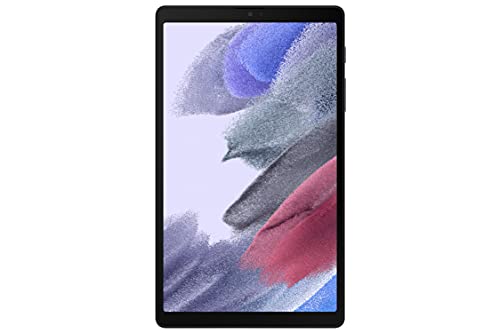
Samsung built the Galaxy Tab A7 Lite for days when a full-size device would simply stay at home. The slim metal body surrounds an 8.7-inch display that is easy to hold while moving through a novel, checking a recipe, or catching up on saved articles. Its sturdy frame also brings welcome reassurance when the tablet is shared with younger family members.
Storage begins at 32GB, but the microSD slot accepts cards up to 1TB. That flexibility is useful for keeping a large offline collection of ebooks, comics, videos, and music without depending on a connection. Long battery life supports extended sessions, and fast charging helps the tablet recover more quickly when power eventually runs low.
One UI connects neatly with other Galaxy devices. A video or piece of content can begin on a Samsung phone and continue on the tablet, while Samsung Kids provides a controlled area with age-appropriate learning and entertainment. Bluetooth 5.0 and a 3.5mm headphone jack give listeners both wireless and wired choices for audiobooks.
Heavy gaming is not where this compact model feels most at home. Its performance is better matched to reading, streaming, everyday apps, and lighter games, which keeps the experience aligned with its affordable and portable character.

Comfortable paperback-like size Rich Liquid Retina panel Responsive A15 Bionic chip Excellent app ecosystem
Apple Pencil costs extra
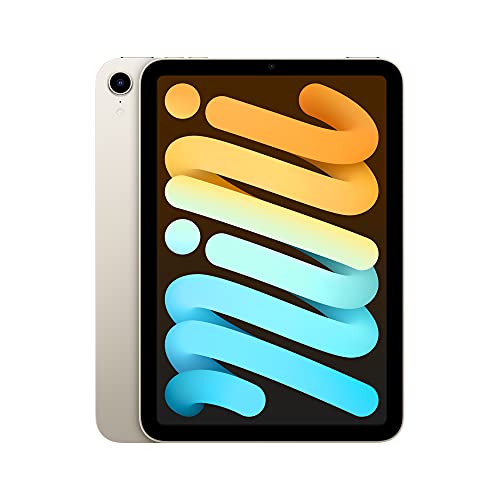
A long commute becomes easier when the device holding an entire bookshelf barely crowds the bag. The iPad mini 6 weighs little, feels balanced in one hand, and offers enough screen area for novels, news, PDFs, and colorful graphic pages. True Tone adapts the display to surrounding light, while P3 color and low reflectivity help everything look rich without making the panel feel harsh.
The A15 Bionic chip gives the small tablet far more energy than basic reading demands. Large files open quickly, scrolling stays smooth, and moving between a book, browser, and note app rarely interrupts the flow. Wi-Fi 6 keeps downloads and cloud syncing responsive, and all-day battery life supports long stretches away from an outlet.
Apple Pencil support is a meaningful addition for anyone who studies from PDFs or enjoys writing directly beside the text. iPadOS also handles multitasking, Scribble handwriting, and a broad App Store, so the same tablet can shift from quiet reading to research or creative work. Touch ID in the top button makes unlocking feel natural, while USB-C simplifies charging and accessories.
The Apple Pencil costs extra, so readers interested in annotation need to budget beyond the tablet itself. For those who plan to use it regularly, though, the stylus adds a tactile layer that ordinary highlighting cannot quite match.

Up to 13 hours Expandable 1TB storage Responsive hexa-core processor Useful Alexa integration
Lockscreen ads on this version
There is something appealing about a tablet that can be picked up without wondering whether every task deserves a premium device. The Fire HD 8 keeps the experience straightforward with a thin, durable frame and an 8-inch HD display. The compact proportions suit ebooks especially well, yet the screen still has room for magazines, web articles, and video.
A hexa-core processor and up to 4GB of RAM make this generation more responsive than its predecessor. The featured 64GB capacity can hold a useful offline collection, and microSD expansion up to 1TB opens far more room for downloaded books and media. Battery life reaches up to 13 hours across reading, browsing, video, games, and music, reducing the need to carry a charger through the day.
Amazon’s Appstore provides Kindle, entertainment, and social apps, while Alexa can set reminders, answer quick questions, play audio, or start video calls. Three integrated smart tools can also summarize webpages, polish emails, and create wallpapers, giving the inexpensive tablet a few helpful extras beyond entertainment.
This version shows sponsored images on the lock screen. They disappear once the device is unlocked, so the actual reading space stays clear, though buyers who prefer a completely neutral start screen may notice them between sessions.

Smooth 90Hz scrolling Large 2TB expansion Modern Android 15 Convenient headphone jack
Charger not included
Smooth scrolling can make a surprising difference when the evening involves long articles, webcomics, or document pages. The Galaxy Tab A11 refreshes its 8.7-inch display at 90Hz, helping motion feel more immediate than on a conventional 60Hz panel. Its 1340 x 800 resolution keeps the screen compact while leaving enough space for readable text and colorful content.
A MediaTek Helio G99 processor works alongside 4GB of RAM for everyday responsiveness. Internal storage is 64GB, but a microSD card can extend that capacity by as much as 2TB, making room for an unusually large offline collection. Android 15 and One UI 7 provide a current interface, with future updates mentioned on the product page.
The 5,100mAh battery supports portable use, and Bluetooth 5.3 covers wireless headphones for audiobooks. Readers who prefer a cable still get a 3.5mm stereo jack. Dual-band Wi-Fi handles online libraries and syncing, while the USB-C port provides a familiar charging connection.
A charger is not included in the box, so buyers need to use a compatible adapter they already own or purchase one separately. Once that small setup detail is handled, the compact design and fluid display become the more noticeable parts of daily use.

Convenient wireless charging Durable strengthened glass Up to 13 hours Expandable 1TB capacity
Google Play is not supported
Place the Fire HD 8 Plus on a compatible charging dock and it can quietly refill between chapters without another cable crossing the table. That convenience fits the tablet’s easygoing personality, especially for readers who keep it near a sofa or bedside. The slimmer, lighter body is protected by strengthened aluminosilicate glass, giving the portable design a reassuring sense of durability.
An enhanced hexa-core processor is rated up to 30% faster than the previous Fire HD 8 Plus, while 3GB of RAM helps app switching remain responsive. The 8-inch HD screen keeps books and articles comfortably close without the weight of a larger panel. Battery life reaches up to 13 hours, enough for a substantial reading stretch, several audiobooks, or a mixture of media throughout the day.
Storage starts at 32GB, with a 64GB option and microSD expansion up to 1TB. Netflix, Hulu, Facebook, Instagram, TikTok, and other services are available through Amazon’s Appstore, while Alexa supports video calls and everyday voice requests. Amazon Kids and optional Kids+ content also make the device adaptable for family use.
Google Play is not officially supported, so the available software selection centers on Amazon’s store. Readers already using Kindle and other Amazon services will feel at home, while those dependent on specific Google Play apps should check their availability first.

Folio case included Bright 480-nit display Lightweight compact body Long unplugged endurance
15W charging speed
Slip the Tab One into a purse or backpack and there is little need to rearrange everything around it. The tablet weighs less than a pound, and its 8.7-inch shape sits naturally between a phone and a full-size slate. That balance works well for ebooks, news, and illustrated content because the screen feels spacious without becoming awkward to hold.
Brightness reaches 480 nits, helping the HD panel remain clear across different indoor settings. Dual Dolby Atmos speakers add depth when switching from silent pages to an audiobook or video, while the MediaTek Helio G85 processor and 4GB of memory keep browsing and streaming responsive. The 60Hz refresh rate is a sensible match for its everyday focus.
Battery performance is another useful strength. Lenovo rates the tablet for up to 12.5 hours of unplugged YouTube streaming, suggesting plenty of endurance for less demanding text-based use. The included folio protects the body during travel and folds into a stand when readers want both hands free.
Charging tops out at 15W, so a full refill will take more patience than it would on a fast-charging premium tablet. The long operating time reduces how often that matters, making an overnight charge an easy routine for most readers.
What to Look For in a best small tablet for reading?
You may think purchasing seems simple, and it sometimes does the opposite! Studying the outcome of best small tablet for reading will take a considerable amount of time. Also, there are multiple sides of best small tablet for reading you need to check. That’s the reason why we’re all ready to assist you with best small tablet for reading issue.
You should pay more attention to the following criteria of best small tablet for reading in 2026:
Cameras
Storage
Software
Hardware Connections
Battery
Online Access
Screen & Audio
FAQs
What size tablet is best for reading?
Small tablets around 8 to 10 inches are excellent for reading because they are easy to hold while providing enough screen space for text.
Is a small tablet comfortable for reading ebooks?
Yes. A compact tablet is lightweight and easy to hold for longer periods, making it a convenient option for ebooks and digital content.
What display type is best for reading?
A sharp display with good brightness and viewing angles is important. IPS and OLED screens can both provide an enjoyable reading experience.
About Michael Brown