The Best Projector For Kids Of 2026
 By, Michael Brown
Updated
Summary

WiMiUS Smart Projector

XuanPad Mini Projector

YGSKK Mini Projector
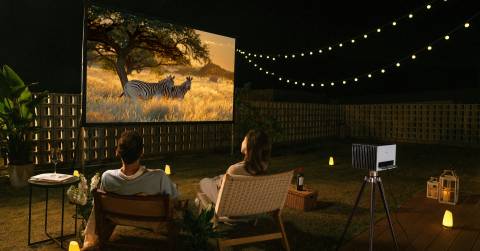
A projector can turn an ordinary bedroom or playroom into a much more exciting space for kids. Cartoons can fill an entire wall, family movie nights feel more like a trip to the cinema, and educational videos become easier to share with siblings or friends. Since there is no fixed screen size, a projector can also adapt as children grow and their interests change.
Choosing one for kids comes with a slightly different set of priorities than shopping for a serious home theater. Easy setup and simple controls are especially useful, while built-in streaming features or wireless connectivity can reduce the number of extra devices and cables involved. Brightness, image quality, portability, and the ability to adjust the picture easily are also worth considering when the projector may move between rooms.
The WiMiUS Smart Projector fits naturally into this kind of everyday family setup. Its smart functionality helps keep entertainment straightforward, making it convenient for quickly putting on a movie, show, or other content without turning the room into a complicated AV setup.
For younger viewers, convenience can ultimately matter just as much as impressive specifications. A projector that parents can set up quickly and kids can enjoy in different spaces often makes a better choice than a more elaborate model designed primarily for enthusiasts. Our selections reflect that balance, with options suited to movie nights, playrooms, casual entertainment, and shared family use.
Our Top Picks


Bright 600 ANSI picture Useful built-in apps Powerful Dolby speakers Generous port selection
Carrying case not included
Family movie night often loses momentum when everyone has to wait for cables, streaming sticks, and menus to cooperate. The WiMiUS P62 Pro keeps that preparation pleasantly short by placing Prime Video, YouTube, an app store, and a browser inside the projector. Regular OTA updates are intended to keep the system current, so finding a cartoon or a familiar film feels closer to using a smart TV.
Once the lights settle, the native 1080p picture has plenty to offer. Its 600 ANSI brightness can handle a slightly lit room in High mode, while HDR10 adds richer highlights and shadows. That extra visibility is useful when animated scenes are filled with small, colorful details. Although the projector accepts 4K content, it displays that material at its native 1080p resolution.
Sound is another part of the experience that feels ready for a group. Dual 10W speakers, Dolby Audio, and AI sound balancing give dialogue and music more weight without immediately requiring external speakers. Meanwhile, Wi-Fi 6, two HDMI ports, and two USB ports make it easy to add a console, laptop, hard drive, or TV stick when children want something beyond the built-in apps.
A carrying case is not included, so families planning frequent trips will need to provide their own protective bag. At home, it can simply remain in its usual viewing spot.

Lightweight travel design Flexible 360-degree stand Fast automatic focusing Built-in streaming access
Lower Brightness
Moving entertainment between a child's room, the living room, and a holiday rental sounds simple until the equipment becomes bulky. XuanPad avoids much of that friction with a 1.89-pound body that is roughly as compact as an iPad mini, plus a detachable stand that rotates through 360 degrees.
The stand gives families freedom to aim the image at a wall, screen, or ceiling without building a permanent setup. Better still, AI autofocus finds a clear picture in about three seconds, while one-touch 6D keystone correction straightens angled images. Digital zoom then adjusts the image from half to full size, which is handy when furniture leaves only one practical place for the projector.
Entertainment is similarly self-contained. Compatibility with Netflix and built-in access to YouTube and Prime Video reduce reliance on another streaming device, though HDMI and wireless screen mirroring remain available when needed. Native 1080p detail, support for 4K material, and projected sizes from 40 to 200 inches give animated films and family adventures a suitably cinematic scale.
Brightness is lower than that of larger home-theater models, so the picture is most enjoyable after curtains are closed or room lights are softened. That is a reasonable routine for evening movies and can also help younger viewers settle into a calmer viewing environment.

300 ANSI lumens Large adjustable picture Remote electric focusing Flexible rotating base
Bluetooth does not pair with phones
An inexpensive projector becomes much more inviting for children when they can use it without turning every viewing session into a technical project. YGSKK builds Prime Video, YouTube, and Hulu into the system, along with an app store for adding more entertainment. Parents can therefore start a shared movie or educational video without attaching a separate streaming stick.
The native 1080p image reaches up to 300 ANSI lumens and can expand from 50 to 200 inches. A smaller image works neatly in a bedroom, while the larger end can turn a blank wall into a playful screen for family films or console games. For 4K material, the source needs to connect through HDMI, and an HDMI cable is included.
Placement is unusually flexible for a budget model. Its base rotates 210 degrees, making wall and ceiling projection possible, while electric focus can sharpen the picture from the remote in around three seconds. Wi-Fi 6 supports phone mirroring, and the HDMI, USB, and audio interfaces accommodate devices ranging from laptops to a Switch or PS5. Built-in stereo speakers then keep the basic setup tidy.
Bluetooth is designed for speakers, headphones, and other audio devices rather than phone pairing. Smartphone owners can still share the screen through Wi-Fi, so the distinction mainly affects how wireless connections are handled.

Automatic picture alignment Simple Air Mouse control Native 1080p clarity Modern Android platform
Best picture requires updated firmware
Getting a clear picture should not be the longest part of movie night. Magcubic addresses that familiar scene with automatic focus and vertical keystone correction, allowing the picture to become clear and properly aligned without a long manual setup.
Native 1080p resolution gives cartoons, films, and family photos clean detail, while support for 4K sources adds flexibility. The 260 ANSI brightness and 10,000:1 contrast ratio are aimed at casual viewing, particularly kids' shows and movie sessions in controlled lighting. Magcubic recommends roughly four feet of distance for a 75-inch image, which provides a useful starting point in a smaller room.
The Android 14 system opens access to thousands of apps, so there is no immediate need for a TV stick. Navigation is handled by an Air Mouse remote that works as both a conventional controller and an on-screen pointer. Voice commands add another convenient route through menus, and Wi-Fi 6 supports stable wireless projection. Bluetooth 5.4 can send audio to wireless headphones or a larger speaker when quiet viewing or a stronger sound is preferred.
One minor downside is that this projector should be updated to the latest firmware for its best picture performance. That small setup task is worth completing before handing over routine operation to the family.
Family-friendly VIDAA system Bright colorful picture Strong 36W audio Useful rotating stand
IOS cannot mirror Netflix or Disney+
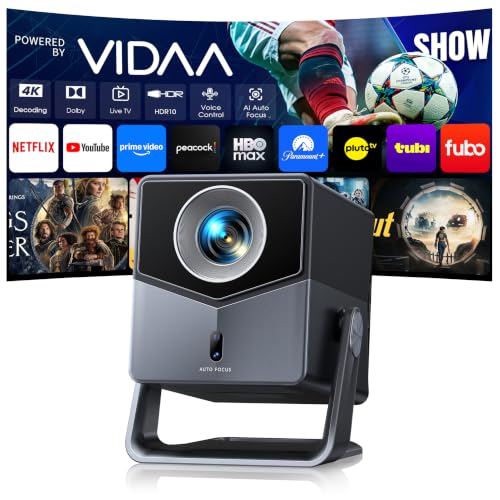
TOPTRO's A2 feels designed for the moment when a quick cartoon turns into a full family movie night. VIDAA works much like a smart TV, placing Netflix, YouTube, Prime Video, Disney+, Hulu, and live channels in one responsive interface. Multiple profiles help keep recommendations personal, while the included kids' content gives younger viewers a more age-appropriate place to explore.
The picture has enough strength to support that living-room role. Native 1080p resolution, 4K decoding, HDR10, 650 ISO ANSI brightness, and a 100% DCI-P3 color gamut work together to make animated colors lively and darker film scenes easier to follow. A 1.0:1 throw ratio produces a 100-inch image from about 2.2 meters away, and the 200-degree rotating stand can aim toward a wall or ceiling.
Audio is equally substantial. Two exposed 18W speakers deliver 36W of Dolby sound, giving music and dialogue more presence without another speaker system. Bluetooth 5.2, HDMI ARC, and CEC still leave room for headphones, game controllers, or a soundbar. Official AirPlay 2, Miracast, and Wi-Fi 6 also make sharing from family devices more convenient.
Due to DRM restrictions, iPhones and iPads cannot mirror Netflix or Disney+ directly. Those services remain available through the projector's own apps, which is the smoother way to watch them anyway.

Space-saving short throw Automatic image calibration Popular apps built in Helpful sleep timer
Requires a 65W+ power bank
A large blank wall can be surprisingly entertaining, especially when the projector does not need to sit halfway across the room. The HP MC425 uses a 0.8:1 short-throw ratio to create a 100-inch image from approximately 1.4 meters, making it practical for smaller bedrooms, playrooms, or compact family spaces.
Automatic focus and keystone correction handle the initial picture adjustment, so adults spend less time fine-tuning while children wait. Native 1080p resolution, 4K support, and 200 ISO lumens provide detailed viewing, with the best results coming when the room is reasonably dark. Built-in dual HiFi speakers cover everyday sound and keep the floor clear of extra equipment.
Android TV places Netflix, Prime Video, YouTube, Disney+, and Tubi directly on the projector. A sleep timer is a thoughtful addition for evening viewing, particularly when a film becomes part of a bedtime routine. Wi-Fi 6 supports stable streaming, while Bluetooth 5.4 can connect headphones, a soundbar, or external speakers.
The USB-C PD input also makes the projector useful away from an outlet, but a compatible power bank must provide at least 65W. Families planning outdoor use should check that rating before leaving home rather than assuming any portable battery will work.

Portable gimbal design Clear native 1080p Simple Roku interface Independent Dolby speakers
Roku account required for activation
Portability means more when the hardware is designed to move without creating a fresh cable puzzle. At 2.6 pounds, it remains easy to carry, while the smooth gimbal stand holds its angle without slowly sinking. Power enters through the bottom, so the cable stays out of the rotation path when the image is moved from a wall to the ceiling.
Native 1080p resolution makes text and animated details look cleaner than they do on a basic 720p model. Its 300 ANSI output is best suited to dim rooms or outdoor viewing after dark, and six picture modes provide quick choices for movies, sports, vivid content, or energy-saving use. TOF autofocus detects distance and restores sharpness as the projector is repositioned, while auto keystone helps straighten the image.
The independent audio base houses two 5W speakers and creates more room for sound than a tiny projector shell normally allows. Dolby Audio helps dialogue come through clearly, and HDMI, USB, Audio Out, USB-C, Wi-Fi, and Bluetooth connections provide several ways to add other devices. Familiar Roku navigation, phone control, voice commands, AirPlay, and Android support keep content selection approachable.
Nevertheless, a free Roku account is required during activation. Once that initial sign-in is completed by an adult, the simple home screen makes everyday navigation much easier for the household.
What to Look For in a best projector for kids?
Brightness
The ambient lighting level, size and material of your projector screen will all affect the brightness. You should buy a professional seller if you are installing a projector in a permanent location, such as at your home, to ensure that you get the best image brightness and the correct screen material.
Resolution
The calculation for projectors that have 4K ultra high definition (3,840 x 2,160 pixels) is slightly different.
Portability
Connection Methods
Component video, composite video and S-Video all make up the most common connections on large projectors. We're also seeing more projectors that offer direct USB connection to computers via a USB cable. A growing variety of projectors now have USB Type-C ports. The majority of USB-C ports can be used to transfer data or video using the DisplayPort protocol. Most USB-C ports support USB Power Delivery (USB PD), which means that a plugged in projector can supply 100 watts of power to charge a device or to charge it using a USB-C cable (assuming the device is capable of charging over USB-C).
Light Source
For longer periods of time, LEDs and lasers retain a greater percentage of their original brightness. While all light sources eventually lose their brightness, lamps lose the most in 500 hours. Then, they slowly decline over time. The brightness of LEDs and lasers will decrease more slowly over the course of their lifetimes.
Projection Tech
DLP projectors with single-chip DLP chips could be subject to the so-called "rainbow effect." Sometimes, tiny, bright flashes with rainbow-like colors may appear, especially in dark scenes. Some DLP projectors have a minimal effect, while others can produce a distracting result, especially when there are bright areas against shady backgrounds. The rainbow effect is not a problem with LCD projectors, which are safer if someone in your household has sensitive eyes. There are many DLP projectors that produce excellent images.
Contrast Ratio
Contrast ratings can only be used to measure in dark rooms. They don't give any information about ambient lighting. Unusually dark blacks in the projector will result in lower contrast. A brighter projector will perform well in home theaters, but not in living rooms or offices.
FAQs
What should I look for in a projector for kids?
Look for easy setup, simple controls, good image quality, portability, and reliable connectivity for streaming devices.
Are projectors safe for kids?
Projectors can be used safely when placed securely and when children avoid looking directly into the projector lens.
What brightness is best for a kids' projector?
Around 500 to 1,500 ANSI lumens is generally enough for a darker bedroom or playroom. Brighter rooms may require more.
Conclusion
It's challenging to determine the greatest product while deciding what to buy. We wanted to help you narrow things down by offering a list of best projector for kids above so you can make a better-educated decision before purchasing anything that might never work for you.
Would any of these ideas strike a chord with you? If that's the case, keep these in mind before making any purchases! You may also look into Aurzen Roku TV D1R Projector to find another option that is a good fit for you.
About Michael Brown