The 7 Best Large Screen Tablet For 2026
 By, Michael Brown
Updated
Summary

Apple iPad Pro 13-inch M5

Samsung Galaxy Tab S10 FE

Apple iPad Pro 13-Inch M4
Large-screen tablets occupy a unique space between traditional tablets and lightweight laptops. They offer enough display area for comfortable multitasking, creative work, and entertainment while remaining far more portable than carrying a notebook computer everywhere. For users who spend hours reading, drawing, editing documents, or watching videos, those extra inches quickly become more than just a luxury.
Of course, a larger display also changes what you expect from the device. A tablet in this category should have enough processing power to handle split-screen apps smoothly, speakers capable of filling a room, and a battery that can keep up with extended work or travel. Simply scaling up the screen is not enough if the overall experience feels compromised.
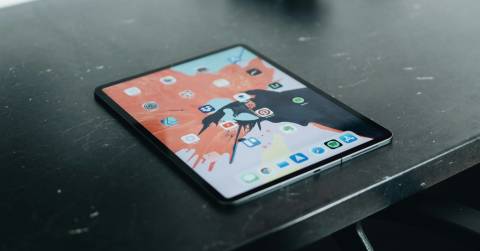
The Apple iPad Pro 13-inch M5 sets a high standard by pairing an expansive display with desktop-class performance. It is equally at home sketching with the Apple Pencil, editing high-resolution media, managing complex workflows, or serving as a premium entertainment device when the workday ends.
Choosing a large-screen tablet is ultimately about deciding how you want to use that extra space. Some models are designed to replace a laptop, others focus on creativity, and a few simply provide the best possible viewing experience. The options below showcase the standout devices across those different priorities, helping you find the one that fits your workflow rather than forcing you to adapt to it.
Our Top Picks


M5 Neural Accelerators Ultra Retina XDR Wi-Fi 7 Four-speaker audio
Apple Pencil and Magic Keyboard are sold separately
Opening a dense project on a 13-inch tablet is a very different experience from squeezing it onto a smaller screen. The Ultra Retina XDR display gives timelines, reference images, and full-page documents room to breathe, while extreme brightness, precise contrast, P3 color, True Tone, and ProMotion keep everything polished as you scroll or move between windows. It is the kind of canvas that can stay readable in a bright room, then become wonderfully dramatic when the lights go down.
The M5 chip does the quiet heavy lifting. Neural Accelerators support on-device AI tasks, and iPadOS 26 brings a more flexible windowing system that makes several active projects easier to arrange. Apple Intelligence adds help with writing and everyday organization, while the 512GB configuration leaves useful space for apps, media, and larger work files. Wi-Fi 7 through Apple N1 also suits a device built for moving substantial photos, documents, and video without turning every transfer into a waiting game.
Away from the desk, the landscape 12MP Center Stage camera sits naturally for calls, and the four microphones and four-speaker system give meetings and movies more presence than the slim body suggests. Face ID keeps sign-ins effortless. Apple Pencil and Magic Keyboard are sold separately, so completing the full workstation requires an additional purchase, but that also lets you build the setup around the way you actually work. Once configured, the broad display and responsive performance make the tablet disappear behind the task.
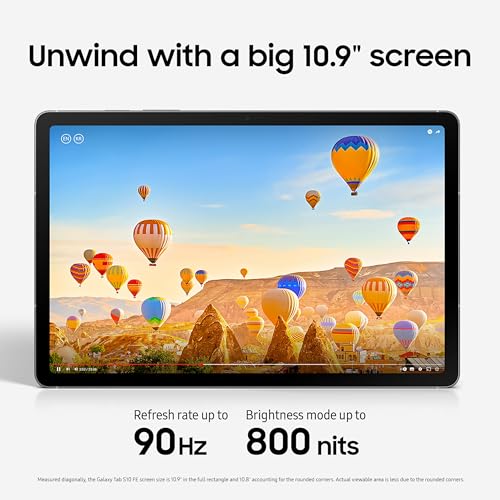
Bright 90Hz display Handwriting Assist Math Solver Included S Pen
Circle to Search requires an internet connection and compatible apps
There is a pleasant rhythm to using a roomy tablet for schoolwork: a lecture video can stay visible while handwritten notes occupy enough space to remain legible. The Galaxy Tab S10 FE supports that rhythm with a big, bright display and a 90Hz refresh rate, so scrolling through documents and moving around the interface looks smooth. When the books close, dual speakers add enough body to shows and games that headphones do not feel mandatory.
Samsung’s S Pen features are the more distinctive part of the experience. Handwriting Assist can straighten, align, and adjust spacing in untidy notes, turning a hurried page from class into something far easier to revisit later. Math Solver takes equations written with the S Pen and converts them into clean text, which is genuinely useful when assembling homework or revision material. Circle to Search with Google also lets you investigate something already on the screen without breaking concentration to type a separate query.
The IP68 construction adds welcome reassurance around backpacks, rainy walks, and the occasional drink beside the desk. Circle to Search requires an internet connection and compatible apps, so it is most useful when the tablet is connected rather than working fully offline. In day-to-day use, that condition is easy to understand, and the combination of handwriting tools, smooth motion, and a spacious display remains the reason this tablet fits so naturally into a student routine.

M4 graphics power Ultra Retina XDR Thunderbolt connectivity ProRes video support
Nano-texture display glass is available only with 1TB and 2TB configurations
Color work reveals the personality of this iPad almost immediately. The 13-inch Ultra Retina XDR display combines extreme brightness and contrast with P3 wide color, True Tone, and ProMotion, so detailed illustrations and video frames retain both nuance and fluidity. It is large enough to keep tools beside the canvas instead of constantly hiding them, yet the thin, light design never turns that extra room into a burden.
Underneath, the M4 chip brings up to a 10-core CPU and 10-core GPU, giving demanding creative apps the pace they need. iPadOS adds practical depth through Stage Manager, resizable overlapping apps, and external-display support. The USB-C connection supports Thunderbolt and USB 4 for drives and displays, while Wi-Fi 6E handles fast wireless transfers. Apple Pencil Pro compatibility is especially natural here, and the 512GB model provides meaningful local space for artwork, applications, and 4K footage.
The camera system broadens what can be created without reaching for another device. A landscape 12MP Ultra Wide front camera supports Center Stage, while the rear 12MP Wide camera records 4K video with ProRes support; LiDAR adds depth mapping for AR work. Four studio-quality microphones and four speakers round out the production-and-play experience. Nano-texture display glass is available only with 1TB and 2TB configurations, so this 512GB version uses the standard glass. Even so, the screen’s scale and color control give creative work a wonderfully finished appearance.

Dynamic AMOLED 2X 12GB RAM Included S Pen Expandable microSD IP68 construction
Note Assist requires a Samsung account and an internet connection
A packed day can move from a marked-up document to a rough concept drawing and then into a presentation with almost no warning. The 11-inch Dynamic AMOLED 2X display gives those jobs crisp text and rich color, while Vision Booster helps preserve clarity during longer sessions. Its slim 5.5mm body also makes the screen easier to carry between rooms than its workspace-like character might suggest.
With 12GB of RAM, the Tab S11 can open and switch among a broad range of Android apps without making the workflow feel heavy. The included S Pen becomes central rather than decorative: Note Assist can organize captured ideas, and Drawing Assist can turn rough sketches into cleaner mock-ups or storyboards. Gemini Live adds another route to quick insight by analyzing what is shared on the display or through the camera. When project folders and downloaded media begin to grow, microSD expansion provides breathing room beyond the internal 512GB.
Samsung also gives the tablet an IP68 rating, so rain, dust, and everyday spills are less distracting when working away from home. Note Assist requires a Samsung account and an internet connection, which means its smartest organizational help depends on being online and signed in. The core writing and display experience remains useful on its own, though, and the mix of AMOLED clarity, expandable storage, and an included precision pen makes this a particularly adaptable large-screen workspace.

NXTPAPER 4.0 Three display modes 4096-level T-PEN Expandable storage 8000mAh battery
18W fast charging requires a compatible charger
The appeal of NXTPAPER 4.0 becomes clearest during a quiet afternoon with several chapters left to read. Its anti-reflective, flicker-free surface reduces blue light, while the Eye Care Assistant adjusts brightness and reminds you to take a break. Instead of forcing one display style onto every activity, the tablet provides Regular Mode for everyday visuals, Ink Paper Mode for reading and handwriting, and Color Paper Mode for softer-toned comics and creative work.
That screen is also a proper working surface. The 11-inch 2K panel pairs with an included T-PEN offering 4096 pressure levels, and the flip cover supports the tablet while writing or sketching. AI tools handle smart voice memos, bilingual subtitles, text refinement, translation, and Circle to Search with Google. Android 15 supports floating windows, split-screen use, screen mirroring, and extended displays, while the listed 128GB storage can expand up to 1TB.
An 8000mAh battery supports long stretches away from an outlet and can reverse-charge smaller devices when necessary. Dual speakers, dual microphones, CenterFace framing, and 1080p recording also make the tablet useful for online classes and meetings. 18W fast charging requires a compatible charger, so owners may need to match it with the right adapter to get the advertised charging speed. At just 0.29 inches thick and 1.1 pounds, it carries its broad, comfortable canvas with surprising ease.

12.7-inch 3K display Dimensity 8300 Quad JBL speakers Included Tab Pen 45W quick charging
The 12.7-inch display uses LCD rather than OLED
Set the Idea Tab Pro on its included folio case and the 12.7-inch 3K display immediately earns its space on the desk. Slides and dense pages have room to spread out, and quad JBL speakers with Dolby Atmos give recorded lectures and entertainment a fuller soundstage. Low Blue Light certification, along with mono and chromatic reading modes, makes extended sessions gentler on the eyes.
The MediaTek Dimensity 8300 processor and Wi-Fi 6E keep work moving quickly, while the included Tab Pen Plus lets Circle to Search start with a simple mark around whatever needs investigation. Google Gemini can help untangle questions or late-night assignments, adding another useful path when a topic needs explaining. This is not solely an academic machine, either: PUBG certification, a 360Hz touch sampling rate, and support for 90fps give faster games a responsive edge after the study material is put away.
Lenovo quotes up to 11 hours of unplugged video playback, and 45W quick charging helps shorten the return to full use. The 12.7-inch display uses LCD rather than OLED, so viewers seeking the deepest OLED-style blacks may notice the difference in a dark room. Yet the 3K resolution, expansive scale, and strong speaker arrangement make the screen highly enjoyable in its own right. It is an easy tablet to picture living in a backpack all week and becoming the shared screen on Friday night.

3.2K resolution 144Hz refresh rate Snapdragon 7+ Gen 3 8850mAh battery
The camera is basic
The Pad 7’s 3.2K display is the first reason to linger. Its 3200 × 2136 resolution reaches 345 ppi, while the adaptive refresh rate climbs to 144Hz for exceptionally fluid movement. A listed 800-nit peak brightness, DCI-P3 color, Dolby Vision, HDR10, and several TÜV Rheinland eye-comfort certifications give the panel range: it can look vivid for video, remain visible in stronger light, and settle down for longer reading sessions.
Snapdragon 7+ Gen 3 power gives that screen a suitably quick foundation, backed by an Adreno GPU and Qualcomm AI engine. The 8850mAh battery provides substantial capacity for long days, and 45W turbo charging is supported through USB-C. Wi-Fi 6E, Bluetooth 5.4, Miracast, and a broad selection of audio codecs make the tablet flexible around wireless networks, displays, and headphones. At 6.18mm thick and 500g, it stays manageable despite the broad panel.
However, the camera is basic, especially compared to the display and processor that define the tablet’s stronger identity. This global Wi-Fi version is clearly positioned as a connected media and app device rather than a phone replacement. When the screen starts moving at full pace, that focus makes perfect sense. The Pad 7 is at its best when content fills every inch.
What to Look For in a best large screen tablet?
Storage
Cameras
Screen & Audio
Battery
Hardware Connections
Online Access
Software
FAQs
What is considered a large screen tablet?
Large screen tablets typically have displays of 11 inches or larger
Are large screen tablets good for productivity?
Yes. The extra screen space makes multitasking, document editing, note-taking, and working with multiple apps more comfortable.
Are large tablets good for watching movies?
Yes. Their spacious displays provide a more immersive viewing experience, especially when combined with high resolution and good speakers.
We decide facts since we are product consulting professionals with extensive expertise. Even so, we maintain and update the list of best large screen tablet so the information is correct and up to date.
After reading this article, you should discover that selecting a best large screen tablet that is both handy and economical to you is not difficult. Please don't hesitate to contact us if you require assistance.
About Michael Brown