The 7 Best Epson 3000 Lumens Projector For 2026
 By, Michael Brown
Updated
Summary

Epson EpiqVision Flex CO-W01 Projector

Epson EpiqVision CO-FH02 Projector
Epson VS240 SVGA Projector
There is a moment in every movie night when someone gets up to grab a snack, and suddenly the screen turns into a washed-out ghost of itself. You know the feeling. That is why 3000 lumens matters. It is the brightness threshold where your projector stops fighting the lights and starts commanding the room, whether it is a living room with wide windows or a conference room buzzing with afternoon meetings.
Epson has built its reputation on making this kind of practical power accessible. With 3000 lumens of both white and color brightness, thanks to their 3LCD technology, these projectors deliver images that stay vivid and punchy even when life happens around them. No rainbows, no dimming, just consistent, watchable performance from sunup to sundown.
Among the models earning their keep in this category, the Epson EpiqVision Flex CO-W01 Projector impresses as a versatile workhorse. It delivers 3000 lumens of equal color and white brightness in a compact, portable design that moves easily from room to room. Our guide cuts through the specs to find Epson projectors that actually deliver on the 3000 lumens promise. Whether you are lighting up a family room or a boardroom, let us help you find the model that keeps the picture perfect, no matter who walks in front of the screen.
Our Top Picks


Lightweight and easily portable design 3,000 lumens for bright room viewing True 3-chip 3LCD color accuracy Projects images up to 300 inches
No built-in smart platform
The Epson EpiqVision Flex CO-W01 impresses right away with its combination of portability and performance. Weighing very little and featuring a sleek design, it tucks neatly into bags for effortless transport between home, office, and friend's houses. The 3,000 lumens of color and white brightness ensure presentations and movies remain clear and vibrant even in rooms with ambient light, while the advanced 3-chip 3LCD technology delivers outstanding color accuracy without the rainbow artifacts common in single-chip projectors.
Widescreen images up to four times larger than a 75-inch flat panel create genuinely immersive viewing experiences, whether displaying spreadsheets or streaming the latest blockbuster. Although a built-in smart platform is not included, connecting a preferred streaming device like Fire TV, Roku, or Apple TV through the HDMI port takes only seconds and opens up endless entertainment possibilities. For those who appreciate simplicity and portability, the Flex CO-W01 delivers where it matters most: bright, accurate, and consistently impressive images wherever life takes you.

Full HD 1080p up to 300 inches Lightweight and portable design Built-in Android TV with Google Assistant 3,000 lumens for bright room viewing
The Android TV interface can feel a bit slow
There is something satisfying about a projector that handles both the big picture and the small details. Its lightweight, portable design means it slips easily into a backpack for trips to friend's houses or outdoor gatherings, yet it delivers a Full HD 1080p picture that can stretch up to an impressive 300 inches. The 3,000 lumens of color and white brightness ensure images remain vibrant even with ambient light present, while the 3-chip 3LCD technology provides outstanding color accuracy without the rainbow artifacts found in some competing systems.
What truly sets this model apart is the built-in Android TV platform, complete with Google Assistant voice search. Streaming services including Netflix, Apple TV+, Disney+, and HBO Max are accessible directly through the simple remote, eliminating the need for external devices.
The Android TV interface provides seamless access to thousands of apps, though performance can occasionally feel a bit slower than dedicated streaming boxes. It is a small trade-off for a projector that brings genuine smart functionality to any space you choose.
3,000 lumens color and white brightness Fast, easy setup process HDMI connectivity for modern devices E-Zoom Plus for image magnification
No wireless connectivity features
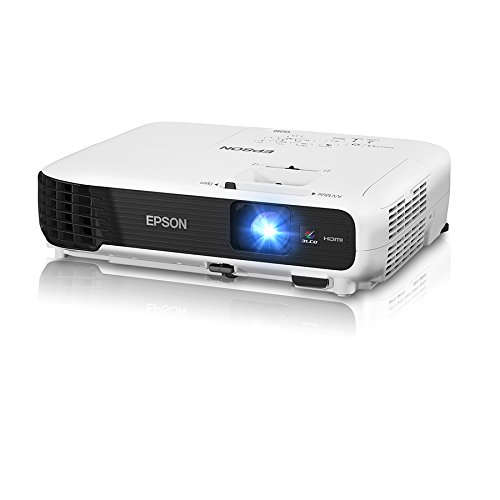
The Epson VS240 proves that sometimes simple is better. With 3,000 lumens of both color and white brightness, presentations remain vivid and readable even in well-lit rooms where ambient light would wash out lesser projectors. The SVGA resolution handles basic spreadsheets, charts, and training materials with clarity, while the E-Zoom Plus button on the remote allows quick magnification of specific image portions for closer examination during discussions.
Setup genuinely lives up to the "fast and easy" promise, with intuitive image adjustments that get presentations running in moments rather than minutes. HDMI connectivity ensures compatibility with modern laptops and media players through a single cable for both video and audio.
One minor downside is that the wireless features are not included. But this keeps the setup straightforward and eliminates connection headaches during important meetings. Users simply plug in via HDMI and present, no network pairing or signal drops to worry about. For organizations that prioritize dependable performance and quick startup over wireless convenience, the VS240 delivers exactly what matters: bright, accurate images that work every time.

3,000 lumens color and white brightness USB Plug 'n Play instant projection Auto vertical and horizontal keystone Instant Off/On for quick packing
Image processing and contrast may not match the latest models on the market
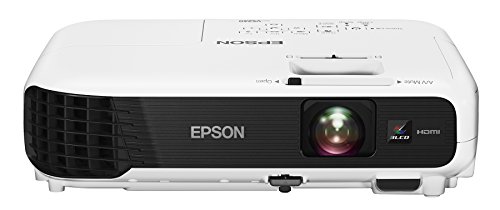
The EX3220 delivers where it counts most: bright, accurate imagery that holds up in real-world conditions. With 3,000 lumens of both color and white brightness, presentations remain vivid and readable even when room lighting stays on. The 3-chip 3LCD technology ensures outstanding color accuracy without the rainbow artifacts found in some competing systems.
Setup flexibility stands out as a genuine strength, with auto vertical correction and Easy-slide horizontal image correction allowing placement almost anywhere while maintaining proper proportions. The USB Plug 'n Play feature simplifies things further, projecting content instantly through a single USB cable while keeping the presentation visible on the laptop screen simultaneously. HDMI connectivity handles modern devices effortlessly, and the Instant Off/On feature means no waiting around when it is time to pack up and move to the next room.
However, image processing and contrast may not match the latest models on the market. Still, the EX3220 compensates with straightforward reliability and thoughtful convenience features. For everyday presentations, training sessions, and classroom use, the difference is rarely noticeable, and the benefits of quick setup, flexible placement, and hassle-free operation more than make up for it. It is a projector built for getting things done, not for bench racing specs.

Wireless connectivity 3,000 lumens color and white brightness 3LCD technology HDMI with single-cable audio/video
Slightly bulky for frequent travel
The EX5220 makes presenting easier right from the start with its fast wireless connectivity for iPads, iPhones, Android devices, and laptops. No more hunting for the right adapter or passing cables around the conference table—simply connect and share content from wherever you are seated. The 3LCD, 3-chip technology delivers 3,000 lumens of both color and white brightness, ensuring images pop with true-to-life color even in rooms that cannot go completely dark.
HDMI connectivity handles digital video and audio through a single cable when a wired connection is preferred, while Epson's Simple Setup Suite enables flexible positioning and rapid deployment in any venue. XGA resolution provides clarity suitable for detailed charts, graphs, and presentation materials.
Nevertheless, the unit carries a bit more heft than ultra-portable models. But this is understandable given its robust feature set and reliable performance. For professionals who prioritize wireless convenience and proven image quality over absolute portability, the EX5220 strikes a practical balance.

3,000 lumens color and white brightness Projects up to 300 inches 720p resolution for clear images Simple setup tools included
Audio output is fairly basic
The 730HD makes a strong case for itself the moment the lights go down. With 3,000 lumens of both color and white brightness, movies and games remain vivid and engaging even when ambient light sneaks in through windows or patio doors. The 720p resolution handles blockbuster action and fast-moving sports with clarity, while HDMI connectivity ensures easy hookup to streaming devices, game consoles, and media players.
Setup tools from Epson remove the guesswork, allowing placement on virtually any wall or screen surface without complicated configurations. The ability to project up to 300 inches means the whole neighborhood could technically gather for game night, though the backyard might feel a bit crowded.
While the audio output is fairly basic, connecting external speakers through the available ports quickly transforms the experience into true cinematic sound. For most viewers, this is a simple trade-off: a few seconds to plug in powered speakers or a soundbar, and the immersion level jumps significantly.

Wireless projection 3,000 lumens WXGA widescreen HD resolution HDMI single-cable connectivity
No smart TV interface
The EX7220 handles the demands of modern presenting with genuine versatility. Wireless projection from tablets and smartphones means last-minute deck changes or sharing from a personal device happen seamlessly, no adapters required. The 3,000 lumens of both color and white brightness ensure spreadsheets, videos, and presentations stay crisp and watchable even with room lights on.
WXGA native resolution (1280 x 800) delivers widescreen HD performance that handles detailed graphics comfortably, while HDMI connectivity provides a simple single-cable hookup for digital audio and video. Epson's Simple Setup Suite lives up to its name, getting presentations running quickly without technical delays. The ability to resize content across multiple resolution formats adds flexibility when working with varied source material.
The only downside is that it has no smart TV interface so you’ll need an external device for streaming apps. Still, that small extra step doesn’t take away from how easy and reliable the overall experience feels.
What to Look For in a best epson 3000 lumens projector?
Different considerations must be taken during the shopping process. Study resources are obtained in a wide variety of ways. Thus, our staff is all here to lend a helping hand, advice, and solutions to your issues.
Please take a closer examination of the features below and that would be beneficial before your purchase of best epson 3000 lumens projector:
Resolution
The calculation for projectors that have 4K ultra high definition (3,840 x 2,160 pixels) is slightly different.
Portability
Contrast Ratio
Contrast ratings can only be used to measure in dark rooms. They don't give any information about ambient lighting. Unusually dark blacks in the projector will result in lower contrast. A brighter projector will perform well in home theaters, but not in living rooms or offices.
Light Source
For longer periods of time, LEDs and lasers retain a greater percentage of their original brightness. While all light sources eventually lose their brightness, lamps lose the most in 500 hours. Then, they slowly decline over time. The brightness of LEDs and lasers will decrease more slowly over the course of their lifetimes.
Brightness
The ambient lighting level, size and material of your projector screen will all affect the brightness. You should buy a professional seller if you are installing a projector in a permanent location, such as at your home, to ensure that you get the best image brightness and the correct screen material.
Connection Methods
Component video, composite video and S-Video all make up the most common connections on large projectors. We're also seeing more projectors that offer direct USB connection to computers via a USB cable. A growing variety of projectors now have USB Type-C ports. The majority of USB-C ports can be used to transfer data or video using the DisplayPort protocol. Most USB-C ports support USB Power Delivery (USB PD), which means that a plugged in projector can supply 100 watts of power to charge a device or to charge it using a USB-C cable (assuming the device is capable of charging over USB-C).
Projection Tech
DLP projectors with single-chip DLP chips could be subject to the so-called "rainbow effect." Sometimes, tiny, bright flashes with rainbow-like colors may appear, especially in dark scenes. Some DLP projectors have a minimal effect, while others can produce a distracting result, especially when there are bright areas against shady backgrounds. The rainbow effect is not a problem with LCD projectors, which are safer if someone in your household has sensitive eyes. There are many DLP projectors that produce excellent images.
FAQs
What does 3000 lumens mean in a projector?
3000 lumens refers to brightness level, making the projector suitable for rooms with ambient light while still delivering clear and vivid images.
Is a 3000 lumens Epson projector good for home use?
Yes, it’s great for home theaters, especially in living rooms where some light is present, offering a bright and enjoyable viewing experience.
Can I use a 3000 lumens projector in daylight?
It can perform well in moderately lit rooms, but direct sunlight may still affect image quality. Using a screen or curtains improves visibility.
When the latest info related to best epson 3000 lumens projector comes available, we will update it as soon as possible. Please check our websites frequently for the most up-to-date research data.
Our team is able to support you with many problems, even the out of best epson 3000 lumens projector. If you require support with your issues, please do not hesitate to contact us.
About Michael Brown